by Actipro Software - Product Type: Component / .NET WPF / 100% Managed Code / Source Code
Actipro SyntaxEditor for WPF by Actipro Software
URLs: actipro-syntaxeditor-for-wpf, actipro syntaxeditor for wpf, actiprosyntaxeditorforwpf, actipro
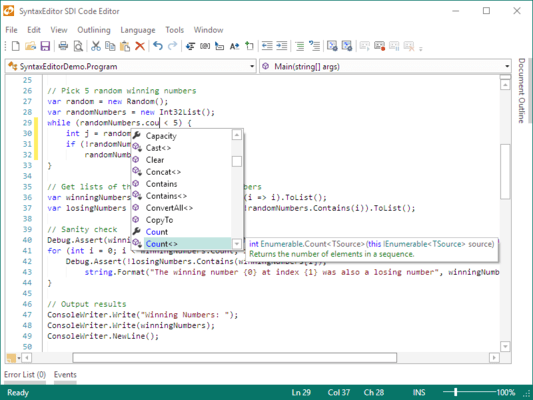
A WPF syntax-highlighting code editor control and parsing suite. Actipro SyntaxEditor for WPF is a text editing control that is packed with features for efficient code editing, including syntax highlighting, line numbers, block selection, IntelliPrompt UI, split views, zooming, bi-di support, and much more. Actipro SyntaxEditor for WPF includes over 20 sample languages such as C#, VB, XML, etc. Custom language definitions can be developed and distributed with your applications as well. Actipro SyntaxEditor for WPF is designed for use in IDE (integrated development environment) applications, however there are many other applications that can take advantage of such a control. Actipro SyntaxEditor for WPF includes one year subscription and can also be bought as part of the Actipro WPF Studio.
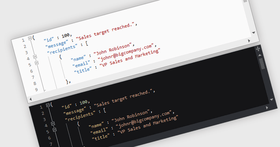
Actipro SyntaxEditor for WPF is a syntax-highlighting code editor control that uses language definitions and a text/parsing framework to provide many of the features found in the Visual Studio code editor. Highlighting styles can be completely customized by the end user, even allowing the changing of text area background and line number margin colors.
Advanced Editing Capabilities
Actipro SyntaxEditor for WPF has a number of display features you find in the Visual Studio code editor such as line numbers, visible whitespace, word wrap, line modification marks, split views, mouse wheel zooming, and more. Multiple undo/redo support is integrated with the editor. Selections can be made using the standard snaking mode or block (rectangular) mode.
Over 100 Edit Actions
Over 100 edit actions are included with Actipro SyntaxEditor for WPF that cover everything from basic caret movement and selection to features such as tabification, character/word/line transposition, etc.
Unicode and Bi-Directional Editing Support
Actipro SyntaxEditor for WPF supports the editing of any Unicode characters and even has full support for working with embedded bi-directional text.
Actipro SyntaxEditor for WPF Text/Parsing Framework Features
Documents and Snapshots
A document is what is "edited" by a Actipro SyntaxEditor for WPF, as it is the object that provides access to all the text being edited. It supports easy file load/save and can be tied to a language definition to provide extended functionality. The complete document text is available any time via snapshots, where each snapshot is an immutable versioned thread-safe copy of the text at the time it was created. Snapshots allow you to parse text without fear of it changing in the middle of a parse. There are powerful text scanning classes included and offsets within a snapshot can be translated to their relative location in any other snapshot for the same document. This means that you can reliably locate a certain range of text, even after multiple edits have been made.
Batch Text Change Operations
The text/parsing framework's text change model is extremely powerful and provides many helper methods for doing everything from simple text replace operations to append operations. Multiple operations can be queued up into a single text change and executed as a single atomic unit.
Language Definitions
Language definitions are a core piece of the text/parsing framework. They basically encapsulate all functionality for a particular code language that is being used within a Actipro SyntaxEditor for WPF control. This is everything from various types of parsing (which drive features like syntax highlighting) all the way to simpler features like determining word breaks or performing line commenting. Transitions between multiple languages are fully supported.Over 20 full source sample language definitions are included with Actipro SyntaxEditor for WPF for common languages like Assembly, Batch files, C#, CSS, HTML, INI files, Java, JScript, Lua, MSIL, Pascal, Perl, PHP, PowerShell, Python, SQL, VB.NET, VBScript, and XML. Custom language definition can easily be created, thereby making it possible to build a code editor for any proprietary language.
Line Commenting
Languages can each be assigned a line commenter that is capable of adding and removing comments. Algoritms for both line-based comments (like C#'s "//") and range comments (like XML's "<!-- -->) are supported. Custom algorithms can be developed as well.
Export to HTML and RTF
Actipro SyntaxEditor for WPF has built-in functionality for easily exporting syntax-highlighted text content to a string or file in HTML and/or RTF formats. Options are also available for auto-copying text in these formats when clipboard operations are performed.
Actipro SyntaxEditor for WPF IntelliPrompt Features
Completion List
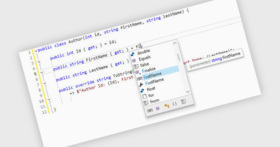
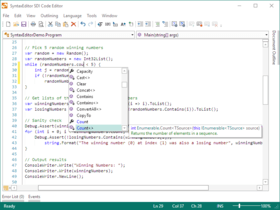
The completion list popup is used to display a number of code completion options to the end user, not only providing intelligent information about the code being edited, but also improving the productivity of the end user by supporting "Ctrl+Space" functionality. Completion lists support a powerful filtering mechanism that can display tabs and/or buttons to show/hide items that meet certain criteria. They include numerous matching algorithm options, including some that allow you to make matches just by typing any characters in the item text. Custom matching algorithms can be developed, and the completion list auto-highlights matched text. Description tips show more information about items via the use of rich formatted content.
Quick Info
Quick info tips can be used to give more information about what is at the current caret location or under the mouse. They support any type of content, however the most appealing way to add content is to use our mini-HTML markup language that applies rich formatting to the displayed text.
Actipro SyntaxEditor for WPF Printing Features
Dialogs and Options
The display of various Print and Print Preview dialogs is as easy as a simple method call. Actipro SyntaxEditor for WPF includes a number of settings that affect printouts only, and not the editor views.
Margins
Built-in margins include document title, line number, word wrap glyph, and page number margins. It's easy to create a custom margin and insert it anywhere in a printed page.
Actipro SyntaxEditor for WPF Searching (Find/Replace) Features
General Search Functionality
All of the standard find/replace options are available, such as match case, match whole word, search up, multiple search pattern providers (regular expressions, etc.), scope options, etc. Regular expression searches return captures and support substitutions.
Search Pattern Providers
Search pattern providers describe the format in which find and replace text can be entered when doing searches. Actipro SyntaxEditor for WPF includes normal, regular expression, wildcard, acronym, and shorthand providers but it's easy for you to build your own custom ones as well.
EditorSearchView Control
An EditorSearchView control is included that implements a complete find/replace user interface, similar to the one found in Visual Studio. It features stylish animations when making mode changes and showing/hiding options and can be embedded in a tool window from our Docking & MDI product.
Actipro SyntaxEditor for WPF Other Features
Performs Great with Large Documents
Actipro SyntaxEditor for WPF and the text/parsing framework have been specifically designed with large files in mind. They use numerous virtualization techniques that both reduce memory usage and improve performance, especially when large files are involved. Actipro SyntaxEditor for WPF can open a 10MB document almost instantly and its editing performance is unmatched by the competition.
Extensible Object Model and Separation of Document/UI
The Actipro SyntaxEditor for WPF product is split into two main assemblies: one that implements the text/parsing model and is cross platform (can be used in WinForms, ASP.NET, etc.) and one that implements the editor control user interface in WPF. There are a number of optional add-on assemblies that can be used and harness the frameworks in the main assemblies. The object models in the product make extensive use of interfaces and thus, are extremely extensible. Our design provides for many extensibility points where you can customize the behavior of the editor however you need.
XBAP Support
Actipro SyntaxEditor for WPF fully supports use in XBAPs (browser applications). We have specifically engineered it to operate within the bounds of the XBAP security sandbox.
Extensive Documentation and Samples
Actipro has spent a lot of time refining the design of Actipro SyntaxEditor for WPF to take advantage of WPF best practices. We realize that a good product is only part of the equation though and have also worked very hard to write detailed documentation on the product. In addition to that, Actipro SyntaxEditor for WPF ships with the full source for many QuickStart examples that each focus on learning a specific feature.
SyntaxEditor Web Languages Add-on for WPF
The core SyntaxEditor control provides a free implementation of XML that has syntax highlighting and several other features. However to truly get advanced XML editing functionality such as automated IntelliPrompt completion lists, quick info, schema validation, AST building, end tag auto-completion and more, you need to get the Web Languages Add-on.
SyntaxEditor Web Languages Add-on for WPF - Features at a Glance
Automated IntelliPrompt completion lists and quick info for elements, attributes, and value based on one or more loaded .XSD files
Abstract syntax tree (AST) generation
Automatic code outlining based on XML element structure
Reporting and automatic squiggle display of errors for invalid XML syntax and non-conformance to schema
Mouse hover quick info for syntax/validation errors
Easily obtain full XML contextual information for any offset
End tag auto-complete
Line commenting
SyntaxEditor .NET Languages Add-on for WPF
The core SyntaxEditor control provides free implementations of the C# and Visual Basic languages that have syntax highlighting and several other features. However to truly get advanced editing functionality such as automated IntelliPrompt, background parsing with AST building, syntax error reporting, automatic outlining and more, you need to get the .NET Languages Add-on.
SyntaxEditor.NET Languages Add-on Features at a Glance
Automated IntelliPrompt completion list and quick info
Abstract syntax tree (AST) generation
Over 130 distinct AST node classes
Automatic code outlining based on AST structure
Reporting and automatic squiggle display of errors for invalid syntax
Mouse hover quick info for syntax errors
Line commenting
Optionally change the parser to parse expressions, statements, etc. instead of compilation units
Project assemblies that manage a project's code files and external references to other assemblies
Assembly repository that stores and caches reflection information for binary .NET assemblies
What's new in Actipro SyntaxEditor for WPF 2011.2?
IntelliPrompt Parameter Info - Show information about each member signature being edited. This makes it easy to implement parameter info for your own custom languages. Parameter info can handle rich-formatted content display using HTML-like markup tags. Colors and font weights or styles can be used to bring attention to portions of the info tip. The .NET Languages Add-on has been updated to fully take advantage of the new parameter info feature. Both the C# and VB language implementations now have parameter info features out-of-the-box, making for a true Visual Studio-like code editing experience. When there are multiple overloads for a signature, the resolver will do its best to show the one that best fits the code that has been typed thus far.
Single-Line Edit Mode - Make the editor appear like a standard TextBox, where there are no scrollbars and line terminators are not accepted as input. While in single-line edit mode, nearly all the standard UI features found in SyntaxEditor are still available, such as automated IntelliPrompt, adornments, etc.
Code Fragment Editing - Edit a portion of a document, such as a method body or just an expression. The benefit of using code fragments is that you can also set up header and footer text to get pre- and post-appended to the text being edited. Since a complete document is then used for parsing and resolution, automated IntelliPrompt, code outlining, and other features work correctly on the fragment being edited.
A WPF syntax-highlighting code editor control and parsing suite.
Pricing: Actipro SyntaxEditor 2011.2 for WPF 1 Developer Subscription License (Includes 12 months of updates, both minor and major, email and forums based support and more), Actipro SyntaxEditor 2011.2 for WPF 1 Developer Subscription License, per license for 2 licenses (minimum quantity 2) (Includes 12 months of updates, both minor and major, email and forums based support and more), Actipro SyntaxEditor 2011.2 for WPF 1 Developer Subscription License, per license from 3 up to 4 licenses (minimum quantity 3) (Includes 12 months of updates, both minor and major, email and forums based support and more), Actipro SyntaxEditor 2011.2 for WPF 1 Developer Subscription License, per license from 5 up to 7 licenses (minimum quantity 5) (Includes 12 months of updates, both minor and major, email and forums based support and more), Actipro SyntaxEditor 2011.2 for WPF 8 or More Developer Subcription Licenses, Price per license (minimum quantity 8) (Includes 12 months of updates, both minor and major, email and forums based support and more), Actipro SyntaxEditor 2011.2 for WPF 1 Site Wide License (Allows Unlimited Developers at a Single Physical Address) (Includes 12 months of updates, both minor and major, email and forums based support and more), Actipro SyntaxEditor 2011.2 for WPF 1 Enterprise License (Allows Unlimited Developers throughout your entire organization, regardless of location) (Includes 12 months of updates, both minor and major, email and forums based support and more), Actipro SyntaxEditor 2011.2 for WPF 1 Blueprint License - (Source Code License) (Current Developer, Enterprise or Site License Subcriptions Required) (Includes 12 months of updates, both minor and major, email and forums based support and more), Actipro SyntaxEditor for WPF - Renewal 1 Developer Renewal License (if you have a current Developer Subscription or if your Developer Subscription expired within the past 30 days), Actipro SyntaxEditor for WPF - Renewal 1 Developer Renewal License, per license for 2 licenses (minimum quantity 2) (if you have a current Developer Subscription or if your Developer Subscription expired within the past 30 days), Actipro SyntaxEditor for WPF - Renewal 1 Developer Renewal License, per license from 3 up to 4 licenses (minimum quantity 3) (if you have a current Developer Subscription or if your Developer Subscription expired within the past 30 days), Actipro SyntaxEditor for WPF - Renewal 1 Developer Renewal License, per license from 5 up to 7 licenses (minimum quantity 5)(if you have a current Developer Subscription or if your Developer Subscription expired within the past 30 days), Actipro SyntaxEditor for WPF - Renewal 8 or More Developer Renewal License, Price per license (minimum quantity 8) (if you have a current Developer Subscription or if your Developer Subscription expired within the past 30 days), Actipro SyntaxEditor for WPF - Renewal 1 Site Wide Renewal License (if you have a current Site Wide Subscription or if your Site Wide Subscription expired within the past 30 days), Actipro SyntaxEditor for WPF - Renewal 1 Enterprise Renewal License (if you have a current Enterprise Subscription or if your Enterprise Subscription expired within the past 30 days), Actipro SyntaxEditor for WPF - Renewal 1 Blueprint Renewal License (if you have a current Blueprint Subscription or if your Blueprint Subscription expired within the past 30 days. You also need a Current Developer, Enterprise or Site License Subcription), Actipro SyntaxEditor Web Languages Add-on 2011.2 for WPF - requires Actipro SyntaxEditor for WPF 1 Enterprise License (Allows Unlimited Developers throughout your entire organization, regardless of location) (Includes 12 months of updates, both minor and major, email and forums based support and more), Actipro SyntaxEditor Web Languages Add-on 2011.2 for WPF - requires Actipro SyntaxEditor for WPF 1 Blueprint License - (Source Code License) (Current Enterprise License Required) (Includes 12 months of updates, both mi
Evals & Downloads: Read the Actipro WPF Studio help file, Read the Actipro Software End User License Agreement, Download the Actipro WPF Studio 2011.2 evaluation on to your computer - Expires after 21 days
Operating System for Deployment: Windows 7, Windows Vista, Windows XP, Windows Server 2003
Architecture of Product: 32Bit, 64Bit
Product Type: Component
Component Type: .NET WPF, 100% Managed Code, Source Code
Built Using: Visual C# .NET
Compatible Containers: Microsoft Visual Studio 2010, Microsoft Visual Studio 2008, Microsoft Visual Studio 2005, Microsoft Visual Basic 2010, Microsoft Visual Basic 2008, Microsoft Visual Basic 2005, Microsoft Visual C++ 2010, Microsoft Visual C++ 2008, Microsoft Visual C++ 2005, Microsoft Visual C# 2010, Microsoft Visual C# 2008, Microsoft Visual C# 2005, .NET Framework 4.0, .NET Framework 3.5
Product Class: User Interface Components
Keywords: actipro syntaxeditorfor wpf, actipro syntaxeditor, syntaxeditor for wpf, syntaxeditor 2009.1 for wpf
Actipro Software
User Interface UI
Part numbers: PC-532436-422971 532436-422971 PC-532436-422973 532436-422973 PC-532436-422995 532436-422995 PC-532436-422997 532436-422997 PC-532436-422975 532436-422975 PC-532436-422977 532436-422977 PC-532436-422987 532436-422987 PC-532436-422989 532436-422989 PC-532436-422979 532436-422979 PC-532436-422999 532436-422999 PC-532436-423001 532436-423001 PC-532436-422981 532436-422981 PC-532436-422983 532436-422983 PC-532436-422985 532436-422985 PC-532436-422991 532436-422991 PC-532436-422993 532436-422993 PC-532436-423003 532436-423003 PC-532436-423005 532436-423005 PC-532436-423007 532436-423007 PC-532436-423009 532436-423009 PC-532436-423011 532436-423011 PC-532436-423013 532436-423013 PC-532436-423015 532436-423015 PC-532436-423017 532436-423017
Mfr. Part No: #1142 #1143 #1144 #1145 #1146 #1147 #1148 #1149 #1150 #1151 #1152 #1153 #1265 #1266 #1267 #1268
ComponentSource offers a unique global service, used by over 1,000,000 software developers worldwide.