by Infragistics - Product Type: Component / ActiveX OCX
ActiveListBar by Infragistics
Give your applications the look and feel of Microsoft Outlook. ActiveListBar is an ActiveX component that provide users with the ability to group and categorize a variety of items for quick access. It incorporates a system of sliding groups, each of which is identified by its header. Clicking a group's header causes the group to become active, slide into view, and display the items it contains. It is fully ActiveX compliant, and supports Internet operation through the inclusion of special URL properties for graphics and sound resources.
The ActiveListBar adds an advanced yet easy-to-use interface to your applications. You can use it to provide users with the ability to group and categorize a variety of items for quick access. Intuitive and visually appealing, ActiveListBar provides a look familiar to anyone who works with the Microsoft Outlook personal organizer or the Office 97 suite of applications. ActiveListBar brings the latest innovation in user-interface design to your client/server and Internet programming projects.
The ActiveListBar is fully ActiveX compliant, and supports Internet operation through the inclusion of special URL properties for graphics and sound resources.
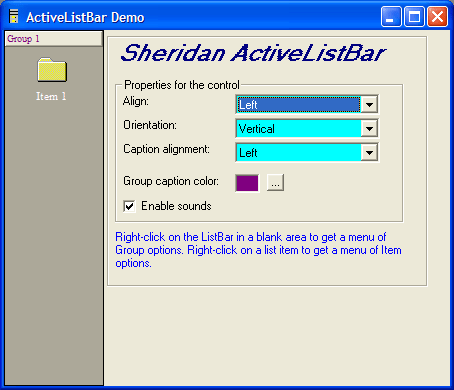
Horizontal or Vertical Orientation - The ActiveListBar can be oriented in one of two ways. By default, the control is oriented vertically. Groups slide up and down, and list items are ordered from top to bottom. The control can also be oriented horizontally. Groups in a horizontal control slide left and right, group captions are rotated, and list items are ordered from left to right.
Image Lists - To conserve resources, images used as icons for the ListItems in an ActiveListBar are stored in the control as image lists. An image list is a special type of collection that contains Image items. Each item in the collection stores a picture and a text string used to identify the picture (its Key value.)
There are two image lists used in the ActiveListBar. One stores large icons (32 by 32 pixels) and the other stores small icons (16 by 16 pixels.) Both are SSImages collections, and contain SSImage objects that store the pictures. Individual ListItems connect to the images in the collection using either an index or a key value.
Mask Colors - One of the cool features of icons is that they can contain areas of transparency that allow what is behind the icon to show through. This is particularly useful when the icon appears over a textured background. The transparency lets the icon appear to be the irregular shape of the object it represents, instead of a square.
Although the ActiveListBar control generally uses bitmaps instead of icons, you can have the same transparency effect in your images through the use of mask colors. A mask color is a color used in your image that you designate to be the transparent color. Any pixels in the image that use the mask color will allow the background to show through the image.
Background Image - In addition to supporting multiple colors in the background, the ActiveListBar also features support for pictures in the background of groups. You can specify a simple texture or a complex design to serve as the background area for an ActiveListBar group. As with background colors, you can use one picture as the background for all groups, or each group can have a unique background picture.
Sound Effects - The ActiveListBar includes a method that gives you the ability to play any sound file. You simply call the method with the appropriate parameters and your control will sound off!
This method can be called at any time from anywhere in your program. It gives you total flexibility when adding sound effects to your application. And, by specifying additional parameters for this method, you can use it to play system sounds or to initiate downloading of a sound file from a remote source.
Internet-specific features - The ActiveListBar contains properties and tools that make it easy to set up the control on a web page for Internet use. To optimize the control for low-bandwidth operation, the graphics and sound resources used can be asynchronously downloaded. You specify a URL that points to the graphic or sound, and the control will download the information and use it when it becomes available. The property pages of the ActiveListBar also provide several tools for working with bandwidth-friendly PNG (portable network graphic) files and using them to store the large and small icons for your applications.
OLE DragDrop - for quick and easy placement of objects via drag and drop.
Asynchronous Graphics Download - When used on a web page, the control and pieces of the application can be active even before all of the graphics have been downloaded.
Framework Control - A lightweight 32-bit control that doesn't require bulky MFC DLLs, minimizing run-time distribution size.
PartNumbers: PC-504580-70840 504580-70840
Publisher PartNumbers: 10102
PurchaseOptions: ActiveListBar V1.02 1 Developer License
Resources: Read the ActiveListBar help file, Read about where Infragisitics stand on classic products, Download the ActiveListBar V1.02 evaluation on to your computer - Expires after 10 days use - Please note that this product is no longer supported by the publisher, so it is no longer eligible for product support or maintenance.
Operating System for Deployment: Windows ME, Windows 2000, Windows 98, Windows NT 4.0, Windows 95
Architecture of Product: 32Bit
Product Type: Component
Component Type: ActiveX OCX
Built Using: ActiveX Framework
General: Internet Enhanced, Includes Digital Signature, Marked as Safe for Scripting, Marked as Safe for Initialization, OCX96 Compatible, Supports Component Categories, Supports Apartment Model Threading
Compatible Containers: Microsoft Visual Studio 6.0, Microsoft Visual Studio 97, Microsoft Visual Basic 6.0, Microsoft Visual Basic 5.0, Microsoft Visual C++ 6.0, Microsoft Visual C++ 5.0, Microsoft Internet Explorer 5.0, Microsoft Internet Explorer 4.0
Product Class: User Interface Components
Keywords: Toolbar tool bar tool-bar Toolbars Menu Menus Ribbon Ribbonbar Treeview List tree view tree-view list-view listview listbox Infragistics Sheridan Protoview Enterprise Partner Sheridan Software Systems, Inc. ActiveListBar Toolbar tools toolbars user interface menu functions OUTLOOK Infragistics Protoview Treeview List tree view connectivity node nodes based item object ButtonBar Button Bar Active List Bar listbar
Publisher
Primary Category
Related Products
Related Categories