ActiveThreed Plus - ActiveX - V3.0

de Infragistics - Tipo de producto: Componente / ActiveX OCX

Por favor note que la información sobre este producto no está disponible en español.
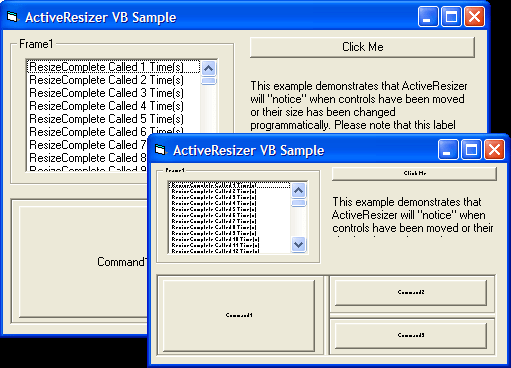
Captura de pantalla ActiveThreed Plus - ActiveX - V3.0Resize and reshape your forms and controls virtually any way you wish. ActiveThreed Plus is a set of eleven 32-bit ActiveX controls that give your applications the look and feel of today's most popular interfaces: Office '97, Microsoft PowerPoint, the Internet and more. You can dynamically resize and reposition your picture boxes and controls, including fonts. As the size and shape of the forms change, the controls are automatically resized and repositioned to maintain their original layout.

Desde
$280.25
 

Más Descargado

Precio en

Nuestros precios Standard están indicados abajo. Inicia una sesión para ver sus precios con descuento.

ActiveThreed Plus V3.03

Añadir a la Cesta $ 280.25 1 Developer License Descarga (6.0 MB)

Este producto esta disponible con precios reservados al GSA Schedule.Nuestros precios incluyen servicio técnico de ComponentSource y, para la mayoría de los productos disponibles para descarga, una copia de seguridad en línea y una actualización GRATUITA a la nueva versión si ésta se publica en un período de 30 días después de la compra.  Todas las ventas están sujetas a nuestros Términos y condiciones standard y a nuestra Política de devolución. Por favor, póngase en contacto con nosotros si necesita alguna opción de licencia no incluida en la lista anterior, incluida la compra por volumen de licencias y versiones anteriores.

Nuestros precios Standard están indicados arriba. Inicia una sesión para ver sus precios con descuento.

New Controls!

With SSResizer, you can dynamically resize and reposition your picture boxes and controls, including fonts, without writing a single line of code. As the size and shape of the forms change, the controls are automatically resized and repositioned to maintain their original layout. SSScroll lets you optimize your use of limited screen space by placing your controls into a large virtual area that can be scrolled in to and out of view. Scrolling can be done at both design-time and run-time, so that users can access more of your application than would otherwise fit on the screen. Astound your users with the exclusive PictureRegion technology, incorporated in SSSplash. It lets your forms and components adopt virtually any shape you can imagine. Rounding out the new controls is SSTransition, which helps you attract attention to certain areas, highlight information, and emphasize dramatic changes. With thirty-seven presentation-style transitions, you can control the effect and speed of the transition for maximum graphic impact.

New Enhancements!

Greater dynamic functionality has been added to the existing controls. For example, now you can place forms in Splitter Panes as easily as setting a property at run-time. Enjoy the flexibility of creating custom button shapes in any way you choose. Generate "disabled" graphics automatically for controls that support disabled states. Save and restore Splitter layouts just the way you want them. Enjoy a finer degree of animation control, even varying the speed of the animation as it is running. Bind SSOption Buttons to a data source to simplify data entry for your users. Incorporate "Active" colors that respond to mouse movements; your controls will light up when the cursor passes over them, a common sight for anyone who browses the web. Plus, you can add a familiar web-like "hand" cursor to your apps.

Original Favorites!

Don't forget the original ActiveX controls that made ActiveThreed, a member of the ActiveSuite family of products, such a hit. Like the SSPanel container control, which displays multiline captions and pictures against a 3D background. SSOption emulates the standard Windows option button control for turning options on and off. SSRibbon introduces multi-state push buttons that can be grouped together like a toolbar. SSSplitter displays multiple panes that can be adjusted in size. SSCheck emulates the Windows check box control; SSFrame emulates the standard frame control; and SSCommand emulates the standard command button, all of which give your applications a "look and feel" users are familiar with.


Búsqueda de productos

Escriba palabras de búsqueda:

Galería de capturas de pantalla

Award