par Lassalle Technologies - Type de produit : Composant / .NET WinForms / .NET Class / 100% Managed Code
AddFlow for .NET by Lassalle Technologies
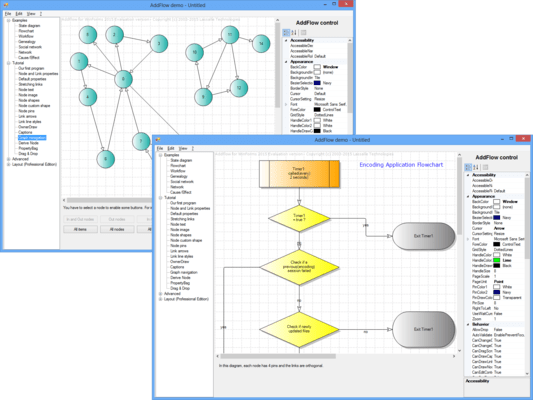
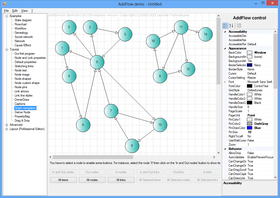
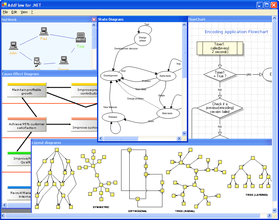
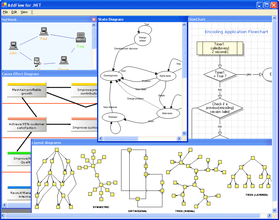
Create interactive flowchart and workflow diagrams. Addflow for .NET lets you quickly build flowchart enabled applications like workflow diagrams, database diagrams, communication networks, organizational charts, process flow, state transitions diagrams, telephone call centers, CRM (Customer Relationship Management), expert systems, graph theory, quality control diagrams, etc. Addflow for .NET supports distinct colors, fonts, shapes, styles, pictures, text, and so on for each object of the flow chart diagram (node or link). Addflow for .NET also supports custom shapes, metafiles, serialization, multi-level undo/redo, print, zoom, Bezier and spline curves, reflexive links, link jumps, link autorouting, multiselection, scrolling, user data association and more. Visual Studio 2005 (VS2005, VS 2005) and Visual Studio .NET 2008 (VS2008, VS 2008) compatible. Royalty free redistribution and many samples included for Visual Basic .NET (VB.NET) and C#.
MAIN FEATURES
General
Drawings can be made interactively or programmatically
Distinct shapes, styles, colors, font can be defined on a per item basis (for a node or a link) or as default properties for the control
Supportof several collections allowing you to traverse the graph in many ways
Many properties allowing customizing the control (CanDrawNode, CanMoveNode, CanMultiLink, etc...) or an item (XSizeable, YSizeable, XMoveable, YMoveable, Selectable, Stretchable, etc...)
Interactivity and display facilities
Multi selection
Multi-level Undo/Redo
Grid support
Nodes stay connected when moved or resized
Zooming
Scrolling, drag scrolling
Anti-aliasing
OwnerDraw property to provide custom drawing for an item or for the entire AddFlow control
Link autorouting via the free extension RouteFlow
Input/Output
Printing and print previewing via the free extension PrnFlow. The C# source code of PrnFlow is provided
Supportof the IXmlSerializable interface: WriteXml and ReadXml methods
XML serialization also via the free extension XMLFlow. The C# source code of XMLFlow is provided
Metafile exportation
SVG exportation via SVGFlow: a class library allowing you to export the diagram in SVG format
Nodes
43 predefined shapes
Custom shapes
Ability to associate an image to a node
Fill color, draw color, text color, gradient color
Shadow
In-place edition
Autosize options
Transparent nodes
Hidden nodes
Text alignment options
Image positioning options
Tooltip
URL which can be used when the diagram is rendered to a Web page using SVG
Links
15 predefined arrow styles
Custom arrow styles
Draw color, text color.
Shadow
Stretchable links. A link can be composed of many segments. The user can interactively add or remove segments
Curved links (Bezier and Spline)
Jumps possible at the intersection of links
Reflexive links
Rigid links
Hidden links
Possibility to interactively change the origin node or the destination node of a link
Tooltip
URL which can be used when the diagram is rendered to a Web page using SVG
Automatic graph layout
AddFlow does not directly provide any automatic graph layout feature. However LayoutFlow, a set of 4 Graph layout components that can be added on:
HFlow for .NET (hierarchical layout)
OFlow for .NET (orthogonal layout)
SFlow for .NET (symmetric force directed layout)
TFlow for .NET (tree layout)
Notices:
HFlow, OFlow, SFlow and TFlow are AddFlow extensions and you cannot use them without AddFlow.
You can purchase LayoutFlow separately or included in the AddFlow Suite license
What’s New in AddFlow for .NET V2.2?
Visual Studio .NET 2008 (VS2008, VS 2008) compatible
What’s New in AddFlow for .NET V2.1?
Enhancements
Substantial improvements have been introduced in the AddFlow for .NET serialization feature:
Four new events allowing the serialization (and de-serialization) of custom nodes and links (objectsof a class derived from the Node or the Link class)
The speed of the ReadXml and WriteXml methods is seriously improved
Additionally, the SendSelectionChangeEventproperty is introduced. (If it is false, the SelectionChange event is not fired)
What’s New in AddFlow for .NET V2.0?
fully supports Visual Studio 2005 and .NET Framework 2.0. (Build for VS.NET 2003 also included)
a parent-child relationship that allows assigning labels to nodes and links, docking nodes inside nodes or offering a new and easy way to group nodes
support of the IXmlSerializable interface: WriteXml and ReadXml methods.
new events (Selection event, serialization events)
the option to use existing events programmatically
the property bag allowing to easily add new properties to nodes and links
enhancements in the undo/redo functionality which can be customized.
and other minor enhancements (like the possibility to draw the printer page limits in the diagram)
PartNumbers: PC-513273-92967 513273-92967 PC-513273-92971 513273-92971 PC-513273-92975 513273-92975 PC-513273-92982 513273-92982 PC-513273-92984 513273-92984 PC-513273-92986 513273-92986 PC-513273-92979 513273-92979 PC-513273-127001 513273-127001
PurchaseOptions: AddFlow for .NET V2.2 1 Developer License , AddFlow for .NET V2.2 4 Developer Team License , AddFlow for .NET V2.2 1 Site Wide License (Allows Unlimited Developers at a Single Physical Address) , AddFlow for .NET V2.2 1 Developer Upgrade License from AddFlow .NET V1.x Developer License , AddFlow for .NET V2.2 4 Developer Team Upgrade License from AddFlow .NET V1.x Team License , AddFlow for .NET V2.2 1 Site Wide Upgrade License from AddFlow for .Net V1.x Site License , AddFlow for .NET V2.2 1 Academic Developer License , AddFlow for .NET Source Code Escrow Annual Subscription - (An Escrow Agreement will be sent to you for signature - please read Licensing section below)
Resources: Read the AddFlow for .NET help file, Read the AddFlow for .NET End User License Agreement, Download the AddFlow for .NET V2.2 (Build for Visual Studio 2005) evaluation on to your computer - Displays Nag Screens, Download the AddFlow for .NET V2.0 (Build for VS.NET 2003) evaluation on to your computer - Displays Nag Screens
Operating System for Deployment: Windows Vista, Windows XP, Windows 2000, Windows 98, Windows NT 4.0
Architecture of Product: 32Bit
Product Type: Component
Component Type: .NET WinForms, .NET Class, 100% Managed Code
Built Using: Visual C# .NET
Compatible Containers: Microsoft Visual Studio 2008, Microsoft Visual Studio 2005, Microsoft Visual Basic 2008, Microsoft Visual Basic 2005, Microsoft Visual C++ 2008, Microsoft Visual C++ 2005, Microsoft Visual C# 2008, Microsoft Visual C# 2005, .NET Framework 3.5, .NET Framework 3.0, .NET Framework 2.0
Product Class: Business Components
Search Items: New Version Aug 03, New Version Feb 04, New Product Aug 04, New Product Oct 04, New Product Apr 05, New Product Oct 05
Keywords: Lassalle Technologies Lasalle Lasal lassal Tech Flow Diagramming diagram diagrams flowchart Professional Partner add flow Diagram Graph Flowchart Workflow .NET Cause and Effect Cause Effect Fish bone Fishbone Ishikawa addflow.net addflow
Éditeur
Catégorie principale
Produits similaires