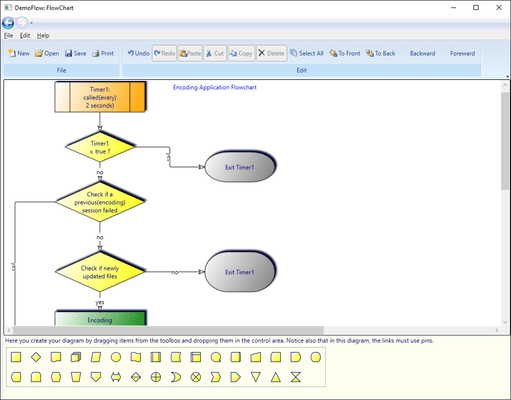
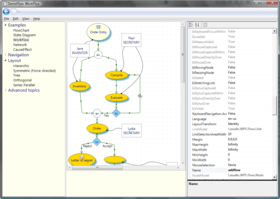
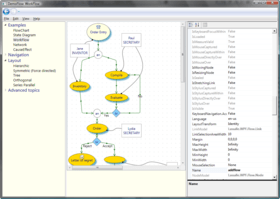
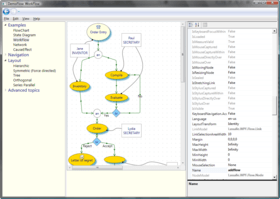
Screenshot Preview

AddFlow for WPF Professional

by Lassalle Technologies - 상품타입: Component / .NET WPF / 100% Managed Code

주의 : 별도의 안내가 없는 경우에는 영어제품 입니다.

*

Create interactive flowchart and workflow diagrams for your WPF applications. Addflow for WPF Professional is a Windows Presentation Foundation custom control that lets you quickly build flowchart enabled WPF applications like workflow diagrams, database diagrams, communication networks, organizational charts, process flow, state transitions diagrams, telephone call centers, CRM (Customer Relationship Management), expert systems, graph theory, quality control diagrams, etc. Addflow for WPF is very easy to use, very light and fast. Addflow for WPF Professional includes LayoutFlow and it is 64 bits compatible. Buy Addflow for WPF Professional Enterprise if you need to license an unlimited number of developers of an enterprise at all its physical addresses. Royalty free redistribution.

$685.02
통화 선택

일반 적인 소비자 가격은 하기에 표시되어 있습니다. 고객님의 할인가격은 표시 하시려면 로그인 해주시기 바랍니다.

AddFlow for WPF Professional V1.3  

주문 $ 685.02 1 Developer License 다운로드 (5.3 MB)
주문 $ 1,371.02 4 Developer Team License 다운로드 (5.3 MB)
주문 $ 4,115.02 1 Site Wide License (Allows Unlimited Developers at a Single Physical Address) 다운로드 (5.3 MB)
주문 $ 6,859.02 1 Enterprise License (Allows Unlimited Developers Worldwide) 다운로드 (5.3 MB)

AddFlow for WPF Professional V1.3 - Upgrade  

주문 $ 391.02 1 Developer Upgrade License from AddFlow for .NET Developer License 확인 다운로드 (5.3 MB)
주문 $ 783.02 4 Developer Team Upgrade License from AddFlow for .NET Team License 확인 다운로드 (5.3 MB)
주문 $ 2,351.02 1 Site Wide Upgrade License from AddFlow for .NET Site License (Allows Unlimited Developers at a Single Physical Address) 확인 다운로드 (5.3 MB)

가격에는 ComponentSource의 기술지원 요금이 포함되어 있습니다. 또한 다운로드 판매를 하고 있는 상품의 대부분은 온라인 백업요금이 포함되어 있어서 구입날로부터 30일 이내에 새로운 버전이 발매된 경우 무료로 업그레이드해 드리고 있습니다.  모든 주문에 대해서 당사표준 계약조건 반품조건 의 내용이 적용됩니다. 다음의 경우,고객 서비스로연락하시기 바랍니다. (상기의 리스트에 게재되지 않은 대량의 라이센스나 구 버전 등의 라이센스 옵션이 필요한 경우)

일반 적인 소비자 가격은 상기에 표시되어 있습니다. 고객님의 할인가격은 표시 하시려면 로그인 해주시기 바랍니다.

What's New in AddFlow for WPF 1.1?

  • Jumps may be displayed at intersections of link segments
  • Panning mode: Can scroll the diagram directly with the mouse
  • Connectors and pins: You can know customize the shape of the pins used to connect create the links. And you can define for each node a connector object that contains several pins.

 *

AddFlow for WPF Professional is a WPF custom control for creating flowchart diagram. It offers the following advantages:

  • A small deployment assembly. The size of the Lassalle.WPF.Flow.dll file is less than 150 Kb
  • A light programming interface
  • Speed: A design where nodes and links are not controls but just low-level DrawingVisual objects. Using DrawingVisual is the most lightweight way to perform drawing. A good choice if you need to create big diagrams (several thousands of nodes and links).
  • Full integration with the WPF environment
  • Runtime royalty free

The main difference between AddFlow for WPF Standard and AddFlow for WPF Professional is that AddFlow for WPF Professional includes Automatic Graph Layout functionality provided by LayoutFlow.

AddFlow for WPF Professional Main Features

AddFlow for WPF Professional General Features

  • Drawings can be made interactively or programmatically.
  • Distinct shapes, styles, colors, font can be defined on a per item basis (for a node or a link) or as default properties for the control.
  • Use of the LINQ technology allowing you to traverse the graph in many ways.
  • Many properties allowing customizing the control (CanDrawNode, CanMoveNode, CanMultiLink, etc...) or an item (IsXSizeable, IsYSizeable, IsXMoveable, IsYMoveable, IsSelectable, IsStretchable, etc...)

AddFlow for WPF Professional Interactivity and display facilities

  • Multi selection
  • Multi-level Undo/Redo
  • Grid support
  • Nodes stay connected when moved or resized
  • Zooming
  • Scrolling, drag scrolling


AddFlow for WPF Professional Input/Output

  • XML serialization also via the free extension XMLFlow. The C# source code of XMLFlow is provided.
  • XAML exportation


AddFlow for WPF Professional Nodes

  •  43 predefined shapes
  • Custom shapes (using Geometry objects)
  • Ability to display a text and an image in a node
  • Ability to associate DrawingVisual objects to the node Children collection
  • In-place edition
  • Text positioning options
  • Image positioning options
  • Tooltip

AddFlow for WPF Professional Links

  • 15 predefined arrow styles
  • Custom arrow styles (using Geometry objects)
  • Stretchable links. A link can be composed of many segments. The user can interactively add or remove segments
  • Curved links (Bezier and Spline)
  • Reflexive links
  • Possibility to interactively change the origin node or the destination node of a link
  • Tooltip

Automatic Graph Layout (Professional version only)

AddFlow provides a set of several graph layout algorithms:

  • Hierarchic layout
  • Orthogonal layout
  • Symmetric layout
  • Series Parallel layout
  • Tree layout
  • Radial Layout

Each of these graph layout algorithms performs a layout on a graph. Performing a layout automatically positions its nodes (also called vertices) and links (also called edges).


주의

제품 리뷰의 한국어 번역이 완료되지 않는 제품은 Google통역 서비스와 연동되어 표시되어 있습니다.통역 기계에 의한 자동 번역인 관계로 한국어 표기가 조금 부자연 스러운 점 양해 바랍니다.
에서 제공
FireFox와 Opera에서는 Flash가 필요합니다.

상품검색

검색어를 입력해주세요:

ComponentSource에서 구입하는 이유?

ComponentSource는 세계 1,000,000명 이상의 개발자에게 각종 글로벌 서비스를 제공합니다.

상세 | About Us

Award