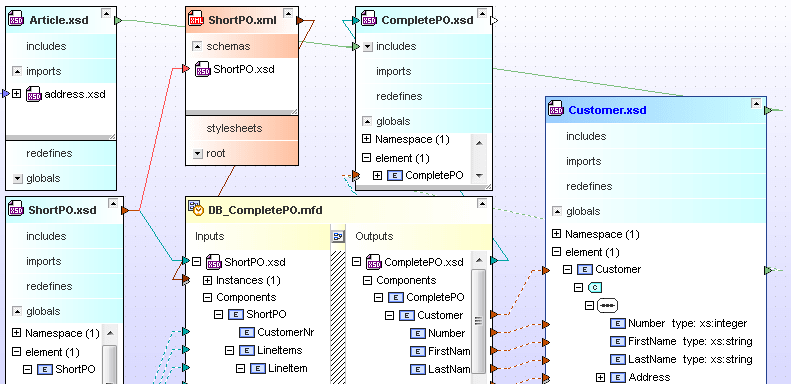
Screenshot Preview

Altova SchemaAgent 2012 - Upgrade from Altova SchemaAgent 2010 - Summary

by Altova - Product Type: Application

Summary

Altova SchemaAgent 2012 - Upgrade from Altova SchemaAgent 2010 by Altova

URLs: altova-schemaagent-upgrades-schemaagent, altova schemaagent upgrades schemaagent, altovaschemaagentupgradesschemaagent, altova

Graphical XML Schema modeling and management tool. Altova SchemaAgent is a tool for analyzing and managing XML Schema, XML instance, XSLT, and WSDL file relationships across a project or an enterprise. With Altova SchemaAgent you can visualize and easily manage file associations via its graphical design view. Altova SchemaAgent lets you create new import, include, and redefine relations using drag-and-drop functionality and save and print visual representations for communication with stakeholders.

SchemaAgent is a graphical schema administration tool that allows you to view a collection of schemas as a pool of resources. SchemaAgent also allows you to view schemas used as data sources and/or targets in Altova MapForce data mapping designs.

SchemaAgent includes the SchemaAgent client and a SchemaAgent Server. The SchemaAgent Server is installed on one computer in your workgroup and can be configured to connect to any standard file repository on your network or on the Internet. Once the SchemaAgent Server is configured with your desired file paths, it builds an internal map of the relationships between all schemas (.XSD) and MapForce mapping design files (.MFD) in the defined server paths. Any number of SchemaAgent clients may connect to the SchemaAgent Server to have access to all these schemas.

Alternatively, for users who don’t need to manage schemas in a team environment, the SchemaAgent client can stand alone and function without the SchemaAgent Server installed. This way, a single user can simply specify the required file paths and access XML Schemas and MapForce mappings directly in the SchemaAgent client.

Visualize Your Information Architecture

The SchemaAgent client interface displays schema components and relationships in a graphical manner, allowing you to immediately visualize the connections between your information assets. Each schema is displayed in an expandable box with its components organized in a hierarchical tree. Relationships between schemas are indicated by color-coded lines connecting associated components. The SchemaAgent design interface allows you to:

Create, save, and print visual schema designs for organizing and managing schema collections intuitively

View the structure of the source and/or target schemas of a MapForce data mapping design files and the relationships of these schemas with other schemas

View the detailed structure of schema components such as global elements, attributes, complex types, simple types, foreign datatypes, and more

View include/import/redefine (IIR) schema relationships indicated by color-coded lines and in greater detail in the component itself

Manage and Reuse Information Assets

In addition to viewing information about and associations between XML Schemas, SchemaAgent allows you to manage the relationships between schemas in a visual manner. SchemaAgent displays schemas and components as graphical objects and supports drag-and-drop functionality for updating or creating schema relationships, making it easy to manage and reuse your schema assets. SchemaAgent only presents you the schema management functions that are applicable in a given context, so it’s next to impossible to make an error. The intelligent SchemaAgent management features allow you to:

Manage single or multiple schemas as schema components

Automatically create, update, or delete IIR references between schemas with simple drag and drop functionality

Propagate changes made in one schema (e.g., rename or move) to all other schemas that reference it in the workspace

Access all schemas and schema components in the SchemaAgent search path while editing schemas in the Schema View of Altova XMLSpy

These features greatly reduce the complexity associated with schema development and enable the efficient, standards-conformant reuse of information assets.

What’s new in Altova SchemaAgent 2012?

Allow user to specify that schemas added to a design are referenced with relative URLs in the SAD file

Reloading path containing ampersand cause loss of connection to SchemaAgent server

Schema Agent crashes upon 'correct referenced paths'

Dragging a schema into schema agent from the explorer crashes Schema Agent

When renaming a schema in schema agent the schemLocation changes from relative to absolute path.

Renaming schema results in 0D0A being changed to 0D

What's new in SchemaAgent 2011?

Bug fixed - Allow user to specify that schemas added to a design are referenced with relative URLs in the SAD file

What's new in Altova 2010 Release 2?

Altova Software Version 2010 Release 2 (v2010r2) provides helpful new features across the product line, and most importantly, significant speed and performance enhancements for working with large XML files. Users will experience optimized loading times – up to 10 times faster – for files larger than 10 MB in Text View, and XML Schema-based validation is up to three times quicker in Text View. Users working in Grid View can experience significant speed increases, completing certain common operations (e.g., copy / paste, etc.) up to 100 times faster.

In addition, with v2010r2, native 64-bit versions of all MissionKit tools are now available. This allows Altova products to capitalize on the benefits of 64-bit operating systems such as Windows Vista 64-bit and Windows 7 64-bit, and, among other advantages, reduces limitations associated with working with very large files sized anywhere from 100 MB up to gigabyte-sized documents.

What's new in Altova SchemaAgent 2010?

Windows 7 Support

What's new in Altova SchemaAgent 2009?

UI and usability enhancements

New features in SchemaAgent 2008 include:

Support for viewing XSLT and WSDL files and their schema relationships – allows users visualize XSLT and WSDL files and their relationships with XML Schemas and other XML-related files.

What's new in SchemaAgent 2007 Release 3?

Graphical display of XML instances – SchemaAgent now allows users to connect to and display XML instance documents – and their connections to XML Schemas and MapForce data mapping projects – in the graphical design view. This allows for a comprehensive view of data connections and interdependencies and allows developers to immediately see which XML instance(s) will be affected when a change is made to the corresponding XML Schema

Graphical XML Schema modeling and management tool.

Pricing: Altova SchemaAgent 2012 Upgrade from Altova SchemaAgent 2011 Installed Users (1), Altova SchemaAgent 2012 Upgrade from Altova SchemaAgent 2011 Installed Users (5), Altova SchemaAgent 2012 Upgrade from Altova SchemaAgent 2011 Installed Users (10), Altova SchemaAgent 2012 Upgrade from Altova SchemaAgent 2011 Installed Users (20), Altova SchemaAgent 2012 Upgrade from Altova SchemaAgent 2011 Installed Users (50), Altova SchemaAgent 2012 Upgrade from Altova SchemaAgent 2011 Concurrent Users (1), Altova SchemaAgent 2012 Upgrade from Altova SchemaAgent 2011 Concurrent Users (5), Altova SchemaAgent 2012 Upgrade from Altova SchemaAgent 2011 Concurrent Users (10), Altova SchemaAgent 2012 Upgrade from Altova SchemaAgent 2011 Concurrent Users (20), Altova SchemaAgent 2012 Upgrade from Altova SchemaAgent 2011 Concurrent Users (50), Altova SchemaAgent 2012 + SMP (1 year) Upgrade from Altova SchemaAgent 2011 Installed Users (1) + SMP (1 year), Altova SchemaAgent 2012 + SMP (1 year) Upgrade from Altova SchemaAgent 2011 Installed Users (5) + SMP (1 year), Altova SchemaAgent 2012 + SMP (1 year) Upgrade from Altova SchemaAgent 2011 Installed Users (10) + SMP (1 year), Altova SchemaAgent 2012 + SMP (1 year) Upgrade from Altova SchemaAgent 2011 Installed Users (20) + SMP (1 year), Altova SchemaAgent 2012 + SMP (1 year) Upgrade from Altova SchemaAgent 2011 Installed Users (50) + SMP (1 year), Altova SchemaAgent 2012 + SMP (1 year) Upgrade from Altova SchemaAgent 2011 Concurrent Users (1) + SMP (1 year), Altova SchemaAgent 2012 + SMP (1 year) Upgrade from Altova SchemaAgent 2011 Concurrent Users (5) + SMP (1 year), Altova SchemaAgent 2012 + SMP (1 year) Upgrade from Altova SchemaAgent 2011 Concurrent Users (10) + SMP (1 year), Altova SchemaAgent 2012 + SMP (1 year) Upgrade from Altova SchemaAgent 2011 Concurrent Users (20) + SMP (1 year), Altova SchemaAgent 2012 + SMP (1 year) Upgrade from Altova SchemaAgent 2011 Concurrent Users (50) + SMP (1 year), Altova SchemaAgent 2012 + SMP (2 years) Upgrade from Altova SchemaAgent 2011 Installed Users (1) + SMP (2 years), Altova SchemaAgent 2012 + SMP (2 years) Upgrade from Altova SchemaAgent 2011 Installed Users (5) + SMP (2 years), Altova SchemaAgent 2012 + SMP (2 years) Upgrade from Altova SchemaAgent 2011 Installed Users (10) + SMP (2 years), Altova SchemaAgent 2012 + SMP (2 years) Upgrade from Altova SchemaAgent 2011 Installed Users (20) + SMP (2 years), Altova SchemaAgent 2012 + SMP (2 years) Upgrade from Altova SchemaAgent 2011 Installed Users (50) + SMP (2 years), Altova SchemaAgent 2012 + SMP (2 years) Upgrade from Altova SchemaAgent 2011 Concurrent Users (1) + SMP (2 years), Altova SchemaAgent 2012 + SMP (2 years) Upgrade from Altova SchemaAgent 2011 Concurrent Users (5) + SMP (2 years), Altova SchemaAgent 2012 + SMP (2 years) Upgrade from Altova SchemaAgent 2011 Concurrent Users (10) + SMP (2 years), Altova SchemaAgent 2012 + SMP (2 years) Upgrade from Altova SchemaAgent 2011 Concurrent Users (20) + SMP (2 years), Altova SchemaAgent 2012 + SMP (2 years) Upgrade from Altova SchemaAgent 2011 Concurrent Users (50) + SMP (2 years)

Evals & Downloads: Read the Altova License Agreement - Requires Acrobat Reader, Read the SchemaAgent help file, Download the Altova SchemaAgent 2012 evaluation on to your computer - Expires After 30 Days

Operating System for Deployment: Windows 7, Windows Vista, Windows XP, Windows Server 2003, Windows ME, Windows 2000, Windows 98, Windows NT 4.0

Architecture of Product: 32Bit, 64Bit

Product Type: Application

Built Using: MFC V4.2 / V6.0

Compatible Containers: Microsoft Visual Studio 2010, Microsoft Visual Studio 2008, Microsoft Visual Studio 2005, Microsoft Visual Studio .NET 2003, Microsoft Visual Studio 6.0, Microsoft Visual Basic 2010, Microsoft Visual Basic 2008, Microsoft Visual Basic 2005, Microsoft Visual Basic .NET 2003, Microsoft Visual C++ 2010, Microsoft Visual C++ 2008, Microsoft Visual C++ 2005, Microsoft Visual C++ .NET 2003, Microsoft Visual C++ 6.0, Microsoft Visual C# 2010, Microsoft Visual C# 2008, Microsoft Visual C# 2005, Microsoft Visual C# .NET 2003, Microsoft Visual InterDev 6.0, Microsoft Office 2003, Microsoft Office 2000, Microsoft Access 2003, Microsoft Access 2002, Microsoft Access 2000, Microsoft SQL Server 2000, Microsoft SQL Server 7.0, Microsoft Outlook 2002, Microsoft Outlook 2000, Microsoft Exchange Server 5.5, Microsoft Internet Information Server 5.0, Microsoft Internet Information Server 4.0, Microsoft Internet Explorer 6.0, Microsoft Internet Explorer 5.5, C++Builder 6, C++Builder 5, Delphi 7.0, JBuilder 9, JBuilder 8, Oracle 9i JDeveloper, .NET Framework 4.0, .NET Framework 3.5, .NET Framework 3.0, .NET Framework 2.0, .NET Framework 1.1, WebLogic Workshop, IBM DB2 8.x

Product Class: Component Development Tools, .NET Development Tool, Component Building Tools

Keywords: XML SPY xmlspy2006 XML XSL XSLT XML editor XML Schema 2006

Altova GmbH - The XML Spy Company

modeling modeled modelled modelling models model UML MDA

Development

XML Extensible Markup

Part numbers: PC-517382-412659 517382-412659 PC-517382-412661 517382-412661 PC-517382-412663 517382-412663 PC-517382-412665 517382-412665 PC-517382-412667 517382-412667 PC-517382-412669 517382-412669 PC-517382-412671 517382-412671 PC-517382-412673 517382-412673 PC-517382-412675 517382-412675 PC-517382-412677 517382-412677 PC-517382-412679 517382-412679 PC-517382-412681 517382-412681 PC-517382-412683 517382-412683 PC-517382-412685 517382-412685 PC-517382-412687 517382-412687 PC-517382-412689 517382-412689 PC-517382-412691 517382-412691 PC-517382-412693 517382-412693 PC-517382-412695 517382-412695 PC-517382-412697 517382-412697 PC-517382-412699 517382-412699 PC-517382-412701 517382-412701 PC-517382-412703 517382-412703 PC-517382-412705 517382-412705 PC-517382-412707 517382-412707 PC-517382-412709 517382-412709 PC-517382-412711 517382-412711 PC-517382-412713 517382-412713 PC-517382-412715 517382-412715 PC-517382-412717 517382-412717

Mfr. Part No: G11Z-G12Z-C001 G11Z-G12Z-C001+M1 G11Z-G12Z-C001+M2 G11Z-G12Z-C005 G11Z-G12Z-C005+M1 G11Z-G12Z-C005+M2 G11Z-G12Z-C010 G11Z-G12Z-C010+M1 G11Z-G12Z-C010+M2 G11Z-G12Z-C020 G11Z-G12Z-C020+M1 G11Z-G12Z-C020+M2 G11Z-G12Z-C050 G11Z-G12Z-C050+M1 G11Z-G12Z-C050+M2 G11Z-G12Z-I001 G11Z-G12Z-I001+M1 G11Z-G12Z-I001+M2 G11Z-G12Z-I005 G11Z-G12Z-I005+M1 G11Z-G12Z-I005+M2 G11Z-G12Z-I010 G11Z-G12Z-I010+M1 G11Z-G12Z-I010+M2 G11Z-G12Z-I020 G11Z-G12Z-I020+M1 G11Z-G12Z-I020+M2 G11Z-G12Z-I050 G11Z-G12Z-I050+M1 G11Z-G12Z-I050+M2

Product Search

Enter search words:

Why buy from ComponentSource?

ComponentSource offers a unique global service, used by over 1,000,000 software developers worldwide.

More Info | About Us

Screenshot Gallery

Click for full screen preview

Screenshot of Altova SchemaAgent - Upgrades from Altova SchemaAgent 2009 - 2012 Screenshot of Altova SchemaAgent - Upgrades from Altova SchemaAgent 2009 - 2012 Screenshot of Altova SchemaAgent - Upgrades from Altova SchemaAgent 2009 - 2012
Award Award