by Altova - Product Type: Application
Altova StyleVision 2012 Enterprise Edition - Concurrent Users by Altova
URLs: altova-stylevision-enterprise-concurrent, altova stylevision enterprise concurrent, altovastylevisionenterpriseconcurrent, altova
Design stylesheets for transforming XML & database content to HTML, PDF, RTF. Altova StyleVision Enterprise Edition is a drag-and-drop, visual stylesheet designer for transforming XML, XBRL, and database data into eye-catching HTML, RTF , PDF, OOXML/Word, and Authentic electronic form output. Altova StyleVision is standards-based and supports XSLT, XSL:FO, CSS, JavaScript, and all major databases. Altova StyleVision is optimized for single source publishing and even integrates with Visual Studio and Eclipse. Altova StyleVision includes templates for industry standard XML vocabularies and an HTML importer for converting HTML pages into XML.
StyleVision features and functionality include:
Enhanced, highly intuitive graphical design interface
Support for built-in and imported CSS styles
Visual, drag & drop stylesheet design
Support for JavaScript functions and a JavaScript editor
Support for DTD, XML Schema, and relational database sources
Support for multiple sources in one design
Web page design Combining XML and database data in one design
Database report design HTML to XML converter
PDF design Industry template support (DITA , DocBook, NewsML, etc.)
Microsoft Word / RTF design
Generation of standards-based stylesheets
Converting XML to HTML, PDF, Word/RTF Style repository for managing and applying styles
Authentic electronic forms design
Batch execution from command line
Standards-conformance: XSLT 1.0/2.0, XPath 1.0/2.0, XSL:FO
Automate Stylesheet Creation
The design you create in StyleVision can be based on any DTD, XML Schema, or relational database, and multiple sources are supported. For instance, you can create one design to produce HTML, PDF, and Word/RTF output that includes data from both XML and database sources. Your single design also simultaneously produces standards-conformant XSLT 1.0 or 2.0 and XSL:FO stylesheets, plus the corresponding Authentic electronic form. At any time during the design process, you can view and save the XSLT and XSL:FO stylesheets that are built behind the scenes based on your design. Since they are standards-based, you can use these generated stylesheets in other applications as necessary. In addition to defining formatting and layout guidelines, StyleVision allows you to design stylesheets and Authentic forms that support advanced functions such as complex table handling, rich input formatting, business logic validation, date control, and more.
Create Eye-catching Output
The new, improved StyleVision user interface allows you to easily create attractive designs that support advanced functionality. You simply drag elements from your data source(s) on to the design pane, and StyleVision prompts you to select an option for rendering the content. You can insert static content, such as headers, images, etc., that you enter directly in your design, then drag and drop elements from XML and/or database sources that will be rendered dynamically based on the source data. It’s easy to apply layout and style information to the content in your design. StyleVision includes multiple advanced entry-helper windows for viewing and editing the source elements and styles used throughout the design. Styles can be applied using drag-and-drop functionality and by editing properties directly in the entry helper windows.
For HTML Web page design, StyleVision supports all the design elements found on today’s advanced Web pages, including hyperlinks, CSS styles, JavaScript functions, etc. It even includes a JavaScript editor for defining functions that add dynamic, event-based functionality to your HTML pages.
To leverage existing Web content, StyleVision also includes a handy HTML importer for HTML to XML conversion. Using easy drag-and-drop functionality, StyleVision will quickly convert an HTML page to an XML Schema, XSLT 1.0 or 2.0 stylesheet, and XML instance document. This feature adds extensibility to your current HTML content, which can now be used in XML-based applications and rendered in PDF, Word/RTF, and Authentic form formats, as well.
Design User-friendly Electronic Forms
In addition to rendering attractive HTML, PDF, and Word/RTF output, each design you create in StyleVision also produces an Authentic form for use with Altova Authentic. Authentic is a free XML and database content editor that allows non-technical business users to view and edit data in XML documents and relational databases - without being exposed to the underlying technology. They simply fill in electronic forms (created using StyleVision), and their content or query is automatically written to or run against an XML document or relational database behind the scenes. And, since Authentic is available under a free license, you can distribute the Authentic forms you create in StyleVision to as many end users as required at no additional cost.
In addition, because your design also simultaneously produces XSLT and XSL:FO stylesheets along with the Authentic form, you can output the data entered through the form directly to HTML, PDF, and Word/RTF without having to design additional stylesheets.
What’s new in Altova StyleVision 2012?
Composite Styles - You now have even more control over how output content is formatted with support for composite styles in StyleVision. In Version 2012 you can use XPath to build a composite that controls multiple style features of a single attribute. In addition, composite styles can now be applied to RTF, Word, and PDF as well as HTML and Authentic electronic forms.
Assigning dynamic class values to RTF, Word, and PDF output - In the past StyleVision users have been able to use XPath to assign class dynamically in HTML and Authentic – now this functionality has been extended to RTF, Word, and PDF as well.
Choose CSS file via XPath - StyleVision offers a great deal of flexibility around output formatting by supporting multiple CSS files in a single design. Now you can exert even more control through the use of XPath to select individual CSS files for output to HTML and Authentic electronic forms based on end user input or other parameters. The XPath is evaluated at the beginning of output processing so that you can easily change the appearance of the entire document – a single CSS or all CSS files associated with the design can be selected.
Support for HTML5 and CSS3 - StyleVision 2012 now supports HTML5 and CSS3 styles. HTML output mode is selected via the same dialog box used to select Internet Explorer compatibility. CSS3 styles (e.g., background-size, font-stretch) can be added in the Styles or Properties entry helper window or called from an external CSS.
JDBC database driver support - StyleVision now supports JDBC drivers to make it even easier for Java developers as well as others to connect to databases. The Database Connection Wizard makes it easy to configure the JDBC connection – simply enter the connection string and select a valid JDBC driver from the dropdown to enable a connection.
Java API - In response to multiple user requests, Altova is pleased to announce the introduction of a completely revamped native Java API. With the introduction of this new native Java API, you can write code that accesses methods and properties in StyleVision from Java applications. Java developers can now more easily automate StyleVision functionality in Java projects – without having to adapt the COM API. This provides even more flexibility for users working with Java.
New samples for API use - StyleVision now includes several code samples in JScript, C#, and Java that demonstrate how to utilize the Java or COM API to automate StyleVision from different development environments.
Search in Project Window - StyleVision’s robust design capabilities mean that users are developing ever more sophisticated projects with multiple folders and sub-folders. Altova has now made it easier to find files in large projects by enabling users to search in the project window– flexible search options make locating files even faster. Simply highlight the title bar in the project window and press Ctrl-F to invoke the Search dialog box.
What’s new in StyleVision 2011r3?
Digital signatures for XML documents
Support for new PXF (Portable XML Forms) file format
New spell checker with improved dictionary support
Support for Internet Explorer 9
Support for .TIFF, .JPEG XR, and .SVG image formats
Scripting editor supports .NET 4.0
Ability to add additional .NET assemblies for scripting
What’s new in StyleVision 2011r2?
Barcode support
Ability to generate multiple output files from a single design template
Ability to define reusable XPath expressions
Support for embedded images in XML
Additional chart types and features
Ability to generate ASPX Web applications
PDF bookmark tree
Ability to create visible/internal combobox values
What’s new in StyleVision 2011?
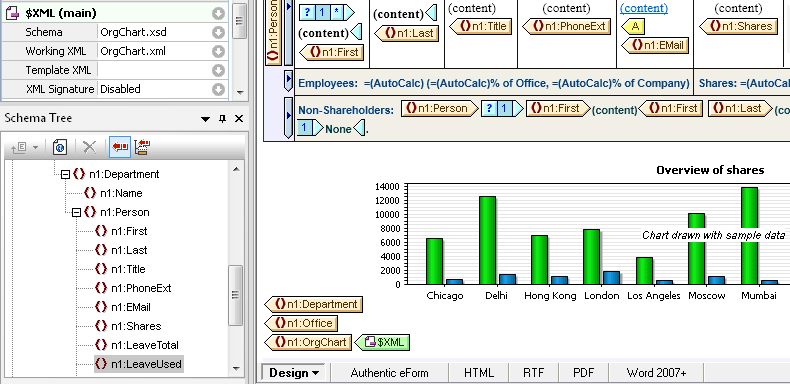
Charts as a new design element
The addition of charting to StyleVision's general purpose reporting capabilities - including support for modular designs, conditional templates, dynamic publishing, creating electronic forms, multiple output formats, and more - makes for an advanced and highly scalable decision support tool for XML, database, and XBRL content. As with all StyleVision designs, charts can be rendered for multi-channel output in HTML, RTF, PDF, Word 2007+, and as electronic forms. Users can now insert different configurations of the following charts/graphs in their template designs:
2D & 3D pie charts
2D & 3D bar charts
Category line graphs
Value line graphs
Gauge charts
The Chart Configuration dialog enables users to easily select chart type, title, size, and data using string entries and/or XPath expressions. Chart data is selected using XPath statements. Users can input the statements directly into the dialog or they can get some assistance with XPath syntax using StyleVision's built-in XPath Builder to define the chart context node, series name (or z-axis), x-axis, and y-axis. Styles and properties can be defined using the All settings… option in the Chart Configuration dialog, and/or by using the StyleVision entry helper windows. Using advanced features like editable variables in Authentic and XPath predicates lets users create forms that can be manipulated by end-users for the desired result.
Chart wizard for XBRL files
Adding to its XBRL rendering capabilities, StyleVision now allows users to generate charts in their XBRL reports using a comprehensive wizard. Charts are created by simply dragging a financial statement or other parent node to the design pane and choosing Create XBRL Chart to start the XBRL Chart Wizard. Users can customize the data rendered in their charts by selecting the desired category or series values (Concept and Period are default) in the properties dialogs. The Period Properties dialog gives options on how to handle XBRL periods, which convey the relevant instant or intervals of time for XBRL reporting. As with the charting feature mentioned above, chart styles and properties can be controlled using the All settings button in the Chart Wizards and/or by using the StyleVision entry helper windows, where users can select chart type, background color, fonts, alignment, etc.
Scripting & toolbar editor for Authentic
StyleVision includes an integrated scripting environment that allows users to interact with XML and database reports using forms, event handlers, and macros created in the Scripting Editor interface. Scripting adds new options for creating Authentic applications and includes:
Script editor with form support
Toolbar editor
Support for JavaScript and VBScript
Ability to define event handlers
Access to Authentic COM interface from script macros
Ability to debug macros
Multi-channel output of HTML/CALS tables
HTML and CALS provide standard tags for representing the structure of tables and are often used common documentation projects as well as in XML industry standards such as DocBook, DITA, and more. Support for HTML/CALS tables means that StyleVision will automatically recognize values dictating table structure such as column number, row height, etc., and apply them to rendered output (v2011 adds support for rendering HTML/CALS tables in HTML, RTF, PDF, AND Word 2007+ - previous releases have supported output to Authentic e-Forms).
Assigning styles to HTML/CALS tables
StyleVision users can now also use the design interface to assign additional presentation styles to HTML and CALS tables such as column and row attributes like width and alignment, font attributes, background color, and more. This enables customers to add information that may be missing from the source format. For instance, in the example below styles have been applied to the table caption, header, and row margins.
Multiple assignments to HTML/CALS tables in a single schema
There are some situations in which different elements can be assigned in the same schema to represent HTML/CALS tables. For example, the DocBook specification uses both the <table> and <informaltable> elements as tags for CALS tables. StyleVision allows users to differentiate between these data structures and define separate styles to each using the Edit HTML/CALS tables dialog.
Ability to import existing XSLT files
Instead of having to design templates from scratch to access StyleVision functionality, users will now be able to base their designs on existing XSLT files that were designed for HTML output or XSLT files with XSL:FO commands for output in PDF. Users will simply specify the XSLT file and schema source and the template will be loaded into the design pane where it can be used for multi-channel publishing and/or to add additional styles using StyleVision's graphical user interface. Any changes to the underlying XSLT code can be previewed or saved at any time.
Support for Apache FOP 1.0
StyleVision now supports the latest version of the XSL:FO processor Apache FOP 1.0.
Design stylesheets for transforming XML & database content to HTML, PDF, RTF.
Pricing: Altova StyleVision 2012 Enterprise Edition Concurrent Users (1), Altova StyleVision 2012 Enterprise Edition Concurrent Users (5), Altova StyleVision 2012 Enterprise Edition Concurrent Users (10), Altova StyleVision 2012 Enterprise Edition Concurrent Users (20), Altova StyleVision 2012 Enterprise Edition Concurrent Users (50), Altova StyleVision 2012 Enterprise Edition + SMP (1 year) Concurrent Users (1) + SMP (1 year), Altova StyleVision 2012 Enterprise Edition + SMP (1 year) Concurrent Users (5) + SMP (1 year), Altova StyleVision 2012 Enterprise Edition + SMP (1 year) Concurrent Users (10) + SMP (1 year), Altova StyleVision 2012 Enterprise Edition + SMP (1 year) Concurrent Users (20) + SMP (1 year), Altova StyleVision 2012 Enterprise Edition + SMP (1 year) Concurrent Users (50) + SMP (1 year), Altova StyleVision 2012 Enterprise Edition + SMP (2 years) Concurrent Users (1) + SMP (2 years), Altova StyleVision 2012 Enterprise Edition + SMP (2 years) Concurrent Users (5) + SMP (2 years), Altova StyleVision 2012 Enterprise Edition + SMP (2 years) Concurrent Users (10) + SMP (2 years), Altova StyleVision 2012 Enterprise Edition + SMP (2 years) Concurrent Users (20) + SMP (2 years), Altova StyleVision 2012 Enterprise Edition + SMP (2 years) Concurrent Users (50) + SMP (2 years), Altova StyleVision 2012 Enterprise Edition SMP renewal (1 year) Concurrent Users (1) SMP Renewal (1 year), Altova StyleVision 2012 Enterprise Edition SMP renewal (1 year) Concurrent Users (5) SMP Renewal (1 year), Altova StyleVision 2012 Enterprise Edition SMP renewal (1 year) Concurrent Users (10) SMP Renewal (1 year), Altova StyleVision 2012 Enterprise Edition SMP renewal (1 year) Concurrent Users (20) SMP Renewal (1 year), Altova StyleVision 2012 Enterprise Edition SMP renewal (1 year) Concurrent Users (50) SMP Renewal (1 year), Altova StyleVision 2012 Enterprise Edition SMP renewal (2 years) Concurrent Users (1) SMP Renewal (2 years), Altova StyleVision 2012 Enterprise Edition SMP renewal (2 years) Concurrent Users (5) SMP Renewal (2 years), Altova StyleVision 2012 Enterprise Edition SMP renewal (2 years) Concurrent Users (10) SMP Renewal (2 years), Altova StyleVision 2012 Enterprise Edition SMP renewal (2 years) Concurrent Users (20) SMP Renewal (2 years), Altova StyleVision 2012 Enterprise Edition SMP renewal (2 years) Concurrent Users (50) SMP Renewal (2 years)
Evals & Downloads: Browse the Altova StyleVision Edtions Feature Comparision, Read the Altova License Agreement - Requires Acrobat Reader, Read the StyleVision help file, Download the Altova StyleVision 2012 Enterprise Edition evaluation on to your computer - Expires After 30 Days
Operating System for Deployment: Windows 7, Windows Vista, Windows XP, Windows Server 2003, Windows ME, Windows 2000, Windows 98, Windows NT 4.0
Architecture of Product: 32Bit, 64Bit
Product Type: Application
Built Using: MFC V4.2 / V6.0
Compatible Containers: Microsoft Visual Studio 2010, Microsoft Visual Studio 2008, Microsoft Visual Studio 2005, Microsoft Visual Studio .NET 2003, Microsoft Visual Studio 6.0, Microsoft Visual Basic 2010, Microsoft Visual Basic 2008, Microsoft Visual Basic 2005, Microsoft Visual Basic .NET 2003, Microsoft Visual C++ 2010, Microsoft Visual C++ 2008, Microsoft Visual C++ 2005, Microsoft Visual C++ .NET 2003, Microsoft Visual C++ 6.0, Microsoft Visual C# 2010, Microsoft Visual C# 2008, Microsoft Visual C# 2005, Microsoft Visual C# .NET 2003, Microsoft Visual InterDev 6.0, Microsoft Office 2003, Microsoft Office 2000, Microsoft Access 2003, Microsoft Access 2002, Microsoft Access 2000, Microsoft SQL Server 2000, Microsoft SQL Server 7.0, Microsoft Outlook 2002, Microsoft Outlook 2000, Microsoft Exchange Server 5.5, Microsoft Internet Information Server 5.0, Microsoft Internet Information Server 4.0, Microsoft Internet Explorer 6.0, Microsoft Internet Explorer 5.5, C++Builder 6, C++Builder 5, Delphi 7.0, JBuilder 9, JBuilder 8, Oracle 9i JDeveloper, .NET Framework 4.0, .NET Framework 3.5, .NET Framework 3.0, .NET Framework 2.0, .NET Framework 1.1, WebLogic Workshop, IBM DB2 8.x
Product Class: Component Development Tools, .NET Development Tool, Component Building Tools
Keywords: XML SPY xmlspy2006 XML XSL XSLT XML editor XML Schema 2006
Altova GmbH - The XML Spy Company
Conversion Convert converts converting
Development
XML Extensible Markup
HTML Editing Edit editor
Database DB Reporting Report reports
Part numbers: PC-517388-411879 517388-411879 PC-517388-411881 517388-411881 PC-517388-411883 517388-411883 PC-517388-411885 517388-411885 PC-517388-411887 517388-411887 PC-517388-411889 517388-411889 PC-517388-411891 517388-411891 PC-517388-411893 517388-411893 PC-517388-411895 517388-411895 PC-517388-411897 517388-411897 PC-517388-411899 517388-411899 PC-517388-411901 517388-411901 PC-517388-411903 517388-411903 PC-517388-411905 517388-411905 PC-517388-411907 517388-411907 PC-517388-411909 517388-411909 PC-517388-411911 517388-411911 PC-517388-411913 517388-411913 PC-517388-411915 517388-411915 PC-517388-411917 517388-411917 PC-517388-411919 517388-411919 PC-517388-411921 517388-411921 PC-517388-411923 517388-411923 PC-517388-411925 517388-411925 PC-517388-411927 517388-411927
Mfr. Part No: V12E-C001 V12E-C001+M1 V12E-C001+M2 V12E-C005 V12E-C005+M1 V12E-C005+M2 V12E-C010 V12E-C010+M1 V12E-C010+M2 V12E-C020 V12E-C020+M1 V12E-C020+M2 V12E-C050 V12E-C050+M1 V12E-C050+M2 VE+M1-C001 VE+M1-C005 VE+M1-C010 VE+M1-C020 VE+M1-C050 VE+M2-C001 VE+M2-C005 VE+M2-C010 VE+M2-C020 VE+M2-C050
Publisher
Primary Category
Related Products
Related Categories
ComponentSource offers a unique global service, used by over 1,000,000 software developers worldwide.