by Kinetic Jump Software - Product Type: Application
AppLife DNA by Kinetic Jump Software
URLs: applife-dna, applife dna, applifedna, kinetic-jump-software, kinetic jump software, kineticjumpsoftware
Manage software requirements and author specifications throughout the life of your application as part of an iterative process. AppLife DNA helps you focus squarely on identified requirements, write iterative functional specifications, and effectively communication change over the duration of your project. With AppLife DNA, you can rapidly produce a “living” requirement specification document on-the-fly during any stage of your application development project. AppLife DNA advances iterative software development by transforming requirements analysis and specification authoring from a task to be completed, into a continuous iterative process.
Why AppLife DNA?
Are you constantly searching through old and inaccurate requirements documents?
Do you suffer from ineffective requirements analysis reviews?
Do you struggle to effectively maintain requirements as development inevitably demands change?
Would maintaining past application context while analyzing and spec’ing new requirements improve the quality of your analysis efforts?
Software projects are naturally iterative. Most industry experts agree on iterative development practices as the best way to create software. AppLife DNA brings iterative practices into the requirement analysis and specification authoring phase. With AppLife DNA, your spec doc becomes a Living Document, where change is not only expected but embraced. Using AppLife DNA, your requirements analysis work will be more efficient, more complete, and more accurate. By focusing your efforts squarely on requirements, you’ll get the right requirements defined quicker and you’ll be able to communicate effectively with team members.
With AppLife DNA you will:
Improve team efficiency and confidence by iterative requirements analysis - The word Iterative simply means “do a little at a time”. In software analysis, this means organize and plan your requirements over many short duration time periods. Using AppLife DNA, an author can organize all of the known application requirements, assign them to iterations, and then efficiently expand on individual requirements just in time for development. This makes the process lean and reduces wasted effort. When requirements are moved between iterations… no problem. AppLife DNA takes care of ensuring the right iteration content is included.
Reduce project risk by authoring each iteration where the previous left off - With AppLife DNA, analyzing and defining requirements continues within the same project. With each iteration, you’ll add new content and change existing content as necessary to describe and explain the new iteration features, while maintaining the previous iteration work. You can even author two planned iterations at once and move content between multiple iterations. Having previous work to provide context for new requirements ensures more thorough analysis, and fewer missed details. Your estimates will be more accurate and your project less risky.
Increase accuracy by effectively communicating iterative change - To iteratively author a specification you must be able to effectively communicate changes to stakeholders. The AppLife DNA Comparison Spec allows you to compare your current work to any past point in time, clearly identifying all changes. The difference between any other document comparison method and an AppLife DNA comparison spec is readablility. The AppLife DNA Comparison Spec is generated and formatted with readability in mind. An AppLife DNA Comparison Spec doesn't just show that differences exist, but rather it provide a distributable document that cleanly marks up the changes, allowing stakeholders to quickly absorb your iterative authoring work. This greatly increases the effectiveness of iterative stakeholder review, ensuring you get the feedback you need to achieve specification accuracy and increases the probability of project success.
With AppLife DNA, application requirements are continuously added, defined, and shared. AppLife DNA provides an environment for iterative management of application requirements. The resulting specifications are more accurate, complete, and easier to communicate. The AppLife DNA process depicted above is easily integrated into your current software development process. Requirements are entered or imported into AppLife DNA. The requirements are then analyzed, organized, and iteratively defined. At any time, functional specs, comparison specs, and requirements reports can be generated and distributed as Word docs, Pdf files, or Html. No new tools, logons, or processes for team members and subject matter experts. Just more accurate, better defined and communicated software specifications, just-in-time for iterative development.
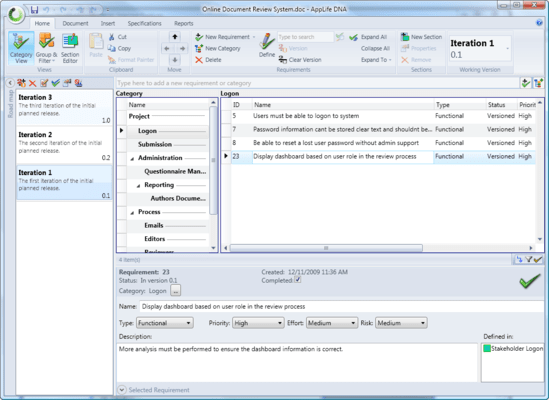
Manage Requirements - Use AppLife DNA to add, categorize, group, sort, filter, search, and report on your application requirements. Customize your requirement views and even add customized requirement properties. Requirements are the center of your specification authoring work in AppLife DNA and the requirement management features allow you to keep up with your ever-growing list of requirements.
Add Requirements
Categorize Requirements
Version Requirements
Add Custom Properties
Create Requirement Reports
Define Requirements into Sections
Add Categories
Prioritize Requirements
Group, Sort, Filter
Search Requirements
Export to Pdf, Doc, Rtf, Htm
Export Requirements Lists to Excel
Author Specifications - In AppLife DNA, specifications are written in Sections. The Section Editor is a full-featured text editor designed to provide a rich text editing experience.
Easily Identify Related Content
Add Requirements from the Editor
Revision Section Text to Software Versions
Print/Draft Layout
Spell Checker
Insert Images
Find and Replace
View Requirements Defined in the Section
Change Section Order and Indent Levels
Use Styles
Text Zoom
Add Tables
Export to Pdf, Doc, Rtf, Htm
Software Versions, Iterating, and Snapshots - As you author section text in AppLife DNA, your work is versioned based on the software version you are currently working on. Write and maintain all of your software version specifications in one place. You can even write sections for multiple versions at the same time. Compare versions to quickly identify and communicate the changes to your specifications between versions. You can also snapshot your work for easy comparison of iterations within the same software version.
New Versions Inherit Section Text
New Versions Inherit Requirements
Mark Shipped Versions to Identify Implemented Requirements
Version and Unversion Requirements
Take a Snapshot at Any Time for Later Comparison
Write an Abstract for Each Version
Specification Options and Comparisons - AppLife DNA provides many different ways to communicate with your stakeholders through specification generation options. Generate specifications for any version of your software. Generate comparison specifications between versions and snapshots that highlight the differences between them.
Compare Versions
Compare Snapshots
Take Snapshots
Include Only Changed Sections
Show/Hide Deleted Text
Add Page Breaks Between Sections
Include Links Between Sections with Common Requirements
Include a List of Requirements Defined in Each Section
Include a Draft Watermark
Export Specifications as Pdf, Doc, Rtf, Htm
Manage software requirements and author specifications throughout the life of your application as part of an iterative process.
Pricing: AppLife DNA V1.1.2.6 AppLife DNA - Single User - Includes one year of software maintenance and phone support, AppLife DNA V1.1.2.6 AppLife DNA - Single User (4 License Pack) - Includes one year of software maintenance and phone support, AppLife DNA V1.1.2.6 AppLife DNA - Single User (10 License Pack) - Includes one year of software maintenance and phone support, AppLife DNA V1.1.2.6 AppLife DNA - Single User Maintenance Renewal, AppLife DNA V1.1.2.6 AppLife DNA - Single User (4 License Pack) Maintenance Renewal, AppLife DNA V1.1.2.6 AppLife DNA - Single User (10 License Pack) Maintenance Renewal
Evals & Downloads: Read the AppLife DNA help file, Read the AppLife DNA License Agreement, Download the AppLife DNA V1.1.2.6 evaluation on to your computer - Expires After 30 Days
Operating System for Deployment: Windows 7, Windows Vista, Windows XP
Architecture of Product: 32Bit
Product Type: Application
Keywords: app life, dna, applifedna
Requirements Management Requirement Manage Managing require
Part numbers: PC-534220-291534 534220-291534 PC-534220-291535 534220-291535 PC-534220-291536 534220-291536 PC-534220-291537 534220-291537 PC-534220-291538 534220-291538 PC-534220-291539 534220-291539
Publisher
Primary Category
Related Products
ComponentSource offers a unique global service, used by over 1,000,000 software developers worldwide.