Screenshot Preview

Aspose.Pdf for SharePoint - Resumen

de Aspose - Tipo de producto: Complemento

Resumen

 *

Aspose.Pdf for SharePoint by Aspose

URLs: aspose-pdf-for-sharepoint, aspose pdf for sharepoint, asposepdfforsharepoint, aspose

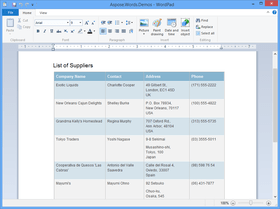
Convert SharePoint content to PDF files. Aspose.Pdf for SharePoint is an add-in that allows users to export lists, items (within the lists) and SharePoint Wiki pages from your SharePoint library to a PDF file. To generate documents, Aspose.Pdf for SharePoint relies on a built-in version of Aspose.Pdf for .NET. Aspose.Pdf for SharePoint requires no additional system requirements besides the ones which exist for Microsoft SharePoint Server 2010.

Aspose.Pdf for SharePoint Main Features:

Export lists and list items from SharePoint document library to PDF

Export Wiki pages from SharePoint server to PDF

Convert XML files to PDF

Export lists and list items from SharePoint document library to PDF

To export a particular item from a list, please choose “Export to Pdf” item in the item’s Edit Control Block (ECB).

Export Wiki pages from SharePoint server to PDF

When on a Wiki page you can use the “Save as PDF” option on menu tab to export the pages to the PDF file format.

Convert XML file to PDF

Aspose.Pdf for SharePoint is built on top of the Aspose.Pdf for .NET component which means to you can convert XML files to PDF using Aspose.Pdf for SharePoint

Create PDF Template - Select ‘Site Action’ and select ‘All Items’. Select the create option and from available list of items, select PDF Template option. Enter template name and press create button.

Load XML template -Once the template has been created, we need to load the XML file that we created in step-1. On PDF template page, please select ‘Add new item’.

Specify source file path - On document upload dialog, press browse button and locate the XML file stored over your system. You may enable the check box to overwrite existing file option. Press the OK button.

Specify file properties - Once the file is loaded, you need to add information in fields marked as mandatory (*).

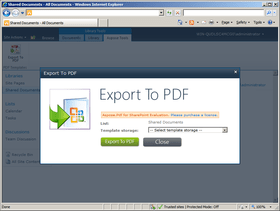
Export to PDF - Once the XML file is added to PDF template, right click test.xml file and from context menu, select Export to PDF. You may also consider selecting ‘Aspose Tools’ menu option from Library Tools and press Export to PDF button.

Save PDF document - On Export to PDF dialog, select Template storage (the location where source file is stored) and select the file you need to export from the drop down menu. Now press ‘Export to PDF’ button to save the final PDF document.

Covert SharePoint content to PDF files.

Pricing: Aspose.Pdf for SharePoint V1.0 1 Developer with Deployment to 1 Physical Location - Small Business Subscription License - Includes Maintenance and Support (1 Year), Aspose.Pdf for SharePoint V1.0 1 Developer with Deployment to Unlimited Physical Locations - OEM Subscription License - Includes Maintenance and Support (1 Year), Aspose.Pdf for SharePoint V1.0 10 Developer with Deployment to 10 Physical Locations - Site Small Business Subscription License - Includes Maintenance and Support (1 Year), Aspose.Pdf for SharePoint V1.0 10 Developer with Deployment to Unlimited Physical Locations - Site OEM Subscription License - Includes Maintenance and Support (1 Year), Aspose.Pdf for SharePoint V1.0 - Subscription Renewals Pre Expiry 1 Developer Small Business Subscription License Subscription Renewal – Includes Maintenance and Support (1 Year), Aspose.Pdf for SharePoint V1.0 - Subscription Renewals Pre Expiry 1 Developer OEM Subscription License Subscription Renewal – Includes Maintenance and Support (1 Year), Aspose.Pdf for SharePoint V1.0 - Subscription Renewals Pre Expiry 1 Site Small Business Subscription License Subscription Renewal – Includes Maintenance and Support (1 Year), Aspose.Pdf for SharePoint V1.0 - Subscription Renewals Pre Expiry 1 Site OEM Subscription License Subscription Renewal – Includes Maintenance and Support (1 Year), Aspose.Pdf for SharePoint V1.0 - Subscription Renewals Post Expiry 1 Developer Small Business Subscription License Subscription Renewal – Includes Maintenance and Support (1 Year), Aspose.Pdf for SharePoint V1.0 - Subscription Renewals Post Expiry 1 Developer OEM Subscription License Subscription Renewal – Includes Maintenance and Support (1 Year), Aspose.Pdf for SharePoint V1.0 - Subscription Renewals Post Expiry 1 Site Small Business Subscription License Subscription Renewal – Includes Maintenance and Support (1 Year), Aspose.Pdf for SharePoint V1.0 - Subscription Renewals Post Expiry 1 Site OEM Subscription License Subscription Renewal – Includes Maintenance and Support (1 Year), Aspose Priority Support Developer Small Business 1 Year Priority Support License, Aspose Priority Support Developer OEM 1 Year Priority Support License, Aspose Enterprise Support Site Small Business 1 Year Enterprise Support License, Aspose Enterprise Support Site OEM 1 Year Enterprise Support License

Evals & Downloads: Read the Aspose.Pdf for SharePoint help file, Read the Aspose License Agreement - Requires Acrobat Reader, Download the Aspose.Pdf for SharePoint V1.0 evaluation on to your computer - Displays Evaluation Messages

Operating System for Deployment: Windows Server 2008

Architecture of Product: 64Bit

Product Type: Add-In

Compatible Containers: Microsoft SharePoint 2010

Keywords: Aspose.Pdf for SharePoint

PDF

pdf

Part numbers: PC-542464-413065 542464-413065 PC-542464-413067 542464-413067 PC-542464-413069 542464-413069 PC-542464-413071 542464-413071 PC-542464-413057 542464-413057 PC-542464-413059 542464-413059 PC-542464-413061 542464-413061 PC-542464-413063 542464-413063 PC-542464-413073 542464-413073 PC-542464-413075 542464-413075 PC-542464-413077 542464-413077 PC-542464-413079 542464-413079 PC-542464-413081 542464-413081 PC-542464-413082 542464-413082 PC-542464-413083 542464-413083 PC-542464-413084 542464-413084

Atención

Para su comodidad, hemos incluido enlaces a Google Translate para traducir la información del producto que todavía tenemos que traducir. Por favor, tenga en cuenta que traducciones automáticas no siempre son totalmente exactas.
Con la tecnología de
Requiere Flash en Firefox y Opera

Búsqueda de productos

Escriba palabras de búsqueda:

Enlaces

Autor

Categoría principal

Productos relacionados

Categorias relacionadas

Noticias relacionadas

View All Related News... 

¿Por qué comprar en ComponentSource?

ComponentSource ofrece un único servicio global, utilizado por más de 1.000.000 de desarrolladores en todo el mundo.

Más Información | Sobre Nosotros

Award