by Developer Express - 상품타입: Component / ASP.NET WebForms / ASP.NET AJAX (ATLAS) / AJAX
주의 : 이 제품정보에는 한글안내가 포함되어 있지 않습니다.
A treeview-grid hybrid for ASP.NET. ASPxTreeList is a feature-complete treeview-grid control for Visual Studio. ASPxTreeList is a multi-purpose data visualization system that can display information as a tree, a grid, or a combination of both - in either data bound or unbound mode. This synergy between a traditional grid and a traditional treeview allows you to create cutting-edge and visually appealing web application interfaces for your end-users with ease. The ASPxTreeList fully exploits existing DevExpress appearance and data management technologies for ASP.NET. Features such as on-demand loading of individual nodes and callback support ensure that the solutions you build are both elegant and effective. In the implementation, the control never needs to transmit the entire tree structure when being updated. The ASPxTreeList is smart enough to determine which portion of the tree to be renewed and only requests a few records from the server, making user interaction extremely fast.
일반 적인 소비자 가격은 하기에 표시되어 있습니다. 고객님의 할인가격은 표시 하시려면 로그인 해주시기 바랍니다.
| 주문 | ₩ 207,200 | 1 Developer License - Includes one year subscription | 다운로드 (166.9 MB) | |
| 주문 | ₩ 276,300 | 1 Developer License with Source code - Includes one year subscription | 다운로드 (166.9 MB) |
가격에는 ComponentSource의 기술지원 요금이 포함되어 있습니다. 또한 다운로드 판매를 하고 있는 상품의 대부분은 온라인 백업요금이 포함되어 있어서 구입날로부터 30일 이내에 새로운 버전이 발매된 경우 무료로 업그레이드해 드리고 있습니다. 모든 주문에 대해서 당사표준 계약조건 및 반품조건 의 내용이 적용됩니다. 다음의 경우,고객 서비스로연락하시기 바랍니다. (상기의 리스트에 게재되지 않은 대량의 라이센스나 구 버전 등의 라이센스 옵션이 필요한 경우)
일반 적인 소비자 가격은 상기에 표시되어 있습니다. 고객님의 할인가격은 표시 하시려면 로그인 해주시기 바랍니다.
Four data access options - To ensure that your data can be easily displayed within the ASPxTreeList, it provides the following data binding options:
Data Sorting - To make it easier to locate records within the control, the ASPxTreeList allows you to sort nodes against an unlimited number of columns. As you might expect, end-users can easily initiate sort operations by simply clicking column headers.
Data Summaries - If your web application requires data analysis, the data summary feature of the ASPxTreeList allows you to focus on the overall numbers instead of having to deal with individual records. You can either summarize data across all records or only those records with a common parent. In both instances, five built-in functions are at your service or you can manually summarize values using a specially designed event. The aggregate result is displayed within the control's footer or group footer. And note that you aren't limited to a single summary per column - you can calculate as many summaries as needed.
Conditional Formatting - To highlight important data or better indicate differences between values, you can use Conditional Formatting. With this feature, entire records or individual cells can be formatted depending upon the data they contain. The simplest use scenario is to highlight records or cells that have a particular value or that have values above or below a particular limit. Beyond these, you can also apply a "color map". This means that cells will use shades of the same color - lighter shades for smaller numbers and darker shades for higher numbers.
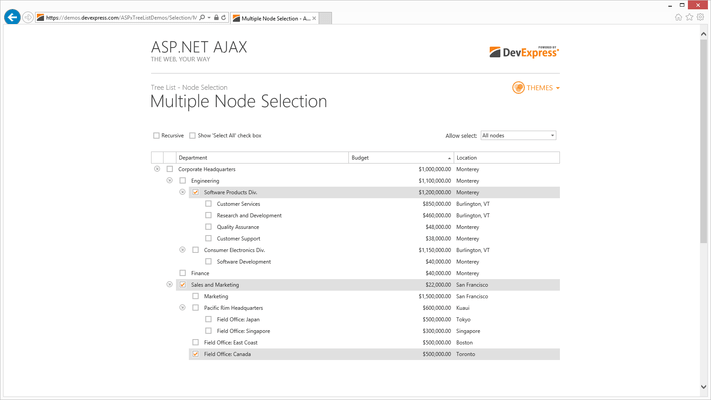
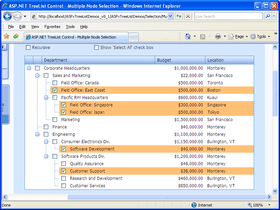
Focused and Selected Rows - You can enable the focused row feature to indicate the last clicked tree node. This is useful when using the treeview for navigation purposes...indicating the end-user's current position. It can also be used with data-browser trees when you must display node details in a separate control. For instance, it can be used when displaying forum messages...highlighting the node whose details are currently displayed. Multi-node selection is also a built-in feature of the ASPxTreeList. By toggling a single option, you can enable selection checkboxes within rows and display a Select All check box within the header panel.
Data Paging - If your tree contains many records, you can split data across multiple pages and thus guarantee a more efficient use of page space and faster initial page rendering. If you do so, the ASPxTreeList displays a built-in ASPxPager control allowing you to navigate to the required page via AJAX callbacks.
Customization Window (Field Chooser) - If end-users need to temporarily hide columns or make hidden columns visible, you can enable a Microsoft Outlook style Field Chooser window. End-users can simply drag fields to the window to hide them and then drag them back to the column header panel to make them visible again.
Node Preview Sections - To elegantly display memo fields, you can use the ASPxTreeList's built-in node preview feature. For instance, if you use the control to create a web forum, this feature allows you to preview individual messages within a discussion thread.