by Aurigma - Product Type: Component / Flash Component
Aurigma Image Uploader Flash is now part of Aurigma Upload Suite 8
Image Uploader Flash by Aurigma
URLs: aurigma-image-uploader-flash, aurigma image uploader flash, aurigmaimageuploaderflash, aurigma
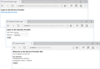
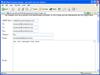
Streamline photo uploads to your website with this flash based upload solution. Aurigma Image Uploader Flash is a new lightweight version of the Aurigma Image Uploader standard product. Ideal for web 2.0 sites with more casual users, it makes photo uploading quick and user-friendly. While Adobe Flash does not offer the advanced functionality of the standard ActiveX/Java uploader, it handles basic uploading needs with ease.
Aurigma Image Uploader Flash allows you to upload any file, anywhere. Easily upload photos, upload videos and upload documents to social network sites, photo sharing site and content management systems.
Easily integrate Aurigma Image Uploader Flash with your website
Just add the Image Uploader code to the upload page on your website, write a few lines of server-side code which saves files to the necessary folder or database, and that’s it. If you are building your site using PHP or ASP.NET, you can use special wrapper classes which reduce the amount of coding to almost nothing.
Aurigma Image Uploader Flash offers a universal upload solution
Adobe Flash is commonly used and installed by most Internet Users. So just about every visitor to your website with a PC/laptop/netbook and any operating system or browser should be able to upload photos. No installation required - users just load the uploader along with the HTML page.
Aurigma Image Uploader Flash lets you upload to any server platform
As with any other Aurigma upload product, Image Uploader Flash is not limited by server platform. Your website can be written with PHP, ASP.NET, JSP, Ruby, or any other technology. You will be able to upload files through Aurigma regardless.
Image Uploader Flash Features Overview:
User-friendly multiple photo uploader
Add multiple files to the upload list and send them to a server with a single click.
Display thumbnails in the upload list.
Show a progress bar during upload.
Resize photos before upload
Upload multiple resized copies of each photo.
Upload additional information along with files
Add comments/description to each photo.
Attach arbitrary HTML form to the upload.
Upload not just pictures, but any other kind of files
Configure Image Uploader Flash to upload not just JPEG, but also other kind of files - documents, ZIP archives, MP3, etc.
Easy to configure for any website
Highly configurable look and feel.
Multilingual user interface.
Configure various restrictions - by file size, dimensions, number of files.
Rich convenient API to extend Image Uploader Flash functionality
Powerful client-side JavaScript API.
Fixed format of HTTP POST requests which enables to integrate Image Uploader Flash with any server platform (PHP, ASP.NET, JSP, Ruby, ColdFusion, and any others).
ASP.NET control integrated with Visual Studio.
PHP library.
What’s new in Aurigma Image Uploader Flash 7.0
General Improvements and New Features
You can now display your own messages in the Information Bar
Added the following localizations: Chinese (simplified), Chinese (traditional), Czech, Dutch, French, German, Italian, Japanese, Korean, Norwegian, Swedish, Turkish, Spanish, Hebrew, and Russian
Save and Cancel buttons in Description Editor are localizable now. Use the descriptionEditor.saveButtonText and descriptionEditor.cancelButtonText properties for this
Improved responsiveness and overall speed of the user interface
Image Uploader Flash now works with Internet Explorer 9 and Firefox 4
Support of EXIF and IPTC metadata.
RTL support
Automatic rotation of images based on EXIF metadata
Sending files by chunks
Minimum required version of the Adobe Flash Player is now 10.1
Users can now be restricted from changing the view in the upload pane by hiding the Change View combo box
Upload Pane behavior is slightly changed: now it scrolls down automatically when new files are added to the Upload Pane
Upload process can be cancelled on "preparing files to upload" stage
The Adding Files dialog has a self-explanatory label now.
All files from a set selected by a user to add to the Upload Pane are cleared from the Upload Pane if a user clicks Cancel button on "adding files to upload list" stage
Progress bar indicates files preparing as a part of the upload process
The Send button is renamed to Upload
The Stop button is renamed to Cancel
The List View is renamed to Upload Pane
API Improvements
Image Uploader Flash API was significantly changed, now it is very similar to the API of Image Uploader 7.
The Error event is added. This event fires if an error occurred during the current upload session
The RestrictionFailed event is added. This event fires if one of selected files does not meet the specified restrictions
The Progress event is no longer used to get information about errors which occurred during the current upload session. Use the Error event to get information about errors
The files.remove(Number) method is added. This method allows removing files from the Upload Pane
The codeBase default value is "./Scripts/aurigma.imageuploaderflash.swf"
POST request format is changed
The /PHPHLibrary folder is renamed to /PHPClasses
The /ClientScripts folder is renamed to /Scripts
Aurigma Image Uploader Flash is now part of Aurigma Upload Suite 8
Streamline photo uploads to your website with this flash based upload solution.
Evals & Downloads: Read the Aurigma Image Uploader Flash help file, Read the Aurigma Image Uploader Flash End User License Agreement
Operating System for Deployment: Windows 7, Windows Server 2008, Windows Vista, Windows XP, Windows Server 2003, RedHat Linux 9.x, RedHat Linux 8.x, RedHat Linux 7.x, SUSE Linux 10.x, SUSE Linux 9.x, SUSE Linux 8.x, MacOS 10.6, MacOS 10.5, Mac OS X
Architecture of Product: 32Bit
Product Type: Component
Component Type: Flash Component
Built Using: ActionScript 3.0
Compatible Containers: Microsoft Visual Studio 2010, Microsoft Visual Basic 2010, Microsoft Visual C# 2010, Microsoft Internet Information Server 7.0, Microsoft Internet Information Server 6.0, Microsoft Internet Information Server 5.0, Microsoft Internet Information Server 4.0, Microsoft Internet Explorer 9.0, Microsoft Internet Explorer 8.0, Microsoft Internet Explorer 7.0, Microsoft Internet Explorer 6.0, Microsoft Internet Explorer 5.5, Microsoft Internet Explorer 5.0, Mozilla Firefox 3.6, Mozilla Firefox 3.5, Mozilla Firefox 3.0, Mozilla Firefox 2.0, Mozilla Firefox 1.5
Keywords: AurigmaInc.formerlyCOMobjects.NET
upload uploading uploaded download downloading downloaded transfer transferring transferred
Imaging image images
image images processing imaging
Publisher
Primary Category
Related Products
Related Categories
ComponentSource offers a unique global service, used by over 1,000,000 software developers worldwide.