par Indigo Rose - Type de produit : Application
AutoPlay Media Studio by Indigo Rose
Build professional autorun CD/DVD ROMs, interactive presentations, custom Windows software, and much more. AutoPlay Media Studio is a development tool that will allow you to easily integrate your existing audio, video, images, text, Flash, Web sites, and scripts by simply dragging and dropping the media files directly into your project. AutoPlay Media Studio has a friendly, easy to use interface, which doesn't require any programming knowledge to use. Limited Time Bonus: AutoPlay Media Studio includes Plugin Pack (SQLite database, Calendar, CD Audio, FTP file transfer WinButton ) and Getting Started Video Training (8 lessons, 40+ minutes) at no extra charge.
What is AutoPlay Media Studio?
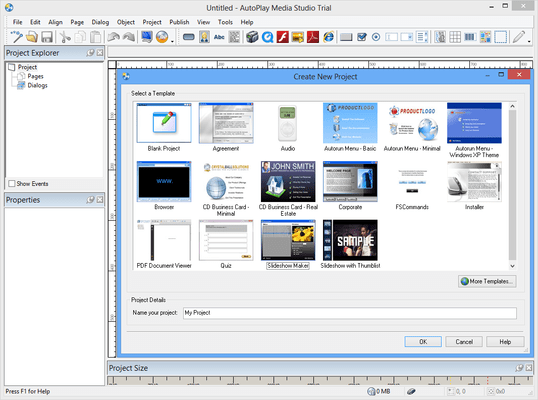
Make a great first impression with a professional autorun CD using AutoPlay Media Studio. This easy to use software tool allows you to quickly create your own custom autorun menus, interactive presentations, and custom applications in just minutes. Use your existing content such as images, music, video, flash, text, and more, and simply drag n' drop your way to amazing autorun menus. Your software will fly off the shelves with a professional front end by AutoPlay Media Studio. To help you get started quickly AutoPlay Media Studio includes extra resources including video training, professional content add-ons, an online user forum, and much more.
Even Non-Programmers Can Create Applications Quickly
AutoPlay Media Studio is built from the ground up to be easy to use. Even if you have absolutely no programming experience you'll be able to get started creating your own custom applications in just minutes. No need to memorize a bunch of code, with AutoPlay Media Studio you let the application do the work for you. The built in wizards simplify common tasks like scripting and publishing so that anyone can point and click their way to fantastic projects quickly and easily
What Can AutoPlay Media Studio Do For You?
AutoPlay Media Studio is a dream suite for developers who wish to create professional autorun menus for their installers, patches, and other software projects. Seamlessly integrate a variety of different media types such as photos, images, music, flash, video, and HTML pages into a single, interactive autorun CD in just minutes.
What Can I Create With AutoPlay Media Studio?
AutoPlay Media Studio helps you make professional multimedia software. While the product excels at certain tasks like making front-end browsers for CD-ROMs (i.e. AutoRun/AutoPlay menus), etc..
Integrating diverse media types such as images, sounds, videos, text, and flash into a single cohesive presentation is what AutoPlay Media Studio does best. In fact, it has been trusted to deliver multimedia experiences to millions of people around the world. Users just like you have chosen AutoPlay Media Studio for:
• Multimedia Authoring & Application Development
• Computer Based Training (CBT) Applications
• CD-ROM AutoPlay/AutoRun Menu Systems
• Interactive Marketing Presentations
• CD Business Cards
• Much more
Intuitive Drag and Drop Design
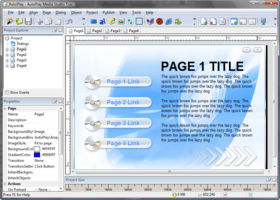
AutoPlay Media Studio has always been known for its easy-to-use visual design environment. Simply drop high-level, interactive objects (images, video, text etc.) onto pages to create instant functionality. Move them into position using your mouse or with the aid of an extensive assortment of alignment tools and grids. Once you’ve got your interface down, it’s a snap to attach powerful actions to various events such as mouse clicks and key presses. Whether it’s opening a PDF file, playing a video or showing a web site, the Action wizard makes it easy to choose from the over 360 built-in functions.
From Concept to CD in Minutes
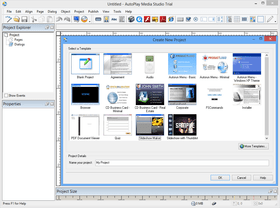
AutoPlay Media Studio is a one stop solution for building high performance autorun CDs. Whether using templates from the built in gallery, or starting from scratch, you can have a project such as a custom installer menu completed in just a few minutes and published directly to CD/DVD ROM, as a single executable file for easy distribution, or even as an ISO image which you can burn directly from your favorite CD/DVD burning software. It's a quick, easy, and reliable way to get your ideas from the raw concept stage directly to disc in just a few minutes on any budget.
Used by Thousands of Developers Worldwide
Each day tens of thousands of developers from thousands of top organizations use AutoPlay Media Studio to reach an end audience of millions of users. The evolution of AutoPlay Media Studio from a simple menu maker into a highly advanced autorun CD suite has been forged directly through Indigo Rose's relationships with these developers. AutoPlay Media Studio offers the very best technology the market has to offer.
What's New in AutoPlay Media Studio 7.0?
Rich Text Object
The new rich text object allows you to display rich text (.rtf) in an object. It supports background transparency as well as design-time and runtime character and paragraph formatting.
Slideshow Object
The slideshow object allows you to show a series of images in a set area. It supports automatic resizing and scaling as well as transitions between images.
Checkbox Object
The new checkbox object wraps the standard Windows checkbox control but takes it to a new level by allowing transparent background and mouse state text color changes.
Radio Button Object
The new radio button object is great for quiz and test applications. Radio buttons support transparent backgrounds and changing text color as the mouse passes over them. Radio button selection and grouping is also handled automatically.
Multiline Text on Button Objects
Button objects now support multiline text. You can have multiple lines of text with word-wrap and specify custom left and right margins.
Thumbnail Support in File Browsers
The file browsers in the product now support thumbnail view, making it much faster and easier to locate files.
Print Pages at Runtime
The addition of the Page.Print action allows you to print pages at runtime including options for whether or not to show a print dialog and whether to scale the pages to fit the paper.
Automatic Sizing and Positioning of Objects
The new Auto-Resize options for each object allow you to control how each side of the object responds to the page being resized at runtime. This makes it very easy to have resizable applications look right at different sizes.
Page Keyword Searching
Specify a list of keywords associated with each page. Then at runtime use the new actions to search for keywords on pages, create an indexed table of keywords, or even show a common dialog to allow the user to perform keyword searches.
New and Enhanced Templates
Includes many new project templates that demonstrate many of the new features in version 7.0.
CD / DVD Burning on Vista
You can now burn CD/DVD projects on Windows Vista systems.
Get and Set Page Properties at Runtime
Two new actions, Application.GetPageProperties and Application.SetPageProperties allow you to query and modify page properties such as keywords, descriptions and even background colors and images dynamically at runtime.
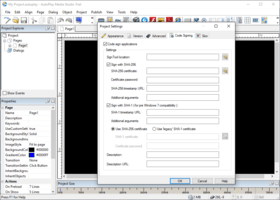
Automatic Code Signing
Automatically have your applications code signed during publishing. This provides a more secure experience for users and helps make applications Windows Vista compliant.
MSI Actions
Over 35 MSI actions that leverage the Windows Installer service technology on the user's system. These actions make it easy to query the state of products, features and components on the end-user's system that were installed with a Windows Installer package.
Dynamic Passwords for Encrypted Data Segments
Now when you build to a Web/Email executable and turn on the Encrypt data segment option, a unique key is used to protect the data ensuring that your data cannot be decrypted using a common key.
Instructions for Project Templates
Now when you export a project to a project template and enter instructions in the Description field of the Project Template Information dialog, the text will be displayed for the developer to read when a project is created from that template.
Support for Alternate Templates Folder
The new project dialog now scans the "My Documents\AutoPlay Media Studio 7.0\Templates" folder for project template files as well as the "Program Files\AutoPlay Media Studio 7.0\Templates" folder. This allows the storage and use of project templates from a per-user folder.
Minimum Page Size
Added support for minimum page sizes for resizable projects. These dimensions can be entered on the Appearance tab of the Project Settings dialog.
CDATA Support for Writing to XML
The XML.SetValue action now has an extra parameter that allows you to specify whether the data should be written out as a CDATA section.
PartNumbers: PC-504787-138028 504787-138028 PC-504787-138034 504787-138034 PC-504787-138031 504787-138031 PC-504787-138070 504787-138070
Publisher PartNumbers: AMS70 AMS70Team3 AMS70Up
PurchaseOptions: AutoPlay Media Studio V7.0 1 Developer License ( Includes 1 Year Maintenance Plan including all major and minor updates) , AutoPlay Media Studio V7.0 3 Developer License ( Includes 1 Year Maintenance Plan including all major and minor updates) , AutoPlay Media Studio V7.0 1 Developer Upgrade License from any previous version , AutoPlay Media Studio V7.0 3 Developer Upgrade License from any previous version
Resources: Read the AutoPlay Media Studio help file, Read the AutoPlay Media Studio User Guide, Read the AutoPlay Media Studio License Agreement, Download the AutoPlay Media Studio V7.0 evaluation on to your computer - Expires after 30 days
Operating System for Deployment: Windows Vista, Windows XP, Windows ME, Windows 2000, Windows 98, Windows NT 4.0, Windows 95
Architecture of Product: 32Bit
Product Type: Application
Product Class: Component Development Tools, Component Building Tools
Search Items: New Version Dec 03, New Product Feb 04, New Product Sep 05
Keywords: Demonstration demonstrate demos demo presentation presents present Multimedia media Installation Installing install installs uninstalling uninstall uninstalls setup MSI msi scripts Indigo Rose Professional Partner Indigo Rose Autoplay, AutoPlay Media Studio
Éditeur
Catégorie principale
Produits similaires
Catégories similaires