Screenshot Preview

BB FlashBack Standard

par Blueberry Consultants - Type de produit : Application

Veuillez noter que á moins d’être stipulé autrement, ce produit est un produit anglais.

*

Advanced screen recorder software. BB FlashBack Standard is an easy to use screen recording and movie authoring application for creating compact but high quality footage for tutorials, demos and presentations. Text effects, sound and commentary are fully supported by BB FlashBack and movies can be exported Flash, QuickTime (H264), WMV, AVI, EXE and PowerPoint. BB FlashBack uploads to YouTube, Blip.tv, Viddler and Revver and gives you a URL you can share. BB FlashBack also records all Vista graphics modes,records from your webcam while it records your screen.

A partir de
$109.03
Calculer le prix en

Nos prix standard sont montrés ci-dessous. Veuillez vous connecter pour voir vos prix.

BB FlashBack Standard V3.0 + Premium Support   *

Ajouter au Caddie $ 109.03 1 Machine licence + Premium Support  *
Réf. Editeur : BB-FBS3-COM-PS-(1)
Téléchargement (10.6 Mo)
Ajouter au Caddie $ 96.78 1 Machine licence + Premium Support , per Machine from 2 to 5 users  *
Réf. Editeur : BB-FBS3-COM-PS-(2-5)
Téléchargement (10.6 Mo)
Ajouter au Caddie $ 91.88 1 Machine licence + Premium Support , per Machine from 6 to 10 users  *
Réf. Editeur : BB-FBS3-COM-PS-(6-10)
Téléchargement (10.6 Mo)
Ajouter au Caddie $ 79.63 1 Machine licence + Premium Support , per Machine from 11 to 20 users  *
Réf. Editeur : BB-FBS3-COM-PS-(11-20)
Téléchargement (10.6 Mo)
Ajouter au Caddie $ 67.38 1 Machine licence + Premium Support , per Machine from 21 to 50 users  *
Réf. Editeur : BB-FBS3-COM-PS-(21-50)
Téléchargement (10.6 Mo)
Ajouter au Caddie $ 55.13 1 Machine licence + Premium Support , per Machine 51 users or more  *
Réf. Editeur : BB-FBS3-COM-PS-(51+)
Téléchargement (10.6 Mo)

BB FlashBack Standard V3.0   *

Ajouter au Caddie $ 87.22 1 Machine License  *
Réf. Editeur : BB-FBS3-COM-SW-(1)
Téléchargement (10.6 Mo)
Ajouter au Caddie $ 77.42 1 Machine Licence, per Machine from 2 to 5 users  *
Réf. Editeur : BB-FBS3-COM-SW-(2-5)
Téléchargement (10.6 Mo)
Ajouter au Caddie $ 73.50 1 Machine Licence, per Machine from 6 to 10 users  *
Réf. Editeur : BB-FBS3-COM-SW-(6-10)
Téléchargement (10.6 Mo)
Ajouter au Caddie $ 63.70 1 Machine Licence, per Machine from 11 to 20 users  *
Réf. Editeur : BB-FBS3-COM-SW-(11-20)
Téléchargement (10.6 Mo)
Ajouter au Caddie $ 53.90 1 Machine Licence, per Machine from 21 to 50 users  *
Réf. Editeur : BB-FBS3-COM-SW-(21-50)
Téléchargement (10.6 Mo)
Ajouter au Caddie $ 44.10 1 Machine Licence, per Machine 51 users or more  *
Réf. Editeur : BB-FBS3-COM-SW-(51+)
Téléchargement (10.6 Mo)

BB FlashBack Standard V3.0 - Educational Discount   *

Ajouter au Caddie $ 52.33 1 Machine License  *
Réf. Editeur : BB-FBS3-EDU-SW-(1)
Vérifier Téléchargement (10.6 Mo)
Ajouter au Caddie $ 47.63 1 Machine Licence, per Machine from 2 to 5 users  *
Réf. Editeur : BB-FBS3-EDU-SW-(2-5)
Vérifier Téléchargement (10.6 Mo)
Ajouter au Caddie $ 42.34 1 Machine Licence, per Machine from 6 to 10 users  *
Réf. Editeur : BB-FBS3-EDU-SW-(6-10)
Vérifier Téléchargement (10.6 Mo)
Ajouter au Caddie $ 37.04 1 Machine Licence, per Machine from 11 to 20 users  *
Réf. Editeur : BB-FBS3-EDU-SW-(11-20)
Vérifier Téléchargement (10.6 Mo)
Ajouter au Caddie $ 31.75 1 Machine Licence, per Machine from 21 to 50 users  *
Réf. Editeur : BB-FBS3-EDU-SW-(21-50)
Vérifier Téléchargement (10.6 Mo)
Ajouter au Caddie $ 26.46 1 Machine Licence, per Machine 51 users or more  *
Réf. Editeur : BB-FBS3-EDU-SW-(51+)
Vérifier Téléchargement (10.6 Mo)

Nos prix comprennent le support technique ComponentSource et, pour la majorité des produits téléchargeables, une sauvegarde en ligne ainsi qu'une mise à niveau GRATUITE si la nouvelle version est parue pendant les 30 jours consécutifs à votre achat.  Toutes les ventes sont sujettes à nos Termes et Conditions standard à notre Politique de renvoi. Veuillez nous contacter si vous avez besoin d'une option de licence (licence de volume et versions précédentes) qui ne figure pas sur la liste ci-dessus.

Nos prix standard sont montrés ci-dessus. Veuillez vous connecter pour voir vos prix.

 *

What's new in BB FlashBack Standard V3.0?

  • A new recorder interface that lets you set the main options and get recording quicker
  • Scheduled recording
  • Add arrows to movie
  • Add watermark images to movies
  • Add video files to movies
  • Easily create start and end titles
  • iPod/Pad/Phone compatible exports
  • Remove noise from audio
  • 'Flatten out' the volume in a movie with audio compression and normalisation
  • Fade sound in and out
  • Displays invisible keystrokes
  • More flexible, 'Rich' text formatting in textboxes
  • Improved player interface that enables easier working with text, image etc objects
  • Improved usability when creating pauses in a movie
  • And many other smaller improvements and fixes.

What's new in BB FlashBack Standard V2.7.4x?

  • New feature: inverted cursor highlight.
  • Fix: Bad final frame or second to last frame in mpeg recordings.
  • Fix: Cropping mpeg recording to final frame produced access violation.
  • Fix: Saving the final frame of an mpeg recording as a new FBR produced a corrupt file.
  • Fix: Saving a single frame could produce an FBR containing a number of frames.
  • Fix: Exe exports would not autoscroll correctly on some PCs - they would be displayed scaled instead.
  • Fix: Improvements to deskband on windows 7 and addition of deskband for 64bit operating systems.
  • Fix: When inserting an mpeg movie into an mpeg movie, blank frames were added to the end of the movie.
  • Fix: Duplicate markers could be produced by deleteing all frames after a marker and saving the movie.
  • Fix: Static frames produced by using mpeg recording with the limit by time function.
  • Fix: EXE export. Message about missing entry point in dll when running EXE exported from some movies.
  • Fix: Media player detection not working for some players.
  • Fix: Capture driver initialisation error on some Windows 7 PCs.
  • Flash exports: Improved handling of pre v9 Flash players.
  • Now disables video hardware acceleration by default on lower powered PCs.

 *

BB FlashBack Standard Overview
BB FlashBack Standard allows users to record the whole, or selected areas of, their computer screen. Once captured these recordings can be replayed, edited, produced and published into a wide range of formats. Unlike most screen recording software, BB FlashBack uses a special capture driver to intelligently detect the changes in your screen. This method of recording minimises the strain on PC resources during recording, produces crystal clear movie quality and delivers a low file size.

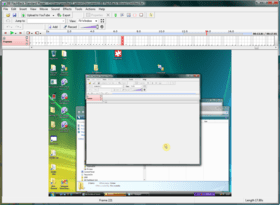
For ease of use BB FlashBack is divided into two sections: the recorder and the player. BB FlashBack recorder deals with all aspects of capturing your screen. After recording, movies can be loaded into the BB FlashBack player and edited by inserting, removing, cutting or pasting footage. Text annotations, sound effects, imported graphics and spoken commentaries are all fully supported. Text can be added into your movie with a variety of different effects, or inside highlighted boxes and callouts. Sound can be recorded from a PC microphone or any other sound input into your computer; either ‘on the fly’ while capturing your screen, or added later in the BB FlashBack editor.

To polish presentations a range of extra production tools are available. The speed of the movie can be tweaked and changed at selected areas. Mouse cursor movements can be shown, hidden or re-recorded altogether. Your own graphics can also be imported into the movie and positioned and displayed as desired.

For navigation through your footage, BB FlashBack player allows users the ability to jump to the next selected movie event such as “next mouse click” or “last keypress”. Along with this functionality a helpful timeline and preview panel are part of the FlashBack player to allow browsing through the footage. Searching for text inside the movie is also possible.

BB FlashBack Standard Features

Recording
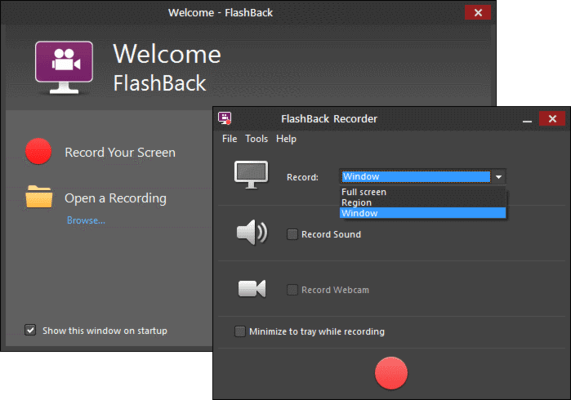
BB FlashBack Standard can record high frame rate, high quality movies without affecting PC performance, even on lower powered PCs. BB FlashBack Standard also provides WebCam Recording so you can give your movies a personal touch. One click, and BB FlashBack records from the webcam while it records the screen. You can also record a commentary at the same time as the screen. It's easy to record the microphone, PC speakers or other sources.

Record Vista
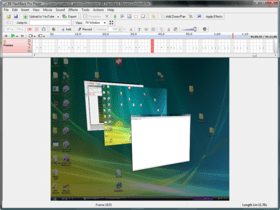
Capture Vista's 'Aero' effects at a high frame rate without a high-spec PC. BB FlashBack screen recorder is fully Vista compatible and can record all of its graphics modes. 

Continuous Recording
Ideal for usability testing, monitoring and similar applications, BB FlashBack lets you record forever but limit the movie file size.

Sharing Movies
Upload to YouTube, Blip.tv, Viddler or Revver. Get the URL and share it

Export to a Range of Formats
BB FlashBack screen recorder exports to the most widely used video formats: Flash, QuickTime, AVI and Windows Media Video.

Features / EditionsStandard EditionProfessional Edition
Recording
  
Record screen, microphone, PC sounds and webcam
Record the full screen, a window or region
Record and display keystrokes
Record continuously and limit the final file size
Choice of recording modes to suit older or newer PCs
Records Vista's Aero mode
Sharing
  
Upload to Youtube, Blip.tv, Revver
Upload to generic http, ftp and local network file servers
 
Export to Flash - SWF and FLV (Flash video)
Export to AVI
Export to Windows Media Video (WMV)
Export to QuickTime (H264)
Export to Standalone EXE
 
Export to MS Powerpoint
 
Annotation
  
Add textboxes
Add sound files or record a new commentary
Add images
Highlight areas of the screen
Add interactive buttons
Add AVI or WMV file as picture-in-picture video
Editing
  
Frame-by-frame video editing
 
Multi-track audio editing
 
Smooth out or re-record cursor movements
 
Speed up and slow down sections of the movie
 
Effects
  
Cursor highlighting
Zoom and Pan
 
Cropping the movie area
 

Support

 *

Standard Support

  • Access to Knowledgebase
  • Minor releases and fixes for free
  • Email support

Premium Support: You receive these additional services for one year:

  • Priority email support
  • Phone support (English speaking only)
  • Major upgrades for free
  • Optional involvement in beta program

Attention

Pour votre référence, nous avons inclus des liens á Google Translate pour les informations sur le produit qui n'ont pas encore été traduites. Veuillez noter que les traductions automatiques ne sont pas toujours complètement exactes.
Fourni par
Flash est requis dans Firefox et Opera

Recherche produit

Entrez vos critères de recherche :

Pourquoi acheter chez ComponentSource ?

ComponentSource offre un service international unique, reconnu par plus de 1 000 000 développeurs de logiciels partout dans le monde.

Complément d'informations | Notre société

Économies sur le développement

Lisez notre livre blanc sur
le taux de rendement du capital investi

Lignes de code : 50,000
Mois-hommes : 50
Coût main d'oeuvre : $250,000

Caractéristiques requises :

Effort pour 1,000 LdC :

Coût main d'oeuvre par mois :