by BCGSoft - 상품타입: Component / DLL / VC++ Class Library / Source Code / Static Link Library
BCGControlBar Library Professional Edition MFC (BCGControlBar Professional) by BCGSoft
URLs: bcgcontrolbar-library-professional, bcgcontrolbar library professional, bcgcontrolbarlibraryprofessional, bcgsoft
Microsoft Office 2007 / XP / 2003 / 2007, Microsoft Visual Studio, Microsoft Internet Explorer(IE), 기타 잘 알려진 제품과 비슷한 사용자 인터페이스로 어플리케이션을 만들 수 있습니다. BCGControlBar Library Professional (BCGControlBar Pro MFC)은 도구 모음, 메뉴, 컨트롤뿐 아니라 Office 및 Microsoft Visual Studio와 비슷한 UI를 추가하기 위해 어플리케이션에 통합할 수 있는 사용자 정의와 시각화와 같은 200가지 이상의 잘 설계되고, 시험을 통과했으며, 완전히 문서화된 MFC 확장 클래스를 포함하는 MFC 확장 라이브러리입니다. BCGControlBar Library Professional (BCGControlBar Pro MFC)은 리본 컨트롤의 Office 2007 (Office 12) 스타일, 스킨 적용 인터페이스, Vista Aero, Gantt 등을 지원합니다. BCGControlBar Library Professional License는 소스 코드 및 이메일 기술 지원, 패치, 업그레이드를 제공하는 1년간 무료 가입을 포함합니다.
개요
BCGControlBar Library Professional Edition MFC (BCGControlBar Professional)는 완전한 사용자 정의 옵션(사용자 정의가 가능한 도구 모음, 메뉴, 키보드 등)으로 Microsoft® Office 2000, XP, 2003, 2007, Vista, Microsoft® Visual Studio®.NET과 비슷한 어플리케이션을 개발할 수 있는 MFC 확장 라이브러리입니다.
이 라이브러리는 어플리케이션에 쉽게 통합하고 엄청난 개발과 디버깅 시간을 단축할 수 있는 200가지 이상의 완전히 문서화된 MFC 확장 클래스를 포함합니다.
BCGControlBar Library Professional Edition MFC (BCGControlBar Professional)는 분리할 수 있는 탭 창, 자동 숨김 창, 끌기 동안 컨텍스트를 표시하는 컨트롤 바와 도구 모음의 도킹, 새로운 도킹 알고리즘(Microsoft® Visual Studio.NET® 환경 및 Microsoft® Visio®에 적용된 알고리즘과비슷), pane을 분리할 수 있는 바로가기 표시줄, 탭 방식 도구 모음, 구문 색상 강조와IntelliSense® 스타일 지원을 포함한 텍스트 편집기, 완전히 평평한 모양 등과 같은 많은 고급 기능을 포함하는 MFC 확장 라이브러리입니다.
도구 모음 및 메뉴:
Microsoft® Office 2000, Office XP, Office 2003, Office 2007 모양과 느낌의 도구 모음 및 메뉴
Microsoft ® Visual Studio 6.0, Visual Studio.NET(VB.NET, C# 등), Visual Studio 2005, VS2008 Themes
Microsoft® Internet Explorer(IE) 모양
사용자 정의 어플리케이션 모양(어플리케이션 정의 스킨의 지원)
High 및 True 컬러의 도구 모음 / 메뉴 이미지 지원
큰 아이콘 지원
메뉴와 도구 도움말에서 키보드 단축키 이름의 자동 생성
도구 모음 메뉴 버튼
콤보 박스, 편집 상자, 날짜/시간 선택기, 색상 선택기 등과 같은 내장된 도구 모음 컨트롤
탭 방식 도구 모음
Microsoft® Office와 비슷한 "티어오프"("분리 가능") 메뉴
컨트롤 바
바로가기(Microsoft® Outlook 스타일) 표시줄
분리 가능 탭과 Auto Hide 모드를 포함한 Visual Studio® 스타일의 Docking/Resizable Control Bar
VS 2005 스타일의 도킹
Microsoft® Office 스타일의 작업 pane
Visual Studio.NET® 스타일의 도구 상자
진행 상태 막대, 애니메이션, 아이콘을 추가해 개선된 상태 표시줄
고급 문서 관리
MDI Tab Control 및 MDI Tab Group
탭 방식 보기
MTI 인터페이스 지원
도킹 보기
사용자 정의
사용자 정의가 가능한 도구 모음과 메뉴
컨텍스트 메뉴의 사용자 정의
키보드 단축키의 사용자 정의
사용자가 정의한 도구
사용자가 정의한 이미지 편집(간단한 비트맵 편집기 포함)
시각화 및 스킨
내장된 스킨: Office2000, OfficeXP, Office2003, VS.NET, VS2005와 비슷
사용자가 정의한 스킨
플래너 컨트롤
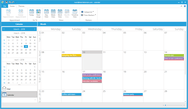
Day, Work Week, Week, Month 보기를 지원하는 Microsoft® Outlook 스타일의 달력
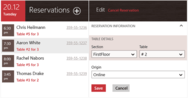
예약 및 일정 관리
일정 리마인더
반복 일정
이벤트
출력 지원
달력 컨트롤과 통합
그리드 및 리포트 컨트롤
열 그룹화, 끌어 놓기 출력 등을 지원하는 Microsoft® Outlook 스타일의 리포트 컨트롤
계층적 데이터를 지원하는 고급 그리드 컨트롤
텍스트, 숫자, 색상, 글꼴, URL 등과 같은 내장된 셀 유형
데이터 바인딩 지원 ODBC, ADO, DAO는 즉시 적용 가능
팝업(데스크탑 경보) 창
이런Microsoft® Office 스타일의 팝업 컨트롤을 이용하면 단기 메시지를 표시할 수 있습니다.
표준 메시지 대화상자와 달리 이 창은 "Ok" 버튼을 클릭해 닫을 필요가 없으며 잠시 후 자동으로 사라집니다.
컨텐트는 사용자가 정의한 대화상자 자원에서 생성하거나 지정한 텍스트와 아이콘에서 자동으로 생성할 수 있습니다.
다양한 팝업 모양: Office 200/XP/2003, MSN Messenger 등
다양한 애니메이션 유형: fade, slide, unfold
반투명 배경
사용자 정의 이벤트
기타GUI 컨트롤
IntelliSense 지원과 구문 색상 강조를 포함한 고급 편집 컨트롤
속성 목록 컨트롤
하이퍼링크 컨트롤
고급 탭 컨트롤
Microsoft® Office 스타일의 색상 선택기
글꼴 선택기
마스크 적용 편집 컨트롤
날짜/시간 선택기
달력 컨트롤
hot-spot 영역의 이미지
계산기
대화상자
고급 속성 시트: 왼쪽 바로가기 표시줄이나 트리로 교체할 수 있는 상부 탭
사용자 정의 대화상자
이미지 편집 대화상자
Office와 비슷한 색상 선택 대화상자
주요 맵 대화상자
창 관리 대화상자
Visual Studio 통합
VC++ 6.0, VS.NET 2002/2003( VB.NET, CSharp 등), VS.NET 2005, VS 2008을 지원합니다.
Integration Wizard는 라이브러리를 Visual Studio 환경에 통합합니다.
Application Wizard를 이용하면 수초 이내에 참신한 모양의 MFC 어플리케이션을 만들 수 있습니다.
Build Wizard는 필요한 라이브러리 구성(들)을 구축합니다.
MSDN 통합 도움말 라이브러리 도움말과 MSDN을 통합하므로, 편집기에서 F1 키를 누르면 관련된 도움말 주제가 나타납니다.
Skin Wizard를 이용하면 특정한 스킨을 새로 만들 수 있습니다.
기타
쉘 관리 클래스 및 쉘 트리와 목록 컨트롤
UNICODE 지원
Microsoft® Active Accessibility 지원
Right-to-Left(RTL) 언어 지원
라이브러리는 중국어, 체코어, 덴마크어, 네덜란드어, 프랑스어, 독일어, 그리스어, 헝가리어, 이탈리아어, 일본어, 한국어, 폴란드어, 포르투갈어, 루마니아어, 러시아어, 슬로바키아어, 스웨덴어, 터키어, 슬로베니아어, 스페인어로 번역되었습니다. 내장된 언어를 이용하면 개발자는 런타임 동안 사용자 인터페이스 언어를 변경할 수 있습니다.
What's New in BCGControlBar Library Professional Edition MFC (BCGControlBar Professional) V12?
CBCGPVisualManager2010 implements Microsoft Office 2010 Beta 1 color themes
Added Microsoft Office 2010-style Ribbon Backstage View
The Ribbon bar Application ("main") Button can display a text label instead of icon in the "scenic" mode (usually "File" in English language UI).
Implemented ability to add Ribbon Galleries to the dialogs
Implemented Resizable Dialogs support
Significantly improved CBCGPVisualManagerVS2010
Calculator control has been significantly improved
What's New in BCGControlBar Library Professional Edition MFC (BCGControlBar Professional) V11?
New Visual Manager - CBCGPVisualManager2010, which implements the new Microsoft Office 2010 TP white theme
New class CBCGPVisualManagerVS2010, which implements Microsoft Visual Studio 2010 Beta 1 look
Added Windows 7 Taskbar Interaction for MDI applications
Added ability to search the Ribbon commands "on the fly"
Added Vista-style Breadcrumb control
Added Office 2010 style Ribbon minimize button
What's New in BCGControlBar Library Professional Edition MFC (BCGControlBar Professional) V10.3?
The library is fully tested on Windows 7 Beta
The product is fully High DPI-compatible now
Added a new visual manager 'CBCGPVisualManagerScenic" that Implements Windows 7-like ("Scenic") Ribbon bar
Added support for Visual Studio 2008-style semi-transparent docking markers
What's New in BCGControlBar Library Professional Edition MFC (BCGControlBar Professional) V10.21?
Added ability to export a Ribbon bar to the Ribbon designer (XML) format. Just call a new static method CBCGPRibbonBar::SaveRibbon after Ribbon initialization and now you can load and edit your Ribbon in the visual designer.
Added read-only mode to CBCGPGanttControl: use a new method SetReadOnly to enable/disable this mode and IsReadOnly to whether a Gantt control is in read-only mode.
Class "CBCGPRibbonRecentFilesList" is exportable now.
What's New in BCGControlBar Library Professional Edition MFC (BCGControlBar Professional) V10?
Improved Office 2007-style Ribbon
Calendar and Grid Enhancements
Skinned dialogs and forms
Vista Aero controls
Gantt Chart
Ribbon Designer is available: This designer dramatically simplifies the ribbon creation process and allows to create the "state of the art" products in few minutes.
What's New in BCGControlBar Library Professional Edition MFC (BCGControlBar Professional) V9.56?
The library is fully-compatible with Microsoft® Visual Studio 2008 now. The following features have been implemented:
Integration and Build wizard
VS 2008 Application Wizard
Implemented a new visual manager "CBCGPVisualManagerVS2008" which allows to create applications with Microsoft® Visual Studio 2008 ("Orcas") look.
What's New in BCGControlBar Library Professional Edition MFC (BCGControlBar Professional) V9.55?
Added .PNG image support for the following products:CBCGPButton, CBCGPHotSpotImageCtrl, CBCGPPropertySheet,CBCGPRibbonStatusBarPane
The .PNG image support can be excluded from the product now
MS Office 2007-style DLLs have a version number prefix now: for example, MS Office 2007 Blue theme DLL in version 9.55 has the following file name: BCGPStyle2007Luna955.dll
CBCGPVisualManager2007: MDI child system buttons located on the menu bar have Office 2007 look now.
CBCGPRibbonEdit class has a new protected method: CreateSpinButton. Calling this method allows to create spin buttons in CBCGPRibbonEdit-derived classes.
What's New in BCGControlBar Library Professional Edition MFC (BCGControlBar Professional) V9.53?
Added support for Microsoft® Visual Studio® 9.0 Beta 1 (Code Name "Orcas"). The Build and Integration Wizards are not ready yet, but you can open VS 9.0 solutions (BCGCBPro90.sln or BCGCBProStatic90.vcproj), build required DLLs/libraries and use them in your projects. All our examples/samples were thoroughly tested with VS 9.0 and no problems were detected. However, if you detect any compatibility issues, please inform us and we'll resolve them. Important note: CBCGPMenuBar::GetMenu and CBCGPPopupMenu::GetMenu methods have been replaced by GetHMenu methods. This change made due to impossibility to override virtual methods returning different types in VS Orcas.
Added IE 7-style "Close" button displayed on active tabs
What's New in BCGControlBar Library Professional Edition MFC (BCGControlBar Professional) V9.52?
Significantly improved Ribbon layout and performance
Added the ability to customize collapsing order of Ribbon control panels
CBCGPCaptionBar can be created as MS Office 2007-style message bar now
Now the toolkit utilizes Microsoft Office 2007 font (if installed on the client machine)
What's New in BCGControlBar Library Professional Edition MFC (BCGControlBar Professional) V9.51?
CBCGPRibbonStatusBar is merged now with the frame bottom edge
Added tooltip support to ribbon galleries
Significantly improved behavior of ribbon mini-toolbar ("floaty")
CBCGPRibbonPaletteButton is automatically stretched when the parent ribbon panel is being resized
What's New in BCGControlBar Library Professional Edition MFC (BCGControlBar Professional) V9.4?
BCGControlBar Pro is fully compatible with Microsoft® Windows® Vista® now. The following general features have been added and improved for the Vista support:
Ribbon "glass" caption. Includes semi-transparent icons on QAT, Vista-style system buttons with glove and animation nd glass-style contextual caption
Glass borders and captions in Visual Manager 2007
All menu shadows are fully Vista-compatible
The library correctly handles DWM notifications in order to automatically apply Aero styles to frames and control bars.
The following ribbon gadgets have been added and improved:
Added a new class CBCGPRibbonEdit: implements ribbon edit box with image, text label and spin buttons.
CBCGPRibbonStatusBarPane allows to show animation on status bar pane. You need to pass an image list to CBCGPRibbonStatusBarPane constructor and call StartAnimation/StopAnimation methods in order to add animation to status bar pane.
CBCGPRibbonPaletteButton allows to resize drop-down menu.
CBCGPRibbonComboBox drop-down list is resizable
Added a new class CBCGPRibbonPaletteMenuButton: implements a popup palette submenu and can be used in CBCGPPopupMenu instead of CBCGPToolbarMenuButton item. Please take a look at CMainFrame::OnShowPopupMenu in BCGPMSOffice2007Demo example to learn how to use palettes in application context menus.
You can add separators to the Ribbon QAT
Introduced new, Office 2007-style options dialog. The new style 'PropSheetLook_List' has been added to CBCGPPropertySheet class. In addition, you can define your own property sheet headers. Call CBCGPPropertySheet::EnablePageHeader and override CBCGPPropertySheet::OnDrawPageHeader method in order to create your property sheet header.
What's New in BCGControlBar Library Professional Edition MFC (BCGControlBar Professional) V9.3?
CBCGPVisualManager2007 implements MS Office 2007 Beta 2 Technical Refresh look
Added popup ribbon panels in minimized state. When an user clicks the category tab on minimized ribbon bar, the temporary popup category appears instead of restored ribbon. This functionality is very similar to Visual Studio auto-hide bars and allows to keep more free space for editing without loosing the ribbon functionality. This feature is provided automatically "out of the box", so no code changes are required
A new class CBCGPRibbonStatusbar has been added. This class implements Office 2007-style customizable, ribbon-based status bar control
The following new Ribbon widgets have been added:
CBCGPRibbonStatusBarPane: implements status bar pane element
CBCGPRibbonSlider: implements slider control
CBCGPRibbonProgressBar: implements progress bar
x64 libraries and DLLs are compiled in separate folder bin64. This prevents mix-up between 32 and 64-bit program databases when both platforms are used together
Microsoft Office 2007 / XP / 2003 / 2007, Microsoft Visual Studio, Microsoft Internet Explorer(IE), 기타 잘 알려진 제품과 비슷한 사용자 인터페이스로 어플리케이션을 작성
가격 설정: BCGControlBar Library Professional Edition MFC (BCGControlBar Professional) V17.0 - Source Code and 1 Year Subscription Included 1-4 개발자 섭스크립션 라이센스 - 1라이센스 당 가격, BCGControlBar Library Professional Edition MFC (BCGControlBar Professional) V17.0 - Source Code and 1 Year Subscription Included 5-10 개발자 섭스크립션 라이센스 - 1라이센스 당 가격, BCGControlBar Library Professional Edition MFC (BCGControlBar Professional) V17.0 - Source Code and 1 Year Subscription Included 11-20 개발자 섭스크립션 라이센스 - 1라이센스 당 가격, BCGControlBar Library Professional Edition MFC (BCGControlBar Professional) V17.0 - Source Code and 1 Year Subscription Included 1 기업 라이센스(지정된 하나의 회사내에 무제한 개발라이센스 제공), BCGControlBar Library Professional Edition MFC (BCGControlBar Professional) V17.0 - Renewal 1 개발자 섭스크립션 리뉴얼 라이센스, BCGControlBar Library Professional Edition MFC (BCGControlBar Professional) V17.0 - Renewal 1 기업 리뉴얼 라이센스(지정된 하나의 회사내에 무제한 개발라이센스 제공)
평가판과 다운로드: BCGControlBar Library 스크린 샷
OS: Windows 7, Windows Vista, Windows XP, Windows ME, Windows 2000, Windows 98, Windows NT 4.0, Windows 95
제품 아키텍쳐: 32Bit, 64Bit
툴 타입: Component
콤포넌트 타입: DLL, VC++ Class Library, Source Code, Static Link Library
호환성있는 플랫드폼: Microsoft Visual Studio 2010, Microsoft Visual Studio 2008, Microsoft Visual Studio 2005, Microsoft Visual Studio .NET 2003, Microsoft Visual Studio .NET, Microsoft Visual Studio 6.0, Microsoft Visual Basic 2010, Microsoft Visual Basic 2008, Microsoft Visual Basic 2005, Microsoft Visual Basic .NET 2003, Microsoft Visual Basic .NET, Microsoft Visual C++ 2010, Microsoft Visual C++ 2008, Microsoft Visual C++ 2005, Microsoft Visual C++ .NET 2003, Microsoft Visual C++ .NET, Microsoft Visual C++ 6.0, Microsoft Visual C# 2010, Microsoft Visual C# 2008, Microsoft Visual C# 2005, Microsoft Visual C# .NET 2003, Microsoft Visual C# .NET, .NET Framework 4.0, .NET Framework 3.5, .NET Framework 3.0, .NET Framework 2.0, .NET Framework 1.1, .NET Framework 1.0
제품 클래스: 유저인터페이스 콤포넌트
키워드: BCGControlBar Library, BCGSoft Library, BCGControlBar Pro, BCGControlBar Library Professional Edition bcgcontrol bcg
표계산, datagrid, data grid, data table, net gridview, net datagrid, data grid, grid control, net datatable, c# gridview, c# datagrid, asp.net datagrid, grid asp, vb.net datagrid, vb.net datatable, datagrid in net, asp.net datatable, datagrid control
상품 번호: PC-511063-433817 511063-433817 PC-511063-433822 511063-433822 PC-511063-433827 511063-433827 PC-511063-433832 511063-433832 PC-511063-433837 511063-433837 PC-511063-433842 511063-433842
개발처/발매처
주요 카테고리
관련 상품
관련 카테고리