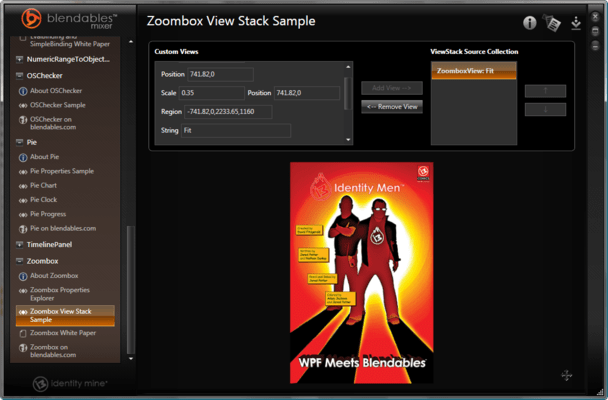
Screenshot Preview

Blendables Essentials Mix

by Xceed Software - 상품타입: Component / .NET WPF

 *

Blendables Essentials Mix is now available as part of Xceed Blendables for WPF. If you require more information, please visit the pages above or Contact Us for pricing and availability.

주의 : 별도의 안내가 없는 경우에는 영어제품 입니다.

*

A suite of Components to enhance your Windows Presentation Foundation applications. Blendables Essentials Mix is a suite of WPF components that offer functionality ranging from advanced data binding to effects performance enhancements. Blendables Essentials Mix functionality includes DragAndDrop list boxes, 3D user experience with Carousel3D, ItemsControl, zooming, panning, DragAndDrop, Pie Chart, ChromelessWindow, Timeline, OSChecker, EvalBinding, SimpleBinding and more. Blendables Essentials Mix is Royalty free and includes 12 months of updates, both minor and major and support.


 *

Blendables Essentials Mix is a suite of WPF components to enhance your WPF applications. Blendables Essntial Mix Developer License includes 12 months of updates, both minor and major and Support.

Blendables Essentials Mix currently includes:

Zoombox
Great for applications that have schematics, maps and other content that benefit from zooming and panning functionality. The Zoom box control allows content to be panned in any direction or zoomed in or out using the mouse, keyboard, or programmatically through methods and properties exposed by the control. It allows the user to track their location using a viewfinder containing a scaled down map of the content. Optionally, the user can retrace their steps through old views using Back and Forward navigation.

ElementSnapshot
ElementSnapshot is a component that allows rendering any FrameworkElement into the Visual Tree without it actually being in the Visual Tree itself. The primary scenario is to enable the use of bitmap effects within an application without the performance degradation that is incurred when a bitmap effect is in the Visual Tree. The control also supports an IsLive mode for when FrameworkElement is needed in the Visual Tree.

Carousel3D
Carousel3D provides ItemsControl like functionality in 3D. Items in the Carousel3D are positioned in a configurable elliptical layout and full collection change support is included in Carousel3D. When your underlying items source changes so does the Carousel3D, just as you would get from the 2D ItemsControl, with one advantage: all changes are smoothly animated in 3D Additionally, Carousel3D exposes multiple properties to give you great control over all its animation.

ChromelessWindow
Create custom branded window experiences. ChromelessWindow is a utility class which can be used to give Glass effect on a window, resize the window, and drag and move the window. The resize utility will redefine the way a typical window resize happens on a WPF window. This utility also provides a draggable functionality to a window using XAML code since there is no default draggable behavior associated with a chromeless window.

DragAndDrop
DragAndDrop allows WPF ItemsControls to support drag and drop via attached properties. The goal is to allow the designer to support the drag and drop metaphor easily via a single line of XAML code. It uses an adorner to show a visual of the item being dragged and automatically uses the data object to move or copy items.

Pie Chart
A little treat for creating charts and radial based controls like speedometers and gauges. The Pie shape is a WPF shape that represents a portion of an ellipse, often in the shape of a slice of pie. More specifically, the Pie shape consists of an arc of an ellipse whose endpoints are joined to the center of the ellipse by two line segments.

OSChecker
Simple, but a great time saver for anyone creating applications targeted at multiple OS's. OS Checker is a control that exposes the current OS version as a DependencyProperty that can be easily used in any number of scenarios such as triggers in styles and templates.

TimelinePanel
Extend WPF's rich data visualization capabilities by arranging your data or UI elements along a timeline. TimelinePanel makes it easy to create compelling data visualizations that emphasize the chronological nature of a data set. Simply drop it into any application, set a handful of properties and watch as elements get arranged in time and space.

EvalBinding and SimpleBinding
The EvalBinding class provides a XAML markup extension for establishing bindings that include code expressions. This allows a WPF dependency property to be dynamically bound to a code expression that is dependent upon zero or more other properties. A change in any of these properties causes the expression to be reevaluated.
The EvalBinding extension is built upon another markup extension called a SimpleBinding. A SimpleBinding encapsulates a native WPF Binding using a simplified, compact syntax. It can be used anywhere that a native Binding can be used. In addition to the simplified syntax, it provides intelligent type conversion, often eliminating the need for custom value converters.

NumericRangeToObjectConverter
Create complex template solutions with ease, change your app's style based on the time of day or even the weather outside. NumericRangeToObjectConverter is an IValueConverter implementation that allows creation of a converter that will return an object for a configurable range of numeric values.

Blendables Essntial Mix Developer License includes 12 months of updates, both minor and major and Support.


주의

제품 리뷰의 한국어 번역이 완료되지 않는 제품은 Google통역 서비스와 연동되어 표시되어 있습니다.통역 기계에 의한 자동 번역인 관계로 한국어 표기가 조금 부자연 스러운 점 양해 바랍니다.
에서 제공
FireFox와 Opera에서는 Flash가 필요합니다.

상품검색

검색어를 입력해주세요:

ComponentSource에서 구입하는 이유?

ComponentSource는 세계 1,000,000명 이상의 개발자에게 각종 글로벌 서비스를 제공합니다.

상세 | About Us

화면 바로가기 갤러리

클릭해서 이미지를 확대

 Blendables Essentials Mix - .NET - V1.2의 스크린샷  Blendables Essentials Mix - .NET - V1.2의 스크린샷  Blendables Essentials Mix - .NET - V1.2의 스크린샷  Blendables Essentials Mix - .NET - V1.2의 스크린샷  Blendables Essentials Mix - .NET - V1.2의 스크린샷