Codejock Xtreme SyntaxEdit - ActiveX

by Codejock Software - 상품타입: Component / ActiveX OCX / ActiveX EXE / ActiveX DLL / DLL / VB Class Library / ActiveX Designer

주의 : 별도의 안내가 없는 경우에는 영어제품 입니다.
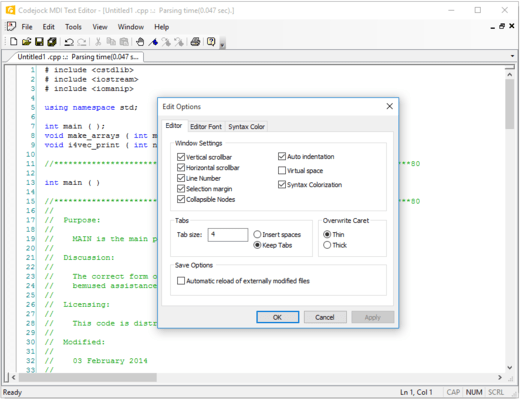
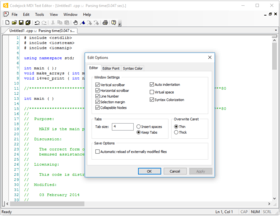
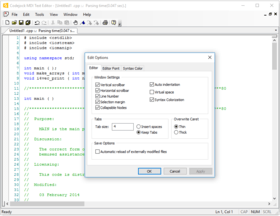
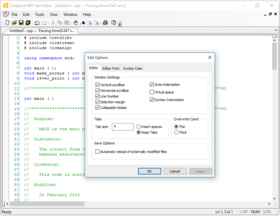
Codejock Xtreme SyntaxEdit - ActiveX COM - 2008 Vol 2 의 스크린샷Visual Studio .NET style code editor control. Xtreme SyntaxEdit Visual Studio .NET style Syntax Editor Control provides your users with a highly sophisticated text editor control that supports advanced features such as text block grouping, syntax colorization, line numbers, font type, pre-defined color schemes, book marks, break points, Intellisense help and many more advanced features. INI file based syntax colorization allows you to specify specific colorization rules for your text documents. For example, you can specify a different set of colors to be used for cpp, h, html, asp, etc files. Color rules can be applied to specific words or groups of words and phrases.

150,800₩
통화 선택

일반 적인 소비자 가격은 하기에 표시되어 있습니다. 고객님의 할인가격은 표시 하시려면 로그인 해주시기 바랍니다.

Xtreme SyntaxEdit 2008 Vol 2 (V12.1) .NET/ActiveX with 30 Days Subscription

주문 ₩ 150,800 1 Developer License
메이커 제품 번호: 1210-COM-SYNTAXEDIT-1DL-30
다운로드 (4.0 MB)
주문 ₩ 379,400 4 Developer Team License
메이커 제품 번호: 1210-COM-SYNTAXEDIT-4DL-30
다운로드 (4.0 MB)
주문 ₩ 684,100 8 Developer Team License
메이커 제품 번호: 1210-COM-SYNTAXEDIT-8DL-30
다운로드 (4.0 MB)
주문 ₩ 1,508,400 1 Site Wide License (Allows Unlimited Developers at a Single Physical Address)
메이커 제품 번호: 1210-COM-SYNTAXEDIT-UDL-30
다운로드 (4.0 MB)

Xtreme SyntaxEdit 2008 Vol 2 (V12.1) .NET/ActiveX with 1 Year Subscription

주문 ₩ 227,000 1 Developer License
메이커 제품 번호: 1210-COM-SYNTAXEDIT-1DL-365
다운로드 (4.0 MB)
주문 ₩ 455,600 4 Developer Team License
메이커 제품 번호: 1210-COM-SYNTAXEDIT-4DL-365
다운로드 (4.0 MB)
주문 ₩ 760,300 8 Developer Team License
메이커 제품 번호: 1210-COM-SYNTAXEDIT-8DL-365
다운로드 (4.0 MB)
주문 ₩ 2,270,200 1 Site Wide License (Allows Unlimited Developers at a Single Physical Address)
메이커 제품 번호: 1210-COM-SYNTAXEDIT-UDL-365
다운로드 (4.0 MB)

Xtreme SyntaxEdit .NET/ActiveX - Subscription Renewal

주문 ₩ 105,100 1 Developer License
메이커 제품 번호: 1210-COM-SYNTAXEDIT-1DL-SUB
확인 다운로드 (29 KB)
주문 ₩ 173,700 4 Developer Team License
메이커 제품 번호: 1210-COM-SYNTAXEDIT-4DL-SUB
확인 다운로드 (29 KB)
주문 ₩ 265,100 8 Developer Team License
메이커 제품 번호: 1210-COM-SYNTAXEDIT-8DL-SUB
확인 다운로드 (29 KB)
주문 ₩ 1,051,300 1 Site Wide License (Allows Unlimited Developers at a Single Physical Address)
메이커 제품 번호: 1210-COM-SYNTAXEDIT-UDL-SUB
확인 다운로드 (29 KB)

본 제품은 GSA Schedule 가격으로 제공해 드릴수 있습니다.가격에는 ComponentSource의 기술지원 요금이 포함되어 있습니다. 또한 다운로드 판매를 하고 있는 상품의 대부분은 온라인 백업요금이 포함되어 있어서 구입날로부터 30일 이내에 새로운 버전이 발매된 경우 무료로 업그레이드해 드리고 있습니다.  모든 주문에 대해서 당사표준 계약조건 반품조건 의 내용이 적용됩니다. 다음의 경우,고객 서비스로연락하시기 바랍니다. (상기의 리스트에 게재되지 않은 대량의 라이센스나 구 버전 등의 라이센스 옵션이 필요한 경우)

일반 적인 소비자 가격은 상기에 표시되어 있습니다. 고객님의 할인가격은 표시 하시려면 로그인 해주시기 바랍니다.

Text Block Grouping - Visual Studio .NET style text block grouping allows you to easily organize a document of text into blocks of text that can be hidden with the click of a button. Hidden blocks of text can have a message stating what has been hidden for view. This allows you to minimize the clutter of vary large text documents.

Bookmarks - Bookmarks allow you to place a "bookmark" at any position in your text document. You can later cycle through all of your bookmarks to easily return to positions of interest in your document.

Breakpoints - Visual Studio style breakpoints allow you to place a "breakpoint" at any position in your text document. This can be used for many different reasons, for example, if you have a code compiler you could use these breakpoints to indicate where code execution will "break" and wait for user interaction.

Visual Studio .NET Style Intellisense Help - Using various configuration files such as a C++ configuration file you can add intellisense to the syntax editor. Using the configuration file you can specify which "keywords" will use the intellisense feature. To active intellisense press Ctrl + Space anytime during editing.

Line Numbers - Line numbers allow you to easily see how many lines are in a text document as well as serve reference to the position you are at in the document. You can use these numbers to communicate points of interest in a document.

Syntax Colorization - INI file based syntax colorization allows you to specify specific colorization rules for your text documents. For example, you can specify a different set of colors to be used for cpp, h, html, asp, etc files. Color rules can be applied to specific words or groups of words and phrases.


상품검색

검색어를 입력해주세요:

개발 코스트 계산


ROI 계산을 참고해주세요.

코드행 수: 8,280
인월 : 8
인건비: $41,400

필요한 기능:

1000행 당 인월:

1개월당 인건비:

Award