de ComponentOne - Tipo de producto: Componente / .NET WinForms / 100% Managed Code
ComponentOne Chart for .NET by ComponentOne
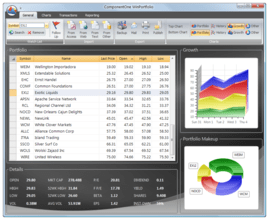
Create a wide variety of 2D and 3D charts, chart cached or streaming data, or display complex data sets in a efficient visual format. ComponentOne Chart for .NET includes a 2D and a 3D chart control for use in your Windows applications. Use the 2D Chart to display data as a bar, X-Y plot, area, pie, radar, polar, candle, or combination chart. The ComponentOne Chart for .NET 2DChart control is optimized for real-time applications giving you the ability to display rapidly changing data. Use the 3D Chart to create 3D surface, contour, or bar charts that end-users can easily rotate, scale, or zoom interactively. The ComponentOne Chart for .NET 3DChart can display 3D data in 15 basic surface or bar appearances and automatically generate contours and zones from the data. Visual Studio 2005 and Visual Studio 2008 compatible (VS2005, VS2008)
ComponentOne Chart for .NET is part of ComponentOne Studio Enterprise and the ComponentOne Studio for WinForms.
Features
Easy to use - A point-and-click user interface is available both during development, and at run time. Both developers and end-users have maximum flexibility to easily customize charts
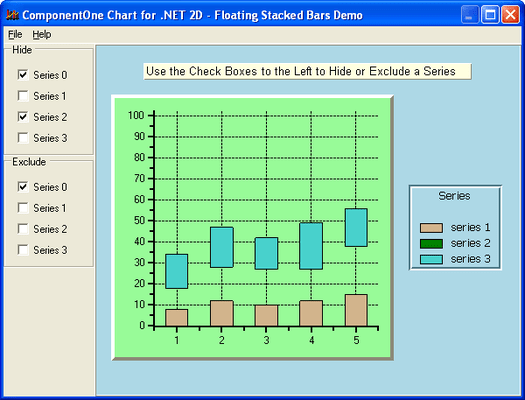
Chart types - Area, bar, bubble, candlestick, hi-low-open-close, pie, plot, polar, radar, ribbon, scatter, stacking area, stacking bar, surface, and more. From scientific information to stock market data, there's a chart for every need
Unicode - ComponentOne have included 2D and 3D Unicode controls to allow multiple language support in a single applicationAlarm zones
You can now use background bands of color or pattern to demarcate significant Y values in charts
Flexible labels - Chart labels and annotations can be positioned anywhere. Multi-line chart labels are unlimited and can be attached to data displayed in the graph or to graph or pixel coordinates
Tunable auto-precision axis - The axis precision is automatically adjusted to fit the data
Code-free data binding - Bind your chart to an external data source to chart data directly in its native format
Web-friendly output - ComponentOne Chart for .NET can be saved in JPEG or PNG format for easy display on web pages
Background images - Customize the look of your chart. You can display any image in the chart background to give your chart a custom look and feel
Mouse tracking - Mouse tracking capabilities keep track of the region, series, or data point under the mouse pointer. The MouseMove event of .NET reports the coordinates of the user's cursor as they drag it over the chart. From this event you can get constantly updating data on where the user's cursor is located. ComponentOne Chart for .NET contains a set of methods that when used in conjunction with. NETs MouseMove event allow the programmer to create interesting application-specific features like handling a double-click in the legend, or chart tool tips
Double buffering - Double buffering makes use of an off-screen memory area to help reduce flicker when doing screen updates
Copying data - Instead of copying data to the chart point-by-point, ComponentOne Chart allows you to copy entire arrays, which means an increase in performance
Multiple format image generation
A Sampling of 2D Features
Multiple symbol types - Choose from various symbol types to represent different series of data
Chart types - X-Y Plot, Area, Bar, High-Low, High-Low-Open-Close, Candle, Bubble, Pie, Radar, and Polar charts provide various ways to display data
Stacking charts - X-Y Plot, Area, Bar, Radar, and Plot charts can be stacked to display more complex data in a smaller space
Interactive wizard - The Chart2D Wizard was designed to allow an easy and interactive way to create and modify chart properties. It displays the chart properties step by step, permitting the construction or modification of a chart in a progressive and logical manner
Legend - Take complete control over the legend appearance. The order of entries in the legend can be reversed, and single-line legend titles can be added
Annotations - Annotations can be rotated to arbitrary angles
CopyDataIn - The CopyDataIn method accepts the DATE parameter type
A Sampling of 3D Features
Built-in zooming, scaling and rotation - Users can dynamically customize views by dragging the mouse on the graph. Users can view a preview cube or the entire graph during rotation, scaling or zooming
Various 3D chart types - Chart types include Surface, bar, and scatter charts that provide various ways to effectively display your data
Automatically generate contours and zones from data - To generate contours and zones, the ComponentOne Chart for .NET analyzes the data and based on the number of levels specified, creates the following: A linear distribution table that contains the Z-value that marks each level, An assignment of ContourStyles from the 100 built-in styles, The chart determines which styles to use by evenly distributing its 100 styles through the number of levels
Interactive viewing - This feature allows both the programmer and the end user (at run-time) to utilize chart rotation, shift and zoom. Using keyboard/mouse combinations, you can perform different interactions. These interactions can be customized (from the default settings) by the programmer to give their end users the ability to interact with the chart area
Transparent data plotting - Use the Chart3DElevation Transparency property to set transparency. Your data will appear transparent, leaving the chart area behind the chart data visible
4D charts capability - By setting the 4D Data Menu item, the chart is able to show a 4D chart, which means that different data is used for plotting and contouring
Interactive wizard - The Chart3D Wizard was designed to allow an easy and interactive way to create and modify chart properties. It displays the chart properties step by step, permitting the construction or modification of a chart in a progressive and logical manner
Legend - You can use custom levels, filtered, or single-line legend titles
Enhanced grid line display - Grid lines can be assigned to line styles, including individual colors
Flexible data layout - Regular or irregular data structures can be selected
Borders - Select from an array of border styles including solid, raised, raised 3d, 3d inset, 3draised bevel, 3d inset bevel, groove (inset + Raised), fillet (raised + inset), double, and dashed
PartNumbers: PC-513322-147139 513322-147139 PC-513322-147140 513322-147140 PC-513322-147141 513322-147141
Publisher PartNumbers: ENT-STUDIO-GOLD-U ENT-STUDIO-U ESD-ENT-STUDIO-GOLD-U ESD-ENT-STUDIO-U ESD-N-CHART-R
PurchaseOptions: ComponentOne Chart for .NET (To renew your current C1 Chart for .NET Subscription - Minimum Quantity 5)* 1 Developer Subscription Renewal License - Minimum Quantity 5 , ComponentOne Studio Enterprise 2008 v2 (To upgrade your expired C1 Chart for .NET Subscription to a C1 Enterprise Studio Subscription)* 1 Developer Upgrade Subscription License - from any Individual ComponentOne Product Subscription , ComponentOne Studio Enterprise 2008 v2 (To upgrade your expired C1 Chart for .NET Subscription to a C1 Enterprise Studio Subscription)* 1 Developer Upgrade Subscription License with Platinum Support - from any Individual ComponentOne Product Subscription
Resources: Read the ComponentOne Chart 3D for .NET help file, Read the ComponentOne Chart 2D for .NET help file, Read End-User License Agreement for ComponentOne Software, Download the ComponentOne Studio for WPF 2008 v2 evaluation on to your computer - Displays Nag Screens, Download the ComponentOne Studio for ASP.NET 2008 v2 evaluation for .NET 1.1 on to your computer - Displays Nag Screens, Download the ComponentOne Studio for ASP.NET 2008 v2 evaluation for .NET 2 and higher on to your computer - Displays Nag Screens, Download the ComponentOne Studio for WinForms 2008 v2 evaluation for .NET 2 and higher on to your computer - Displays Nag Screens, Download the ComponentOne Studio for Mobile Devices 2008 v2 for .NET 2 or higher evaluation onto your computer - Displays Nag Screens, Download the ComponentOne Studio for Mobile Devices 2008 v2 for .NET 1.1 evaluation onto your computer - Displays Nag Screens, Download the ComponentOne Studio for WinForms 2008 v2 evaluation for .NET 1.1 on to your computer - Displays Nag Screens, Download the ComponentOne Studio ActiveX 2008 v2 evaluation onto your computer - Displays Nag Screens
Operating System for Deployment: Windows Vista, Windows XP, Windows 2000, Windows NT 4.0
Architecture of Product: 32Bit
Product Type: Component
Component Type: .NET WinForms, 100% Managed Code
Built Using: Visual C# .NET
Compatible Containers: Microsoft Visual Studio 2008, Microsoft Visual Studio 2005, Microsoft Visual Studio .NET 2003, Microsoft Visual Studio .NET, Microsoft Visual Basic 2008, Microsoft Visual Basic 2005, Microsoft Visual Basic .NET 2003, Microsoft Visual Basic .NET, Microsoft Visual C++ 2008, Microsoft Visual C++ 2005, Microsoft Visual C++ .NET 2003, Microsoft Visual C++ .NET, Microsoft Visual C# 2008, Microsoft Visual C# 2005, Microsoft Visual C# .NET 2003, Microsoft Visual C# .NET, Delphi 2005 (9.0), Delphi 8.0, C#Builder, .NET Framework 3.5, .NET Framework 3.0, .NET Framework 2.0, .NET Framework 1.1, .NET Framework 1.0
Product Class: User Interface Components
Search Items: New Product Jan 03, New Version Oct 03, New Version Feb 04, New Product Apr 04, New Version Apr 04, New Product May 04, New Product Aug 04, New Product Oct 04, New Product Jan 05, New Product Feb 05, New Product May 05, New Product Sep 05
Keywords: Chart Charting Charts Graph Graphing Graphs componentone, component1, componentone studio, component one, componentone studio enterprise, componentone com, www componentone, componentone llc, componentone review, componentone activex, component one studio, studio enterprise, studio for winforms Enterprise Partner ComponentOne Chart for .NET