ComponentOne Input for .NET - .NET Component - 2008 v1 - 개요

by ComponentOne - 상품타입: Component / .NET WinForms / 100% Managed Code

요약

ComponentOne Input for .NET by ComponentOne

Create a fully functional data bound .NET Windows application that can be fully interacted with by the user. ComponentOne Input for .NET is a set of components that allows you to display dynamic data in a visual format, manage dataset navigation, display or edit dates, and much more. ComponentOne Input for .NET is Visual Studio 2005 and Visual Studio 2008 compatible ( VS2005 VS2008 )

ComponentOne Input for .NET is part of ComponentOne Studio Enterprise and the ComponentOne Studio for WinForms.

ComponentOne Input for .NET includes:

C1TextBox

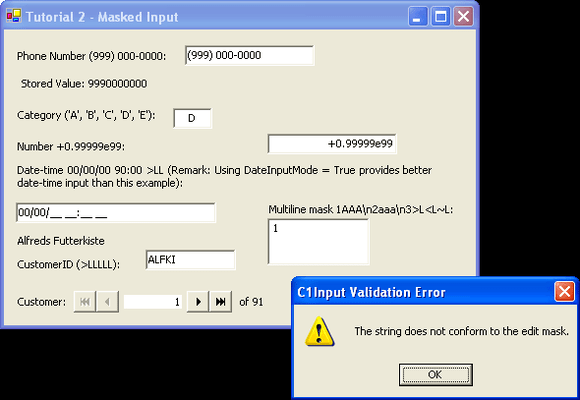
The main data bound control used for entering and editing information of any data type in a text form. Supports data formatting, edit mask, data validation and other features. C1TextBox also supports formatted and masked editing of all data types, including special features for date-time formats. Apart from being the main data editor control, C1TextBox also serves as the base class for specialized controls such as C1NumericEdit and C1DateEdit. C1TextBox derives from the standard System.Windows.Forms.TextBox control.

C1NumericEdit

Data bound control derived from C1TextBox specialized for editing numeric values. In addition to C1TextBox functionality, C1NumericEdit supports a dropdown calculator and an up-down (spin) button that can be used to increment/decrement the value.

C1DateEdit

Data bound control derived from C1TextBox specialized for editing date and time values. In addition to C1TextBox functionality, C1DateEdit supports a dropdown calendar and an up-down (spin) button for changing the value.

C1Label

Read-only data bound control that displays formatted data. C1Label derives from the standard System.Windows.Forms.Label control.

C1PictureBox

Data bound control which shows picture images stored in a data source field, derives from System.Windows.Forms.PictureBox.

C1DbNavigator

Data bound control, which provides buttons for convenient navigation over data source rows. It enables movement to the first, last, previous and next row and common data actions such as updating the data source and refreshing data.

Features:

Data Binding - C1Input controls can function both in unbound and in bound mode. In bound mode, a controls Value is bound to a data source field. C1Input controls support data binding to all .NET data sources. This includes ADO.NET data source objects such as DataTable, DataView and DataSet, and also ComponentOne DataObjects components such as C1ExpressTable, C1ExpressView, C1ExpressConnection, C1DataView, C1DataTableSource and C1DataSet

Formatting Data - C1Input controls support a rich formatting model, which enables developers to customize the appearance of a controls text in almost any way imaginable. The main function of Formatting is to display a string Text representation of a typed or stored Value

Validating Data - C1Input controls support data validation both of the raw input string (PreValidation) and of the typed value entered by the user (PostValidation)

Dropdown and Increment Buttons - The specialized C1Input controls for date-time and numeric editing, C1DateEdit and C1NumericEdit controls support dropdown and increment/decrement (up/down) buttons. Button visibility is controlled by the ShowDropDownButton and ShowUpDownButtons properties

Error Handling - When C1Input detects an error while parsing or validating input value it fires the ValidationError event, then, by default, it shows an error message. The default behavior can be changed and customized in different ways

Handling NULL and Empty Values - NULL values (DbNull) can be difficult to handle without appropriate tools. C1Input provides flexible rules for handling nulls allowing the programmer the ability to solve this problem in practically any circumstance

PartNumbers: PC-513333-147201 513333-147201 PC-513333-147202 513333-147202 PC-513333-147203 513333-147203

Publisher PartNumbers: ENT-STUDIO-GOLD-U ENT-STUDIO-U ESD-ENT-STUDIO-GOLD-U ESD-ENT-STUDIO-U ESD-N-INPUT-R

PurchaseOptions: ComponentOne Input for .NET (To renew your current C1 Input for .NET Subscription - Minimum Quantity 5)* 1 Developer Subscription Renewal License - Minimum Quantity 5 , ComponentOne Studio Enterprise 2008 v2 (To upgrade your expired C1 Input for .NET Subscription to a C1 Enterprise Studio Subscription)* 1 Developer Upgrade Subscription License - from any Individual ComponentOne Product Subscription , ComponentOne Studio Enterprise 2008 v2 (To upgrade your expired C1 Input for .NET Subscription to a C1 Enterprise Studio Subscription)* 1 Developer Upgrade Subscription License with Platinum Support - from any Individual ComponentOne Product Subscription

Resources: Read the ComponentOne Input for .NET help file, Read End-User License Agreement for ComponentOne Software, Download the ComponentOne Studio for WPF 2008 v2 evaluation on to your computer - Displays Nag Screens, Download the ComponentOne Studio for ASP.NET 2008 v2 evaluation for .NET 1.1 on to your computer - Displays Nag Screens, Download the ComponentOne Studio for ASP.NET 2008 v2 evaluation for .NET 2 and higher on to your computer - Displays Nag Screens, Download the ComponentOne Studio for WinForms 2008 v2 evaluation for .NET 2 and higher on to your computer - Displays Nag Screens, Download the ComponentOne Studio for Mobile Devices 2008 v2 for .NET 2 or higher evaluation onto your computer - Displays Nag Screens, Download the ComponentOne Studio for Mobile Devices 2008 v2 for .NET 1.1 evaluation onto your computer - Displays Nag Screens, Download the ComponentOne Studio for WinForms 2008 v2 evaluation for .NET 1.1 on to your computer - Displays Nag Screens, Download the ComponentOne Studio ActiveX 2008 v2 evaluation onto your computer - Displays Nag Screens

Operating System for Deployment: Windows Vista, Windows XP, Windows 2000, Windows NT 4.0

Architecture of Product: 32Bit

Product Type: Component

Component Type: .NET WinForms, 100% Managed Code

Built Using: Visual C# .NET

Compatible Containers: Microsoft Visual Studio 2008, Microsoft Visual Studio 2005, Microsoft Visual Studio .NET 2003, Microsoft Visual Studio .NET, Microsoft Visual Basic 2008, Microsoft Visual Basic 2005, Microsoft Visual Basic .NET 2003, Microsoft Visual Basic .NET, Microsoft Visual C++ 2008, Microsoft Visual C++ 2005, Microsoft Visual C++ .NET 2003, Microsoft Visual C++ .NET, Microsoft Visual C# 2008, Microsoft Visual C# 2005, Microsoft Visual C# .NET 2003, Microsoft Visual C# .NET, Delphi 8.0, C#Builder, .NET Framework 3.5, .NET Framework 3.0, .NET Framework 2.0, .NET Framework 1.1, .NET Framework 1.0

Product Class: User Interface Components

Search Items: New Product Jan 03, New Version May 03, New Version Oct 03, New Version Feb 04, New Product Apr 04, New Version Apr 04, New Product May 04, New Product Aug 04, New Product Oct 04, New Product Jan 05, New Product Feb 05, New Product May 05, New Product Sep 05

Keywords: validation validate Entry data-entry componentone, component1, componentone studio, component one, componentone studio enterprise, componentone com, www componentone, componentone llc, componentone review, componentone activex, component one studio, studio enterprise, studio for winforms Enterprise Partner Component One Input .NET

상품검색

검색어를 입력해주세요:

화면 바로가기 갤러리

Award