Screenshot Preview

ComponentOne Input for WinForms

by ComponentOne - 상품타입: Component / .NET WinForms / 100% Managed Code

 *

ComponentOne Input for WinForms is now officially part of ComponentOne Studio Enterprise and ComponentOne Studio for WinForms.

If you require 5 or more individual licenses for ComponentOne Input for WinForms, please Contact Us for pricing and availability.

주의 : 별도의 안내가 없는 경우에는 영어제품 입니다.

*

Create a fully functional data bound .NET Windows application that can be fully interacted with by the user. ComponentOne Input for WinForms is a set of components that allows you to display dynamic data in a visual format, manage dataset navigation, display or edit dates, and much more. ComponentOne Input for WinForms is Visual Studio 2005 and Visual Studio 2008 compatible ( VS2005 VS2008 )


 *

ComponentOne Input for WinForms is part of ComponentOne Studio Enterprise and the ComponentOne Studio for WinForms.

ComponentOne Input for WinForms includes:

C1TextBox
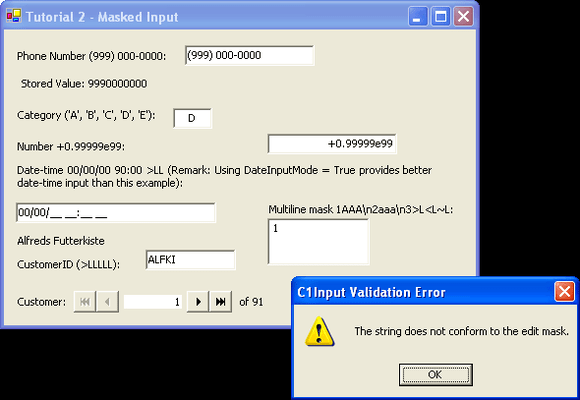
The main data bound control used for entering and editing information of any data type in a text form. Supports data formatting, edit mask, data validation and other features. C1TextBox also supports formatted and masked editing of all data types, including special features for date-time formats. Apart from being the main data editor control, C1TextBox also serves as the base class for specialized controls such as C1NumericEdit and C1DateEdit. C1TextBox derives from the standard System.Windows.Forms.TextBox control.

C1NumericEdit
Data bound control derived from C1TextBox specialized for editing numeric values. In addition to C1TextBox functionality, C1NumericEdit supports a dropdown calculator and an up-down (spin) button that can be used to increment/decrement the value.

C1DateEdit
Data bound control derived from C1TextBox specialized for editing date and time values. In addition to C1TextBox functionality, C1DateEdit supports a dropdown calendar and an up-down (spin) button for changing the value.

C1Label
Read-only data bound control that displays formatted data. C1Label derives from the standard System.Windows.Forms.Label control.

C1PictureBox
Data bound control which shows picture images stored in a data source field, derives from System.Windows.Forms.PictureBox.

C1DbNavigator
Data bound control, which provides buttons for convenient navigation over data source rows. It enables movement to the first, last, previous and next row and common data actions such as updating the data source and refreshing data.

ComponentOne Input for WinForms Features:

  • Data Binding - C1Input controls can function both in unbound and in bound mode. In bound mode, a controls Value is bound to a data source field. C1Input controls support data binding to all .NET data sources. This includes ADO.NET data source objects such as DataTable, DataView and DataSet, and also ComponentOne DataObjects components such as C1ExpressTable, C1ExpressView, C1ExpressConnection, C1DataView, C1DataTableSource and C1DataSet
  • Formatting Data - C1Input controls support a rich formatting model, which enables developers to customize the appearance of a controls text in almost any way imaginable. The main function of Formatting is to display a string Text representation of a typed or stored Value
  • Validating Data - C1Input controls support data validation both of the raw input string (PreValidation) and of the typed value entered by the user (PostValidation)
  • Dropdown and Increment Buttons - The specialized C1Input controls for date-time and numeric editing, C1DateEdit and C1NumericEdit controls support dropdown and increment/decrement (up/down) buttons. Button visibility is controlled by the ShowDropDownButton and ShowUpDownButtons properties
  • Error Handling - When C1Input detects an error while parsing or validating input value it fires the ValidationError event, then, by default, it shows an error message. The default behavior can be changed and customized in different ways
  • Handling NULL and Empty Values - NULL values (DbNull) can be difficult to handle without appropriate tools. C1Input provides flexible rules for handling nulls allowing the programmer the ability to solve this problem in practically any circumstance

지원

 *

ComponentOne Platinum Support Subscriptions provide a full year of Telephone and Online Technical Support. ComponentOne Technical Support Engineers are available by phone Monday through Friday, except U.S. holidays, from 9:00 a.m. to 5:00 p.m. Eastern,USA. Customers outside the USA, please remember to check your time difference for phone support.

주의

제품 리뷰의 한국어 번역이 완료되지 않는 제품은 Google통역 서비스와 연동되어 표시되어 있습니다.통역 기계에 의한 자동 번역인 관계로 한국어 표기가 조금 부자연 스러운 점 양해 바랍니다.
에서 제공
FireFox와 Opera에서는 Flash가 필요합니다.

상품검색

검색어를 입력해주세요:

ComponentSource에서 구입하는 이유?

ComponentSource는 세계 1,000,000명 이상의 개발자에게 각종 글로벌 서비스를 제공합니다.

상세 | About Us

화면 바로가기 갤러리

클릭해서 이미지를 확대

 ComponentOne Input for WinForms - .NET Winforms - 2009 v1의 스크린샷  ComponentOne Input for WinForms - .NET Winforms - 2009 v1의 스크린샷  ComponentOne Input for WinForms - .NET Winforms - 2009 v1의 스크린샷  ComponentOne Input for WinForms - .NET Winforms - 2009 v1의 스크린샷  ComponentOne Input for WinForms - .NET Winforms - 2009 v1의 스크린샷
Award Award