Screenshot Preview

ComponentOne Menus and Toolbars for WinForms - Summary

by ComponentOne - Product Type: Component / .NET WinForms / 100% Managed Code

ComponentOne Menus and Toolbars for WinForms is now officially part of ComponentOne Studio Enterprise and ComponentOne Studio for WinForms.

If you require 5 or more individual licenses for ComponentOne Menus and Toolbars for WinForms, please Contact Us for pricing and availability.

Summary

ComponentOne Menus and Toolbars for WinForms by ComponentOne

URLs: componentone-menus-toolbars-winforms, componentone menus toolbars winforms, componentonemenustoolbarswinforms, componentone

Add menus and toolbars with the Visual Studio /Office look and feel to your .NET Windows Forms applications and controls. ComponentOne Menus and Toolbars for WinForms is a suite of integrated components including 4 main components: C1ToolBar, C1CommandDock, C1MainMenu and C1ContextMenu. Visual Studio 2005 and Visual Studio 2008 compatible ( VS2005 VS2008 )

ComponentOne Menus and Toolbars for WinForms is part of ComponentOne Studio Enterprise and the ComponentOne Studio forWinForms.

ComponentOne Menus and Toolbars for WinForms includes 4 main components that provide you with the functionality you need to add a dynamic set of menus and toolbars to your .NET Windows Forms applications.

C1ToolBar

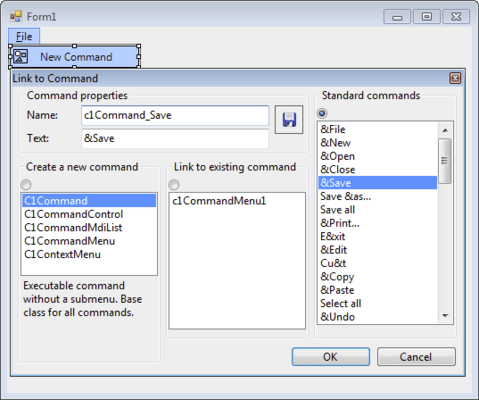
This is the toolbar control of the suite. When you place it on a form, you can add buttons to it by right clicking and selecting appropriate items from the context menu. To make a toolbar that end users will be able to move around the form, dock to its sides or make floating; put your C1ToolBar controls inside C1CommandDock containers.

C1CommandDock

C1CommandDock is a container control that provides flexible docking and floating behavior to your toolbars. You can drop a C1CommandDock anywhere on your form, adjust its size and position, and place your toolbars in it. At runtime, toolbars contained in a C1CommandDock will show a drag area on their left (horizontal toolbars) or top (vertical toolbars) side, and your user will be able to easily drag the toolbar to any position, dock to other sides of the form and/or to other C1CommandDock objects. Users can even choose to make the toolbars float. C1CommandDock also includes a robust set of properties giving you complete control over the available docking behavior options.

C1MainMenu

This control provides the main menu for a form. When you place this object on your form, it will show across the whole form at the top, as regular Windows main menus do. Easily add items to a C1MainMenu by simply right-clicking and selecting Item...item from the context menu. Alternatively, you can edit the CommandLinks collection of the C1MainMenu using the collection editor.

C1ContextMenu

C1ContextMenu is a command with one or more sub-items (i.e., a command with a submenu), which can be used as a context menu for an arbitrary control on your form. Objects of type C1ContextMenu appear in the component tray.

ComponentOne Menus and Toolbars for WinForms features and benefits

The ComponentOne Menus and Toolbars for WinForms suite of components integrate menus and toolbars into a single system, allowing you to reuse the same objects and code for menu items and toolbar buttons. ComponentOne Menus and Toolbars for WinForms provides many convenient and timesaving features including: integration between menus and toolbars; Context menus with similar look and feel; Docking and floating toolbars; automatic updates of your menu items' and toolbar buttons' state; and more.

C1Command also comes with an easy to use Visual Studio add-in utility (converter) that can convert the standard .NET menus and toolbars defined on a form to C1Command-style menus and toolbars. The converter can convert forms written in VB.NET or C# languages.

Add menus and toolbars with the Visual Studio /Office look and feel to your .NET Windows Forms applications and controls.

Evals & Downloads: Read the ComponentOne Menus and Toolbars for .NET help file, ComponentOne Studio Enterprise and ComponentOne Report Designer Edition Case Study, Read End-User License Agreement for ComponentOne Software, Download the ComponentOne Studio for WPF 2010 v3 evaluation on to your computer - Expires after 30 days, Download the ComponentOne Studio for ASP.NET AJAX 2010 v3 evaluation on to your computer - Expires after 30 days, Download the ComponentOne Studio for WinForms 2009 v3 evaluation on to your computer - Expires after 30 days, Download the ComponentOne Studio for Mobile Devices 2009 v3 for .NET Evaluation on to your computer - Expires after 30 days, Download the ComponentOne Studio ActiveX 2010 v3 evaluation. Includes both 32 bit and 64 bit installers - Expires after 30 days

Operating System for Deployment: Windows Vista, Windows XP, Windows 2000

Architecture of Product: 32Bit

Product Type: Component

Component Type: .NET WinForms, 100% Managed Code

Built Using: Visual C# .NET

Compatible Containers: Microsoft Visual Studio 2010, Microsoft Visual Studio 2008, Microsoft Visual Studio 2005, Microsoft Visual Basic 2010, Microsoft Visual Basic 2008, Microsoft Visual Basic 2005, Microsoft Visual C++ 2010, Microsoft Visual C++ 2008, Microsoft Visual C++ 2005, Microsoft Visual C# 2010, Microsoft Visual C# 2008, Microsoft Visual C# 2005, Delphi 8.0, C#Builder, .NET Framework 4.0, .NET Framework 3.5, .NET Framework 3.0, .NET Framework 2.0

Product Class: User Interface Components

Keywords: componentone menus and toolbars for winforms, componentone menus and toolbars .net, componentone menus, componentone toolbars, component one menus and toolbars .net, component1 menus, c1 menus, c1menus, c1toolbars, c1 menu winforms, c1 menu and toolbars winforms

c1 controls, c1 components, componentone controls, componentone components, componentone, componentone, c1, componentone studio, component one, componentone studio enterprise, componentone review, componentone activex, truegrid, true dbgrid, flexgrid

Toolbar tool bar tool-bar Toolbars Menu Menus Ribbon Ribbonbar

User Interface UI

User Interface Collections UI

Product Search

Enter search words:

Why buy from ComponentSource?

ComponentSource offers a unique global service, used by over 1,000,000 software developers worldwide.

More Info | About Us

Screenshot Gallery

Click for full screen preview

Screenshot of ComponentOne Menus and Toolbars for WinForms - .NET Winforms - 2009 v1 Screenshot of ComponentOne Menus and Toolbars for WinForms - .NET Winforms - 2009 v1 Screenshot of ComponentOne Menus and Toolbars for WinForms - .NET Winforms - 2009 v1 Screenshot of ComponentOne Menus and Toolbars for WinForms - .NET Winforms - 2009 v1
Award Award