ComponentOne Preview for .NET - Summary

by ComponentOne - Product Type: Component / .NET WinForms / 100% Managed Code

Summary

ComponentOne Preview for .NET by ComponentOne

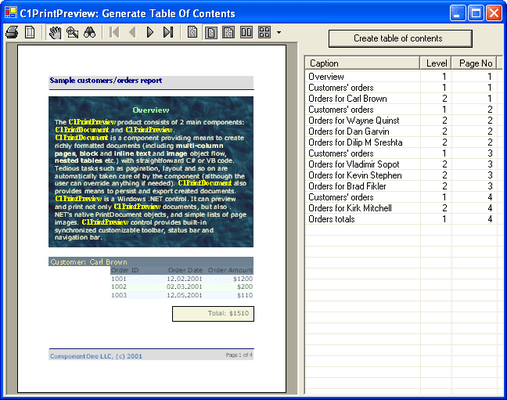
Add robust previewing, formatting, printing, and exporting to your applications. ComponentOne Preview for .NET consists of two main components: C1PrintDocument (a powerful document generator) and C1PrintPreview (a full-featured print preview component). The C1PrintDocument is an invisible component representing a single generated document. It allows users to set up page settings including size, orientation, margins, and columns and to generate document content with a set of rendering methods. The C1PrintPreview component is a document preview component that adds many advanced features to the PrintPreview and PrintPreviewDialog components included with the .NET Framework. Visual Studio 2005 and Visual Studio 2008 compatible (VS2005, VS2008)


ComponentOne Preview for .NET is sold as part of ComponentOne Studio Enterprise and the ComponentOne Studio for WinForms.

It has been completely re-engineered to provide sophisticated printing and print preview capabilities for Windows Forms applications.

Preview for .NET 2.0 includes 7 new components that provide for a simple and efficient design-time experience. These components are:
C1PrintDocument

C1PreviewPane

C1PrintPreviewControl

C1PrintPreviewDialog

C1PreviewThumbnails

C1PreviewOutline

C1PreviewTextSearchPanel

ComponentOne Preview for .NET adds previewing, formatting, printing, and exporting to your applications. Preview for .NET 1.x still includes C1PrintDocument and C1PrintPreview

C1PrintDocument Features:

Object-oriented document structure - All rendering objects (text, pictures, shapes, tables, etc.) have a common parent in the class hierarchy, which provides a convenient and uniform way to manipulate similar but different objects. Rendering objects can be reused as templates to aid in consistent presentation of your documents. A rich set of shortcut methods is also provided to allow you to perform simple tasks without having to create and manipulate rendering objects

Advanced table support, nested tables - Customize the presentation and layout of your document with ease using tables and nested tables. All parts of tables are accessible via an intuitive and familiar object model containing bands (header, body, and footer), rows, columns, and cells

Cascading style sheets - Take complete control over formatting attributes using cascading style sheets. All formatting properties of rendering objects are defined by styles. Style inheritance gives you the flexibility to make changes to the entire document or to customize individual object properties

Content flow and page layers - Place document content at a specific position on the page or render it into the block content flow to have C1PrintDocument automatically take care of content positioning, including automatic insertion of column and page breaks. Independently of content flow, each page can contain up to three overlapping layers

XML document storage - You can save and load documents, transfer the generated documents or their parts over the Internet, perform arbitrary processing of document content, and much more

Advanced text formatting - Use multiple fonts, colors, line spacing, horizontal and vertical text alignment and justification to fully customize your documents

Pictures - You can clip, tile, and zoom pictures (scale them while preserving aspect ratio). This is especially useful for handling pictures that come from databases and may have varying dimensions

Export to PDF - Full-featured export to Adobe PDF (with outline, graphics and embedded fonts) is available

Full-Featured Print Preview

Enhanced document navigation/manipulation - In addition to printing, the C1PrintPreview control provides a rich set of options such as text search, outline and page thumbnail views, zoom, and file load and save

Built-in customizable toolbar - Use the built-in, fully customizable toolbar with several predefined sets of icons (including an XP-style set) and mouse-over image highlighting to control print preview operations

Document Navigation – Allow end users to browse through the preview document, zoom in and out, and print! Navigation with the mouse wheel and keyboard is also supported

Standard .NET PrintDocument Viewing - View the standard .NET framework's PrintDocument objects or raw page images along with C1PrintDocument objects using the C1PrintPreview control

PartNumbers: PC-512169-147248 512169-147248 PC-512169-147249 512169-147249 PC-512169-147250 512169-147250

Publisher PartNumbers: ENT-STUDIO-GOLD-U ENT-STUDIO-U ESD-ENT-STUDIO-GOLD-U ESD-ENT-STUDIO-U ESD-N-PREVIEW-R

PurchaseOptions: ComponentOne Preview for .NET (To renew your current C1 Preview for .NET Subscription - Minimum Quantity 5)* 1 Developer Subscription Renewal License - Minimum Quantity 5 , ComponentOne Studio Enterprise 2008 v2 (To upgrade your expired C1 Preview for .NET Subscription to a C1 Enterprise Studio Subscription)* 1 Developer Upgrade Subscription License - from any Individual ComponentOne Product Subscription , ComponentOne Studio Enterprise 2008 v2 (To upgrade your expired C1 Preview for .NET Subscription to a C1 Enterprise Studio Subscription)* 1 Developer Upgrade Subscription License with Gold Support - from any Individual ComponentOne Product Subscription

Resources: ComponentOne Preview for .NET help file, Read End-User License Agreement for ComponentOne Software, Download the ComponentOne Studio for WPF 2008 v2 evaluation on to your computer - Displays Nag Screens, Download the ComponentOne Studio for ASP.NET 2008 v2 evaluation for .NET 1.1 on to your computer - Displays Nag Screens, Download the ComponentOne Studio for ASP.NET 2008 v2 evaluation for .NET 2 and higher on to your computer - Displays Nag Screens, Download the ComponentOne Studio for WinForms 2008 v2 evaluation for .NET 2 and higher on to your computer - Displays Nag Screens, Download the ComponentOne Studio for Mobile Devices 2008 v2 for .NET 2 or higher evaluation onto your computer - Displays Nag Screens, Download the ComponentOne Studio for Mobile Devices 2008 v2 for .NET 1.1 evaluation onto your computer - Displays Nag Screens, Download the ComponentOne Studio for WinForms 2008 v2 evaluation for .NET 1.1 on to your computer - Displays Nag Screens, Download the ComponentOne Studio ActiveX 2008 v2 evaluation onto your computer - Displays Nag Screens

Operating System for Deployment: Windows Vista, Windows XP, Windows 2000, Windows NT 4.0

Architecture of Product: 32Bit

Product Type: Component

Component Type: .NET WinForms, 100% Managed Code

Built Using: Visual C# .NET

Compatible Containers: Microsoft Visual Studio 2008, Microsoft Visual Studio 2005, Microsoft Visual Studio .NET 2003, Microsoft Visual Studio .NET, Microsoft Visual Basic 2008, Microsoft Visual Basic 2005, Microsoft Visual Basic .NET 2003, Microsoft Visual Basic .NET, Microsoft Visual C++ 2008, Microsoft Visual C++ 2005, Microsoft Visual C++ .NET 2003, Microsoft Visual C++ .NET, Microsoft Visual C# 2008, Microsoft Visual C# 2005, Microsoft Visual C# .NET 2003, Microsoft Visual C# .NET, Delphi 2005 (9.0), Delphi 8.0, C#Builder, .NET Framework 3.5, .NET Framework 3.0, .NET Framework 2.0, .NET Framework 1.1, .NET Framework 1.0

Product Class: User Interface Components

Search Items: New Product Jan 03, New Version Oct 03, New Version Feb 04, New Product Apr 04, New Version Apr 04, New Product May 04, New Product Aug 04, New Product Oct 04, New Product Jan 05, New Product Feb 05, New Product May 05, New Product Oct 05

Keywords: Print Preview Printing previews prints componentone, component1, componentone studio, component one, componentone studio enterprise, componentone com, www componentone, componentone llc, componentone review, componentone activex, component one studio, studio enterprise, studio for winforms Enterprise Partner ComponentOne Preview for .NET

Product Search

Enter search words:

Screenshot Gallery

Award