de ComponentOne - Tipo de producto: Componente / .NET WinForms / 100% Managed Code
ComponentOne True DBGrid for .NET by ComponentOne
Completely manage the database interface. ComponentOne True DBGrid for .NET is the .NET version of the ActiveX control, True DBGrid Pro that offers outstanding features and flexibility to browse, edit, add, delete, and manipulate tabular data using ADO.NET, the latest data binding technology. Features include: multiple display modes, horizontal and vertical splits with independent or synchronized scrolling, fully customizable grid appearance (fonts, colors, pictures, and format), enhanced keyboard navigation, robust print options, and more. Compatible with Visual Studio 2003, Visual Studio 2005 and Visual Studio 2008 (VS2005, VS2008)

True DBGrid for .NET is sold as part of the ComponentOne Studio Enterprise and the ComponentOne Studio for WinForms.
ComponentOne True DBGrid for .NET is the .NET version of ComponentOne’s ActiveX control, True DBGrid Pro. It uses ADO.NET, the latest data binding technology, to completely manage the database interface, offering outstanding features and flexibility to browse, edit, add, delete, and manipulate tabular data.
Fans of the True DBGrid Pro for ActiveX will love ComponentOne True DBGrid for .NET because it includes the features you've come to rely on: multiple display modes, horizontal and vertical splits with independent or synchronized scrolling, fully customizable grid appearance (fonts, colors, pictures, and format), enhanced keyboard navigation, robust print options, and more.
Features:
Rich scrolling capabilities
Track the location of the scroll bar and give users an informational pop-up as the scroll bar moves.
Automatic column sizing (Spring Mode)
Keep you data viewable by resizing columns proportionately whenever the grid is resized horizontally.
Enhanced keyboard navigation
Control the relative position of the next cell, using the DirectionAfterEnter property, when users press the Enter key.
FilterBar data entry row
Implement custom end-user operations, such as incremental search and recordset filtering.
Tag property
Attach any type of object to a column.
Merge contiguous like-valued cells
Merge adjacent rows of like-valued data from a specified column into a noneditable cell, or display all cell values individually.
AutoDropdown and AutoCompletion properties
Simplify data entry by reducing the number of keystrokes needed for dropdown selection.
Automatic grid cell translation to True DBDropDown values
Connect a TDBDropDown control to a table containing a value and a representation—the dropdown will automatically map the representation to the value.
Robust print options
Control printing fully with features such as zoom, fit in window, stop pagination, and print preview.
ComponentOne True DBGrid for .NET has the top features that you’ve come to expect from the popular ActiveX control, True DBGrid Pro. Here's a sampling:
Multiple display modes
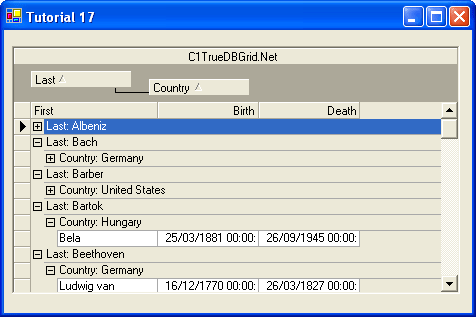
Present data in the format that’s most useful for you: standard Outlook-style grouping that dynamically sorts grid columns; Hierarchical Data Display that offers enhanced Master-Detail presentation and fully editable, dropdown views; Form View that repositions data in a standard “form” that can be modified as needed; and Inverted View that repositions rows as columns to provide a convenient “read down” format.
Microsoft Word- and Excel-like style model
Customize the grid’s appearance with font, color, picture, and formatting specifications. From column and row borders...to foreground pictures...to text wrapping, it’s easy to make the grid look the way you want it to.
Horizontal and vertical splits with customized scrolling
Split the grid horizontally, vertically, or both! Plus, you have control over scrolling behavior: choose to have scroll bars work independently in each split (great for users who need to compare field values from records in different sets of rows) or opt for one scroll bar to scroll multiple splits simultaneously, for example.
2D and 3D cell display
Choose two-dimensional, three-dimensional, or a combination of the two to control cell appearance to your specifications. For example, you may wish to allow mouse-over elements to acquire a 3D appearance.
Excel-style cell selection
Choose not only any row or column, but also any range of cells.
PartNumbers: PC-512168-147268 512168-147268 PC-512168-147272 512168-147272 PC-512168-147273 512168-147273
Publisher PartNumbers: ENT-STUDIO-GOLD-U ENT-STUDIO-U ESD-ENT-STUDIO-GOLD-U ESD-ENT-STUDIO-U ESD-N-TDBG-R
PurchaseOptions: ComponentOne True DBGrid for .NET (To renew your current C1 True DBGrid for .NET Subscription - Minimum Quantity 5)* 1 Developer Subscription Renewal License - Minimum Quantity 5 , ComponentOne Studio Enterprise 2008 v2 (To upgrade your expired C1 True DBGrid for .NET Subscription to a C1 Enterprise Studio Subscription)* 1 Developer Upgrade Subscription License - from any Individual ComponentOne Product Subscription , ComponentOne Studio Enterprise 2008 v2 (To upgrade your expired C1 True DBGrid for .NET Subscription to a C1 Enterprise Studio Subscription)* 1 Developer Upgrade Subscription License with Platinum Support - from any Individual ComponentOne Product Subscription
Resources: ComponentOne True DBGrid for .NET help file, Read End-User License Agreement for ComponentOne Software, Download the ComponentOne Studio for WPF 2008 v2 evaluation on to your computer - Displays Nag Screens, Download the ComponentOne Studio for ASP.NET 2008 v2 evaluation for .NET 1.1 on to your computer - Displays Nag Screens, Download the ComponentOne Studio for ASP.NET 2008 v2 evaluation for .NET 2 and higher on to your computer - Displays Nag Screens, Download the ComponentOne Studio for WinForms 2008 v2 evaluation for .NET 2 and higher on to your computer - Displays Nag Screens, Download the ComponentOne Studio for Mobile Devices 2008 v2 for .NET 2 or higher evaluation onto your computer - Displays Nag Screens, Download the ComponentOne Studio for Mobile Devices 2008 v2 for .NET 1.1 evaluation onto your computer - Displays Nag Screens, Download the ComponentOne Studio for WinForms 2008 v2 evaluation for .NET 1.1 on to your computer - Displays Nag Screens, Download the ComponentOne Studio ActiveX 2008 v2 evaluation onto your computer - Displays Nag Screens
Operating System for Deployment: Windows Vista, Windows XP, Windows 2000, Windows NT 4.0
Architecture of Product: 32Bit
Product Type: Component
Component Type: .NET WinForms, 100% Managed Code
Built Using: Visual C# .NET
Compatible Containers: Microsoft Visual Studio 2005, Microsoft Visual Studio .NET 2003, Microsoft Visual Studio .NET, Microsoft Visual Basic 2005, Microsoft Visual Basic .NET 2003, Microsoft Visual Basic .NET, Microsoft Visual C++ 2005, Microsoft Visual C++ .NET 2003, Microsoft Visual C++ .NET, Microsoft Visual C# 2005, Microsoft Visual C# .NET 2003, Microsoft Visual C# .NET, Delphi 2005 (9.0), Delphi 8.0, C#Builder, .NET Framework 2.0, .NET Framework 1.1, .NET Framework 1.0
Product Class: User Interface Components
Search Items: New Product Jan 03, New Version Feb 04, New Product Apr 04, New Version Apr 04, New Product May 04, New Product Aug 04, New Product Oct 04, New Product May 05, New Product Sep 05
Keywords: Grid Grids Table Tables DataGrid DataGrids componentone, component1, componentone studio, component one, componentone studio enterprise, componentone com, www componentone, componentone llc, componentone review, componentone activex, component one studio, studio enterprise, studio for winforms Enterprise Partner ComponentOne True DBGrid for .NET, TrueDBGrid Grid, True DBGrid,