VSVIEW Classic Edition - Summary

by ComponentOne - Product Type: Component / ActiveX OCX

Summary

VSVIEW Classic Edition by ComponentOne

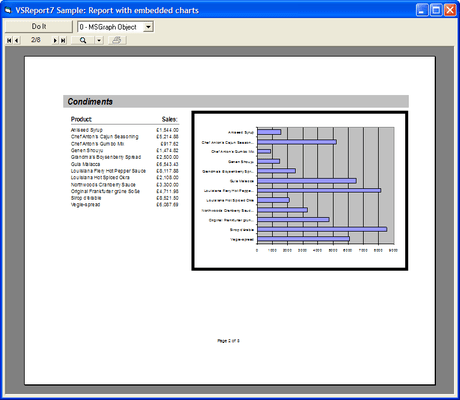
Automatically format text for display and/or exporting. VSVIEW allows you to format text into multiple columns for table creation, including adding header, footers, text boxes, borders, and word wrapping. You can render pictures, embed RTF strings, and export to RTF or HTML. There is even a WYSIWYG preview that you can add to your applications, offering unlimited zoom, thumbnails, and side-by-side page previews. Users have full control over zooming and page orientation.


VSVIEW Classic Edition is sold as part of ComponentOne Studio Enterprise and the ComponentOne Studio for ActiveX

New Packaging

VSView 6 included a single OCX file that contained all three controls in the product. In response to user requests, the controls have been split into separate files, VSPrint7.ocx, VSDraw7.ocx, and VSVPort7.ocx. This allows applications that use only one of the controls to become smaller, saving disk space and download time. We have also worked hard to improve our documentation so that new users can get started quickly and experienced programmers can find the information they need more easily.

Document Navigation

The VSPrinter control now has a built-in navigation bar that allows end users to browse through the preview document, zoom in and out, and print. For details, see the NavBar, NavBarColor, and NavBarText properties. VSPrinter 7 also supports navigation with the mouse wheel and keyboard. For details, see the Navigation property.

RTF/HTML Export

This was the most requested feature for this new version. VSPrinter 7 can export documents to RTF and HTML formats, including all font and paragraph formatting, as well as tables. The HTML export filter also allows for paged HTML output, which generates a series of hyperlinked HTML pages. For details, see the ExportFile, ExportFormat, and ExportNavBar properties.

Internet Awareness

VSPrinter 7 has a new URL property that allows you to load documents located on your Web site directly into a control hosted by a browser on the client's machine. For details, VSPrinter 7 also introduces a new ReadyState property and ReadyStateChange event that allow you to monitor the document downloading process and the control state in general.

Tables

Tables have always been one of VSPrinter's most popular features. VSPrinter 7 allows you to create tables with rows that span page breaks, row and column spanning (cell merging), vertical text in table cells, and custom borders on a per-row/per-column basis. The event model for tables has also been improved, so you can add custom contents to individual table cells, suppress repeated values, add spacing before and after each row, and more. For details, see the TableCell property and the BeforeTableCell and AfterTableCell events.

Pictures

VSPrinter 7 has new options for scaling, cropping and aligning pictures. You can now clip, tile, and zoom pictures (scale them while preserving aspect ratio). This is especially useful for handling pictures that come from databases and may have varying dimensions. The new settings can be used in the DrawPicture method and assigned to the TableCell(tcPictureAlignment) property.

Styles

The new Styles property allows you to define, apply, save, and load styles that define the properties for pages, paragraphs, characters, and graphical objects. This makes it easy to create documents with consistent formatting, favors separating formatting from content generation, and eliminates the need to save several controls properties in order to restore them after rendering parts of the document that have special formatting.

Page Ranges

The PrintDialog method has a new setting (pdPrint) that allows users to specify a range of pages and number of copies to print. Also, the PrintDoc method can now handle strings that define complex page ranges (e.g. 1-5, 7, 9, 23-45 ) rather than simply a starting and an ending page.

Active Documents

VSPrinter 7 has new methods that allow you to retrieve text from a document. You can search for a string within a document using the FindText property, or retrieve the contents of an area on a page using the RetrieveText property.

You can also include invisible tags in documents and retrieve them using the FindTag and RetrieveTag properties. You can use tags to implement pop-up help, hyperlinks, and many other interesting and useful elements.

Also, the new ScrollIntoView method allows you to scroll the control so that a specific part of a page is visible to the user.

And Much More...

VSPrinter 7 has numerous other improvements, including much faster display, persisted paper sizes with save documents, the ability to move pages within a document (MovePages method), reset the current document (Clear method), and descriptive error strings (ErrorDescription property).

VSDraw Improvements

VSDraw 7 supports the mouse wheel for scrolling and allows better measurement of strings with the TextWidth and TextHeight properties. VSDraw 7 also has a new property, KeepTextAspect, that allows you to create strings the preserve their aspect ratio when the control is resized or that stretch both horizontally and vertically when the control is resized.

VSViewPort Improvements

VSViewPort 7 supports the mouse wheel for scrolling and has a new FocusTrack property that causes it to scroll automatically so that the control that has the keyboard focus remains visible.

You also get faster display, the ability to move pages within a document, an optional built in navigation bar, and the ability to define and print complex ranges of document pages. With VSVIEW 7.0s documentation, youll have access to more sample code and details about each property, event, and method. And sample projects created in Visual Basic and Visual C++ will help you put the control to use immediately

VSVIEW Technical Details

View! VSVIEW can automatically load documents created by any Web or Windows application and then allow you to zoom, pan, scroll, and navigate with unprecedented ease and flexibility. Find and retrieve text, include invisible tags to pop up help or hyperlinks, and more

Format! A new styles property separates format information from content generation, making it easy to create documents with consistent formatting. You have full control of the formatting of paragraphs, tables, fonts, colors, alignment, and justification. Plus youll find options for scaling, cropping, and aligning pictures

Export! VSVIEW 7.0 can export documents to RTF and HTML while preserving all font and paragraph formatting as well as tables. You can work with your RTF document in any RTF enabled program such as MicroSoft Word. Or you can work with your HTML document in a browser, choosing either scrolling or paged HTML mode

Print! Adding print preview to your application is a snap. A new URL property lets you load a document from a Web site directly into a browser on a clients machine and print it at high fidelity on a local or network printer

PartNumbers: PC-504726-147047 504726-147047 PC-504726-147048 504726-147048 PC-504726-147049 504726-147049

Publisher PartNumbers: ENT-STUDIO-GOLD-U ENT-STUDIO-U ESD-ENT-STUDIO-GOLD-U ESD-ENT-STUDIO-U ESD-VIEW8CE-R

PurchaseOptions: VSVIEW Classic Edition (To renew your current VSVIEW Classic Edition Subscription - Minimum Quantity 5)* 1 Developer Subscription Renewal License - Minimum Quantity 5 , ComponentOne Studio Enterprise 2008 v2 (To upgrade your expired VSVIEW Classic Edition Subscription to a C1 Enterprise Studio Subscription)* 1 Developer Upgrade Subscription License - from any Individual ComponentOne Product Subscription , ComponentOne Studio Enterprise 2008 v2 (To upgrade your expired VSVIEW Classic Edition Subscription to a C1 Enterprise Studio Subscription)* 1 Developer Upgrade Subscription License with Platinum Support - from any Individual ComponentOne Product Subscription

Resources: Read the VSVIEW help file, Read End-User License Agreement for ComponentOne Software, Download the ComponentOne Studio for WPF 2008 v2 evaluation on to your computer - Displays Nag Screens, Download the ComponentOne Studio for ASP.NET 2008 v2 evaluation for .NET 1.1 on to your computer - Displays Nag Screens, Download the ComponentOne Studio for ASP.NET 2008 v2 evaluation for .NET 2 and higher on to your computer - Displays Nag Screens, Download the ComponentOne Studio for WinForms 2008 v2 evaluation for .NET 2 and higher on to your computer - Displays Nag Screens, Download the ComponentOne Studio for Mobile Devices 2008 v2 for .NET 2 or higher evaluation onto your computer - Displays Nag Screens, Download the ComponentOne Studio for Mobile Devices 2008 v2 for .NET 1.1 evaluation onto your computer - Displays Nag Screens, Download the ComponentOne Studio for WinForms 2008 v2 evaluation for .NET 1.1 on to your computer - Displays Nag Screens, Download the ComponentOne Studio ActiveX 2008 v2 evaluation onto your computer - Displays Nag Screens

Operating System for Deployment: Windows Vista, Windows XP, Windows ME, Windows 2000, Windows 98, Windows NT 4.0, Windows 95

Architecture of Product: 32Bit

Product Type: Component

Component Type: ActiveX OCX

Built Using: ActiveX Template Library (ATL)

Compatible Containers: Microsoft Visual Studio 6.0, Microsoft Visual Studio 97, Microsoft Visual Basic 6.0, Microsoft Visual Basic 5.0, Microsoft Visual C++ 6.0, Microsoft Visual C++ 5.0, Microsoft Visual J++ 1.1, Microsoft Visual FoxPro 5.0, Microsoft Office 97

Product Class: Business Components

Search Items: New Version Oct 03, New Version Feb 04, New Product May 04, New Product July 04, New Product Oct 04, New Product Jan 05, New Product Feb 05, New Product May 05, New Product Sep 05

Keywords: Reporting Reports Report Print Preview Printing previews prints componentone, component1, componentone studio, component one, componentone studio enterprise, componentone com, www componentone, componentone llc, componentone review, componentone activex, component one studio, studio enterprise, studio for winforms Enterprise Partner VS View vsDraw vsViewPort DataReporter

Product Search

Enter search words:

Screenshot Gallery

Award