by ComponentOne - Product Type: Component / ASP.NET WebForms / ASP.NET AJAX (ATLAS) / 100% Managed Code
ComponentOne WebReports for ASP.NET is now officially part of ComponentOne Studio Enterprise and ComponentOne Studio for ASP.NET.
If you require 5 or more individual licenses for ComponentOne WebReports for ASP.NET, please Contact Us for pricing and availability.
ComponentOne WebReports for ASP.NET by ComponentOne
URLs: componentone-webreports-asp-net, componentone webreports asp net, componentonewebreportsaspnet, componentone
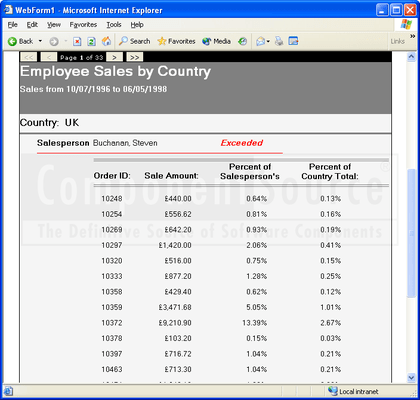
Create and integrate interactive reports into your Web / Server applications. ComponentOne WebReports for ASP.NET is a Web Forms control that runs within Microsoft Internet Information Server (IIS) and includes many powerful and flexible features allowing you to stream complex HTML and PDF reports to your client's machine. ComponentOne WebReports for ASP.NET is compatible with Visual Studio 2005 and Visual Studio 2008 (VS2005, VS2008)

ComponentOne WebReports for ASP.NET is part of the ComponentOne Studio Enterprise and the ComponentOne Studio for ASP.NET
Quickly create enterprise-style reports with ComponentOne WebReports for ASP.NET by simply dragging the control onto an ASPX page, setting the ReportSource property to select the report you want to show, and optionally customizing the appearance of the control by setting a few properties (e.g. Paged, DrillDown, NavigationBar).
When you run the application, the C1WebReport control will load the report definition you selected and render it directly into HTML, which is displayed on the client's machine. Also, C1WebReport will automatically cache the reports it renders, so subsequent requests for the same report will be served very quickly. The information stored in the cache is compressed, so the load on the server is dramatically reduced.
Because C1WebReport hosts the C1Report component, it uses the exact the same report definitions used in Windows applications developed with Componentone Reports for .NET. You can also use the rich ComponentOne Reports for .NET object model to customize reports on the fly, providing ad-hoc reporting capability to your pages. This integration also gives you the power to use the advanced features included in ComponentOne Reports for .NET (e.g. report customization and generation and RTF export).
ComponentOne WebReports for ASP.NET Features
Efficient Report Cache - Each time the C1Report control renders a report, it is compressed and stored in the object. If the same report (page) is requested again, the control simply fetches it back from the cache and sends it to the client again. This feature increases server load efficiency and results in extremely fast response times at low memory cost
Customizable Paging - The CurrentPage property gives you the ability to quickly and easily implement custom navigation bars that allow users to browse to the first, previous, next, and last pages of your report
Powerful Drill Down Functionality - The ability to expand and collapse report sections makes it dramatically easier to navigate, analyze and understand your report data. The DrillDown property determines whether the control should automatically insert JavaScript code into the report to allow users to collapse and expand report sections with the mouse. With this property, developers can allow users to collapse a product catalog and see all the categories at a glance. The user can also select a specific category and drill-down into it to examine the individual products within that category. Note that not all browsers support this capability. If a browser does not support this feature, the report will be shown completely expanded
Built-in/Customizable Navigation Bar - Use the easy to use and highly configurable built-in navigation bar is useful when you are rendering paged reports and you do not want to write a custom navigation bar to allow user to page through the report. You can even set the text displayed in the bar and the Style used to render it
Set the NavigationBar.Visible property to false to customize the navigation bar at design-time or run-time. You can even create your own custom navigation bar and change colors, font, and borders of the built-in navigation bar
Automatic Page Counting - The PageCount property automatically gets the number of pages in the current report. This property is useful if you want to implement custom navigation bars that show a "Page n of m" message
Access to C1Report's powerful object model - The Report property gives you access to the C1Report (ComponentOne Reports for .NET) object model. This feature allows you to customize the report on a Web page and gives you access to other C1Report features such as creating RTF versions of the report and sending them via e-mail
Automatic Scrolling/Sizing - The Scrollable property determines whether the report control should have scrollbars or expand to show all of its contents on the page. By default, the report is rendered within the bounds of the control, and scrollbars will automatically be added so that your users can see all contents of the report. If the Scrollable property is set to false, the control will automatically resize itself on the page to fit its contents
Generate and display PDF Reports - The ShowPDF method redirects the browser to show the current report in Adobe's Portable Document Format (PDF). PDF reports are also cached by the C1WebReport control (see the Efficient Report Cache feature), so once they are generated; subsequent requests can be fulfilled almost instantly.
Create and integrate interactive reports into your Web / Server applications.
Evals & Downloads: ComponentOne WebReports for ASP.NET help file, ComponentOne Studio Enterprise and ComponentOne Report Designer Edition Case Study, ComponentOne Enterprise Framework document - Requires Acrobat Reader, ComponentOne Corporate Information document - Requires Acrobat Reader, Read End-User License Agreement for ComponentOne Software, Download the ComponentOne Studio for WPF 2010 v3 evaluation on to your computer - Expires after 30 days, Download the ComponentOne Studio for ASP.NET AJAX 2010 v3 evaluation on to your computer - Expires after 30 days, Download the ComponentOne Studio for WinForms 2009 v3 evaluation on to your computer - Expires after 30 days, Download the ComponentOne Studio for Mobile Devices 2009 v3 for .NET Evaluation on to your computer - Expires after 30 days, Download the ComponentOne Studio ActiveX 2010 v3 evaluation. Includes both 32 bit and 64 bit installers - Expires after 30 days
Operating System for Deployment: Windows Vista, Windows XP, Windows 2000
Architecture of Product: 32Bit
Product Type: Component
Component Type: ASP.NET WebForms, ASP.NET AJAX (ATLAS), 100% Managed Code
Built Using: Visual C# .NET
Compatible Containers: Microsoft Visual Studio 2010, Microsoft Visual Studio 2008, Microsoft Visual Studio 2005, Microsoft Visual Basic 2010, Microsoft Visual Basic 2008, Microsoft Visual Basic 2005, Microsoft Visual C++ 2010, Microsoft Visual C++ 2008, Microsoft Visual C++ 2005, Microsoft Visual C# 2010, Microsoft Visual C# 2008, Microsoft Visual C# 2005, Microsoft Internet Information Server 6.0, Microsoft Internet Information Server 5.0, Microsoft Internet Information Server 4.0, Microsoft Internet Explorer 7.0, Microsoft Internet Explorer 6.0, Delphi 2005 (9.0), Delphi 8.0, C#Builder, .NET Framework 4.0, .NET Framework 3.5, .NET Framework 3.0, .NET Framework 2.0
Product Class: User Interface Components
Keywords: componentone webreports for asp.net, componentone webreports, componentone web reports, component1 webreports for asp.net, component1 webreports componenton1 web reports, c1reports for asp.net, c1 webreports, c1 web reports
c1 controls, c1 components, componentone controls, componentone components, componentone, componentone, c1, componentone studio, component one, componentone studio enterprise, componentone review, componentone activex, truegrid, true dbgrid, flexgrid
Reporting Reports Report
ComponentSource offers a unique global service, used by over 1,000,000 software developers worldwide.