by Dart Communications - 상품타입: Component / .NET Class / 100% Managed Code
PowerTCP FTP for .NET by Dart Communications
Easily add FTP functionality to your applications. PowerTCP FTP for .NET was written entirely in C# and is a client development tool that will allow you to easily transfer files using wildcards and streams with high levels of control. To help you deliver applications quickly, debugging has been extended beyond run-time testing to a new design-time editor that lets you test file transfers without compiling. PowerTCP FTP for .NET comes with integrated Help 2.0 documentation which includes over three dozen tutorials and a comprehensive reference guide.
PowerTCP FTP for .NET includes comprehensive client development components. You can easily transfer files using wildcards or streams, plus direct access to the data connection for unprecedented levels of control and customization. To help you deliver an application in record time, debugging has been extended beyond receiving feedback through standard Events. The data connection can be tested and your settings immediately recorded to your code using the design-time connection Editor. A real-time send/receive feedback screen gives you a detailed view of client-server communications for debugging capability. Finally, to get you up and running in the shortest possible time, there is integrated Help 2.0 documentation which includes over 3-dozen tutorials and a comprehensive reference guide. C# and VB.NET samples are also included.
Features:
Comprehensive MS Help 2.0 enables Dynamic Help, linking keywords to not only their respective Help document, but to any associated tutorials.
Manipulate data on the file level, stream level, data connection level, and TCP Level
All FTP elements (files, streams, listings) represented as objects, enabling quick, intuitive code development.
Fully integrated proxy support and completely Firewall friendly.
Use automatically as a component or manually as a reference.
Can be used with ANY FTP server, regardless of implementation.
100+ code examples in the documentation (inVB.NET and C#) demonstrate how the products can best make use of the .NET Framework.
UNIX and DOS listings are fully parsed.
Elegant method over loading provides a streamlined interface while providing more power than any other FTP component on the market.
Unprecedented stream support. Store streams as files; retrieve files as streams, or read/write directly to the data connection.
Flexible wildcard capability.
AutoRestart support.
FTP support for Microsoft's pluggable protocol; model using FtpWebRequest and FtpWebResponse classes
Allows for user-defined FTP commands
Includes a WYSIWYG code generator and connectivity-testing environment
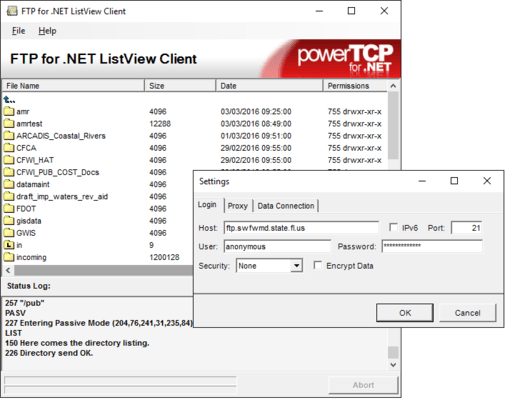
Full applications written in C# and VB.NET include a ListView Client, a transfer Manager, an Mget and Mput demonstration, and a StreamPut and StreamGet demonstration
Copy files between your client and any FTP server — a single method call will do. Simple properties provide fine-grain control, and file data will even spool to/from memory. Listings are captured as objects, so parsing is eliminated — a superior performer for your most demanding applications
.NET component can be used in traditional client applications and services as well as scalable ASP applications
File transfer options are set using simple properties and are automatically used as needed, making this control exceptionally efficient AND easy-to-use
Upload/download multiple files using wild-cards — even directory trees — with only a single line of code
Version 1.1 adds a Delete() method that removes files using wild-cards, and can recursively remove directory trees. Be careful with this one!
Comprehensive Stream-based design provides awesome flexibility — overloaded methods provide direct stream access to the data connection, so you can process file transfers in memory (without ANY local disk access)
Can be used in BOTH event driven (asynchronous) and scripted (synchronous) application designs
3-Level Customer Support
Intuitive On-line Help integrates with Visual Studio .NET
Sample Projects:
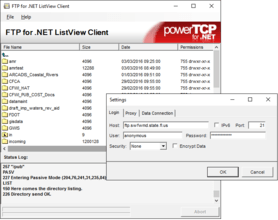
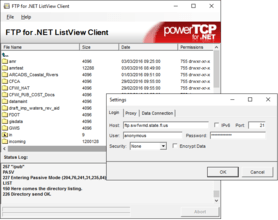
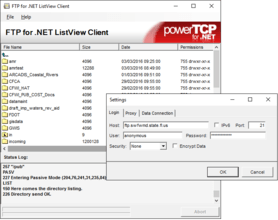
ListView Client - Demonstrates a full FTP client, including the ability to store and retrieve files, send commands, and retrieving listings
Transfer Manager Sample - Demonstrates storing and retrieving multiple files to/from multiple servers at the same time
MGet Demo - Demonstrates retrieving multiple files
MPut Demo - Demonstrates storing multiple files
StreamGet Demo - Demonstrates retrieving a file as a stream
StreamPut Demo - Demonstrates storing a stream as a file
Some uses of PowerTCP FTP for .NET include:
Create an automated process to retrieve or store files
Create an FTP web client to upload files to/from a server using ASP.NET
Create an FTP client with such features as full multithreading, enhanced file transfer progress notification, stream manipulation (eliminating the need to write to a temp file), full MGet and MPut support, and notification when the Ftp component is busy
Create an FTP client that can work with proxy servers
Add the ability to transfer files or streams to any application
Create a "master-control" Windows application to use as an interface for an ASP.NET Web application
Implement the new .NET Framework "pluggable-protocol" paradigm
Create a download transfer manager as demonstrated by the sample. Based on the Microsoft MSDN Transfer Manager
Automate uploads/downloads to/from any FTP server using NT scheduler
Build a turn-key application for upload/download of enterprise data, integrating graphic display of downloaded files
Use with ASP to tranfer files to/from the FTP Server
Automate the generation and transfer of reports to corporate decision-makers
Build a proxy that downloads Internet files for users on a local network
Upload data files to a UNIX server, execute a task to crunch the data, download and parse the result into an SQL database
Automate data file downloads for updating stock market charts
Automate upload of dynamic images to web site
Check file timestamps on any FTP Server
Superior replacement for IND$FILE on OS/390 systems(preserves PDS structure)
What’s Included: The FTP Tool installation comes complete with the following:
12 Components/Major Classes
7 Full Sample projects
Full MS Help 2.0 Documentation, including extensive examples and tutorials
PowerTCP FTP for .NET comes complete with the following major classes and components (minor classes are not listed):
Ftp Component - Use to manage FTP functionality within your .NET application
FtpFile Class - Represents a transferred file or stream
FtpProxy Class - Provides an easy way to manage communication with FTP proxy servers when transferring files
FtpWebRequest Class - An implementation of the .NET "pluggable-protocol" request class
FtpWebResponse Class - An implementation of the .NET "pluggable-protocol" response class
FtpWebRequestCreator Class - An implementation of the .NET "pluggable-protocol" creator class
Invoke Class - Represents an FTP request/response
ListEntry Class - Represents an individual entry in an FTP listing
Listing Class - Represents an FTP listing.
Response Class - Represents an FTP response for easy parsing
SegmentedStream Class - Enables reading/writing to/from the data connection
TraceForm Class - Provides instant trace/debugging support in your application
What’s new in PowerTCP FTP for .NET V3?
Now includes all the features previously available in PowerTCP Secure FTP for .NET
Privacy is now a standard feature. Freely switch between secure (SSL, PCT, TLS) and non-secure modes
On-the-fly ZLIB compression is fully supported, conserving bandwidth over slower connections
Files can be compressed for archival storage by setting a property, saving server disk-space
New "synchronization" feature only transfers files that have changed in size
What's new in PowerTCP FTP for .NET V2.3?
UseControlAddressForPassive property. Besides setting a record for use of Hungarian notation, this property allows you to override the address returned from the server when the PASV command is sent
UseIpSync property. The XP SP2 firewall enhancement does not respond correctly to the IP/SYNC signal used for aborting a file transfer (neither do many servers). Through the use of this property, your users can control the use of this feature when aborting a file transfer
MaxTransferRate property. If the value of this property is below the actual transfer rate, the worker thread will be put to sleep each second to slow the actual rate to match this value specified by this property
What's new in PowerTCP FTP for .NET V2.2.5?
This release is a major maintenance update. The version number of the installation kit has been incremented to match the assembly to minimize confusion. For more information, please see the Readme file included with the installation. All the samples have been revised and ASP.NET samples are now included with installation, rather than just from the Web. Plus, all ASP.NET samples now automatically create virutal directories upon installation, making ASP.NET testing easier.
What's new in PowerTCP FTP for .NET V1.2?
This update fixes a documentation registration problem that prevented the Help file from displaying the first page of the documentation. Please note that the documentation is integrated the first time you access MS Help after installing a new component. This can be a time-consuming process. This is an aspect of the Microsoft Help engine and is unrelated to the PowerTCP FTP for .NET product
Microsoft has updated their licensing model to address a number of licensing limitations including the use of 3rd party components in ASP and Web Services. To accommodate this change alterations have been made to the PowerTCP FTP for .NET product. As a result you will see some changes to the Namespace structure and that will impact your current application. The new Namespace for the FTP component has been changed from Dart.PowerTCP to Dart.PowerTCP.Ftp. Code that is dependent on the previous Namespace will raise an error with the new component
Another modification includes the removal of the dependence on the Dart.PowerTCP.Tcp.dll. That DLL will no longer be required for distribution of your end-user application
Finally, the Dart.PowerTCP.Ftp.dll is now placed in the Global Assembly Cache (GAC)
What's new in PowerTCP FTP for .NET V1.1?
NEW Delete() and BeginDelete() methods delete directories, files (using wild-cards), and recursive directory trees
NEW BusyChanged event notifies you when operations start and end, providing a convenient signal for enabling/disabling UI components, and minimizing the amount of housekeeping code required
Additional exception information is now captured for wild-card file transfers
PartNumbers: PC-512455-162875 512455-162875 PC-512455-162876 512455-162876 PC-512455-162877 512455-162877 PC-512455-162878 512455-162878 PC-512455-162879 512455-162879
Publisher PartNumbers: P-3030-LIC P-3030-SUB P-3030-SUB-RENEW
PurchaseOptions: PowerTCP FTP for .NET V3.0.4 1 Developer License , PowerTCP FTP for .NET V3.0.4 - Basic Subscription 1 Developer License - includes One Year Standard Support/Updates , PowerTCP FTP for .NET V3.0.4 - Basic Subscription Basic Subscription Renewal - includes One Year Standard Support/Updates , PowerTCP FTP for .NET V3.0.4 - Enterprise Subscription 1 Developer License - includes Source Code (delivered separately) and One Year Mission Critical Support/Updates , PowerTCP FTP for .NET V3.0.4 - Enterprise Subscription Enterprise Subscription Renewal - includes One Year Mission Critical Support/Updates
Resources: Read the PowerTCP FTP for .NET help file, Read the PowerTCP FTP for .NET End User License Agreement, Download the PowerTCP FTP for .NET V3.0.4 evaluation on to your computer - Expires After 30 Days
Operating System for Deployment: Windows Vista, Windows XP, Windows ME, Windows 2000, Windows NT 4.0
Architecture of Product: 32Bit, 64Bit
Product Type: Component
Component Type: .NET Class, 100% Managed Code
General: Supports Free Threading
Compatible Containers: Microsoft Visual Studio 2008, Microsoft Visual Studio 2005, Microsoft Visual Studio .NET 2003, Microsoft Visual Studio .NET, Microsoft Visual Basic 2008, Microsoft Visual Basic 2005, Microsoft Visual Basic .NET 2003, Microsoft Visual Basic .NET, Microsoft Visual C++ 2008, Microsoft Visual C++ 2005, Microsoft Visual C++ .NET 2003, Microsoft Visual C++ .NET, Microsoft Visual C# 2008, Microsoft Visual C# 2005, Microsoft Visual C# .NET 2003, Microsoft Visual C# .NET, Microsoft Internet Information Server 5.0, .NET Framework 3.5, .NET Framework 3.0, .NET Framework 2.0, .NET Framework 1.1, .NET Framework 1.0
Product Class: Business Components
Search Items: New Product July 05
Keywords: Internet Communication IP comms upload uploading uploaded download downloading downloaded transfer transferring transferred File Handling Dart Communications Corporate Partner net ftp file transfer protocol component dart powertcp Internet Communication web www email e-mail net server servers on-line messaging SSL TCP IP upload Mget Mput StreamPut StreamGet
개발처/발매처
주요 카테고리
관련 상품
관련 카테고리