PowerWEB LiveControls for ASP.NET - Summary

by Dart Communications - Product Type: Component / ASP.NET WebForms / ASP.NET AJAX (ATLAS) / .NET Class / 100% Managed Code / JavaScript / AJAX

Summary

PowerWEB LiveControls for ASP.NET by Dart Communications

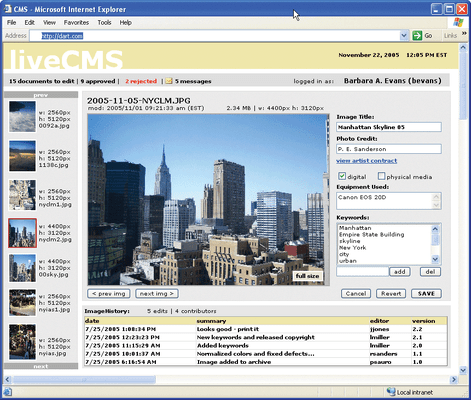
Create real-time client-server communications without postbacks in any Web application. PowerWEB LiveControls for ASP.NET is a suite of 20 AJAX enabled (Asynchronous JavaScript and XML) controls that allow you to build Web applications that don't require a postback. Just like the Microsoft intrinsic controls, LiveControls trigger events in code-behind, but do not require the client browser to be refreshed when data is sent back to the browser. Commonly known as Ajax, or client callback, this technique helps you create richer and cleaner Web applications by eliminating the flicker and delays associated with a postback, providing a smoother Windows-like behavior for the application. No need for Flash, Java Applets, or complex JavaScript, and extensive browser compatibility is automatically provided.

Features:

The ability to manipulate non-LiveControls in Code-Behind and have them updated on the client without a refresh (this is not guaranteed to work with all 3rd party controls)

Addition of Windows-like mouse, key, and click events to visual LiveControls

No need for Java applets, Flash, or complex JavaScript

Will automatically fallback to standard ASP.NET postbacks when unsupported browser detected

Compatible with IE 5.0 +, IE 5 Mac, Mozilla 1.3+, Mozilla 1.3+ Mac, Galeon, Konqueror and Opera 5

The ability of controls to operate in blocking or non-blocking manner on the client

A LiveTimer that is capable of polling the server at a specified interval

Limits the amount of data sent round-trip to maximize performance

A LiveCallback control that easily enables "Remote Scripting" implementations

Compatible with all versions of the .NET Framework

LiveControls for ASP.NET includes the following server controls:

LiveButton - Use the LiveButton control to create a push button on the Web page. You can create either a submit button or a command button

LiveCallback - Use the LiveCallback to create custom callbacks into code-behind

LiveCheckBox - Use the LiveCheckBox control to allow the user to select a true or false state

LiveCheckBoxList - The LiveCheckBoxList control provides a multi selection check box group that can be dynamically generated with data binding. It contains an Items collection with members corresponding to individual items in the list

LiveDataGrid - Use the LiveDataGrid control to display the fields of a data source as columns in a table dynamically. Each row in the LiveDataGrid control represents a record in the data source. The LiveDataGrid control supports selection, editing, deleting, paging, and sorting

LiveDropDownList - Use the LiveDropDownList control to create a single selection drop-down list control

LiveHyperlink - Use the LiveHyperLink control to create a link to another Web page

LiveImage - Use the LiveImage control to display an image on the Web page

LiveImageButton - Use the LiveImageButton control to display an image that responds to mouse clicks

LiveLabel - Use the LiveLabel control to display text in a set location on the page

LiveLinkButton - Use the LiveLinkButton control to create a hyperlink style button on the Web page

LiveListBox - Use the LiveListBox control to create a list control that allows single or multiple item selection

LiveMessageBox - Use LiveMessageBox to inform the user, ask the user for confirmation, or prompt the user for information

LivePanel - Use the LivePanel control as a container for other controls

LivePlaceHolder - Use the LivePlaceHolder control as a container to store dynamically added server controls to the Web page. The LivePlaceHolder control does not produce any visible output and is only used as a container for other controls on the Web page

LiveRadioButton - The LiveRadioButton server control permits you to intersperse the radio buttons in a group with other content in the page

LiveRadioButtonList - The LiveRadioButtonList control provides page developers with a single-selection radio button group that can be dynamically generated through data binding

LiveSound - Use LiveSound to play a sound file client-side during a callback

LiveTextBox - Use LiveTextBox to display a text box control for user input

LiveTimer - Use LiveTimer to raise an event at user-defined intervals, enabling server polling

LiveControls for ASP.NET includes the following sample applications demonstrating use of the above controls:

LiveAuction - Demonstrates using LiveControls to update an imaginary auction for a guitar in real-time

LiveProgress - Demonstrates using LiveControls to the update a progress bar based on information from the server

LiveComparison - Compares the difference between using LiveControls and standard Microsoft controls

LiveShoppingCart - Demonstrates a shopping cart that can be updated with real-time server price information as options are chosen without a postback

LiveSlideShow - Demonstrates a slideshow that is driven by server-side image URLs

LiveTutorial - Demonstrates how the PowerWEB LiveControls for ASP.NET can be used and explains the technology

LiveStockQuote - Demonstrates a stock quote application that updates stock prices and news without a refresh

What’s new in V1.6x?

Internal LiveControls internal processes have been optimized for this release, dramatically improving performance and reducing memory consumption under extreme load

Added the Configuration.AppSettings key "Dart.PowerWEB.LiveControls.DisableExceptionHandling" to globally prevent LiveControls from using custom exception handlers

Refresh() method added to LiveControls which provides a method to force re-rendering of an element's HTML contents when targeted updates are not possible

What's new in V1.x?

ViewStateCache mechanism has been added to greatly reduce bandwidth and to improve rendering performance, most notably in applications with complex or numerous controls

Callback ordering is now improved, even when issued in high volume, and rapid succession

Response.Redirect and Server.Transfer are recognized and handled within a LiveControls callback

Various fixes and improvements

PartNumbers: PC-515611-166008 515611-166008 PC-515611-166010 515611-166010 PC-515611-166012 515611-166012 PC-515611-166014 515611-166014 PC-515611-166006 515611-166006

Publisher PartNumbers: P-4110-ENT-SUB P-4110-ENT-SUB-RENEW P-4110-LIC P-4110-SUB P-4110-SUB-RENEW

PurchaseOptions: PowerWEB LiveControls for ASP.NET V1.6.2 1 Developer License , PowerWEB LiveControls for ASP.NET V1.6.2 - Basic Subscription 1 Developer License - includes One Year Standard Support/Updates , PowerWEB LiveControls for ASP.NET V1.6.2 - Basic Subscription Basic Subscription Renewal - includes One Year Standard Support/Updates , PowerWEB LiveControls for ASP.NET V1.6.2 - Enterprise Subscription 1 Developer License - includes Source Code (delivered separately) and One Year Mission Critical Support/Updates , PowerWEB LiveControls for ASP.NET V1.6.2 - Enterprise Subscription Enterprise Subscription Renewal - includes Source Code (delivered separately) and One Year Mission Critical Support/Updates

Resources: Read the PowerWEB LiveControls for ASP.NET help file, Read the Dart PowerWEB Licensing Agreement, Download the PowerWEB LiveControls for ASP.NET V1.6.2 evaluation on to your computer - Expires After 30 Days

Operating System for Deployment: Windows Vista, Windows XP, Windows 2000

Architecture of Product: 32Bit, 64Bit

Product Type: Component

Component Type: ASP.NET WebForms, ASP.NET AJAX (ATLAS), .NET Class, 100% Managed Code, JavaScript, AJAX

Built Using: Visual C# .NET

Compatible Containers: Microsoft Visual Studio 2008, Microsoft Visual Studio 2005, Microsoft Visual Studio .NET 2003, Microsoft Visual Studio .NET, Microsoft Visual Basic 2008, Microsoft Visual Basic 2005, Microsoft Visual Basic .NET 2003, Microsoft Visual Basic .NET, Microsoft Visual C++ 2008, Microsoft Visual C++ 2005, Microsoft Visual C++ .NET 2003, Microsoft Visual C++ .NET, Microsoft Visual C# 2008, Microsoft Visual C# 2005, Microsoft Visual C# .NET 2003, Microsoft Visual C# .NET, .NET Framework 3.5, .NET Framework 3.0, .NET Framework 2.0, .NET Framework 1.1, .NET Framework 1.0

Product Class: User Interface Components

Search Items: New Product Jan 05, New Product May 05, New Product July 05, New Product Sep 05

Keywords: Popup Pop up pop-up Alerts Alert alerting alerted User Interface Collections UI User Interface UI Text word words processing textbox Treeview List tree view tree-view list-view listview listbox Grid Grids Table Tables DataGrid DataGrids Dart Communications Button Cursor Buttons Cursors Corporate Partner Power Web live controls control ajax atlas asynchronous javascript postback client callback

Product Search

Enter search words:

Screenshot Gallery

Award