Data Dynamics Analysis - .NET - V1.0.321 - Récapitulatif

par Data Dynamics - Type de produit : Composant / ASP.NET WebForms / ASP.NET AJAX (ATLAS) / .NET WinForms / .NET Class

Récapitulatif

Data Dynamics Analysis by Data Dynamics

Provide an interactive decision support system that allows users to explore their relational and multidimensional data in an useful way. Data Dynamics Analysis is a free form visual analysis component for .NET developers. Data Dynamics Analysis takes the complexity out of standard data analysis and gives users a simple drag and drop environment that promotes exploring data visually. Data Dynamics Analysis is aimed towards developers whose business users need to analyze data.

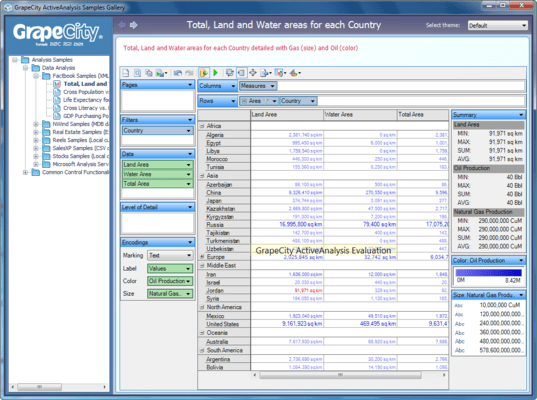
With Data Dynamics Analysis managers of all business industries are now able to spot new trends and dive deep into their data. Businesses such as financial services, sales, retail, marketing, software, hospitality, insurance, manufacturing, or government are now able to embed visual analysis to their .NET applications. The new Data Dynamics Analysis component offers pivot tables, bar charts, line charts and xy charts with interactive sorting and filtering to provide a complete ad hoc information source.

Rediscover Your Data

Data Dynamics Analysis allows you to find trends in your data. A single connection is able to generate thousands of chart variations using nothing more than a mouse. Each view gives the user a different look inside their business data. A different story can be told using the same data simply by reorganizing your field layouts. When data is seen in the right perspective, new findings appear that may have otherwise gone unnoticed.

Instant Dashboards

Data Dynamics Analysis offers the ability to connect multiple PivotView's to a single data source control. You can achieve a different view of the same data organized together using completely different fields against the same data source which would enable a business executive to gain deep insight to actionable data with little effort.

Connect to Any Data Source

Data Dynamics Analysis can connect to any data source. There is no limit to what type of data you can analyze with Data Dynamics Analysis. For easy setup, there are various data source controls that help bind to some of the more common data sources such as SQL Server, MySQL, Oracle, Microsoft Access, Microsoft Excel, Xml, DB2, Microsoft SQL Server Analysis Services, and many more.

Relational Data - Model relational data into multidimensional objects including dimensions, measures, hierarchies, and named sets. Fields can be modeled from any OleDb data source, a SQL Server data source, or any ODBC data source. Stored procedures are supported as well. Data Dynamics Analysis doesn't care how you get the data, as long as you can feed it to the data engine in a flat manner.

Xml Data - Transform your XML data into visual charts and pivot tables. Data Dynamics Analysis has built-in support for analyzing XML data. By mapping to an Xml file and an (optional) Xsl file, Xml data becomes meaningful and allows business executives to analyze the data in a unique way.

Disconnected Data - Disconnect your data by saving it to a compressed format. This allows business users to analyze data away from the data source in a fully disconnected mode. Imagine analyzing data on a plane or at some remote location where the data source is not accessible. This option enables users to analyze a snapshot of the data, and then sync the layouts to live data once reconnected to get updated results instantly.

Multidimensional Data - Connect to SQL Server Analysis Services 2005 data cubes and begin exploring the data in an exciting new way. Using simple drag and drop operations, multidimensional data is transformed into presentation quality charts. Data Dynamics Analysis has full support for multidimensional hierarchies, KPI's, named sets, dimensions, and measures.

Unbound Data - Connect Data Dynamics Analysis to in-memory business objects. A good example of unbound data would be a case where you wish to analyze data from a web service or analyze your computers processor load. The nice thing about Data Dynamics Analysis unbound data source is that it can be used for every other data source that isn't supported directly.

Basically, if you can get access to your data in code, then Data Dynamics Analysis will allow you to explore it visually.

Visual Analysis in Your Browser

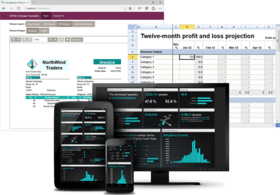
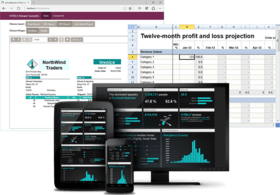
Data Dynamics Analysis installs with a Windows Forms component as well as an ASP.NET Ajax Web component. The Web component is capable of connecting to all of the same data sources. The result enables end users to experience a multi-tiered analysis solution for visualizing relational and multidimensional data over the Web.

Built-In Undo / Redo Support

The process of analyzing data involves looking for new insight that has never been discovered before. In order to support this fast analytical thinking, Data Dynamics Analysis provides the ability to undo any changes made to the view. This allows users to revisit their results at any time. Having this built right into the component saves hours and possibly weeks of development for such support. This is works in both the Windows Forms control and the ASP.NET Ajax control.

Filters Everywhere

Filtering data is an essential item to any data analysis experience. Data Dynamics Analysis is built to ensure that every conceivable way to filter data is possible and available directly from the component with no additional configurations.

Data Dynamics Analysis offers the ability to filter data in several ways. Simply by placing the control on a Windows Form or ASP.NET Web form, users are immediately able to begin drilling into their data and filtering their results to show only the data that are most important to their analysis goals.

Top N Filters - Users are able to isolate the top 10 results, the bottom 15%, or even the top results that calculate to a certain value. All Top N filters are capable of being determined by any measure or calculated field. This enables business users to isolate and highlight the values that matter most.

Conditional Member Filters - Filter data using a conditional filter definition. Users are instantly able to exclude all values where the data meets a certain conditional filter. For example, perhaps the user wishes to view all products that end with "ion". Perhaps they wish to view all customers whose name starts with "Adams" and ends with "Jones". These types of ad hoc filtering capabilities are available using the built-in dialogs and context menus.

Value Filters - Users are able to filter results based on a calculated value within the grid. This enables business users to exclude all results that fall within a conditional filter definition, such as a range of values. So, for example, show only the States where Sales were greater than $400,000 during 2007.

Manual Filters - Filter out certain values using the manual filter dialogs. Users are able to filter out individual members using a checked member tree for dimension filters. Filtering measures is possible through a custom range slider control. Using the built in measure range slider and hierarchical member tree, users are able to isolate exact members and values. All of these filtering techniques are possible using nothing more than a mouse or track pad.

Quick Filters - Both types of filters are capable of being displayed on a card that sits inside the PivotView while you analyze your data. Use the quick filter cards to filter your data without ever opening a dialog. Quick filters offer quick access to hierarchical and numeric filtering capabilities.

Built In Toolbar

Almost all of the functionality that is within Data Dynamics Analysis is accessible using the built-in toolbar. This makes it easy for developers to access the commands and speeds development time. The toolbar can be hidden using the design time properties grid or programmatically with a single line of code.

Model Unstructured Data

One of the most powerful features of Data Dynamics Analysis is its ability to model unstructured data into a multidimensional format. Using a single Xml file, a flat set of data can be structured to support a full OLAP analysis experience. Data Dynamics Analysis comes with a utility to assist in this modeling process. When a schema configuration is not provided, a simple schema is built internally using intelligent defaults.

Data Dynamics Analysis allows the following objects to be modeled from unstructured data:

Hierarchies- Enable multiple categories that are closely related to each other into separate levels. When hierarchies are used on the PivotView, users are able to drill down into detail data and roll up to summarize results.

Dimensions- Group like fields together into logical collections using custom dimensions. Dimensions are able to contain folder groups, hierarchies, and attributes.

Attributes- Attributes are individual fields from the underlying data source. An example of an attribute is 'FullName' or 'OrderNumber'.

Measures- Any numeric data can be transformed into a measure. Measures are the key to all analysis functionality; they are the "data" of the view. One key aspect of a measure is the ability to plot numeric scales on the X and Y axes in the PivotView.

Calculated Attributes - When modeling data, Data Dynamics Analysis offers the ability to perform various functions on any field. An example of a calculated attribute would be OrderYear = Year(Fields!OrderDate.Value) to extract the year value from a date field. Another example would be SalesQuarter = DatePart(DateInterval.Quarter, Fields!SaleDate.Value) to extract the quarter from a date field. These are only two simple examples. However, Data Dynamics Analysis has many built in functions to enable all kinds of calculated attributes.

Calculated Measures - Create custom calculations from any data source. An example of a calculated measure would be AverageSale = Fields!TotalSales.Value / Fields!OrderCount.Value.

Custom Security

Deliver permission based security to every aspect of the analysis experience. Easily provide a role based security system using Data Dynamics Analysis' built in persist flags to load custom security settings per user.

Charts and Pivot Tables

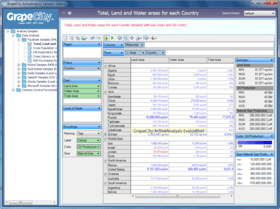
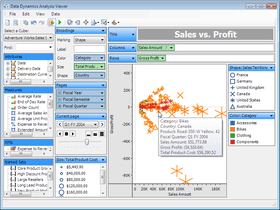
Data Dynamics Analysis delivers both a pivot table and charting solution. It provides a wide array of charting capabilities; with the click of a button, users can turn a cross tab pivot table into a trellis display of feature rich chart displays.

CSS-like Styling

Data Dynamics Analysis offers a robust themes engine that enable users to get the look and feel that they want. Styling can be performed down to each aspect of the view using a CSS style approach. The product ships with many pre-built themes like Office 2007, Windows Classic, Windows Vista, and more. Configuring your own style is as easy as modifying an Xml file and does not require a full recompile of the hosting application.

Dockable Cards

Every aspect of Data Dynamics Analysis' user interface experience is capable of being displayed, repositioned, or hidden. This is a very nice feature, not only because it allows for a customized experience for each user, but also because the UI logic is fully encapsulated within the component itself. Card layouts can be saved to disk (or memory) and reloaded at any time.

Summarize Dynamic Data

Highlight a selection of data points and watch them summarize into various aggregate results on the Summary Card. This feature allows for detailed analysis against dynamic displays. Selecting data points and summarizing the values of those points is very handy for determining what values make up major outliers.

Extract Aggregate and Detail Data

Once a section of data has been highlighted, use the built in context menu to view the underlying data. All data sources are capable of extracting the aggregate data. When connected to an OLAP cube, users have the additional option of performing a "drill through" against the cube to retrieve the detailed transaction rows.

Paged Chart Displays

Analyze multiple pages of data easily using the built in Page Controller. By placing fields on the PageShelf, users are able to move pages of dynamic chart displays.

Ranking and Sorting

Using the built in context menus users are able to sort their display in many different ways. Members are able to be sorted and ranked in ascending or descending order as defined by the end user. When a field has a sorting function applied to it, a sort indicator is displayed on the field to inform the user that a custom sort operation is set on that field.

Persist Flags

Data Dynamics Analysis provides a robust architecture for saving and loading various aspects of the view. By combining flags on the Read() and Write() methods, users are able to load pre-saved layouts, permissions, card configurations, data, and styles without ever recompiling the hosting application. This is a very powerful feature and saves a lot of time when it comes to developing and deploying an analysis solution.

Layouts- Save layout configurations to XML and then load those pre-saved layouts at a later time to refresh the view with updated results. When saving layouts, there is an optional flag to save the layouts with data. This is a handy feature when sending layouts to business users that my not have access to the data source.

Card Settings - Saving and loading card layouts allows for each user to customize their card layouts to fit their needs.

Permissions- Loading permissions is a key feature of Data Dynamics Analysis and is extremely easy to do. At design time, developers are presented with a checked list of various permission settings. At runtime, it's as easy as loading a pre-saved XML file.

Styles- Every aspect of the user interface is configurable. This enables users to style the PivotView to fit seamlessly into their existing Windows Forms and ASP.NET applications.

Data Source - Most analysis solutions are capable of connecting to multiple data sources with the same database schema. Data Dynamics Analysis enables layout files to persist the data source information with the layout file which ensures that the results will always use the specified data source. Alternatively, omitting the data source information allows the current layout to be run against an older version of the database for historic analysis.

Present your Results

In order to get the most out of an analysis experience, it is paramount that the results are able to be shared with others. Data Dynamics Analysis offers many features that promote the presentation of the analysis results to various formats:

Title Card - Describe the overall goal of your analysis experience using the Title card. By using this card, users are able to describe their analysis goal for all to see.

Description Card - As the user filters and drills down into data, the built-in description card describes the layout in verbal form. This enables others to simply read the description to understand exactly what the display is showing.

Copy Image to Clipboard - Directly from the built in toolbar, users are able to copy their image to the system clipboard and paste their results into PowerPoint or a Word document. All of the necessary information is included in the image by default.

Built-In Printing Capabilities

Share your results with others by using the built-in print preview capabilities. All of the necessary UI aspects are sent to the printer as well to help describe the resulting view, including the various legends, the title, and the description text.

Codeless Development

Every aspect of the development process is capable of being configured at design time within Visual Studio 2005 IDE. It is possible to develop and deploy a full blown business intelligence solution that offers visual analysis against relational or multidimensional data without ever writing a single line of code.

Add Calculated Fields

Using Data Dynamics Analysis schema files, users are able to add calculated fields to their solution with little effort. Calculated fields can be sent directly to the data source, or they can be configured to be calculated in the data engine after the results have been queried from the data source. Both options have their advantages depending on the type of calculation.

Drill Down Into Your Data

Data Dynamics Analysis enables business users to drill down into databases to gain deep insight to their business data. By drilling down users are gaining deeper insight to their data. When rolling values up, values are automatically summarized.

PartNumbers: PC-518360-156394 518360-156394 PC-518360-157500 518360-157500 PC-518360-157501 518360-157501 PC-518360-156396 518360-156396 PC-518360-157510 518360-157510 PC-518360-157511 518360-157511

Publisher PartNumbers: DDA DDAPKG

PurchaseOptions: Data Dynamics Analysis V1.0.321 1 Developer License , Data Dynamics Analysis V1.0.321 10-19 Developer License (Price per license, Minimum quantity 10) , Data Dynamics Analysis V1.0.321 20+ Developer License (Price per license, Minimum quantity 20) , Data Dynamics Business Intelligence Suite (includes Data Dynamics Analysis and Data Dynamics Reports) 1 Developer License , Data Dynamics Business Intelligence Suite (includes Data Dynamics Analysis and Data Dynamics Reports) 10-19 Developer License (Price per license, Minimum quantity 10) , Data Dynamics Business Intelligence Suite (includes Data Dynamics Analysis and Data Dynamics Reports) 20+ Developer License (Price per license, Minimum quantity 20)

Resources: Read the Data Dynamics Analysis End User License Agreement, Browse the Data Dynamics Reports License Agreement, Download the Data Dynamics Analysis V1.0.321 evaluation on to your computer - Displays Evaluation Messages, Download the Data Dynamics Business Intelligence Suite evaluation on to your computer - Displays Evaluation Messages

Operating System for Deployment: Windows Vista, Windows XP, Windows Server 2003, Windows 2000

Architecture of Product: 32Bit

Product Type: Component

Component Type: ASP.NET WebForms, ASP.NET AJAX (ATLAS), .NET WinForms, .NET Class

Compatible Containers: Microsoft Visual Studio 2008, Microsoft Visual Studio 2005, Microsoft Visual Basic 2008, Microsoft Visual Basic 2005, Microsoft Visual C# 2008, Microsoft Visual C# 2005, .NET Framework 3.5, .NET Framework 3.0, .NET Framework 2.0

Keywords: Mining analyze analyse analysis データ分析 Analysis Design Modeling On-Line Analytical OLAP analysis analyze analyse Data Dynamics datadynamics Enterprise Partner ddanalysis dd dynamic datadynamic datadynamics dynamicanalysis dynamicanalysis dynamicsanalysis dunamicsanalysis datadynamicsanalysis datadynamicsanalysis datadynamicanalysis datadynamicanalysis

Recherche produit

Entrez vos critères de recherche :

Galerie de copies d'écran

Award