by Software FX - Product Type: Component / ASP.NET AJAX (ATLAS) / .NET Class / Web Part / 100% Managed Code
DataParts for SharePoint 2007 by Software FX
URLs: dataparts-sharepoint, dataparts sharepoint, datapartssharepoint, software-fx, software fx, softwarefx
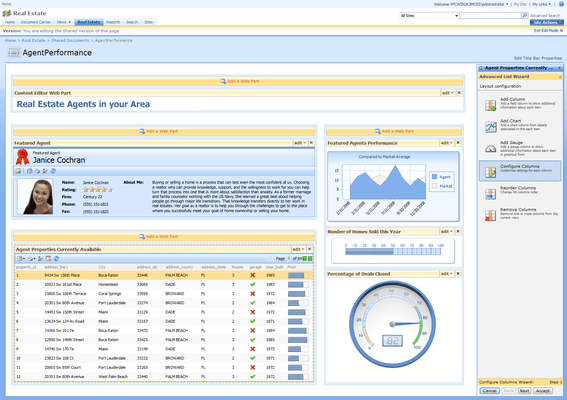
Create usable information dashboards using SharePoint. DataParts for SharePoint 2007 is a set of Web Parts from Software FX that enable you to add business intelligence, data visualization and analysis to your SharePoint portals. DataParts for SharePoint 2007 enhances your SharePoint portals by providing a number of web parts that facilitate data visualization and analysis and that are easily connected to different types of data, such as SharePoint lists, Business Data Catalogs and even SQL databases. With DataParts for SharePoint 2007, visualizing and analyzing data becomes easy through the use of advanced lists, card views, charts, digital panels and radial, linear and horizontal gauges that can be easily configured to visualize the type of data desired in just minutes. By providing the building blocks such as charts, improved AJAX lists, gauges and maps, DataParts deliver the ideal combination of easy-to-use data visualization and analysis tools, formatted and displayed based on the unique requirements of the individual and your entire organization.

Software FX DataParts for SharePoint 2007 lets users insert, modify and personalize any DataParts control's user interface (UI) directly from SharePoint's Tools Pane via a Tool Pane Wizard Technology where users can edit the appearance, layout, behavior, and other properties of the visible DataParts Web Parts intuitively and without a single line of code. DataParts is a suite with many other Web Parts currently under development. As new additional web parts are available, they will be added to the suite at no additional charge.
DataParts for SharePoint 2007 Features
DataParts includes a full set of building blocks that enable you to quickly develop and maintain dashboards with SharePoint that include dynamic, interactive data visualization and analysis capabilities, such as drill-down, filter, and sort through ready-to-use Web Parts including but not limited to charts, gauges, maps, card view lists, hierarchical lists, columnar lists, and much more.
Improve the look and functionality of your SharePoint 2007 portal with attractive Web Parts.
Easy installation. DataParts integrates seamlessly with the SharePoint environment without the need of any additional configuration.
Easily connect and visualize data from popular data sources like SharePoint Lists, SQL Server or Business Data Catalogs (BDC)
Simple user interface, designed to suit both IT administrators and end users alike.
Smooth end user interactions through the use of powerful AJAX techniques, avoiding cumbersome page refreshing, while providing mechanisms to analyze your data more efficiently.
Theme awareness. All Web Parts automatically adjust to fit the color scheme of the site, allowing a seamless integration with minimum effort.
Fully interactive wizards, efficiently integrated into the SharePoint Tool Pane provide a wide range of customization possibilities.
Real-time preview allows the user to see changes to the Web Part instantly while editing.
A great variety of motifs, themes and palettes carefully selected to capture visual attention at first glance
DataParts provides a collection of customizable Web Parts, each with a specific purpose. While each DataParts component has a much targeted functionality, they can be grouped in the following categories based on their general characteristics: List/Card presentation web parts, Chart web parts and Gauge web parts.
List/Card Presentation Web Parts
Advanced List The Advanced List web part is intended to provide an advanced presentation vehicle that lets you view and interact with the content of Lists, Databases and Business Data Catalogs on any page in your SharePoint site. The tabular layout resembles the look of the built-in SharePoint Lists but provides additional User Interface elements that provide sorting, filtering and paging for easy navigation.
Card View Like the Advanced List, this web part provides an alternative for the display of list data within SharePoint. On the other hand the Card View web part provides the user with several different layout formats, providing extensive flexibility on how the data fields are shown. This web part is ideal for displaying data containing thumbnails or small images
Chart Web Parts
The Chart web part lets the user choose from a gallery containing more than 25 different chart types. From simple Pie and Bar charts to complex XY and Financial plots, the chart web part is a great asset in the visualization and analysis of numerical data.
Gauge Web Parts
Horizontal Gauge, Radial Gauge and Vertical Gauge These web parts provide quick visual access to specific data from databases, lists, or BDCs. Gauge web parts let the user view one or two values at a time making them excellent for monitoring and tracking purposes.
Digital Panel Like the needle/marker-based gauge web parts, the Digital Panel lets you view one or two specific values in a single display. However, this web part does have support for non-numerical data making it very useful to visualize messages, times or dates
DataParts for SharePoint 2007: Built with full integration in mind
DataParts is fully compatible with Windows SharePoint Services (WSS) and Office SharePoint Server (MOSS), and DataParts Web Parts have been integrated as native SharePoint web parts. IT staff can customize DataParts Web Parts to meet the specific needs of individuals in the organization without intervention from a developer. DataParts Web Parts have been exclusively architected with SharePoint integration and use in mind and the consolidation of personal, team, corporate, and external information with a single-click customization approach. Unlike other products that wrap ASP.NET controls for Visual Studio, each Web Part inside DataParts has been carefully built with SharePoint integration model in mind, as soon as you drop a DataParts Web Part in your SharePoint site, you should expect to become quickly proficient and productive with it, without the need to learn developer APIs (Application Programming Interface) or face complex integration issues normally faced with web parts that have been retrofitted from developer based products.
DataParts for SharePoint 2007: Make sense of your data
DataParts can draw information from multiple data sources and formats, combining complex information into a single SharePoint portal. DataParts provide a simple way for users to create complex query filters and data visualization scenarios to deliver specific views of data, enabling any SharePoint user to develop personalized role-based dashboards that meet individual, specific decision-making needs.
DataParts for SharePoint 2007: Intuitive, easy to use Web Parts
DataParts Web Parts have been carefully crafted with solid designs and user interfaces that conform to SharePoint standards. The secret to each DataParts control is the flexibility and simplicity of motifs, a set of complex visuals associated to each control like colors, user interface looks and interactions with other Web Parts in your SharePoint site, enabling users to automatically correspond to a highly professional corporate look and feel while preserving the usability of DataParts Web Parts.
Responsive user interfaces through the use of AJAX
DataParts conforms to SharePoint server architecture by creating browser independent HTML renderings from the results returned by the server, enabling users to universally view and interact with the resulting dashboard in a Web browser with minimal configuration and installation complexities. Unlike SharePoint Dashboard support via Microsoft Office components that are designed with Client use in mind, DataParts is a truly web based and thin client solution that will help you reduce training, deployment and maintenance costs on your SharePoint implementation.
Built on award-winning technology
DataParts Web Parts are based on award winning proven technology found in products like Chart FX, Grid FX and PowerGadgets that have been deployed by thousands of organizations worldwide and accessed by millions of end users in many different leading software products.
Create usable information dashboards using SharePoint.
Pricing: DataParts for SharePoint 2007 Small Business License (0-100 users), DataParts for SharePoint 2007 Medium Business License (up to 1000 Users)
Evals & Downloads: Read the DataParts for SharePoint 2007 Help File, White Paper - Layered Security Modeling for SharePoint Portals, White Paper - 7 Common Mistakes in Implementing SharePoint 2007, White Paper - Executive Dashboards, DataParts for SharePoint 2007 License Agreement, Download the DataParts for SharePoint 2007 evaluation on to your computer - Expires after 30 days
Operating System for Deployment: Windows Server 2008, Windows Server 2003
Architecture of Product: 32Bit
Product Type: Component
Component Type: ASP.NET AJAX (ATLAS), .NET Class, Web Part, 100% Managed Code
Compatible Containers: Microsoft SharePoint Portal Server, Microsoft Windows SharePoint Services
Keywords: dataparts for sharepoint 2007, dataparts for sharepoint, dataparts sharepoint, software fx dataparts, softwarefx dataparts, software fx dataparts for sharepoint
Software FX softwarefx ChartFX Chart FX
Product Suites Suite bundles bundle
Chart Charting Charts Graph Graphing Graphs
Instrumentation instrument instruments
treeview, list, tree view, tree-view, list-view, listview, listbox
Mapping Maps Map GIS geographic geography
Part numbers: PC-528795-226574 528795-226574 PC-528795-226575 528795-226575
Mfr. Part No: DP10MB DP10SB
Publisher
Primary Category
Related Products
Related Categories
ComponentSource offers a unique global service, used by over 1,000,000 software developers worldwide.