Screenshot Preview

dbForge Studio for MySQL - Summary

by Devart (formerly Core Lab) - Product Type: Application

Summary

dbForge Studio for MySQL by Devart (formerly Core Lab)

URLs: dbforge-studio-for-mysql, dbforge studio for mysql, dbforgestudioformysql, devart

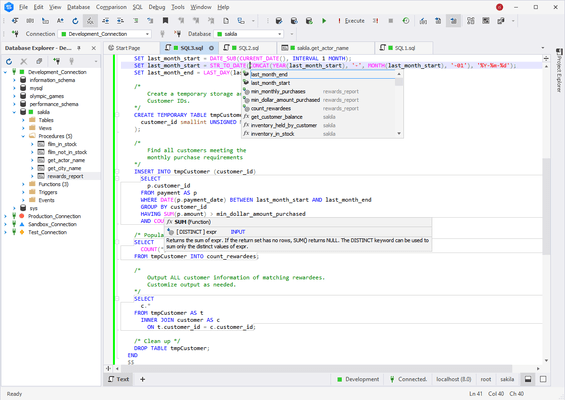
Administration tool and development environment for working with MySQL databases. dbForge Studio for MySQL is a tool designed to automate and simplify work with MySQL. dbForge Studio for MySQL provides an easier way to explore and maintain existing databases, design compound SQL statements, query and manipulate data in different ways. dbForge Studio for MySQ offers full support of MySQL from version 3.23 and advanced features like Quick code navigation, Automatic SQL syntax check and Customizable SQL formatting.

dbForge Studio for MySQL Key Features

Database Designer - a state-of-the-art visual database design tool

Database projects for offline database development

Advanced stored routine debugger

Schema comparison and synchronization tool

Data comparison and synchronization tool

Context-sensitive code completion

Quick code navigation

Automatic SQL syntax check

Customizable SQL formatting

Handy schema object editors

Visual Query Builder

Integrated Security Manager

Server maintenance toolkit

Schema export and import wizards

SQL templates library

Schema object search engine

Multiformat data export

Full support of MySQL versions 3.23-6.0

Direct access to a server

dbForge Studio for MySQL Benefits

With dbForge Studio for MySQL you will get a clear solution for many puzzling tasks, while administrating, developing, and maintaining MySQL databases.

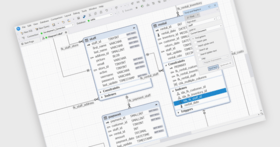
Visual Database Designer - Design the whole database visually with a visual database design tool - Database Designer. Database Designer allows you to view and edit databases in a convenient visual way. You can observe all objects of the database, see foreign key relations between tables, view database objects information, easily access database objects for editing, retrieving data, executing stored routines.

Offline Development with Database Projects - Enhance your work with complex database projects. Instead of doing lots of time-consuming tasks, perfect your management with well-tried features. You can integrate various SQL and script files into a project, group them into folders, and manage in one place. Build your project to a single script file or several ones and easily deploy on the server. Feel difference. Read how to work with projects.

Stored Routine Debugger - Replace “by hand” debugging with a full-featured debugger tool. Debug stored procedures, functions, and triggers with no worry. You can easily set breakpoints to stop execution on any code line and evaluate variables and parameters declared in routines.

Schema and Data Comparison and Synchronization Tools - Just select two databases (or a database and a project) to compare. Based on your needs, you can compare and synchronize the structures of databases (schema comparison) or the content of databases (data comparison). Manage differences in a convenient window and simply select the required synchronization actions.

Powerful SQL Management - Free yourself from tedious work, while coding, with well-thought features. Speed up your development with code templates, code completion, syntax check, code formatter, and many other options. Make your work simple and pleasant. Learn how to effectively manage SQL scripts.

Visual Query Builder - Create effortlessly complex queries which you could not create before. Do not think about coding, just use Query Builder. Drag’n’drop required tables to the diagram, select parameters, set conditions in a convenient editor, and then view and edit a query text. Find out more about Query Builder features.

Convenient Schema Object Editors - Manage efficiently shema objects in visual editors. Get clear and automated ways to work with tables, views, procedures, functions, triggers, events, and user-defined functions (UDF). Take advantage of a quick search and navigation.

Centralized Server Administration and Maintenance - Have centralized server maintenance with powerful tools. Use Security Manager to have simple and accurate management of users and their privileges. Get total control of user sessions and their information with Session Manager. Benefit from MySQL services empowered with Service Control window. Transform difficult tasks into your new opportunities. See how to use Security Manager.

Multiformat Data Export - Experience visual and accurate data export to well-known formats. You will quickly choose required columns and rows along with additional settings for the selected format. With Data export wizard you can customize and even preview the result. You won’t waste your time changing the exported data, the result will be just what you wanted.

Intuitive and Highly Customizable UI - Tune layout based on your convenience and work on-the-fly. GUI elements are well-located and easy-to-use. Tabbed documents, dockable tool windows, and other customizable elements will give you a quick navigation and full control.

Standard includes tools for database administrators and developers, such as a debugger, Query Builder, code templates, object search, various export and maintenance wizards.

Professional additionally includes accurate comparing and synchronizing the structures of databases (schema comparison) or the content of databases (data comparison), debugging stored procedures and scripts, creating complex queries, etc

Standard Features

Multiple database connections in Database Explorer window

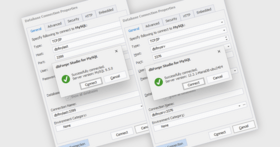
Support of SSL/SSH/HTTP connections

Work with MySQL embedded server

Database Designer

Visual editors for all MySQL schema objects

Partitioning support for table editor

Summary window for quick browsing of schema object properties

Customizable DDL generation wizard

Schema object and data searching on a live database

SQL editor with syntax coloring, bookmarks, and text searching

Code templates library with the browser window

Context-sensitive code completion

Parameter information for stored routines

Quick information about schema objects

One step access to a schema object editor from code (go to definition)

Dynamic help on MySQL accessible from the editor

Execution of scripts, selected SQL fragments, and statements

Execution plan tool

Data editor with in-place filtering, grouping, and sorting options

Data export wizard

Visual Query Builder with support of sub-queries

Stored routine and script debugging framework

Security Manager to administer user accounts and privileges

Schema export and import wizards

Table maintenance wizard and flush dialog

Session manager

Service control for starting and stopping MySQL servers

Server Variables window

Rich user settings

Full shortcut customization

Wizards for exporting/importing user settings

Professional Features (All Standard features plus the following)

Schema comparison and synchronization tool

Data comparison and synchronization tool

Database project framework

Support of code refactoring

Automatic SQL syntax check

SQL formatting

Commercial License is for professional use of the product by one person for making any kind of profit. Registered users can access dbForge Studio from more than one PC but not at the same time.

Non-Commercial License is for use of the product by non-profit organizations like charities and other social-oriented organizations, all kinds of educational institutions, and individuals who use the product for non-commercial purposes only (education, entertainment, etc). Registered users can access dbForge Studio from more than one PC but not at the same time.

What's new in dbForge Studio for MySQL V5.0?

Support for MySQL server 5.5 - The product is fully compatible with MySQL server version 5.5

New features were added and obsolete clauses removed in the Syntax check functionality

New encodings were added to the encoding list in the Connection Properties dialog

New kinds of partitioning are supported in the table editor

Master-detail Browser - Explore and analyze master-detail data in a convenient browser with the following features:

Design view allows building relations between tables with setting where condition and fetch limit, choosing fields for output, and sorting them by default

Data of the parent table/view is shown in the upper part of the Data view to allow analyzing data of child tables/views without extra navigation.

The document allows saving and loading data and diagram for future use

Sorting and filtering data in the Data view

Ability to analyze self-referencing tables

Object dependency tree

Easily explore object's references and dependants in Database Explorer.

Compilation of dependants for debugging is now also available through the object's context menu.

Enhanced Data Editor - Newly added features and a few totally redesigned ones provide even more freedom when working with data.

Foreign Key lookup editor added

Server-side sorting and filtering implemented to avoid retrieving all data from the table and enhance work in Paginal Mode

A few indications added to inform user about Data Editor's state

Editing of tables in join statements is enabled now

Option for numbering records added

Copy data with header functionality added

Ability to build graphical representation of your data with fully functional wizard added

Improved Security Manager

Ability to edit permissions for several users added

Virtual roles for users were added to allow granting a definite set of permissions to selected users

Grouping by hosts in the users list tree added

Editing users and working with Security Manager window simplified

Data Export and Import improvements

Ability to export data from several tables at once added

Exporting data from command line added

Importing data from command line added

Object Viewer - a simple way to view object's details - Object Viewer (formerly known as Summary Window) was totally redesigned to provide an easier way for analyzing objects and their structure:

There are three views to display properties, DDL (text), and data of the selected object

Inner navigation through object hierarchy

History with previously viewed objects

More information about each object is displayed in the Properties view now

New state-of-the-art skins - Four new UI skins added to improve the application appearance.

What's new in dbForge Studio for MySQL V4.50.311?

Removed spaces in the integer and float format in Data Export wizard

Fixed NullReferenceException on saving a database project with opened table editors

Fixed NullReferenceException on deleting a table from a database with an opened inactive editor

Fixed NullReferenceException on auto hiding a tool window

Added possibility to edit a definer for triggers in the trigger editor

Fixed problem with BINARY(16) column type on selecting its data to the Data Editor

Fixed problem with empty gray windows after editing a table in the modal editor from Database Designer

Fixed syntax checking for some constructions in CREATE TABLE statements

Fixed lost connection on the data comparing

Impossibility to disable Code Completion in the Express edition was fixed

Files in database projects are saved with a relative path now

What's new in dbForge Studio for MySQL V4.50.280 ?

Redesigned Database Backup Wizard

Schema Export wizard has been totally redesigned to provide more freedom for backing up schemas. It features the following:

Capability to save backup options for future use

Support of command line interface. You can back up schemas in automatic mode using Windows task scheduler

Automatic archiving of schema backup scripts

Writing a report about backup process into a log file

Automatic removing old backup files based on date or quantity

New tool for database developers - Query Profiler

dbForge Studio offers results of internal MySQL tools like SHOW PROFILE and EXPLAIN in a convenient and clear GUI. Besides you get STATUS variables for the required query automatically calculated.

Additional benefits:

Plan of the query displayed in the tree view for easy review

Profiling history that can be saved for further analysis

Capability to compare profiling results in two clicks

Capability to print profiling results

Revised Data Comparison tool

Diverse testing and close interaction with database developers, admins and casual users resulted in thoughtful redesign and enhancement of Data Comparison tool. Now it embraces the following:

Capability to compare and synchronize database of any length

Increased performance of comparison processes

Generating accurate comparison reports in HTML and Excel formats

Capability to change synchronization direction in one click

New comparison options: Ignore columns by mask, Ignore trailing spaces, Round float types

Quick filtering tables in comparison results

Optimized object management during custom synchronization

Capability to edit values of default comparison options

New synchronization option Exclude Comments

Improved Query Builder tool

Optimized performance of the Selection tab in the expression editor

New Wrap to Subquery option to wrap tables into a subquery

Visual addition of subqueries to any part of the main query

Optimized navigation in the editor, particularly between subqueries

Capability to edit view location in the query document

Joins show connection direction; better described connection properties

New skin for objects on the diagram

Quick generating template SQL scripts for database objects

Thanks to this new functionality, you can save your time while working with database objects. For example, you can quickly generate template SQL scripts CREATE, DROP, SELECT, INSERT, UPDATE or DELETE scripts for tables. This option is available in the context menu and called "Create Script As".

A few improvements in Schema Comparison tool

Extended capabilities of Schema Comparison wizard

New comparison options to ignore some table options, DEFINER and SQL SECURITY expressions, default values for columns

Other improvements

New SQL document view layout - now you can see query text and retrieved data at the same time

Generate DDL wizard was renamed into Generate Schema Script

What's new in dbForge Studio for MySQL V4.0?

Data import from various formats (Text, CSV, Excel, ODBC, Excel 2007, Access, XML, DBF) implemented

Improved work with Data Editor

Pivot Grid for data analysis was added

Data Reports functionality was added

Capability to create virtual relations on Database Diagram was added

Capability to generate schema comparison reports

Customizable product updates check, downloading and installation

Product installation was redesigned to allow product updating without unistalling a previous version

Enhanced management of schema comparison results

Capability to add an SQL-filter to every pair of tables, while comparing data, was implemented

Capability to ignore triggers during data synchronization was added

Design of Procedure editor wad extended, capability to edit procedure parameters was added

While working with an SQL document, it is easy to set a database for script execution

A mechanism to renew a server connection after its break was implemented

Interaction between database connections and a MySQL service in Service Manager was improved

Multiple usablility impovements throughout the application

Administration tool and development environment for working with MySQL databases.

Pricing: dbForge Studio for MySQL V5.0 Commercial Licenses 1 User License Standard Edition with 1-year subscription, dbForge Studio for MySQL V5.0 Commercial Licenses 1 User License Professional Edition with 1-year subscription, dbForge Studio for MySQL V5.0 Commercial Licenses 1 User License Professional Edition Upgrade from Standard (same version) with 1-year subscription, dbForge Studio for MySQL V5.0 Commercial Licenses 1 User License Professional Edition Upgrade from Professional V2.x with 1-year subscription, dbForge Studio for MySQL V5.0 Commercial Licenses 1 User License Standard Edition Upgrade from Standard V2.x with 1-year subscription, dbForge Studio for MySQL V5.0 Non-Commercial Licenses 1 User License Standard Edition with 1-year subscription, dbForge Studio for MySQL V5.0 Non-Commercial Licenses 1 User License Professional Edition with 1-year subscription, dbForge Studio for MySQL V5.0 Non-Commercial Licenses 1 User License Professional Edition Upgrade from Standard (same version) with 1-year subscription, dbForge Studio for MySQL Subscription Renewals 1 User License Standard Edition Subscription Renewal, dbForge Studio for MySQL Subscription Renewals 1 User License Professional Edition Subscription Renewal

Evals & Downloads: Read the dbForge Studio for MySQL help file, Read the dbForge Studio for MySQL License Agreement, Download the dbForge Studio for MySQL V5.0 evaluation on to your computer - Expires After 30 Days

Operating System for Deployment: Windows Vista, Windows XP

Architecture of Product: 32Bit

Product Type: Application

Compatible Containers: MySQL 5.0, MySQL 4.1, MySQL 4.0, MySQL 3.23

Keywords: db forge

crlab corelab

Database DB Management

Part numbers: PC-532064-415502 532064-415502 PC-532064-415504 532064-415504 PC-532064-415510 532064-415510 PC-532064-415514 532064-415514 PC-532064-415512 532064-415512 PC-532064-415506 532064-415506 PC-532064-415508 532064-415508 PC-532064-415516 532064-415516 PC-532064-415518 532064-415518 PC-532064-415520 532064-415520

Product Search

Enter search words:

Why buy from ComponentSource?

ComponentSource offers a unique global service, used by over 1,000,000 software developers worldwide.

More Info | About Us

Award