by DBI Technologies - 상품타입: Component / ActiveX OCX
Calendar Tools by DBI Technologies
Add calendaring functionality to your applications. Calendar Tools is a suite of six ActiveX calendaring components: ctDays offers a single day's events by various intervals. ctCalendar offers definable start and end dates, drag and drop functionality, and more. ctDropDate is a drop down calendar for date selection and date navigation. ctDate presents a month of dates with view and selection options. ctMonth provides a view of an entire month. ctYear allows viewing up to 12 months at a time.
ctCalendar is a scrolling virtual calendar component that gives the developer complete control over calendar presentation with user definable start and end dates. Create and track appointments with colors, pictures, task bars, and scrolling text for each date on the calendar.
Start Date/End Date : Allows developer to define the calendar for any period of time
Edit Text : This component offers the ability to edit text directly within each date of the calendar
Print Methods : Formats and sends the contents of the calendar to a printer device or print window inside of a page on a printer device
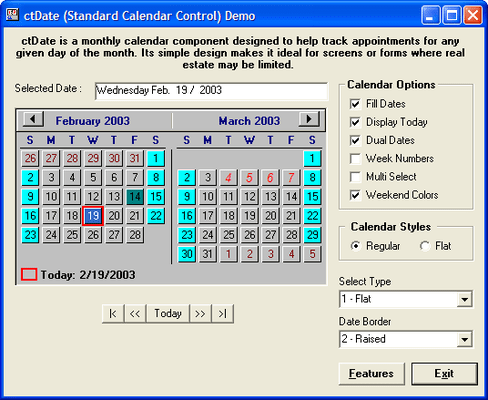
ctDate is a monthly calendar component able to display one or two months at a time. Its simple design makes it ideal in situations where screen real estate is limited.
Multiple Styles : Independent weekend, date and week number colors. Show or hide monthly navigation buttons. Display one or two months at a time. Display week numbers and/or current date
Print Method : A "PrintInWindow" method allows to the calendar to be printed anywhere on a page
ctDays is a visual representation of a daily schedule planner. It is able to accept and/or display a days worth of appointments at a time. Appointments are easily created within the control by clicking and selecting a time line in the control, and then entering some text from the keyboard.
Appointment Management : Custom methods for programmatically adding, deleting, and changing appointments. Also includes methods for conflict checking
Print Methods : Formats and sends the contents of the control to a printer device or print window inside of a page on a printer device
Presentation Options : Define the start and and of the schedule. Display normal or military time. Place images into an appointment
Drag And Drop : Drag appointments into and out of the control
ctDropDate is a masked date edit control with a built in drop down calendar. Optional spin buttons within the component can be used to automatically increment or decrement the current date. Intelligent data entry fills in the date with a best guess if only part of the date is entered.
Flat Style : The component can appear flat until the mouse moves over it or until it receives focus.
Calendar Designer : Design and view the calendar through the controls property pages
Drop and Spin Buttons : Built in drop button can be used to display the drop calendar. Built in spin buttons can be used to increase and decrease the current date
ctMonth provides a view of an entire month. It allows for extensive customization and control over its graphical presentation. Each date supports independent background and text colors, images, time bars, text, and the ability to be disabled. All labels within the control (i.e. day and month names) can easily be changed so the component can be used with a variety of different languages.
Multiple Styles : Independent colors, text, images, time bars and disabling for each date. Display week numbers. Independent weekend colors
Drag And Drop : Drag appointments into and out of the control
Image List : Store up to 100 images in an internal image list. Support for masked bitmaps
Print Methods : Formats and sends the contents of the calendar to a printer device or print window inside of a page on a printer device
ctYear allows the user to view up to 12 months or one calendar at a time. It contains the ability to place independent colors on any date of the control. This can be most useful when your are trying to present a schedule of independent events that may go over many days or weeks (i.e. holidays).
Multiple Months : Display 3, 4, 6, or 12 months at a time
Definable Start Time : Define what month the calendar should start at. For example, display a fiscal year that starts in April and ends the next year at the end of March
Print Methods : Formats and sends the contents of the calendar to a printer device
PartNumbers: PC-510863-158783 510863-158783 PC-510863-158785 510863-158785 PC-510863-158787 510863-158787 PC-510863-158784 510863-158784 PC-510863-158786 510863-158786
Publisher PartNumbers: CALT0301 CALT0301E CALT0305 CALT0305E CALT03site CALT03siteE
PurchaseOptions: Calendar Tools V3.0 1 Developer License , Calendar Tools V3.0 5 Developer License , Calendar Tools V3.0 1 Site Wide License (Allows Unlimited Developers at a Single Physical Address) , Calendar Tools V3.0 1 Developer License Upgrade from V2.0 , Calendar Tools V3.0 Source Code Escrow Annual Subscription - (An Escrow Agreement will be sent to you for signature - please read Licensing section below)
Resources: Read the Calendar Tools help files, Browse the Calendar Tools What's New in V3.0 Web page, Download the Calendar Tools V3.0 evaluation on to your computer - Displays Nag Screens
Operating System for Deployment: Windows Vista, Windows XP, Windows ME, Windows 2000, Windows 98, Windows NT 4.0, Windows 95
Architecture of Product: 32Bit
Product Type: Component
Component Type: ActiveX OCX
Built Using: MFC V4.2 / V6.0
General: Internet Enhanced, Marked as Safe for Scripting, Marked as Safe for Initialization
Compatible Containers: Microsoft Visual Studio .NET 2003, Microsoft Visual Studio .NET, Microsoft Visual Studio 6.0, Microsoft Visual Studio 97, Microsoft Visual Basic .NET 2003, Microsoft Visual Basic .NET, Microsoft Visual Basic 6.0, Microsoft Visual Basic 5.0, Microsoft Visual C++ .NET 2003, Microsoft Visual C++ .NET, Microsoft Visual C++ 6.0, Microsoft Visual C# .NET, Microsoft Visual InterDev 6.0, Microsoft Visual FoxPro 6.0, Microsoft Office 2000, Microsoft Office 97, CodeGear C++ 5.0 (formerly Borland), C++Builder 5, Delphi 8.0, Delphi 5.0, C#Builder, Sybase PowerBuilder 7.0, .NET Framework 1.1, .NET Framework 1.0
Product Class: User Interface Components
Search Items: New Version Jul 03, New Product Apr 05
Keywords: Product Suites Suite bundles bundle DBI Technologies date dates pickers pick Professional Partner Buy DBI Calendar, DBI Calendar Tools, Buy Calendar Tools,
개발처/발매처
주요 카테고리
관련 상품
관련 카테고리