par DBI Technologies - Type de produit : Composant / ActiveX OCX / COM Add-in for Office 2000
Veuillez noter que les informations sur les produits ne sont pas disponibles en français.
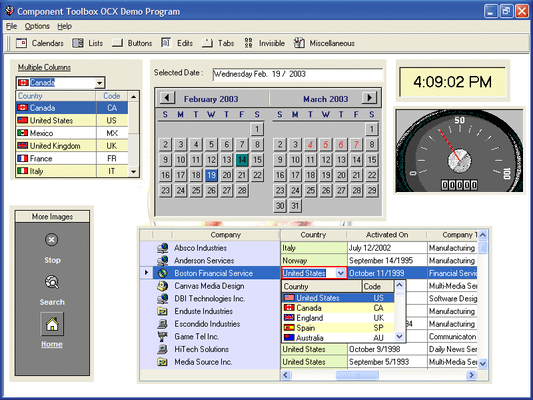
Add expanded functionality with this robust collection of 53 components. Component Toolbox OCX contains 53 licensed 32-bit OCX/ActiveX components for Outlook-style menus, enhanced tree view, advanced list box, calendars, edit controls, buttons, sliders, gauges, and much more. Speed time to market by using these fully documented (including dedicated help files for each component), and time-tested components.
Score :
basé sur 5 revues.
Nos prix standard sont montrés ci-dessous. Veuillez vous connecter pour voir vos prix.
| Ajouter au Caddie | $ 383.04 | 1 Developer License Special Offer, Purchase one license of a DBI product and get a second DBI Product license of equal or lesser value Free - Ends 31st October | Téléchargement (25.7 Mo) | |
| Ajouter au Caddie | $ 1,535.04 | 5 Developer License Special Offer, Purchase one license of a DBI product and get a second DBI Product license of equal or lesser value Free - Ends 31st October | Téléchargement (25.7 Mo) | |
| Ajouter au Caddie | $ 2,541.63 | 1 Site Wide License (Allows Unlimited Developers at a Single Physical Address) | Téléchargement (25.7 Mo) | |
| Ajouter au Caddie | $ 229.82 | 1 Developer Upgrade License from V6.0 | Vérifier | Téléchargement (25.7 Mo) |
| Ajouter au Caddie | $ 500.00 | Source Code Escrow Annual Subscription - (An Escrow Agreement will be sent to you for signature - please read Licensing section below) | Téléchargement (43 Ko) |
Nos prix comprennent le support technique ComponentSource et, pour la majorité des produits téléchargeables, une sauvegarde en ligne ainsi qu'une mise à niveau GRATUITE si la nouvelle version est parue pendant les 30 jours consécutifs à votre achat. Toutes les ventes sont sujettes à nos Termes et Conditions standard à notre Politique de renvoi. Veuillez nous contacter si vous avez besoin d'une option de licence (licence de volume et versions précédentes) qui ne figure pas sur la liste ci-dessus.
Nos prix standard sont montrés ci-dessus. Veuillez vous connecter pour voir vos prix.
What's New in Component ToolBox V7.x?
ctCombo 5.0.0.0
ctDEdit 6.0.0.0
ctExplorerBar 1.0.0.0
New component for Component Toolbox OCX version 7.0
ctGrid 3.0.0.0
ctList 6.0.0.0
ctListBar 7.0.0.0
ctMEdit 5.0.0.0
ctNavBar 1.0.0.4
ctNEdit 5.0.0.0
ctToolBar 4.0.0.0
ctTree 7.0.0.0
Please NOTE: The following components previously available in the Component Toolbox OCX are no longer in production and are not available in the Component Toolbox OCX version 7.0:
ctData.ocx,ctFormFX.ocx,ctMenu.ocx,ctMove.ocx,ctPlayer.ocx,ctRotate.ocx,ctSched.ocx,ctVList.ocx.
Please also NOTE: The following components previously available in the Component Toolbox are now only available as part of Solutions::PIM Professional:
ctMonth.ocx,ctYear.ocx.
Whether you're crafting a commercial product or an on-demand in-house solution you want to know that your choice of development tools perform beyond your expectations, are compatible with your choice of IDE(s) and have the functionality to meet your end-user's demands.
Component Toolbox is a comprehensive, value packed collection of components including Data Edit/Input, Dialogue, Calendar, Navigation, Animation, General Presentation, Rulers/Meters and List/Tree View components. Create fresh designs and great end-user functionality with Component ToolBox and its new functionality, including: XP styles, new gradient fills, multi-column listbar, ToolBar navigation, Date/Time and Data Edits, Lists and Tree Views. Component Toolbox has 53 individual components to choose from.
New, extensively commented component sample applications are provided to assist you in getting your job done faster.
Data Edit/Input (4) - Inputting and editing data is eventually what application development is all about. Add effective user interfaces with ctCheck, ctDEdit, ctMEdit and ctNEdit.
Dialogue (7) - There are quicker and simpler ways to make calls to Windows dialogues. Use DBI's dialogue controls for end-user interaction and the least amount of programming with ctColorButton, ctColorCombo, ctColor, ctCPick, ctFile, ctFont and ctPrint.
Calendars (2): Time is a sensitive issue and using the right calendar components can make a huge difference.
Navigation - Build on the Windows interface standard quickly and effortlessly using these controls for great presentations and user navigation; ctButton, , ctDropMenu, ctHyplnk, ctListBar, ctPush, ctToolBar and ctTabs.
List / Tree - When crafting an application, data loading and presentation are timing issues where latency is not usually an option. These five primary controls out-perform and provide results beyond expectations in your choice of IDE: ctList, ctTreeView, ctSList and ctCombo.
Presentation - From concept to implemented solution you need the right set of tools. DBI's presentation components are the perfect mix complimenting the developers' toolbox with: ctClock, ctDigit, ctFold, ctImage, ctPaper, ctSpin, ctSpiral, ctText and ctTips.
General - Add Flexibility to your favorite IDE with the great presentation tools of Component ToolBox. These eleven general purpose components will add to your own branding, User Interface design and implementation and save you countless hours of programming time: ctFrame, ctGroup, ctHTML, ctCalc, ctRadio, ctScroll, ctSize, ctSplit, ctTray and ctWave.
Animation : Create unique branding and set your User Interfaces apart from the every-day with simple, effective animations with these components: ctBanner, ctClip, ctDial.
Rulers & Meters - We all like to know where we're at, whether we're installing software, building a simulator, defining a time line, measuring an input or output, or moving to a new position, DBI's Rulers and Meters will get you there: ctFill, ctGauge, ctMeter, ctRuler and ctSlide.
Complete list of included components:
ctBanner : An animated banner/marquee component.
ctButton : A standard button replacement component providing transparency and mouse effects.
ctCalc : A simple calculator/math component.
ctCheck : An enhanced version of a standard check box.
ctClip : A picture clip component.
ctClock : A control used to view a clock in an analog or a digital format.
ctColor : A control used to activate the standard Color Common Dialog Box
ctColorButton : (NEW) A button control with a drop down color palette.
ctColorCombo: (NEW) A color combo-box object.
ctCombo : An enhanced combo-box object.
ctCPick : A compact alternative to the color common dialogue box.
ctDate : A visual representation of a monthly calendar presenting one or more months at a time.
ctDEdit : A masked edit text box that supports date/time entry and presentation.
ctDial : A component that simulates a stereo dial style of user-input interface.
ctDigit : (NEW) A digital display component.
ctDropMenu : (NEW) creates and displays drop-down or popup menus.
ctFile : A control used to activate the FileOpen and FileSave common dialogue boxes
ctFill : A meter-type component that simulates the filling of irregularly shaped objects.
ctFold : A container object that mimics a tabbed file folder.
ctFont : A control used to activate the standard Font Common Dialogue Box
ctFrame : A simple container object with many special drawing effects.
ctGauge : Provides a visual representation of a needle or scale in a gauge-type display.
ctGroup : An enhanced group box component.
ctHtml : An Html browser object.
ctHyperLink : A caption component that allows users to open linked documents.
ctImage : An image list component.
ctList : An enhanced list box component.
ctListBar : A navigation component similar to the MicrosoftOutlooklist bar.
ctMEdit : A mask-edit text entry box component.
ctMeter : An enhanced visual representation of a progress meter.
ctNEdit : An enhanced numeric edit component.
ctPaper : A text label component that simulates a paper background
ctPrint : A control used to activate the standard Printer Common Dialogue Box
ctPush : An enhanced picture push button.
ctRadio : An enhanced replacement for the standard radio button.
ctRuler : A ruler object that represents a timeline or measuring instrument.
ctScroll : An enhanced version of the standard scroll bar.
ctSize : An elastic component that sizes and/or positions its child controls.
ctSlide : An enhanced slider component.
ctSList : (NEW) A scrolling list component
ctSpin : A spinner-button component
ctSpiral : An object that simulates a spiral tabbed notebook interface
ctSplit : A splitter-bar component that divides an area into two panes
ctTabs : A page tab strip component
ctText : An enhanced text label object
ctTips : A control that provides a popup help tip display for other controls within a form
ctToolBar : a horizontal toolbar and menu component
ctTray : An invisible component that places icons in the system tray
ctTree : An enhanced hierarchical tree / outline control
ctWave : A wave file player component
Éditeur
Catégorie principale
Produits similaires
Catégories similaires