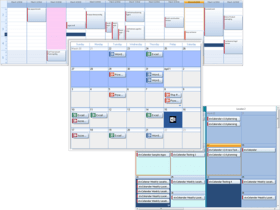
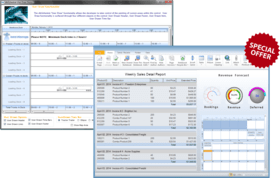
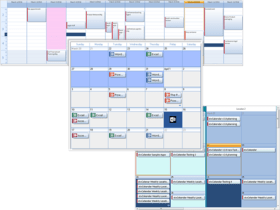
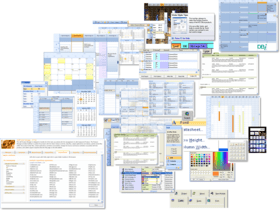
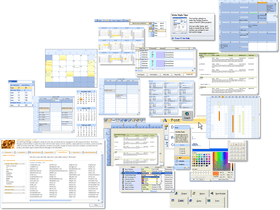
Screenshot Preview

Studio Controls for COM

de DBI Technologies - Tipo de producto: Componente / ActiveX OCX / COM Add-in for Office 2000 / DLL / Windows Foundation Class (WFC)

Por favor note que al menos que se indique lo contrario, esta es la versión en Inglés del producto.

*

Optimize the time from concept to solution. Studio Controls for COM includes 62 royalty-free ActiveX controls for Outlook style scheduling to snap-in Windows application design, data entry and presentation including components for intuitive UI design. Integrating standards based component software in project development advances the time to market while offering application development a whole new set of features at a fraction of the cost.

Desde
$1,703.24
Precio en

Nuestros precios Standard están indicados abajo. Inicia una sesión para ver sus precios con descuento.

Studio Controls for COM v1.2 and Solutions Schedule for COM v11 Special Offer Bundle - Ends 31st January 2012   *

Añadir a la Cesta $ 1,703.24 1 Developer Subscription License (Includes support for one year.)  *
Ref. Fabricante: SSCOM + SCCOM
Descarga (40.7 MB)
Añadir a la Cesta $ 6,812.96 5 Developer Subscription License (Includes support for one year.)  *
Ref. Fabricante: SSCOM-5 + SCCOM-5
Descarga (40.7 MB)

Studio Controls for COM v1.2 - Subscription License   *

Añadir a la Cesta $ 719.04 1 Developer Subscription License (Includes support, new updates, new upgrades and new controls added to Studio Controls for COM for one year.)  *
Ref. Fabricante: SCCOM
Descarga (36.4 MB)
Añadir a la Cesta $ 2,906.12 5 Developer Subscription License (Includes support, new updates, new upgrades and new controls added to Studio Controls for COM for one year.)  *
Ref. Fabricante: SCCOM-5
Descarga (36.4 MB)
Añadir a la Cesta $ 4,722.93 1 Site Wide Subscription License (Includes support, new updates, new upgrades and new controls added to Studio Controls for COM for one year.)  *
Ref. Fabricante: SCCOM-S
Descarga (36.4 MB)

Studio Controls for COM v1.2 - Subscription Renewal (Requires valid subscription license)   *

Añadir a la Cesta $ 365.14 1 Developer Subscription Renewal License (Includes support, new updates, new upgrades and new controls added to Studio Controls for COM for one year.)  * Verificar Descarga (36.4 MB)
Añadir a la Cesta $ 1,438.08 5 Developer Subscription Renewal License (Includes support, new updates, new upgrades and new controls added to Studio Controls for COM for one year.)  * Verificar Descarga (36.4 MB)
Añadir a la Cesta $ 2,337.12 1 Site Wide Subscription Renewal License (Includes support, new updates, new upgrades and new controls added to Studio Controls for COM for one year.)  * Verificar Descarga (36.4 MB)

Studio Controls for COM v1.2 - New Subscription (for product owners who have a lapsed subscription)   *

Añadir a la Cesta $ 660.62 1 Developer New Subscription License (Includes support, new updates, new upgrades and new controls added to Studio Controls for COM for one year.)  * Verificar Descarga (36.4 MB)
Añadir a la Cesta $ 2,642.47 5 Developer New Subscription License (Includes support, new updates, new upgrades and new controls added to Studio Controls for COM for one year.)  * Verificar Descarga (36.4 MB)
Añadir a la Cesta $ 4,294.46 1 Site Wide New Subscription License (Includes support, new updates, new upgrades and new controls added to Studio Controls for COM for one year.)  * Verificar Descarga (36.4 MB)

Studio Controls for COM v1.2   *

Añadir a la Cesta $ 500.00 Source Code Escrow Annual Subscription - (An Escrow Agreement will be sent to you for signature - please read Licensing section below)  * Verificar Descarga (43 KB)

Nuestros precios incluyen servicio técnico de ComponentSource y, para la mayoría de los productos disponibles para descarga, una copia de seguridad en línea y una actualización GRATUITA a la nueva versión si ésta se publica en un período de 30 días después de la compra.  Todas las ventas están sujetas a nuestros Términos y condiciones standard y a nuestra Política de devolución. Por favor, póngase en contacto con nosotros si necesita alguna opción de licencia no incluida en la lista anterior, incluida la compra por volumen de licencias y versiones anteriores.

Nuestros precios Standard están indicados arriba. Inicia una sesión para ver sus precios con descuento.

 *

New in Studio Controls for COM V1.2:

ctCalendar (v6.0)
New additions for ctCalendar include:

  • BeforeWeekSummaryPaint event added to enable changing of the Week Summary text through the WeekSummaryText property
  • New Zune Black control style
  • A new vertical edge fill type has been added (VertEdge2) and
  • Enhanced printed report functionality allowing Page Numbers to be toggled (turned off/on)

ctDayView (v3.0.0.1)
New additions for ctDayView include:

  • Enhancement to the OnMouseWheel event enabling mouse wheel values to be read from the Registry
  • New Zune Black control style.
  • An AppointmentForeColor property has been added allowing greater custom style setting by the developers.
  • A new vertical edge fill type has been added (VertEdge2).
  • Enhanced printed report functionality allowing Page Numbers to be toggled (turned off/on)


ctGrid (v5.0)

  • Progress Bar - Column data types can now be set to a "Progress Bar" style. Progress Bars will take a value of 0-100. Properties available on the Progress Bars include: height, from color and to color, and fill type.
  • Hit test methods for ColumnAt and ItemAt (1 based) and the Pre-Column set to return a value of 0.
  • Enhanced printed report functionality allowing Page Numbers to be toggled (turned off/on)
  • A new vertical edge fill type has been added (VertEdge2)
  • Style properties have been enhanced for Windows 7 presentations including: HeaderOverFillType, HeaderOverBackColorTo, PreColumnFillType, and PreColumnBackColorTo
  • Header arrows now have an additional setting for 'solid'
  • Mouse Wheel enhancement - the OnMouseWheel event enables the mouse wheel values to be read from the Registry


ctList (v9.0)

  • Progress Bar - Column data types can now be set to a "Progress Bar" style. Progress Bars will take a value of 0-100. Properties available on the Progress Bars include: height, from color and to color, and fill type.
  • Sub Text formatting enhancement - a new SubTextBackColor property allows for Coloring of the background area of all the subtext areas. TheSubTextBackColor property is set to Clear by default
  • Hit test methods for ColumnAt and ItemAt (1 based) and the Pre-Column is set to return a value of 0.
  • Enhanced printed report functionality allowing Page Numbers to be toggled (turned off/on)
  • New SelectedBackColorTo, SelectedFillType, NoFocusBackColorTo and NoFocusBorderColor properties have been added replacing the FocusType property (backward compatibility has been maintained) to allow greater control over focus and item selected border coloring.
  • Added, Windows 7 fill styles for Rounded Borders. Selected items now use a 2 pass fill system that allows the fill and the border to have an enhanced 3D presentation.
  • Mouse Wheel enhancement - the OnMouseWheel event enables the mouse wheel values to be read from the Registry

ctTree (v10.0)

  • A new addition to ctTree includes Hit test methods for ColumnAt and ItemAt (1 based), and a Pre-Column set to return a value of 0.
  • Enhanced printed report functionality allowing Page Numbers to be toggled (turned off/on)
  • New SelectedBackColorTo, SelectedFillType, NoFocusBackColorTo and NoFocusBorderColor properties have been added replacing the FocusType property (backward compatibility has been maintained) to allow greater control over focus and item selected border coloring.
  • A new DrawFocus property has been added to enhance presentation of focus given to a selected node with a dotted focus line.
  • New sorting methods - FindFirstSelected and FindNextSelected methods have been added.
  • New Header styling properties - NodeHeaderBackColor, NodeHeaderBackColorTo, and NodeHeaderFillType properties are now available
  • Added, Windows 7 fill styles for Rounded Borders. Selected items now use a 2 pass fill system that allows the fill and the border to have an enhanced 3D presentation.
  • Mouse Wheel enhancement - the OnMouseWheel event enables the mouse wheel values to be read from the Registry

 *

Studio Controls for COM is a complete set of Scheduling, Data Input, Data Presentation, Dialogue, Calendar, and Navigation software components for COM technologies developers. Studio Controls for COM includes sample applications , plus one full year of technical support, updates and product upgrades.

Appointment Scheduling Controls:
ctAlarm  - is a programmable alarm capable of firing single or recursive alarms
ctCalendar - is a scrolling virtual calendar that presents an enhanced month and week calendar views with a uniquely interactive interface.
ctContact - is an enhanced list control designed specifically for contact management.
ctDayView - is an appointment scheduling component displaying multiple days of a schedule for a single resource or a single day's schedule for multiple resources.
ctDropDate - is a date-edit object with a built-in drop-down calendar with smart data-entry features.
ctWeek - is a planner object that allows end-users to view one or more days worth of activities at a glance.

Calendars Controls:
ctDate - is a visual representation of a monthly calendar presenting one or two months at a time.
ctMonth - is a highly customizable month view component providing sophisticated visual flexibility and built-in functionality.
ctYear - is a configuarable calendar for displaying multiple consecutive months in either 3, 4, 6 or 12 configurations.

List and Tree and Grid Controls:
ctCombo - is a drop down list control offering multiple columns, built-in sortin, images within lists and edit areas, import and export XML styles, XML data.
ctGrid - is the ideal data entry and data presentation component perfect for interactive data presentations including formatted data entry, current Windows styles, combo boxes, column locking, column sorting, auto column sizing, XML data current styles and themes and much more.
ctList - Designed for high volume data environments where performance, compatibility and functionality are must have requirements, ctList is an ideal control for reporting and data presentations
ctSList - is a scrolling list component. Similar in behavior to the rolling credits at the end of a movie presentation or television show.
ctTree - is a navigational hierarchical tree and data outline control offering extensive presentation, interaction, and print functionality ideal for document management, index entries, file directory structures and reporting.

Data Entry and Presentation Controls:
ctBanner - Manage Banner headlines with animated graphics
ctClip - is a picture clip component ideal for managing multiple animation and web images
ctDial - incorporates 2D and 3D formats providing developers with unique Dial presentation options.
ctGauge - is great for creating system interfaces that represent instrumentation panels and for giving data a new presentation twist.
ctMeter - is a visual representation of a progress meter with the option of either a vertical or horizontal orientation.
ctRuler - represents a timeline or measuring instrument for presenting data values as increments of common measurements.

Dialogue Controls:
ctColorButton - is a button control with a drop down color palette.
ctColorCombo - is a color combo-box object providing an easy way for users to choose colors from a drop down list.
ctColor - ctColor can be used to activate the standard Color Common Dialog Box provided by the MS Windows API allowing end-users to select a color from a pre-defined palette.
ctColorPicker - is a compact alternative to the color common dialogue box. Much simpler and quicker to use than the Microsoft common dialogue box.
ctFile - offers developers is a quick and easy method for adding standard FileOpen and FileSave common dialogue boxes.
ctFont - Give end-users easy access to system fonts and font styles.
ctPrint - activates the standard Print Common Dialog provided by the Microsoft Windows API allowing developers to customize the presentation and enhancing end-user's interaction.

General Presentation Controls:
ctCalc - is a simple calculator ActiveX object perfectly suited for giving end-users basic calculator functionality.
ctFrame - is a container object making it easy to create boxes, title bars, or container objects with a variety of border effects.
ctGroup - effectively manage a group of child components using a single container - ctGroup.
ctHTML - is an Html browser object providing full functionality of a Web Browser within an ActiveX design.
ctRadio - is an enhanced replacement for the standard radio button object found in most integrated development environments.
ctScroll - enables the presentation of several graphically diverse scroll bar styles.
ctSize - is an elastic component that sizes and/or positions its child controls.
ctSplit - is an excellent tool for crafting application interfaces with discrete navigational zones.
ctTray - is an invisible component that places icons in the system tray.
ctWave - is a wave file player component rendering wave files to a system's sound card.

Navigation Controls:
ctButton - provides transparency, simulated transparency, 2D and 3D button effects.
ctDropMenu - Create and display drop-down or popup menus quickly with ctDropMenu. A variety of display options are available in the control including the ability to add pictures, text, sub-text, background, and text colors for each item. The initial menu can be placed in any position on a form.
ctExplorerBar - a fully customizable outlook style explorer bar with great navigation features.
ctHyperlink - is a caption component that allows users to open linked documents.
ctListbar - ctListBar is a multi-column navigation component capable of displaying sets of sliding lists; each list containing its own group of items. A List item may be represented by text and/or an image (icons or bitmaps).
ctMenu - is an invisible menu notification object.
ctNavBar - is a hybrid hierarchical tree-view object and a list bar object wrapped into a single presentation.
ctPush - is an enhanced picture push button component incorporating all of the usual features and functions of a command button. Plus, ctPush can be implemented with text and/or an image, assigned to an accelerator key, given a default state, cancel state, or toggled state, used with masked bitmaps, and customized with multiple bevel sizes.
ctTabs - is a page tab strip component that hosts a series of tabs in a single strip. As a tab is clicked, it becomes active or selected. ctTabs can be easily and quickly connected to any other object.
ctToolbar - is a horizontal toolbar and menu component displaying a series of buttons used to create a toolbar. Toolbar buttons may be set with a variety of styles; regular, drop down, toggle, and separators. In addition to displaying text, buttons can also display images from ctToolbar's internal image list. Tool tips and drop-down menus may also be assigned to individual buttons.

Presentation Controls:
ctClock - includes its own styles for analog and digital interfaces which can be further enhanced with a developer's own selection of bitmap images.
ctDigit - displays alpha-numeric characters through a series of line segments.
ctFold - is a container object that mimics a tabbed file folder. Each tab may contain its own set of display objects which are displayed or hidden as a user selects tabs.
ctImage - An invisible image list component capable of storing up to 50 individual bitmaps, icons or meta-files, as well as, file paths (URLs) to an additional 50 images.
ctPanel - ctPanel is an ideal component for managing Outlook style presentations, Data presentations and navigation interfaces.
ctPaper - is a text label component that simulates a paper background. Adjustable line spacing automatically maintains text in proportion.
ctSlide - Create system interfaces, instrumentation panels and test simulators using ctSlide.
ctSpin - is a spinner-button component that accepts input for incrementing or decrementing values.
ctSpiral - simulates a spiral tabbed notebook interface.
ctText - is an enhanced text label component offering many enhancements over regular static text controls by providing the ability to display text at any angle, with an optional shadowed three dimensional appearance and the capability of combining a bitmap images with text.
ctTips - present context sensitive information and descriptions for active areas on a form. ctTips offers developers extensive control over the positioning, color, and even the style of the tips display.

Edit Controls:
ctCheck - This five-state check box component is a great tool for adding selection items for surveys to state sensitive data items.
ctDEdit - is the perfect masked edit control for date/ time entry and presentation.
ctMEdit - is a flexible data mask interface for validating or formatting text at the point of input and display.
ctNEdit - is an enhanced numeric edit component capable of displaying integers, real or floating point values, and real numbers in a currency format.


Soporte

 *

Studio Controls for COM Subscription: Includes support, new updates, new upgrades and new controls added to Studio Controls for .NET for one year.

Atención

Para su comodidad, hemos incluido enlaces a Google Translate para traducir la información del producto que todavía tenemos que traducir. Por favor, tenga en cuenta que traducciones automáticas no siempre son totalmente exactas.
Con la tecnología de
Requiere Flash en Firefox y Opera

Búsqueda de productos

Escriba palabras de búsqueda:

¿Por qué comprar en ComponentSource?

ComponentSource ofrece un único servicio global, utilizado por más de 1.000.000 de desarrolladores en todo el mundo.

Más Información | Sobre Nosotros

Award