ComponentOne Doc-To-Help for Word 2008 - Summary

by ComponentOne - Product Type: Application

Summary

ComponentOne Doc-To-Help for Word 2008 by ComponentOne

Simplify and speed the process of creating help documents. Doc-To-Help® for Word 2008 lets you to author content in Microsoft® Word to create online Help files and professional manuals. Produce these Help files in popular formats including HTML Help, Cross-Platform HTML-based Help, JavaHelp, WinHelp, Visual Studio .NET-style Help, and printed documentation. Since Doc-To-Help uses a simple style markup to create Help systems, you have the freedom to use any editor. Doc-To-Help for Word 2008 also includes features such as Documenter for .NET for automatic reference document creation and support for Windows Vista and the 2007 Microsoft Office System including seamless integration with Word 2007.

Doc-To-Help for Word gives you every feature you need to create fully functional and customized Help files and printed manuals from a single source document, or set of documents. Use basic features, such as Topic Jumps and Pop-ups, or more advanced features like Conditional Text, Context Sensitive Help and Documenter for .NET (for automatic reference documentation). Doc-To-Help for Word also includes a subscription service delivering free upgrades for a year, and an HTML theme designer.
Doc-To-Help Enterprise and Doc-To-Help Word main differences:

Doc-To-Help Enterprise includes:

Team Authoring Support

Macromedia Dreamweaver Integration

Microsoft FrontPage Integration

Import RoboHelp HTML Projects

Import Individual HTML Files

Use Any HTML Editor

A document with all differences between Doc-To-Help Enterprise and Doc-To-Help Word Editions can be found in the 'Evals and Downloads' section.

Doc-To-Help Features:

Creating Help Systems and Printed Manuals (Features for Your Help Systems)

Microsoft Windows Vista and Office 2007 System Support: Experience support for Windows Vista and the 2007 Microsoft Office System including Seamless Integration with Word 2007

Single source authoring:Quickly and easily create and implement HTML Help, Cross-Platform HTML-based Help, JavaHelp, WinHelp, Visual Studio .NET-style Help, and printed documentation from one source document

Graphics and Screenshots:Easily include images in your project

Image Map Editor:Insert an image and add hotspot links to specific Help topics

Links, jumps, pop-ups, and more:Add topic links and jumps, pop-up topics, dynamic links, and cross-references

Dynamic Text Effects:Add dynamic text, such as expanding text, pop-up text, and drop-down text, to your Help files

Table of Contents and Index:Doc-To-Help uses information from your source content to automatically create a customizable table of contents and an index

Modular TOC Utility: Automatically populate all modular system Help files with fully functional table of contents links

Glossary Terms: Use the convenient toolbar buttons or styles to add and sort glossary terms

Natural Search: Add a Natural Language search engine to your output. Keyword search is also included

Context Sensitive Help: Automatically generate context IDs, or specify your own, to map topics to your application's interface

Context Sensitive Help for Web Applications: Automatically generate context IDs, or specify your own, to map topics to your Web application's interface. Help topics will appear in NetHelp, the Web-based Help output

Context String Editor: Use a convenient interface to define context ID strings for Help 2.0 and conveniently connect them to Help topics without writing a single line of code

Use Existing Content (Convert files from RoboHelp, other tools, and Doc-To-Help 2000. Also import existing documents)

RoboHelp HTML Project Converter (Enterprise Edition only): Import a RoboHelp HTML file and Doc-To-Help will automatically convert it to a Doc-To-Help project, complete with Doc-To-Help markups. All you have to do is point and click!

RoboHelp Word Project Converter : Import a RoboHelp Word file and Doc-To-Help will automatically convert the project information and the Word source file(s).

Import Any HTML Help Project: Import any HTML Help file and Doc-To-Help will automatically convert it.

Import Any WinHelp Project: Import any WinHelp file and Doc-To-Help will automatically convert it.

Doc-To-Help 2000 Converter: Easily convert your existing Doc-To-Help 2000 projects with the click of a button

Import Individual Word Files: Import individual files containing single or multiple topics

Import Individual HTML Files (Enterprise Edition only): Import individual files containing single or multiple topics

Merge Multiple HTML Help and WinHelp Projects: Combine multiple projects into one TOC, index, and glossary

Merge Multiple NetHelp Projects: Combine multiple projects into one TOC, index, and glossary

Highlighted Search Results in NetHelp: When opening a topic found by NetHelp Search, the search phrase is now highlighted in the topic text

More NetHelp Enhancements: A new NetHelp theme gives more functionality such as print/email topic and save-to-favorites to improve the user experience

Authoring and Editing Projects (Features to make your content creation process easy and flexible)

Microsoft Word or HTML Source: Author your source documents in Microsoft Word, HTML, or both

Microsoft Word Integration: Use the toolbar and wizards that install in the Microsoft Word interface to create online Help and printed documentation elements

Microsoft FrontPage Integration (Enterprise Edition only): Use the toolbar and wizards that install in the Microsoft FrontPage interface to create online Help and printed documentation elements

Macromedia Dreamweaver Integration ( Enterprise Edition only): Use the toolbar and wizards that install in the Dreamweaver interface to create online Help and printed documentation elements

D2HML (Doc-To-Help Markup Language): Use D2HML to specify styles that translate into Help elements when Doc-To-Help processes the document

Built-in or Custom Templates: Choose from a variety of templates for producing high quality print documentation. You can modify the built-in templates or use your own

Built-in Styles: Use built-in styles for authoring "What's This" topics and mid-topic jumps. You can also use the built-in character styles to easily implement jumps, pop-ups, and index entries based on textual matches

HTML Theme Designer: Use the theme designer to control the layout and appearance of topics for HTML-based platforms

Conditional Text: Use Doc-To-Help's built-in conditional text styles to designate content for a specific output

Team Authoring Support ( Enterprise Only): Source control technology provides integrated check-in/check-out functions so multiple authors may contribute to one project

Conditional Build Expressions: Use a combination of conditional build tags to create advanced conditional builds

Margin Notes: Add margin notes in Word with the click of a button

Scripting: Create custom scripts and assign them to styles to develop your own features

Output Folder Specification: Specify any folder as the output folder of a help target

Generating Help Systems and Printed Documentation (Features to empower you to create the outputs you need)

Improved Command-Line Support: Build a Doc-To-Help project from the command line

ComponentOne NetHelp (Cross-Platform HTML):Create a searchable Help system designed for deployment on the Web

Popular Online Help Formats: Generate any popular Help system such as HTML Help, WinHelp, JavaHelp, and Visual Studio .NET-style Help

Help 2.0: Software developers can use Doc-To-Help in conjunction with the Visual Studio Help Integration Kit (VSHIK) to develop content that integrates with the Help system in Visual Studio .NET

Printed Documentation: Transform your Microsoft Word and HTML sources into professional printed documentation complete with a customizable title page, table of contents, index, and glossary

Section 508 Compliance: Doc-To-Help creates a version of NetHelp that is Compliant with Section 508 of the US Rehabilitation Act

Document Conditions: build tags allow the user to set conditional build tags for entire documents

PDF Output: Automatically create a print-ready PDF manual and skip the manual-to-PDF conversion process

Application Developer Support (Features to support Web and Windows application developers)

Documenter for .NET: Automatically generate MSDN-style internal and end user documentation. Documenter for .NET creates reference documentation from compiled assemblies and XML comment files, providing you with complete and well-formatted documents for class libraries Documenter now supports any custom user-defined tags and attributes in XML comments. This is done through an optional XSLT transformation that can now be specified in a Documenter project.

Context String Editor: Define context ID strings and conveniently connect them to Help topics

Visual Basic Scripting: Use Microsoft Visual Basic scripts to customize the behavior of individual styles at compile time

Links to Standard Framework Types in Help 2.0: Generate links to system classes and types (those belonging to .NET Framework, such as System.String, etc)

What's New in Doc-To-Help 2008?

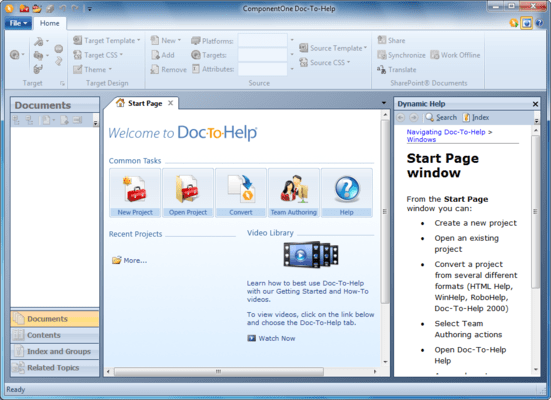
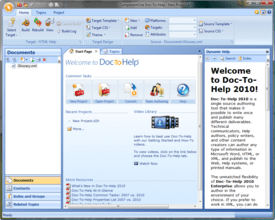
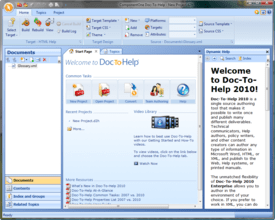
Doc-To-Help 2008 has a completely redesigned, contemporary user interface:

Office 2007-style Ribbons have replaced menus.

The Properties Panel is gone - all configuration and settings are managed with the ribbons or within dialog boxes.

You can edit your source or target Cascading Style Sheets using the new Style Editor.

Complex Conditions - You can assign three different conditions to a topic, document, or text: Platform, Target, or Attribute - giving you more single-sourcing options.

The Topic Grid is significantly improved to allow you to see and edit many topic properties at once.

Outlook-style Accordion tabs have replaced the Icon bar.

The tabbed interface makes it possible to have multiple windows open and easily accessible at the same time.

You can create custom topic relationships using the Related Topics Editor. This makes creating links to "See Also" topics quick and easy.

The Dynamic Help window displays help topics automatically as you navigate the interface.

What's New in Doc-To-Help 2007 v3?

Support for XHTML Output: Users can now generate an XHTML version of NetHelp, HTML Help, Help 2.0, and JavaHelp targets. The XHTML output conforms to the W3C XHTML 1.0 transitional specification

New D2H toolbar button for inserting DemoWorks movies: Doc-To-Help now has a new Flash Movie toolbar button in the Microsoft® Word Doc-To-Help toolbar that allows a user to import and insert a Flash movie object into online output. This button was not added to HTML editors because they already have this feature built in

Expanding/Collapsing Sections: Doc-To-Help has drop-down text, but it is for a single drop-down instance. If you would like to subdivide entire topics into collapsible sections, use the new Expanding/Collapsing Sections feature, which allows you to define collapsible sections with a special style

XML Transforms:Users can now add transforms to XHTML output to manipulate content.These transforms can be .NET or XSLT

Extensive Improvements to Sandcastle Functionality

Added CodeBlock and PostTransform components

D2HML hot spots in XML comments in source code

XSLT transformation of the source code comments XML

Exclude elements without description

Special styles to easily create links from narrative parts to the reference part

Source template C1H_sandcastle_src.dot and the toolbar "Doc-To-Help - Sandcastle

Added "Enable sending feedback" check box and Company name/email text boxes

Added "Copyright text" text box

Option to select Word format when creating documents:There is a new property, WordDocFormat, that allows Microsoft® Word 2007 users to set the .docx format as the default for Manual Targets

What's New in Doc-To-Help 2007 v2?

Text Variables: Doc-to-Help users will be able to re-use and re-distribute blocks of text across a project. Any change to the original block of text will then be reflected across the project.

Rich Content Variables: Similar to Text Variables, it will allow the user to save content blocks that contain graphics, tables, and styles, and then re-use these topics across a project.

Sandcastle Integration for Documenter for .NET: Documenter for .NET will now integrate with Microsoft's Sandcastle to quickly, easily, and more efficiently scan .NET assemblies and .dlls to create MSDN-style reference documentation.

What's New in Doc-To-Help 2007 v1?

JavaScript enabled NetHelp: Doc-To-Help 2007 v1 adds a JavaScript search option (adding the to existing Java search). This option uses technology that requires no setup or installation of Java utilities. It will work as soon as you produce the output

Bread crumbs added to all HTML outputs: Breadcrumbs are a popular way to help end-users keep track of their location in a Help file. Doc-To-Help's HTML-based outputs (NetHelp, HTML-Help, HTML 2.0) now include this navigational element. Additionally, Doc-To-Help's breadcrumbs can be removed and are fully customizable

Generate PDF button in Word: Doc-To-Help produces printed manuals in .PDF and/or Word format. With Doc-To-Help 2007 v1, you have the choice to either generate the .PDF directly from Doc-To-Help or from a generated Word manual. This gives you the opportunity to format your manual before you generate the .PDF

What's New in Doc-To-Help 2006v3?

Team Authoring Support (Enterprise Edition Only):

Ready to use out of the box. No setup required.

Step-by-step wizard shares and connects to the projects for you.

Choose whether you would like to share the project via File System (for local networks) or Web (for remote users).

User Interface gives a visual representation of documents’ status.

Convenient toolbars provide easy access to Team Authoring functions, such as check in, check out, get latest version from repository, and refresh view.

Automatically keep all projects synchronized.

Direct to PDF Output:Generate a PDF directly from your Doc-To-Help progress.

New Vista Inspired NetHelp (web-based Help) Theme

New NetHelp Features: added convenient features to NetHelp including, email topic, print topic, and a favorites tab.

Document Conditions:Set conditions on the document level for single sourcing. With the addition of this feature, you can now set conditions on the text, paragraph, topic, and document level.

What's New in Doc-To-Help 2006v2?

More Linking Options: Choose more specific targets for topic links, such as bookmarks and document names

Better Command Line Support: Execute a variety of tasks from the command line, as well as schedule builds

More Flexible Publishing: Specify any location as the output folder of a Help target

Improved Search Results in NetHelp: NetHelp now highlights search terms in search results

Improved Developer Support: Use your own XML tags in comments when automatically generating .NET reference documentation

Section 508 Compliance: Create output that meets Section 508 federal regulations

What's New in Doc-To-Help 2006 v1?

RoboHelp Converter Enhancements - The RoboHelp converters have been made even more robust by adding more advanced RoboHelp project elements. With Doc-To-Help 2006v1, these RoboHelp project items will be converted:

Conditional Build Expressions

Single Source Layouts

NetHelp Project Merge - Many organizations have multiple projects from multiple authors that need merged into one. Doc-To-Help 2006 includes functionality that seamlessly merged multiple NetHelp files into one.

General NetHelp Enhancements - Doc-To-Help 2006 makes a few important enhancements to NetHelp such as a menu for multiple links and a noise list for NetHelp search.

Live Links in Manual - Doc-To-Help 2006 gives you the option of creating live links for your printed manual output.

Documenter for .NET Enhancements - Doc-To-Help 2006 includes two enhancements for Documenter for .NET:

Links for Standard Framework Types in Help 2.0

Support for Non-Standard XML Comment Tags (Supported by nDoc)

What's New in Doc-To-Help 2005 v2?

Macromedia Dreamweaver Integration (Enterprise Only)

Import RoboHelp Word Projects

Import Any WinHelp Project

Doc-To-Help Express

Context Sensitive Help for Web Applications

Live Update Utility

Unicode Support

PartNumbers: PC-512182-154741 512182-154741 PC-512182-154738 512182-154738 PC-512182-154693 512182-154693 PC-512182-154695 512182-154695 PC-512182-154697 512182-154697 PC-512182-154699 512182-154699 PC-512182-154701 512182-154701 PC-512182-154703 512182-154703 PC-512182-154705 512182-154705 PC-512182-154707 512182-154707 PC-512182-154709 512182-154709 PC-512182-154711 512182-154711 PC-512182-154713 512182-154713 PC-512182-154714 512182-154714 PC-512182-154715 512182-154715 PC-512182-154716 512182-154716 PC-512182-154717 512182-154717 PC-512182-154718 512182-154718 PC-512182-154719 512182-154719 PC-512182-154720 512182-154720 PC-512182-154721 512182-154721 PC-512182-154722 512182-154722 PC-512182-154723 512182-154723 PC-512182-154724 512182-154724 PC-512182-154725 512182-154725 PC-512182-154726 512182-154726 PC-512182-154727 512182-154727 PC-512182-154728 512182-154728 PC-512182-154729 512182-154729 PC-512182-154730 512182-154730 PC-512182-154731 512182-154731 PC-512182-154732 512182-154732 PC-512182-154733 512182-154733 PC-512182-154734 512182-154734 PC-512182-154735 512182-154735 PC-512182-154736 512182-154736 PC-512182-154737 512182-154737 PC-512182-154739 512182-154739 PC-512182-154740 512182-154740

Publisher PartNumbers: D2H08-WORD D2H08-WORD-U ESD-D2H08-WORD ESD-D2H08-WORD-U

PurchaseOptions: Doc-To-Help for Word DemoWorks Bundle Special Offer Price - Ends 15th September 2008 1 Developer License , ComponentOne Doc-To-Help for Word 2008 V1 1 User License , ComponentOne Doc-To-Help for Word 2008 V1 5-9 User License - Price per license , ComponentOne Doc-To-Help for Word 2008 V1 10-19 User License - Price per license , ComponentOne Doc-To-Help for Word 2008 V1 20-29 User License - Price per license , ComponentOne Doc-To-Help for Word 2008 V1 30-49 User License - Price per license , ComponentOne Doc-To-Help for Word 2008 V1 50-249 User License - Price per license , ComponentOne Doc-To-Help for Word 2008 V1 with Platinum Support 1 User Subscription License , ComponentOne Doc-To-Help for Word 2008 V1 with Platinum Support 5-9 User Subscription License - Price per license , ComponentOne Doc-To-Help for Word 2008 V1 with Platinum Support 10-19 User Subscription License - Price per license , ComponentOne Doc-To-Help for Word 2008 V1 with Platinum Support 20-29 User Subscription License - Price per license , ComponentOne Doc-To-Help for Word 2008 V1 with Platinum Support 30-49 User Subscription License - Price per license , ComponentOne Doc-To-Help for Word 2008 V1 with Platinum Support 50-249 User Subscription License - Price per license , ComponentOne Doc-To-Help for Word 2008 V1 with Gold Support 1 User License , ComponentOne Doc-To-Help for Word 2008 V1 with Gold Support 5-9 User License - Price per license , ComponentOne Doc-To-Help for Word 2008 V1 with Gold Support 10-19 User License - Price per license , ComponentOne Doc-To-Help for Word 2008 V1 with Gold Support 20-29 User License - Price per license , ComponentOne Doc-To-Help for Word 2008 V1 with Gold Support 30-49 User License - Price per license , ComponentOne Doc-To-Help for Word 2008 V1 with Gold Support 50-249 User License - Price per license , ComponentOne Doc-To-Help for Word 2008 V1 Upgrade 1 User Upgrade License , ComponentOne Doc-To-Help for Word 2008 V1 Upgrade 5-9 User Upgrade License - Price per license , ComponentOne Doc-To-Help for Word 2008 V1 Upgrade 10-19 User Upgrade License - Price per license , ComponentOne Doc-To-Help for Word 2008 V1 Upgrade 20-29 User Upgrade License - Price per license , ComponentOne Doc-To-Help for Word 2008 V1 Upgrade 30-49 User Upgrade License - Price per license , ComponentOne Doc-To-Help for Word 2008 V1 Upgrade 50-249 User Upgrade License - Price per license , ComponentOne Doc-To-Help for Word 2008 V1 Upgrade with Platinum Support 1 User Upgrade License , ComponentOne Doc-To-Help for Word 2008 V1 Upgrade with Platinum Support 5-9 User Upgrade License - Price per license , ComponentOne Doc-To-Help for Word 2008 V1 Upgrade with Platinum Support 10-19 User Upgrade License - Price per license , ComponentOne Doc-To-Help for Word 2008 V1 Upgrade with Platinum Support 20-29 User Upgrade License - Price per license , ComponentOne Doc-To-Help for Word 2008 V1 Upgrade with Platinum Support 30-49 User Upgrade License - Price per license , ComponentOne Doc-To-Help for Word 2008 V1 Upgrade with Platinum Support 50-249 User Upgrade License - Price per license , ComponentOne Doc-To-Help for Word 2008 V1 Upgrade with Gold Support 1 User Upgrade License , ComponentOne Doc-To-Help for Word 2008 V1 Upgrade with Gold Support 5-9 User Upgrade License - Price per license , ComponentOne Doc-To-Help for Word 2008 V1 Upgrade with Gold Support 10-19 User Upgrade License - Price per license , ComponentOne Doc-To-Help for Word 2008 V1 Upgrade with Gold Support 20-29 User Upgrade License - Price per license , ComponentOne Doc-To-Help for Word 2008 V1 Upgrade with Gold Support 30-49 User Upgrade License - Price per license , ComponentOne Doc-To-Help for Word 2008 V1 Upgrade with Gold Support 50-249 User Upgrade License - Price per license , ComponentOne Doc-To-Help 2008 - Gold and Platinum Support 1 Gold Support License (Doc-To-Help 2008 License Required) , ComponentOne Doc-To-Help 2008 - Gold and Pla

Resources: See a video of how authors use Microsoft FrontPage to create content and configure their Help systems - requires Macromedia Flash Player, See a video of how authors use other HTML editors, such as Macromedia Dreamweaver, to create content and configure their Help systems - requires Macromedia Flash Player, Doc-To-Help Case Study - Requires Acrobat Reader, Read the ComponentOne Doc-To-Help Version Comparison Document, Download the ComponentOne Doc-To-Help 2008 V1 evaluation on to your computer - Expires after 30 days

Operating System for Deployment: Windows Vista, Windows XP, Windows ME, Windows 2000, Windows NT 4.0

Architecture of Product: 32Bit

Product Type: Application

Compatible Containers: Microsoft Visual Studio 2005, Microsoft Visual Studio 6.0, Microsoft Visual Studio 97, Microsoft Visual Basic 2005, Microsoft Visual Basic 6.0, Microsoft Visual Basic 5.0, Microsoft Visual C++ 2005, Microsoft Visual C++ 6.0, Microsoft Visual C# 2005, Microsoft Office 2007, Microsoft Office 2003, Microsoft Office XP, Microsoft Office 2000, Microsoft Internet Explorer 7.0, Microsoft Internet Explorer 6.0, Microsoft Internet Explorer 5.5, C++Builder 6, Delphi 2006 (10.0), Delphi 2005 (9.0), Delphi 8.0, .NET Framework 2.0

Search Items: Special Offer, New Product Aug 05

Keywords: Help Authoring ForeFront Documentation documenting document author ComponentOne APEX Videosoft VS C1 Component1 Enterprise Partner ComponentOne Doc-To-Help for Word, dot-to-help, dottohelp, doc to help, doctohelp

Product Search

Enter search words:

Screenshot Gallery

Award Award