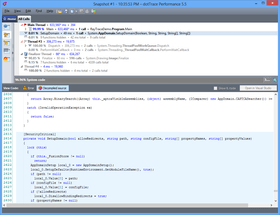
Screenshot Preview

dotTrace Performance

by JetBrains - 상품타입: Add-In / 어프리케이션

주의 : 별도의 안내가 없는 경우에는 영어제품 입니다.

*

A profiling solution for profiling the performance of your .NET applications. dotTrace profiles the performance of .NET applications, ASP.NET applications running on Internet Information Server and Windows services. You can compare any two performance snapshots of the same application with dotTrace. dotTrace program interface features effective navigation, easy filtering and smart search options. dotTrace also features source preview.


$587.02
통화 선택

일반 적인 소비자 가격은 하기에 표시되어 있습니다. 고객님의 할인가격은 표시 하시려면 로그인 해주시기 바랍니다.

dotTrace 4.5.2 Performance Professional - Per-developer commercial license   *

주문 $ 587.02 1-9 Developer License - (price per license)  * 다운로드 (21.4 MB)
주문 $ 581.03 10-19 Developer License - (price per license)  * 다운로드 (21.4 MB)
주문 $ 569.05 20-49 Developer License - (price per license)  * 다운로드 (21.4 MB)

dotTrace 4.5.2 Performance Professional - Floating commercial license   *

주문 $ 2,939.02 1-9 Floating License - (price per license)  * 다운로드 (21.4 MB)
주문 $ 2,909.03 10-19 Floating License - (price per license)  * 다운로드 (21.4 MB)
주문 $ 2,849.05 20-49 Floating License - (price per license)  * 다운로드 (21.4 MB)

dotTrace 4.5.2 Performance Professional - Personal License   *

주문 $ 293.02 1-9 Personal License - (price per license)  * 다운로드 (21.4 MB)
주문 $ 290.03 10-19 Personal License - (price per license)  * 다운로드 (21.4 MB)
주문 $ 284.05 20-49 Personal License - (price per license)  * 다운로드 (21.4 MB)

dotTrace 4.5.2 Performance Standard - Per-developer commercial license   *

주문 $ 391.02 1-9 Developer License - (price per license)  * 다운로드 (21.4 MB)
주문 $ 387.03 10-19 Developer License - (price per license)  * 다운로드 (21.4 MB)
주문 $ 379.05 20-49 Developer License - (price per license)  * 다운로드 (21.4 MB)

dotTrace 4.5.2 Performance Standard - Floating commercial license   *

주문 $ 1,959.02 1-9 Floating License - (price per license)  * 다운로드 (21.4 MB)
주문 $ 1,939.03 10-19 Floating License - (price per license)  * 다운로드 (21.4 MB)
주문 $ 1,899.05 20-49 Floating License - (price per license)  * 다운로드 (21.4 MB)

dotTrace 4.5.2 Performance Standard - Personal License   *

주문 $ 195.02 1-9 Personal License - (price per license)  * 다운로드 (21.4 MB)
주문 $ 193.03 10-19 Personal License - (price per license)  * 다운로드 (21.4 MB)
주문 $ 189.05 20-49 Personal License - (price per license)  * 다운로드 (21.4 MB)

dotTrace Bundle (includes dotTrace 4.5 Performance and dotTrace Memory 3.5) - Per-developer commercial license   *

주문 $ 734.02 1-9 Developer License - (price per license)  * 다운로드 (32.0 MB)
주문 $ 726.53 10-19 Developer License - (price per license)  * 다운로드 (32.0 MB)
주문 $ 711.55 20-49 Developer License - (price per license)  * 다운로드 (32.0 MB)

dotTrace Bundle (includes dotTrace 4.5 Performance and dotTrace Memory 3.5) - Floating commercial license   *

주문 $ 3,429.02 1-9 Floating License - (price per license)  * 다운로드 (32.0 MB)
주문 $ 3,394.03 10-19 Floating License - (price per license)  * 다운로드 (32.0 MB)
주문 $ 3,324.05 20-49 Floating License - (price per license)  * 다운로드 (32.0 MB)

dotTrace Bundle (includes dotTrace 4.5 Performance and dotTrace Memory 3.5) - Personal License   *

주문 $ 366.52 1-9 Personal License - (price per license)  * 다운로드 (32.0 MB)
주문 $ 362.78 10-19 Personal License - (price per license)  * 다운로드 (32.0 MB)
주문 $ 355.30 20-49 Personal License - (price per license)  * 다운로드 (32.0 MB)

가격에는 ComponentSource의 기술지원 요금이 포함되어 있습니다. 또한 다운로드 판매를 하고 있는 상품의 대부분은 온라인 백업요금이 포함되어 있어서 구입날로부터 30일 이내에 새로운 버전이 발매된 경우 무료로 업그레이드해 드리고 있습니다.  모든 주문에 대해서 당사표준 계약조건 반품조건 의 내용이 적용됩니다. 다음의 경우,고객 서비스로연락하시기 바랍니다. (상기의 리스트에 게재되지 않은 대량의 라이센스나 구 버전 등의 라이센스 옵션이 필요한 경우)

일반 적인 소비자 가격은 상기에 표시되어 있습니다. 고객님의 할인가격은 표시 하시려면 로그인 해주시기 바랍니다.

 *

What's new in dotTrace Performance 4.5.2?

  • The latest minor update enables profiling of unit tests by integrating with a variety of recent versions of ReSharper, including 6.1, 6.0, and the 5.x family.

What's new in dotTrace Performance 4.5?

  • Less noise in call stacks and improved tree presentation - Content in snapshot views is now better organized: specifically, icons to the left of the tree no longer misalign its nodes. In addition, you can now quickly fold or unfold calls that take insignificant time with Ctrl+Space.
  • Extracting all public methods of a class to a single tab - You can now quickly view all public method calls from a certain class in a separate tab, which helps analyze the performance of a class along the lines of its API.
  • Improved estimation of potential performance gains - You can now adjust time of a function called from a specific parent function, leaving its other calls intact.
  • Sampling profiling is now used by default - Sampling is the fastest profiling mode that imposes least overhead. Of course, whenever you need to collect more detailed performance data, you can switch to tracing or line-by-line profiling.
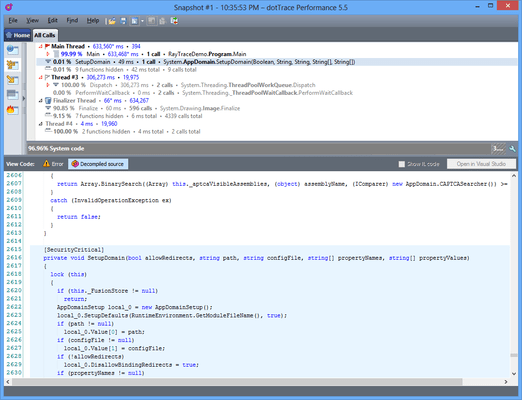
  • Previewing .NET Framework source code - By connecting dotTrace 4.5 Performance to Microsoft Reference Source Server (via View | Options | Source Preview), you can preview the source code of .NET Framework when you analyze the behaviour of library code in your snapshot.
  • Displaying IL code in source view - In the Source Preview area, you can now switch between source form and CIL form of methods that you're analyzing:
  • New floating license handling policy - This is an important change for customers who are using dotTrace integrated into Visual Studio in corporate environments. Before, a floating license ticket was issued right upon loading the dotTrace plug-in in Visual Studio irrelevant of whether a user actually needed it. Starting from dotTrace 4.5 Performance, a ticket is only requested after a user has performed an operation with dotTrace from within Visual Studio.
  • Performance improvements - dotTrace 4.5 Performance generates Hot Spots and Plain List views a lot faster than version 4.0. Acceleration has also been applied to search in Hot Spots view and canceling view construction on pressing Esc.

 *

dotTrace Performance Features:

  • Take advantage of efficient navigation, easy filtering, smart search and handy source preview.
  • Navigate from a function in snapshot directly to source file
  • Launch dotTrace from Visual Studio 2005, 2008, or 2010.
  • Profile CLR 4 applications
  • Profile Silverlight 4 applicationsly
  • Profile line-by-line
  • Find out line-level timings for your application's functions.
  • Use line-by-line profiling selectively if you like.
  • Every millisecond counts. Use the "High Accuracy" mode to account for the time spent inside the profiler.
  • Profile applications remotely with an automatic utility.
  • Profile Windows Mobile apps for .NET Compact Framework 3.5
  • Remote Profiling
  • Profile the performance of applications targeting .NET Framework 1.0 to 4.0, or .NET Compact Framework 3.5.
  • Profile complex desktop and server applications.
  • Process snapshots of up to several hundred GB in size.
  • Apply textual annotations to selected functions.
  • Save annotations with snapshots to review them later on.
  • Immediately estimate how removing a bottleneck would affect overall performance -- without recalculating your snapshot.

Performance profiling features in dotTrace Performance

  • Top-class technology support - dotTrace Performance provides a fast way to profile the performance of .NET applications based on .NET Framework 1.x to 4.0, .NET Compact Framework 3.5, and Silverlight 4.dotTrace Performance is able to profile standalone desktop applications, Web applications running under IIS or Visual Studio development server, Windows services, smart device applications, remote applications, and unit tests.
  • Server-scale snapshot support - dotTrace Performance is able to profile huge applications and get snapshots of several hundred gigabytes while still working at an acceptable speed. That means, you can use dotTrace Performance for profiling complex desktop and server applications.
  • Tracing profiling is a very accurate way of profiling that involves getting notifications from the CLR whenever it enters or exits a function. The time between these two notifications is taken as the execution time of the function. Tracing profiling helps you learn precise timing information and the number of calls on the function level.
  • Sampling profiling is a profiling method which is up to 30 times faster than tracing profiling, but at the expense of lower accuracy. It is extremely useful for at least two profiling scenarios: first, quickly getting a general idea of your application's performance, and second, profiling for extensive periods of time, up to many hours long.
  • Line-by-line profiling collects timing information for every statement in a function that has source code available. This lets you collect detailed information about functions that perform significant algorithmic work. You can specify exactly which functions you want to be profiled line-by-line or profile all functions which dotTrace Performance is able to locate symbol information for. In addition, dotTrace Performance provides a 'High Accuracy' flag to account for the time spent inside the profiler. When every millisecond counts, dotTrace pays attention.
  • Local or remote profiling - dotTrace Performance Professional Edition can connect to a remote machine to profile a standalone or Web application, or a Windows service. You don't even have to install dotTrace there — just copy a couple of files.
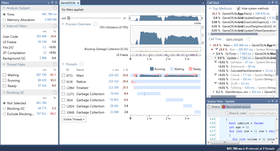
  • Convenient data representation - A number of informative views (Call Tree, Hot Spots, Threads Tree and more) allow convenient inspection of profiling data stored in snapshots. The importance of each function call is represented with descriptive icons, along with precise execution times and other relevant information. You can open functions in individual tabs, easily navigate views with keyboard shortcuts, focus on relevant calls, and create profiling reports by saving views to an external file.
  • Instant estimation of performance gains - dotTrace Performance is able to recalculate a snapshot instantly — without reprofiling your application. It's like asking the profiler: "what if I optimize this function by 40%?". Just call Edit | Adjust Time and specify the new time for the function or for all functions in a particular class. Time values for the entire snapshots will be recalculated.
  • Comparing performance snapshots - dotTrace Performance is able to compare any two performance snapshots of the same application. It generates a comparison snapshot which shows the difference in the number of calls and times consumed by each function. Comparison snapshots can be viewed and analyzed the same way as regular performance snapshots.
  • Quick function info - You can look up Quick Info on any function from the Call Tree view. The lookup window provides a summary of function statistics with respect to the selected call and to all calls in the current tab.
  • Filtering and formatting - dotTrace Performance lets you hide functions of little importance from a snapshot and highlight those that really make a difference. Filter out system calls and other non-essential functions with a combination of different filters. To emphasize important functions or classes of functions, use custom formatting rules.
  • Folding calls - In addition to filtering and formatting, dotTrace Performance provides another way to see all the data you want to see and none that you don't.
  • Fold filtered calls - Chains of filtered calls can be set to be folded by default or folded/unfolded manually. Recursive call chains can be folded to display the aggregate timings and call counts of all functions called recursively. You can hide functions that only call other functions but don't do any calculation on their own.
  • Annotating snapshots - During performance analysis, you may want to leave a comment about a function and its behavior. dotTrace Performance provides textual annotations for functions that are saved with the snapshot and can be reviewed later.
  • Search and navigate function calls - You can quickly locate functions and navigate to them. When searching for a function, you can type in the function name using CamelHumps, just like you do in ReSharper.  You can highlight all occurrences of the function in the current view and then navigate between them with a simple press of a key.
  • Visual Studio integration and source code preview - dotTrace Performance provides a two-way integration with Visual Studio 2005, 2008, and 2010, allowing you to profile your applications right from the IDE, or view suspicious source code right from the profiler (and open it in Visual Studio for editing.) Run dotTrace Performance from Visual Studio: With a single button click, you can launch profiling or your startup project directly from Visual Studio. In addition, if you have ReSharper installed in your Visual Studio, you can easily start profiling unit tests from the code editor. Open a file from dotTrace Performance in Visual Studio — if your solution is opened in Visual Studio, you can click a button in the Preview Source tab to navigate to the corresponding source file in Visual Studio.

주의

제품 리뷰의 한국어 번역이 완료되지 않는 제품은 Google통역 서비스와 연동되어 표시되어 있습니다.통역 기계에 의한 자동 번역인 관계로 한국어 표기가 조금 부자연 스러운 점 양해 바랍니다.
에서 제공
FireFox와 Opera에서는 Flash가 필요합니다.

상품검색

검색어를 입력해주세요:

Quick 링크

개발처/발매처

주요 카테고리

관련 상품

관련 카테고리

ComponentSource에서 구입하는 이유?

ComponentSource는 세계 1,000,000명 이상의 개발자에게 각종 글로벌 서비스를 제공합니다.

상세 | About Us

화면 바로가기 갤러리

클릭해서 이미지를 확대

 dotTrace Performance - Application - 4.5.2의 스크린샷  dotTrace Performance - Application - 4.5.2의 스크린샷  dotTrace Performance - Application - 4.5.2의 스크린샷  dotTrace Performance - Application - 4.5.2의 스크린샷  dotTrace Performance - Application - 4.5.2의 스크린샷
Award Award Award