de Developer Express - Tipo de producto: Componente / ASP.NET WebForms / ASP.NET AJAX (ATLAS) / .NET Class / 100% Managed Code / AJAX
Si esta interesado en el código fuente de DXperience ASP.NET, por favor, haga click aquí: DXperience Enterprise/Universal.
DXperience ASP.NET by Developer Express
All the ASP.NET component suites and libraries produced by Developer Express in one package. DXperience ASP.NET includes the following products: XtraReports Suite, XtraCharts Suite, ASPxGridView and Editors Suite, ASPxScheduler Suite, ASPxHTMLEditor Suite, ASPxTreeList Suite, ASPxPivotGrid Suite, ASPxSpellChecker, ASPxCloudControl, ASPxDataView, ASPxMenu, ASPxNavBar, ASPxNewsControl, ASPxPopupControl, ASPxSiteMapConrol, ASPxTabControl, ASPxTitleIndex, ASPxUtilities Library and eXpress Persistent Objects.
DXperience ASP.NET includes all ASP.NET components engineered by Developer Express. This subscription type does not include source code nor priority support.
Components designed for ASP.NET platforms
XtraReports Suite
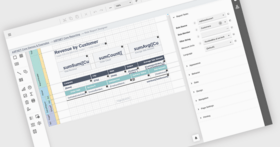
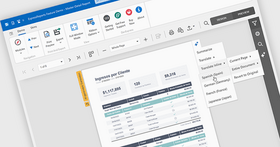
A reporting tool that features an extremely easy-to-use report designer - the XtraReports Suite is fully integrated into MS Visual Studio IDE so you customize reports like you customize your Windows Forms. You simply build an XtraReport class descendant either within the designer or via code. Other features include: large set of export formats including XLS, HTML and PDF; the ability to integrate reports into ASP.NET applications; several wizards simplifying the report construction process; numerous built-in native controls including rich text box, bar code, zip code and charts; the ability to print 3-rd party Windows Forms controls; master-detail and sub-report support; fully functional end-user designer; multi-column reports, and much more.
XtraCharts Suite
A 2D/3D charting solution for both Windows Forms and the Web. Regardless of platform or chart type, you are free to customize each aspect of data representation – from axes and diagram backgrounds to legend and titles. The XtraCharts Suite offers multiple built-in coloring schemes for all charts types and natural lighting with full smoothing support for 3D charts. You simply provide data and automatically get a perfect visualization.
ASPxGridView and Editors Library
A robust Grid and Data Editors Library for ASP.NET. With 18 individual components, the ASPxGridView and Editors Library gives you the ability to deliver robust and user-friendly web applications.
ASPxPivotGrid Suite
A multi-dimensional analysis component library for ASP.NET 2. The ASPxPivotGrid allows you to deliver fully configurable visual reporting solutions so that your end-users can mine and analyze their data with ease. The ASPxPivotGrid is both dynamic and fully configurable and is certain to improve your productivity and significantly improve the effectiveness of data centric applications.
ASPxNavBar Suite
Web navigation bar with full AJAX support, numerous link layout options and total appearance customization capabilities.
ASPxMenu Suite
Extremely lightweight, customizable and easy-to-use main and context menu controls for your web pages.
ASPxPopupControl
A component suite allowing you to easily add popup windows and advanced hints onto your web pages. It offers you numerous options for window arrangement customization and even automatic window popup and close-up in response to end-user actions. You also have full manual control over your popup windows on the client side.
ASPxTabControl Suite
AJAX-enabled tab or page control allowing you to build stunning navigation for your web applications.
ASPxSiteMapControl Suite
An easy-to-configure site map control with myriads of appearance customization options, automatic content generation possibilities and built-in design-time site map editor.
What's New in DXperience v2008 vol 2?
Common changes across all ASP.NET controls
Useful Classes for Client-Side Scripting - a new ASPxClientUtils class allowing you to easily perform typical client-side actions, including the following:
Determine web browser type
Work with arrays
Access an object's parent or child object
Obtain event parameters
Easily Transmit Data onto the Client -All DevExpress AJAX-enabled controls allow you to use callbacks to easily exchange data with the web server. Controls expose a JSProperties property, which allows you to declare custom properties for the client control. You can specify these property values on the server and then access them on the client...as you would with built-in properties.
Enabling/Disabling Controls and Control Elements on the Client Side - Previously, enabling or disabling a control or a particular control element required a round trip to the server. In v2008 vol 2 the ASPxEditors and ASPxperience Libraries allow you to change their enabled state or the state of their elements (e.g., tabs and menu items) on the client side, to reduce the number of round trips and increase web site responsiveness.
Distinguishing Between Callbacks and Postbacks - A new server-side IsCallback property has been added to our web controls. This property enables you to determine whether a control is taking part in callback processing.
Native Rendering for Data Editors - Some controls from the ASPxEditors Library (ASPxTextBox, ASPxMemo, ASPxListBox, ASPxComboBox and ASPxButton) can now be rendered as HTML INPUT elements. This allows you to enable native rendering for these elements to provide a Windows® style UI across your web site.
ASPxGridView and Editors Suite
LINQ Support Improvements -full support for data editing with three options that control whether end-users can edit cell values, add new records and delete existing rows.
Filter Row Menu - End-users can now select comparison operators to be used in filtering conditions.
New Comparison Operators - Five new built-in comparison operators are now available. They include the following: Greater Than, Greater Than or Equal, Less Than, Less Than or Equal, Not Equal.
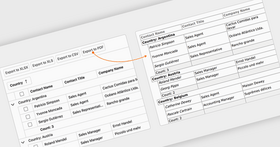
Master-Detail Export -ASPxGridView now allows you to export master-detail data. When exporting, you can use one of the following options:
Export only master rows
Export all master rows and all details
Export all master rows and only expanded details
Page Headers and Footers -When exporting a grid's data, it's now possible to customize the content of page headers and footers. Both headers and footers provide three sections - with left, centered and right alignment. Every section can contain arbitrary text as well as service fields displaying the current date, page number, user name, etc.
URL Export - In previous versions, hyperlinks were always exported as plain text – with this release, they are automatically exported in hyperlink format.
ASPxTreeList Suite
Built-In Data Editing UI -The ASPxTreeList Suite now fully supports data editing. To allow end-users to modify cell values, simply add a Command Column and display required command buttons (Edit, Insert, Delete). To provide user-friendly data input, the TreeList control now ships with eight different data column types, each providing a particular cell editor - check box, spin editor, combo box, etc. These editors are controls from our ASPxEditors Library shipped with the ASPxTreeList Suite.
Edit Form Layouts - When an end-user switches to edit mode, the ASPxTreeList can use one of the following UI solutions:
In-line Editing - in this mode, editors are simply embedded into data cells.
Edit Form - When switching to this mode, an edit form appears below or instead of the edited node. This form is represented by a table, which automatically arranges label-editor pairs. You can customize this table by specifying the number of its columns by changing column and row span values of individual label-editor pairs.
Edit Form Template - It's also possible to construct edit forms manually via templates.
Node Validation and Error Indication - The ASPxEditors Library implements an advanced data validation mechanism that can now be used when editing ASPxTreeList nodes. One way to use it is to enable client-side validation so that errors are immediately shown to end-users (this of course requires additional scripts to be loaded on to the client). Another way is to validate data on the server. Two built-in error indication options are available in this mode. You can display error icons next to the editors with invalid values, or display the error node below the edit form, or both.
Node Drag-And-Drop -End-users can now drag and drop nodes either within an ASPxTreeList, or from the ASPxTreeList to an external control. A single option needs to be changed to enable this functionality.
Data Export - The ASPxTreeList Suite v2008 vol 2 supports data export to PDF, RTF and XLS formats.
ASPxHTML Editor
Integrated Spell Checker -The ASPxSpellChecker control has been integrated into the ASPxHTML Editor and thus enabled spelling validation in the editor's Design View. To check spelling, end-users can now simply press a built-in toolbar button.
Predefined Styles for Text Formatting - Previously, every toolbar button performed a very basic formatting operation – for instance, applying bold or italic formatting, changing background color, etc. Now you can create buttons that change multiple style attributes at once. This is extremely useful if end-users need to highlight multiple text fragments using the same style settings. To enable this functionality, all you need is to create a custom CSS style and expose it via a toolbar's specially designed dropdown editor.
Responding to Focus Changes via Client-side Events - Newly implemented client-side events allow you to respond to focus received or lost by the editor's Design View. For instance, this enables you to implement client-side user input validation when an end-user tries to leave the editor.
Complete XHTML compliance -With this release, HTML code entered into the editor's HTML View can be automatically validated and transformed into the XHTML 1.0 Transitional compliant markup. As a result, the editor's content is always kept safe, since the editor removes all potentially harmful code - unknown tags and attributes, script elements, client-side event handlers and URLs with script content. Automatic validation also helps to keep HTML code validity by correcting invalid tag hierarchies and changing invalid attribute values. The editor exposes several options allowing you to control which automatic transformations are required. You can also update HTML code manually by handling an appropriate event.
ASPxScheduler Suite
Full Support for iCalendar Data Exchange Standard - DevExpress Scheduler controls simplify information transmission between different platforms by implementing iCalendar RFC 2445 standard support. The support for this format allows you to easily exchange scheduling data between your application and the most popular calendars - Apple iCal, Lotus Notes, Google Calendar, Novell GroupWise, and Windows Calendar. XtraScheduler and ASPxScheduler support the main set of elements included in the iCalendar standard. Tasks and journaling capabilities of RFC 2445, as well as descriptors and extensions specific for a particular calendar application, are to be implemented in future versions.
Zooming - Improved the usability of the controls with methods that imitate zooming of the current view. The ZoomIn method displays content in greater detail, while its counterpart, ZoomOut, displays a more general view. Zooming is implemented by adjusting the time scale or changing the number of visible weeks (in Month View).
New Services - In v2008 vol 2, three new services have been implemented: One of them allows you to determine the control's state, i.e. whether the modal form, popup menu or inplace editor is opened, if appointments are being resized or dragged, and if you can start a data refresh operation. Two other services can be used to customize textual representation of date-time values within the Time Ruler, headers, tooltips and appointments. Thus, end-users can specify different display formats for different visual elements within the Scheduler’s view. This allows you to provide a more user-friendly interface. All services are now available in the ASPxScheduler Suite as well as its WinForms counterpart, the XtraScheduler Suite.
Reminders Processing - The following reminder management enhancements have been implemented in v2008 vol 2:
Reminder functionality is now fully supported by the ASPxScheduler Suite.
Reminders can now be selectively ignored when triggering alerts, meaning that they can be invoked on a per-user basis.
Often, users run the application only to check for alerts. Now an application can trigger all alerts immediately on startup, to avoid delays.
XtraScheduler - Calendar Navigation Extensions - If you own the XtraBars Suite, you can now use two new extension components that enable easy calendar management. Simply drop these components onto a form and they will automatically add proper toolbars or Ribbon tabs to your existing navigation system, so that end-users can change the active view or navigate the calendar.
ASPxperience Suite
Obtaining Element Settings from Data Fields - With this release, controls (such as the ASPxNavBar, ASPxMenu and ASPxTabControl) expose properties allowing you to specify data fields from which items settings are to be obtained. Examples of settings that can be fetched from a data table are item tooltips, navigation URLs, image URLs, etc.
New Media Formats for Object Container - The list of supported video and audio types has been extended with QuickTime Video and QuickTime VR (virtual reality).
ASPxCallbackPanel Improvement - The panel's content can now remain visible during callback processing. Note that this behavior is optional – a loading panel is displayed by default.
What’s new in DXperience 2008 vol 1?
Rich Text Editor for ASP.NET 2.0 - This new control allows you to incorporate rich text editing capabilities into your web sites. This initial release implements all the basic text formatting features, fully supports embedded images and provides two text editing modes - WYSIWYG and HTML code editing. The user interface in this editor is built entirely with controls from the ASPxperience Suite, including a brand new ASPxUpload control used to embed images.
TreeView-Grid Hybrid for ASP.NET 2.0 - This new control combines the capabilities of tree and grid components. allowing you to build trees with arbitrary data layout within its nodes. Performance and lightweight rendering are the main features of all the web controls. As such, the ASPxTreeList Suite implements numerous performance optimization features - from callback-based data paging to loading child nodes on demand and even partial control update via AJAX callbacks. This initial release doesn't support data editing and can be used for data display and/or web site navigation, which will be enough for the majority of usage scenarios.
Spelling Checker for ASP.NET- The ASPxSpellChecker provides you a straightforward way in which to add Microsoft Office style spell checking capabilities into your next ASP.NET application. With this control, you need a single line of code to check text within an individual text editor or within all controls in a specified container. When an error is encountered, you can review it and take necessary actions using a Microsoft Outlook style dialog that is built with controls from the ASPxperience Suite and thus will seamlessly integrate into your application's UI.
Developer Express also introduced a common set of visual styles that are supported across the entire ASP.NET product line. In addition to these new controls, the following major changes are available to you:
XtraCharts Suite
New Spline Views - Eight in Total: 2D Spline View, 3D Spline View, 2D Spline Area View, 3D Spline Area View, 2D Stacked Spline Area View, 3D Stacked Spline Area View, 2D Full-Stacked Spline Area View, and 3D Full-Stacked Spline Area View
New XML Serialization
Medium Trust Support
Advanced Customization: Separate Titles for Pie and Doughnut Views; Display Text Patterns for Labels;Labels for Zero-Height Bars
ASPxGridView and Editors Suite
LINQ Server Mode - The ASPxGridView bound to a LinqDataSource web server control can now function in server mode. In this mode the grid fetches only those records that need to be displayed on-screen - giving you significant performance benefits against very large datasets.
Popup Edit Form
Various Data Export Enhancements
Various Template Enhancements
PartNumbers: PC-518396-162495 518396-162495 PC-518396-162501 518396-162501 PC-518396-162502 518396-162502 PC-518396-162503 518396-162503 PC-518396-162504 518396-162504 PC-518396-162505 518396-162505 PC-518396-162498 518396-162498
PurchaseOptions: DXperience ASP.NET v2008 vol 2 (V8.2.3) - Does not include source code 1 Developer License - Includes one year subscription, does not include source code , DXperience ASP.NET v2008 vol 2 (V8.2.3) - Does not include source code 2-5 Developer License - Includes one year subscription, does not include source code - price per license , DXperience ASP.NET v2008 vol 2 (V8.2.3) - Does not include source code 6-10 Developer License - Includes one year subscription, does not include source code - price per license , DXperience ASP.NET v2008 vol 2 (V8.2.3) - Does not include source code 11-15 Developer License - Includes one year subscription, does not include source code - price per license , DXperience ASP.NET v2008 vol 2 (V8.2.3) - Does not include source code 16-20 Developer License - Includes one year subscription, does not include source code - price per license , DXperience ASP.NET v2008 vol 2 (V8.2.3) - Does not include source code 21+ Developer License - Includes one year subscription, does not include source code - price per license , DXperience ASP.NET v2008 vol 2 (V8.2.3) - Does not include source code Subscription Renewal for one year
Resources: Read the Developer Express License Agreement, Download the DXperience v2006 Vol3 for Visual Studio 2002/2003 evaluation on to your computer - Expires After 30 Days, Download the DXperience v2008 vol 2 (V8.2.3) for Visual Studio 2005/2008 evaluation on to your computer - Expires After 30 Days
Operating System for Deployment: Windows Vista, Windows XP, Windows 2000
Architecture of Product: 32Bit
Product Type: Component
Component Type: ASP.NET WebForms, ASP.NET AJAX (ATLAS), .NET Class, 100% Managed Code, AJAX
Compatible Containers: Microsoft Visual Studio 2008, Microsoft Visual Studio 2005, Microsoft Visual Basic 2008, Microsoft Visual Basic 2005, Microsoft Visual C++ 2008, Microsoft Visual C++ 2005, Microsoft Visual C# 2008, Microsoft Visual C# 2005, .NET Framework 3.5, .NET Framework 3.0, .NET Framework 2.0
Product Class: Business Components
Search Items: New Product May 04, New Product June 04, New Product May 05, New Product June 05, New Product Sep 05
Keywords: validation validate Calendar calendaring calendars Scheduling Schedule Schedules Database DB Reporting Report reports planning plan scheduling schedule schedules scheduler User Interface Collections UI User Interface UI Toolbar tool bar tool-bar Toolbars Menu Menus Ribbon Ribbonbar Spelling spell spel speling check spellcheck Reporting Reports Report Product Suites Suite bundles bundle Print Preview Printing previews prints Treeview List tree view tree-view list-view listview listbox Grid Grids Table Tables DataGrid DataGrids Chart Charting Charts Graph Graphing Graphs Explorer exploring explore Developer Express devexpress Entry data-entry Enterprise Partner dxperience dexperience dx perience experience devexpress developer express webforms web forms form asp.net aspnet asp net
Autor
Categoría principal
Productos relacionados
Categorias relacionadas