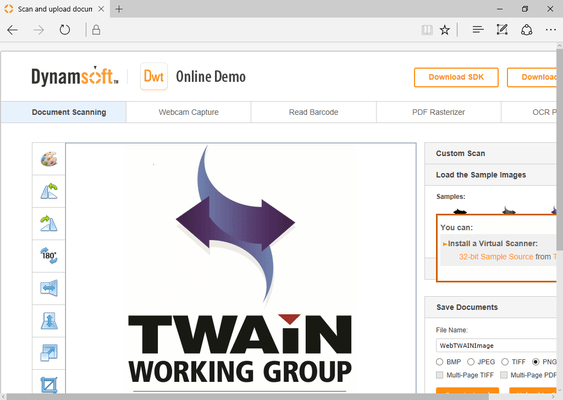
Screenshot Preview

Dynamic Web TWAIN

by Dynamsoft Corporation - 상품타입: Component / DLL

주의 : 별도의 안내가 없는 경우에는 영어제품 입니다.

*

Integrate TWAIN image capture with your Web applications. Dynamic Web TWAIN has many features specifically designed for your Web environment, such as upload and download images through FTP or HTTP protocol. Images can be displayed within Dynamic Web TWAIN directly, without exchanging image data between the ActiveX control and the img HTML tag, and the initial image can be downloaded from a Web server.


평균    1 리뷰.
$391.02
통화 선택

일반 적인 소비자 가격은 하기에 표시되어 있습니다. 고객님의 할인가격은 표시 하시려면 로그인 해주시기 바랍니다.

Dynamic Web TWAIN V6.3.1 - ActiveX Edition (32bit and 64bit)   *

주문 $ 391.02 1 Developer License (32-bit and 64-bit License)  * 다운로드 (6.8 MB)
주문 $ 78.20 1 Developer Subscription (includes support and free upgrades for 1 year) (32-bit and 64-bit License)  * 확인 다운로드 (6.8 MB)
주문 $ 489.02 1 Web Server License (32-bit and 64-bit License)  * 확인 다운로드 (6.8 MB)
주문 $ 97.80 1 Web Server Subscription (includes support and free upgrades for 1 year) (32-bit and 64-bit License)  * 확인 다운로드 (6.8 MB)

Dynamic Web TWAIN V6.3.1 - Plug-In Edition   *

주문 $ 293.02 1 Developer License  * 다운로드 (9.6 MB)
주문 $ 74.24 1 Developer Subscription (includes support and free upgrades for 1 year)  * 확인 다운로드 (9.6 MB)
주문 $ 391.02 1 Web Server License  * 확인 다운로드 (9.6 MB)
주문 $ 97.76 1 Web Server Subscription (includes support and free upgrades for 1 year)  * 확인 다운로드 (9.6 MB)
주문 $ 137.20 1 Developer License - Upgrade from any previous version  * 확인 다운로드 (9.6 MB)
주문 $ 137.20 1 Web Server License - Upgrade from Plug-In Edition any previous version 1 Intranet Web Server License  * 확인 다운로드 (9.6 MB)

Dynamic Web TWAIN V6.3.1 - Mac Edition   *

주문 $ 391.02 1 Developer License  * 다운로드 (1.9 MB)
주문 $ 78.20 1 Developer Subscription (includes support and free upgrades for 1 year)  * 확인 다운로드 (1.9 MB)
주문 $ 587.02 1 Web Server License  * 다운로드 (1.9 MB)
주문 $ 117.40 1 Web Server Subscription (includes support and free upgrades for 1 year)  * 확인 다운로드 (1.9 MB)
주문 $ 881.02 Bundle (1 Developer License & 1 Web Server License)  * 다운로드 (2.0 MB)
주문 $ 176.20 Bundle Subscription - 1 Developer License & 1 Web Server License (includes support and free upgrades for 1 year)  * 다운로드 (1.9 MB)

Dynamic Web TWAIN V6.3.1 - Bundle   *

주문 $ 1,077.02 ActiveX Edition 32-bit/64-bit & Plugin Edition (1 Developer License & 1 Web Server License)  * 다운로드 (16.8 MB)
주문 $ 1,567.02 ActiveX Edition 32-bit/64-bit & Plugin Edition & Mac Edition (1 Developer License & 1 Web Server License)  * 다운로드 (19.4 MB)

가격에는 ComponentSource의 기술지원 요금이 포함되어 있습니다. 또한 다운로드 판매를 하고 있는 상품의 대부분은 온라인 백업요금이 포함되어 있어서 구입날로부터 30일 이내에 새로운 버전이 발매된 경우 무료로 업그레이드해 드리고 있습니다.  모든 주문에 대해서 당사표준 계약조건 반품조건 의 내용이 적용됩니다. 다음의 경우,고객 서비스로연락하시기 바랍니다. (상기의 리스트에 게재되지 않은 대량의 라이센스나 구 버전 등의 라이센스 옵션이 필요한 경우)

일반 적인 소비자 가격은 상기에 표시되어 있습니다. 고객님의 할인가격은 표시 하시려면 로그인 해주시기 바랍니다.

 *

What's new in Dynamic Web TWAIN V6.3.1?

  • Improved the memory management for ActiveX 64-bit Edition.
  • Added LogLevel property to capture more exceptions.

What's new in Dynamic Web TWAIN V6.3?

  • Support both 32-bit and 64-bit TWAIN binaries (ActiveX Edition only)
  • Support for Firefox 4
  • Added the OnPostLoad event which is triggered after executing LoadImage/LoadImageEx
  • Optimized the LoadDibFromClipboard method
  • Optimized image editor

What's new in Dynamic Web TWAIN V6.2?

  • Support TWAIN Specification 2.1.
  • Compatible with Data Execution Prevention (DEP) and Protected Mode.
  • Added Windows Authentication and Basic Authentication support for Plug-in Edition.
  • You can now install the ActiveX control to your personal folder.
  • Added IfShowFileDialog property to show the browse dialog box when loading and saving images.
  • Added IsBlankImageEx method to detect whether a certain area on an image is blank.
  • Added SaveSelectedImagesToBase64Binary to save selected images to base64 binary.
  • Added LoadImageFromBase64Binary to load images from a base64 byte array.
  • Added support for fitting the selected image to the width or height of the window. Added properties: FitWindowType .
  • Added support for getting general info of a scanned image, including image width/height and bit depth. Added methods: GetImageBitDepth , GetImageWidth and GetImageHeight
  • Added IfShowPrintUI to set whether to display the user interface of the printer.
  • Support more models of Canon scanners.

What's new in Dynamic Web TWAIN V6.1?

  • Simplified installation process for Chrome, Safari, Opera users
  • Now supports simple annotations
  • Now supports forms authentication
  • Now support certificate binding
  • Added session/cookie support for Plug-in Edition
  • Added the ability to remove selected images

What's new in Dynamic Web TWAIN V6.0?

  • Now supports Firefox 3.6
  • Chrome, Opera, Safari on Windows now supported (Plug-in Edition).
  • Added barcode detection
  • Added multiple images selection
  • Added saving images to a byte array
  • Added loading an image from a byte array
  • Added uploading multiple images as a multipage PDF/TIFF file
  • Supports setting board color for selected images
  • Supports FTP passive mode
  • Supports specifying the field name when uploading through HTTP POST
  • Added rotating images by a specified angle
  • Added cutting the image data in the specified area to the system clipboard in DIB format
  • Added clearing the specified area of an image and filling the area with a color

What's new in Dynamic Web TWAIN V5x?

  • PDF and multi-page PDF support added. You can now save the scanned documents to local disk or upload to web server in PDF format
  • HTML form manipulation support added. You can now add fields to the HTML form to have additional information for web server before uploading the scanned images to the web server
  • Image preview mode added. You can view the scanned images in the preview mode, like 1 by 2, 2 by 2. This feature helps you have better overview of your images when you have multi-page document
  • Image upload progress bar and cancel option added. You can use the built-in progress bar or your own progress bar for the upload. Cancel option is also provided
  • Download from HTTP stream support added. You do not need to create temp files at server side for download
  • More user interaction features added. Several mouse events are added

What's new in V4.2?

  • Dynamic Web TWAIN ActiveX is now digitally signed by VeriSign

What's new in V4.1?

  • Image Editor added: Can be used for image editing and viewing. Supports basic image editing features including Rotate, Crop, Mirror, Flip and ChangeImageSize
  • Added methods for Image Editor: RotateLeft(), RotateRight(), Mirror(), Crop(), CropToClipboard(), GetImageSize(), ChangeImageSize(), ShowImageEditor()
  • Added properties for Image Editor: ImageEditorWindowTitle, ImageEditorIfReadonly, ImageEditorIfEnableEnumerator
  • Other methods added: LoadDibFromClipboard(), GetDefaultImageLayout(), GetImageLayout(), ResetImageLayout(), SetImageLayout()

 *

Dynamic Web TWAIN enables you to acquire images from any TWAIN compatible devices it supports both ActiveX and Plug-in. With the carefully designed interface, and the built-in wizard mode, Dynamic Web TWAIN is very easy to use. You can typically do your TWAIN job in several lines of code. At the same time, Dynamic Web TWAIN is compatible with TWAIN V1.9 specifications and has a built-in TIFF, JPEG and PNG encoder and decoder.

With Dynamic TWAIN you can control any scanner, digital camera or capture card if it has a TWAIN driver. High-level acquisition support is provided for ease of use, and low-level functionality is provided for flexibility and control in even the most demanding applications.

Dynamic Web TWAIN has many features specifically designed for web environment, such as uploading and downloading images through FTP or HTTP protocol. Benefits include:

  • Compatible with Internet Explorer
  • Compatible with Netscape, Firefox, Mozilla, and other browsers, if it supports plug-in
  • Supports all 32-bit Windows operating system, including Windows 95, 98, ME, 2000, NT, XP, 2003
  • Reduced web page load time. The size of distribution file is only 115k. It takes seconds to be downloaded and installed
  • Reduced image upload time. Dynamic Wed TWAIN supports major compression methods, including JPEG, TIFF and PNG
  • Improved customer confidence. Absolutely no local file operation required
  • SSL image download/upload supported
  • Proxy supported. There is no need for customer to reconfigure their firewall

Main features:

  • Both ActiveX and Plug-In are supported. Compatible with Internet Explorer, Mozilla, NetScape, FireFox and many other browsers
  • Multi acquired images can be buffered, viewed and managed locally before being uploaded to web server
  • Developed directly with pure Win32 API and assembly language, which make Dynamic Web TWAIN
  • Small: no C/C++ run time library is used. Even with built-in JPEG, PNG, TIFF codec, the size of the CAB file is only 115K;
  • Fast: the core engine of the image processing part of the Dynamic Web TWAIN is optimized with assembly language;
  • Easy to distribute: absolutely no supporting DLL is needed for distributing
  • TWAIN specification 1.9 compatible
  • Supports BMP, JPEG, PNG, TIFF image formats
  • Supports RLE, G3, G4, LZW, PackBits TIFF compression
  • Strong internet support: downloading and uploading image through HTTP or FTP
  • Supports multi-page TIFF upload without any local file operation
  • Marked safe for initializing and scripting
  • Can be deployed in .NET environment as an unmanaged control
  • Can be used in any COM-enlightened program language, such as C#, VB.NET, Visual C++, Visual Basic, Delphi, HTML/VBScript/JavaScript, PowerBuilder and so on
  • Supports Native, Buffered Memory and Disk File image transfer modes
  • Both single page and multi-page TIFFs are supported
  • Built-in wizard mode manages the states of the TWAIN session intelligently and makes the Dynamic Web TWAIN easy to use
  • Built-in JPEG, PNG and TIFF encoder enables you to compress the acquired image no matter whether the TWAIN source has the capability
  • Sample code provided: C#, VB.NET, VC, VB, Delphi, HTML (VBScript, JavaScript)
  • Supports auto document feeder (ADF) and multiple images acquisition
  • Can set and read common device features through properties, such as: IfAutoFeed, IfAutoScan, Resolution, BitDepth, Brightness, Contrast, Unit, Duplex and so on

What are the differences between ActiveX and Plug-in? - The ActiveX edition can be used in Microsoft IE while the Plug-in edition can be used in Firefox, Chrome, Safari, Opera. If you are sure that your end user will use IE, then ActiveX edition is right for you. If you do not know which browser your end user will use, you may need both ActiveX and Plug-in editions.


주의

제품 리뷰의 한국어 번역이 완료되지 않는 제품은 Google통역 서비스와 연동되어 표시되어 있습니다.통역 기계에 의한 자동 번역인 관계로 한국어 표기가 조금 부자연 스러운 점 양해 바랍니다.
에서 제공
FireFox와 Opera에서는 Flash가 필요합니다.

상품검색

검색어를 입력해주세요:

Quick 링크

개발처/발매처

주요 카테고리

관련 상품

관련 카테고리

ComponentSource에서 구입하는 이유?

ComponentSource는 세계 1,000,000명 이상의 개발자에게 각종 글로벌 서비스를 제공합니다.

상세 | About Us

화면 바로가기 갤러리

클릭해서 이미지를 확대

 Dynamic Web TWAIN - DLL - V6.3.1의 스크린샷  Dynamic Web TWAIN - DLL - V6.3.1의 스크린샷  Dynamic Web TWAIN - DLL - V6.3.1의 스크린샷
Award Award