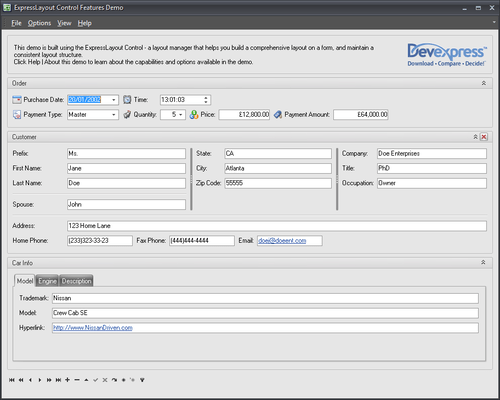
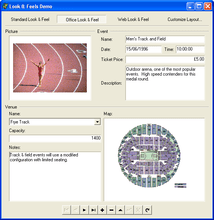
Screenshot Preview

ExpressLayout Control - Summary

by DevExpress (Developer Express) - Product Type: Component / VCL

Summary

ExpressLayout Control by DevExpress (Developer Express)

URLs: expresslayout-control, expresslayout control, expresslayoutcontrol, devexpress

Offer end-users complete control over the layout and appearance of your Delphi and C++Builder applications. ExpressLayout Control is a native VCL component that provides a new way to design and manage your Windows forms. With ExpressLayout Control, you can construct forms with full runtime customization, allowing end-user to tailor the appearance of your user interface to suit their individual needs. At the heart of the ExpressLayout Control lies a basic concept, you build a layout using 'items', from control containers providing automatically aligned labels to auxiliary items, such as splitters. With ExpressLayout Control, you are freed from manual, pixel-by-pixel positioning of individual controls and liberated from runtime screen resolution problems so common in Delphi/C++ Builder applications. ExpressLayout Control with Source Code Licenses available.


The ExpressLayout Control represents a radical new way to develop and maintain applications with highly evolved and complex interfaces. It is both a developer productivity tool and an end-user customization tool.

Users often have use for only a small portion of the power an application provides. This small portion, however, varies significantly from one user to another. This results in applications that have extremely complex data entry screens with little or no customization ability for the user. In other words, a user’s screen is often cluttered by controls that have little or no use within a given organization.

The extensive customization features of the ExpressLayout Control give you all the tools you will need to combat UI bloat - and it will place power back into the hands of each individual user - in a manner that has never been available before in any programming environment. This is accomplished by allowing users to layout and manage their own UI - as their needs dictate - in a manner that suits their business requirements best - without seeking assistance from programmers or programmer oriented tools.

Among the features you will find in the ExpressLayout Control are:

Supports development of inductive user interfaces

Full Resolution Independence - Using Microsoft UI standards found in applications such as Outlook®

Comprehensive Design and Runtime Customization - Both developers and end-users can fully customize Windows forms via an intuitive docking system

Auto-Management - Control groups and individual control elements are automatically managed by the Layout Control. You never worry about pixel-by-pixel positioning

Unlimited Nesting - Control groups and control elements can be organized in a myriad of different ways - to give your application the functionality and ease of use it requires

Runtime Creation of Groups - Users can add groups as they wish

Intricate UI Control - From the manner in which captions are displayed, to the offsets between individual UI elements - to hot-tracking - Everything is under your control

MS Money® Style UI - You can build Windows forms that look and behave like those found in MS Money

Vertical and Horizontal Orientation

Full Persistence - ExpressLayout Control supports full persistence - You can save settings to the Registry, INI file, and to a Stream

Style Support - Visual styles allow you to control the look and feel of your applications

What’s new in ExpressLayout Control v2011 vol 1?

Layout Structure Inheritance - All layout elements can now be transferred to descendants of the layout control.

New Layout Settings - New options for tabbed groups. With these settings, you can customize a tabbed group’s appearance in various ways. Group buttons can be positioned either on the group's left or right side. You can specify padding for each side of a layout element. Once specified, padding can be quickly triggered by changing individual padding options.

Automatic tree expansion when dragging - In the Customization Form, a collapsed layout group is automatically expanded if a dragged layout element is positioned over the group's caption.

Automatic tab switching when dragging - When the Customization Form is in tabbed View, dragging a layout element over the Layout Tree View or Available Items tabs automatically switches panes.

Lock icon for layout groups - To ensure that end-users can see that a group is locked, the layout control displays a lock icon above the group's icon in the Customization Form.

Offer end-users complete control over the layout and appearance of your Delphi and C++Builder applications.

Pricing: ExpressLayout Control v2011 vol 2.3 with Source code 1 Developer License with Source code - includes 1 year subscription (updates and upgrades for 1 year), ExpressLayout Control v2011 vol 2.3 with Source code 1 Developer with Source code Subscription Renewal (updates and upgrades for 1 year)

Evals & Downloads: Read the Developer Express License Agreement - Requires Acrobat Reader, Download the Developer Express VCL product demonstration on to your computer, Download the Developer Express VCL v2011 vol 2.3 evaluation on to your computer - Displays Nag Screens

Operating System for Deployment: Windows 7, Windows Vista, Windows XP, Windows 2000, Windows NT 4.0

Architecture of Product: 32Bit, 64Bit

Product Type: Component

Component Type: VCL

Compatible Containers: Embarcadero RAD Studio XE2, Embarcadero RAD Studio XE, Embarcadero RAD Studio 2010, CodeGear RAD Studio 2009, C++Builder XE, C++Builder 2010, C++Builder 2009, C++Builder 2007, Delphi XE, Delphi 2010, Delphi 2009, Delphi 2007 for Win32, Delphi 7.0

Product Class: User Interface Components

Keywords: devexpress layout, devexpress layout control, expresslayout, expresslayout control, expreslayout, expresslayout control with source, expresslayout upgrade, buy expresslayout, expresslayout renewal

devexpress, developer express, dxperience, devexpress.com, devexpress controls, devexpress download, www.devexpress.com, devexpress dxperience, devexpress suite, devexpress components, devexpress tools, devexpress universal, devexpress upgrade

User Interface UI

Resizing resize resizes size sizing scaling scale

Part numbers: PC-512161-384130 512161-384130 PC-512161-384292 512161-384292

Product Search

Enter search words:

Why buy from ComponentSource?

ComponentSource offers a unique global service, used by over 1,000,000 software developers worldwide.

More Info | About Us

Screenshot Gallery

Click for full screen preview

Screenshot of ExpressLayout Control - VCL - v2011 vol 2 Screenshot of ExpressLayout Control - VCL - v2011 vol 2 Screenshot of ExpressLayout Control - VCL - v2011 vol 2
Award Award