Screenshot Preview

Express Quantum Grid Suite - Resumen

de DevExpress (Developer Express) - Tipo de producto: Componente / VCL

 *

New licenses can only be purchased as part of Developer Express VCL Subscription or DXperience and VCL Subscription Bundle

If you require information, please visit the pages above or Contact Us for pricing and availability.

Resumen

 *

Express Quantum Grid Suite by DevExpress (Developer Express)

URLs: expressquantumgrid, devexpress

Add grid, treelist and data editor functionality to your applications. ExpressQuantumGrid Suite is an advanced Grid, TreeList, and Data Editors Library for Delphi and C++Builder. Written from the ground up, ExpressQuantumGrid Suite is 100% native VCL and is specifically designed to help you create professional applications, deliver rich features to your end-users, and gain a competitive advantage - all without writing a single line of source code. ExpressQuantumGrid Suite includes QuantumGrid, GridPopupMenu, GridViewRepositiory and more. ExpressQuantumGrid Suite gives you great data source flexibility when displaying data within the QuantumGrid. Whether it is a dataset from Borland or Third-Parties, file systems, registry entries, INI files, or application object properties - all can be used as a data source for QuantumGrid. ExpressQuantumGrid Suite with Source Code price options available. TcxGrid is the current name for ExpressQuantumGrid, ExpressQuantumGrid v3 was called TdxDBGrid. cxgrid is a short form of TcxGrid.


ExpressQuantumGrid Suite is one of the most capable Grid and Data Editors Library ever created for Delphi and C++ Builder. With ExpressQuantumGrid Suite, you can create visually stunning interfaces and deliver incredible features/flexibility to your end users - without writing a single line of code.

From standard two-dimensional tables, to runtime grouping and column customization; from master/detail relationships, to card views; from XP themes to unbound mode the ExpressQuantumGrid Suite has been engineered to fully address your development requirements and help you compete and win in the marketplace - without compromise or hassles.

ExpressQuantumGrid Suite has been written completely new to make full use of new possibilities in the software-development-community as technologies aren’t static. TcxGrid is the current name for ExpressQuantumGrid, ExpressQuantumGrid v3 was called TdxDBGrid. cxgrid is a short form of TcxGrid.

Features:

Multiple Data Modes - The ExpressQuantumGrid Suite allows you to bind data from a traditional data source (Data Aware Mode); from non-database sources (Unbound Mode); and from custom data structures (Provider Mode)

Fast Data Loading - With the advanced ExpressDataController - you can load 100,000 rows in a blink of an eye and group/sort against them just as fast

View Based Architecture - Every level in the QuantumGrid can be represented by a different view (grid, card). Views can even be changed on the fly

Master/Detail - Developer Express was the first VCL component vendor to offer a Master/Detail grid with integrated data grouping - ExpressQuantumGrid Suite v4 has improved on the past, and given you the ability to display master/detail information in tabular or card format - with ease

Automatic Data Grouping - Without writing a single line of code. Just set a property and you are on your way to enabling an extremely powerful data viewing and manipulation metaphor inside your applications. When in grouped mode, the ExpressQuantumGrid does not display information in a Read-Only state. Grouping is available at all grid levels and is performed at lightning speeds with an ultra-low memory footprint

Automatic Sorting Against an Unlimited Number of Columns - The ExpressQuantumGrid allows you to sort against one or more columns without writing a single line of code

Banded/Stacked Columns - When screen real estate is at a premium, you can use banded columns to maximize the number of columns visible to your end-users

CardView - Like MS Outlookyou can display data within the QuantumGrid Suite using a card layout format

Instant Runtime Summaries for All Grouped Nodes - Without writing a single line of code. You can summarize information and eliminate the need to write complex banded reports using a traditional report writer

Instant Runtime Summary Footers - Without writing a single line of code. You can create compelling grid displays and allow your application to become a data-analysis engine

Automatic Runtime Column Selection - With the Quantum Grid your end-user can easily customize the columns visible on-screen with intuitive drag and drop, just as they can in MS Outlook

Built-in MS ExcelStyle Data Filtering - With the QuantumGrid, you can quickly add column data filtering without writing a single line of code

Fixed Bands and Columns - Easily fix columns and bands to the left or right side of the QuantumGrid

Built-in XP Theme Support - With the ExpressQuantumGrid Suite, you can quickly enable XP Themes within your application

Advanced Style Controller - Styles control the display of the visual elements which make up the grid (headers, group panel, odd/even/detail rows, footers, etc). By using our unique style sheet technology, you can easily manage the style associated with each grid element. In fact, by using our Styles repository, you can control the appearance of all grids and editors within your application from a centralized location without any hassles

Auto Preview Pane - Similar to MS Outlook

New Record Row - Using the New Record Row, you can provide a consistent place where users can add information to the grid

MS Intellimouse Support

Easy to Use Design Time Interface - The ExpressQuantumGrid Suite provides advanced design time features that allow you to control virtually every aspect of the grid without having to write a single line of code so you can focus on application logic and not have to fuss with grid setup

Intelligent Scroll Bar

Custom Row Height - Need to set specific row height? The QuantumGrid makes it a snap

Standard and Extended Multi-Select Support - CTRL and SHIFT Key

Save to Registry, INI Files, and Stream - With just a couple property settings, all runtime modifications made by end-users are automatically stored and retrieved each time a user executes your application

Export to XML, MS ExcelHTML, Text

Over 35 Powerful and Innovative Data Editors, available as standalone and Inplace Cell variants

Complete Custom Draw Support

Incremental Search for each Column - Your users can instantly locate any information displayed within individual columns without the need to scroll the entire contents of the grid

Multiple Editor Types for Each Grid Column - Flexibility is at the heart of the QuantumGrid Suite. Via the Multi-Editor support, you can display multiple editors for the same grid column with ease

Built-in Menus for Common Grid Functions

Advanced Mask Support - ExpressQuantumGrid Suite introduces full regular expression support.

Printing Support via the ExpressPrinting System

Localization Support - ExpressQuantumGrid Suite v4 includes advanced localization support, allowing you to modify resource strings at runtime via a simple procedure call

What’s new in ExpressQuantumGrid Suite v2011 vol 1?

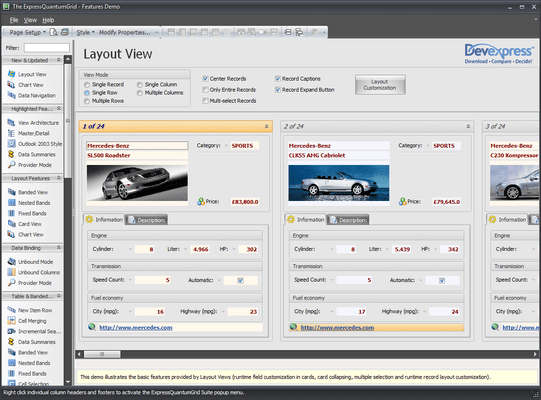
Layout View - In Layout View, data records are displayed as cards. This new View extends the Card View, in that it gives end-users the ability to visually remodel card structure via drag-and-drop operations. In customization mode, end-users can manually rearrange card rows within cards. You can combine card rows into layout groups. You can span card rows over neighboring rows and layout groups. You can also add auxiliary layout elements (empty regions, separators and labels) to the card from the Customization Form.

New Chart View Options - This release includes enhanced Chart Views and new Chart View options: Area Diagram, Stacked Area Diagram, Line Diagram, Stacked Bars/Columns, Full-Stacked, Bars/Columns, Side-by-Side Stacked Bars/Columns and Side-by-Side Full-Stacked Bars/Columns

Chart diagram features - Missing values can be displayed as either empty points or zero values. It includes transparency support for filled diagrams (requires the Microsoft GDI+ Library) and antialiasing. For a better-looking chart, you can enable a smoothing option (requires the Microsoft GDI+ Library)

Locked View Image - For time-consuming operations, such as bulk data updates, the grid can optionally display a "Locked View" image informing end-users that the View is awaiting updates.

New "Group By" Panel Layout - The "Group By" panel provides two options to display dropped column headers. The first uses a standard layout, in which headers are shown hierarchically. In the new layout, column headers are aligned horizontally, taking up less space vertically.

Grid Navigator Enhancements - The Grid Navigator is equipped with an "Info Panel" section. This panel displays information about the total number of records and the focused record's position within the recordset.

Multi-Line Editor Autosizing - In-place editor sizing. In the edited data cell, an editor is sized vertically to populate entered content. When the end-user has completed data editing, the height of the edited row is automatically changed to fit the new data.

Alternate Hints for Column Headers - As an alternative to the default hint, you can provide any explanatory text specific to the column within the hint window. This hint can be displayed even when the column caption is not clipped.

Data Export Enhancements - The QuantumGrid supports export to the XLSX (Microsoft Excel 2007 and higher). When using new export routines, image format in the final output is the same as that defined in the grid.

Filtering Enhancements - Incremental filtering mode for the Filter Row has been extended with a “deferred update” option. If this option is enabled, the View will be updated after a specified delay. This behavior allows an end-user to make several changes within the Filter Row (to create a more complete filter) before applying the entered filter criteria. When filtering large amounts of data, the deferred update option will reduce the amount of work being done and the number of filter requests generated compared to filtering the data with each keystroke.

Add grid, treelist and data editor functionality to your applications.

ExpressQuantumGrid Suite Upgrade Policy

Need to buy an ExpressQuantumGrid Suite Upgrade?

ExpressQuantumGrid Suite Upgrades are available. You can buy an ExpressQuantumGrid upgrade at a discounted price for your ExpressQuantumGrid v3, ExpressQuantumGrid v4 or ExpressQuantumGrid v5. No upgrade discounts are available for ExpressQuantumGrid v2 or ExpressQuantumGrid v1 customers.

If you need to upgrade your existing ExpressQuantumGrid License to a ExpressQuantumPack or a Developer Express VCL Subscription License, please contact us for pricing and availability.

Feel free to contact us if you have any questions about upgrading your ExpressQuantumGrid License.

ExpressQuantumGrid Suite includes the following products:

ExpressQuantumGrid Components: QuantumGrid, GridPopupMenu, GridViewRepositiory

In-Memory Dataset: MemData

Shared Components: LookAndFeelController, PropertiesStore, StyleRepository, ImageList, Localizer, Common Controls,EditRepository, EditStyleController, DefaultEditStyleController, HintStyleController, Filter, DB Filter, Button, GroupBox, Header, ListView, Multi Column ListBox, Spin Button, Splitter TreeView,

Editors (Unbound): TextEdit, MaskEdit, RichEdit, MemoEdit, DateEdit, ButtonEdit, CheckBox, Image, ComboBox, SpinEdit,ComboBox, CalculatorEdit, HyperLink Edit, TimeEdit, CurrencyEdit, ImageEdit, BLOBEdit, MRUEdit, PopupEdit, Lookup, ComboBox,Extended Lookup (shipped with the QuantumGrid), RadioGroup, ListBox, Radio, Button, Label, DataNavigator, Progress Bar, Track Bar, CheckListBox, ColorComboBox, FontName Combo, CheckComboBox, ShellCombo Edit (VCL only)

Editors (Data-Aware): DB TextEdit, DB MaskEdit, DB RichEdit, DB MemoEdit, DB DateEdit, DB ButtonEdit, DB CheckBox, DB Image ComboBox, DB SpinEdit, DB ComboBox, DB CalculatorEdit, DB HyperLink Edit, DB TimeEdit, Db CurrencyEdit, DB ImageEdit, DB BLOBEdit, DB MRUEdit, DB PopupEdit, DB Lookup ComboBox, DB Extended Lookup (shipped with the QuantumGrid), DB RadioGroup, DB Label, DB DataNavigator, DB Progress Bar, DB Track Bar, DB CheckListBox, DB ColorComboBox, DB FontName Combo, DB CheckComboBox, DB ShellCombo Edit (VCL only)

Shell Controls: Shell Browser Dialog, Shell TreeView (VCL only), Shell ListView (VCL only)

Tab Controls: PageControl, TabControl

Pricing: ExpressQuantumGrid Suite 12.2.5 1 Developer Subscription Renewal - for Subscriptions soon to expire or just expired (updates and upgrades for 1 year), ExpressQuantumGrid Suite 12.2.5 with Source code 1 Developer with Source code Subscription Renewal - for Subscriptions soon to expire or just expired (updates and upgrades for 1 year)

Evals & Downloads: Read the Developer Express License Agreement - Requires Acrobat Reader, Download the Developer Express VCL product demonstration on to your computer, Download the Developer Express VCL 12.2.6 evaluation on to your computer - Displays Nag Screens

Operating System for Deployment: Windows 8, Windows 7, Windows Vista, Windows XP, Windows 2000, Windows NT 4.0

Architecture of Product: 32Bit, 64Bit

Product Type: Component

Component Type: VCL

Compatible Containers: Embarcadero RAD Studio XE3, Embarcadero RAD Studio XE2, Embarcadero RAD Studio XE, Embarcadero RAD Studio 2010, C++Builder XE3, C++Builder XE, C++Builder 2010, C++Builder 2007, Delphi XE3, Delphi XE, Delphi 2010, Delphi 2007 for Win32, Delphi 7.0

Product Class: User Interface Components

Keywords: cxgrid, devexpress grid, devexpress delphi, quantum grid, quantumgrid, expressquantumgrid,devexpress datagrid, expressquantumgrid suite, devexpress quantumgrid, devexpress quantum grid, xpressquantumgrid, quantumgrid download, express quantumgrid, quantumgrid suite, xpressquantumgrid suite, tcxgrid, tdxdbgrid, quantum, express, grid, component, components

devexpress, developer express, dxperience, devexpress.com, devexpress controls, devexpress download, www.devexpress.com, devexpress dxperience, devexpress suite, devexpress components, devexpress tools, devexpress universal, devexpress upgrade

datagrid controls, datatable controls, datagrid components, datatable components, datagrid, data grid, data table, net gridview, net datagrid, data grid, grid control, net datatable, c# gridview, c# datagrid, asp.net datagrid, grid asp, vb.net datagrid

Entry data-entry

Part numbers: PC-511319-384226 511319-384226 PC-511319-384227 511319-384227

Atención

Para su comodidad, hemos incluido enlaces a Google Translate para traducir la información del producto que todavía tenemos que traducir. Por favor, tenga en cuenta que traducciones automáticas no siempre son totalmente exactas.
Con la tecnología de
Requiere Flash en Firefox y Opera

Búsqueda de productos

Escriba palabras de búsqueda:

¿Por qué comprar en ComponentSource?

ComponentSource ofrece un único servicio global, utilizado por más de 1.000.000 de desarrolladores en todo el mundo.

Más Información | Sobre Nosotros

Galería de capturas de pantalla

Haga clic para obtener una vista previa completa

Captura de pantalla ExpressQuantumGrid Suite - VCL - 12.2.5 Captura de pantalla ExpressQuantumGrid Suite - VCL - 12.2.5 Captura de pantalla ExpressQuantumGrid Suite - VCL - 12.2.5 Captura de pantalla ExpressQuantumGrid Suite - VCL - 12.2.5 Captura de pantalla ExpressQuantumGrid Suite - VCL - 12.2.5
Award Award Award