by DevExpress (Developer Express) - Product Type: Component / VCL
ExpressSpellChecker by DevExpress (Developer Express)
URLs: expressspellchecker, devexpress
Add spell checking to your VCL applications. ExpressSpellChecker provides you with a straightforward way to add Microsoft Office style spell checking capabilities into your next Windows application. ExpressSpellChecker offers you built in correction forms that replicate corresponding forms found in Microsoft Word and Outlook. Because these forms were built using the Developer Express ExpressEditors Library, they will seamlessly integrate into any application that uses Developer Express components. ExpressSpellChecker includes the ExpressEditors Library.

ExpressSpellChecker Features include:
Built-in support for Ispell and OpenOffice dictionaries.
Using the ExpressSpellChecker, you can check text in standard text editors.
If you use Developer Express text input controls, words that aren't in the dictionary can be underlined. The ExpressSpellChecker automatically checks spelling as you type, word by word. This is done in a separate thread without affecting UI responsiveness.
Plain text format custom dictionary support.
Dictionary dialogs allow end-users to add unrecognized words to a dictionary. As one would expect from this type of control, end-users can build a custom word list as their needs dictate.
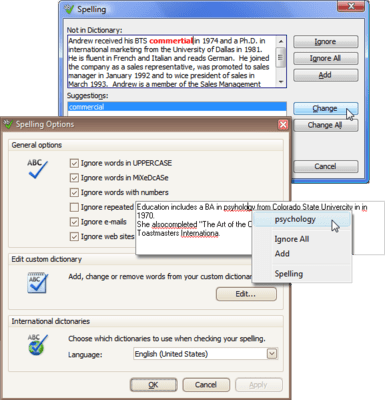
A choice of two error indication dialogs - both replicate dialogs found in Microsoft Office.
Pre-built Options editor.
Spell checker options allow you to ignore emails, URLs, mixed case/upper-case words, repeated words and words with numbers within them.
You can force the spell checker to start scanning the text from the current cursor position or to check the current selection first.
Error correction using a customizable built-in context menu.
The ExpressSpellChecker's API includes methods to check an arbitrary string, a text editor's content or all text editor controls within a specified container.
You can handle specially designed events to fully manage the spell checking process - including suppression of built-in forms, modification to suggestion lists, skipped words, manual error processing, etc.
What's new in ExpressSpellChecker?
New Hunspell Format Attributes
Complex Language Dictionary Performance Improvements
Add spell checking to your VCL applications.
Pricing: ExpressSpellChecker v2011 vol 2.3 with Source code 1 Developer License with Source code - includes 1 year subscription (updates and upgrades for 1 year), ExpressSpellChecker v2011 vol 2.3 with Source code 1 Developer with Source code Subscription Renewal (updates and upgrades for 1 year)
Evals & Downloads: Read the Developer Express License Agreement - Requires Acrobat Reader, Download the Developer Express VCL product demonstration on to your computer, Download the Developer Express VCL v2011 vol 2.3 evaluation on to your computer - Displays Nag Screens
Operating System for Deployment: Windows 7, Windows Vista, Windows XP
Architecture of Product: 32Bit, 64Bit
Product Type: Component
Component Type: VCL
Compatible Containers: Embarcadero RAD Studio XE2, Embarcadero RAD Studio XE, Embarcadero RAD Studio 2010, CodeGear RAD Studio 2009, C++Builder XE, C++Builder 2010, C++Builder 2009, C++Builder 2007, Delphi XE, Delphi 2010, Delphi 2009, Delphi 2007 for Win32, Delphi 7.0
Keywords: devexpress spell, devexpress spell checker, expressspellchecker, tdxspellchecker, expressspellchecker with source, expresseditors library
devexpress, developer express, dxperience, devexpress.com, devexpress controls, devexpress download, www.devexpress.com, devexpress dxperience, devexpress suite, devexpress components, devexpress tools, devexpress universal, devexpress upgrade
Spelling spell spel speling check spellcheck
Part numbers: PC-533016-384205 533016-384205 PC-533016-384855 533016-384855
ComponentSource offers a unique global service, used by over 1,000,000 software developers worldwide.