Tab Pro - ActiveX/DLL - V3.1 - Récapitulatif

par FarPoint Technologies - Type de produit : Composant / ActiveX OCX / DLL

Récapitulatif

Tab Pro - ActiveX/DLL - V3.1 by FarPoint Technologies

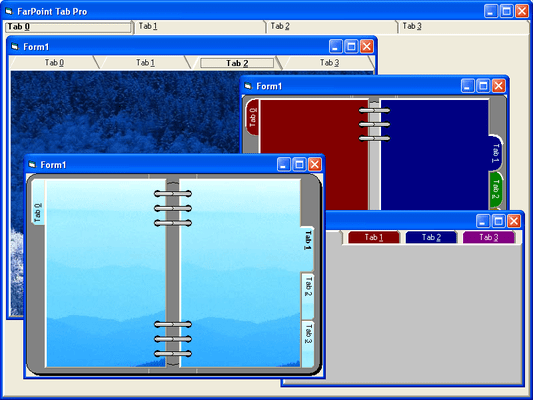
Add organized and professional user interfaces to your Windows applications. Tab Pro is an ActiveX tab component for displaying multiple pages of data within a tabbed interface. It includes seven appearance styles and numerous features for customizing your application's GUI, such as predefined appearance styles - including Notebook, Notecards, Notched, Worksheet, Personal Organizer, Property Pages, and Traditional. Also includes a 3D frame component.


The Tab Pro package offers a flexible, easy-to-use Tab component and a useful Imprint component that are both available as 16- and 32-bit DLL, VBX, and 16- and 32-bit ActiveX components. You can design the Tab component to look and act like a one- or two-page notebook, with a book binding that you can customize.

In addition, Tab Pro offers these new features:

ActiveX Components

The ActiveX components available with Tab Pro provide an enhanced design-time interface that includes property pages. ActiveX controls represent the next generation of custom omponents; they can be placed in diverse applications in many development environments. For more information about ActiveX components and the ActiveX components provided in Tab Pro, refer to Using ActiveX Components in the Help file below.

AutoStyles

Tab Pro comes with eight predefined AutoStyles that let you quickly create Tab components to use in a variety of applications. The available AutoStyles include a traditional file folder look, property pages, notecards, worksheets, and a personal organizer. For more information about AutoStyles, see Using Tab AutoStyles in the Help file below.

Tab Component

Choose from predefined appearance styles: Notebook, Notecards, Notched, Worksheet, Personal Organizer, Property Pages, Traditional

Define the number of tabs per row and the number of rows of tabs

Each tab can have multiple pages, creating a book chapter effect

Allow the text in the headers to wrap to multiple lines or allow the text to fit in one line, making different header widths Includes 35 properties for customizing the look and feel of the book's styles

Customize the tab's three-dimensional appearance by specifying the width and/or color of the inner and outer border Bind the tab captions to a database to display the field names

Display any number of tabs at one time using scrollable tabs

Position tab headers on the top, bottom, left or right side

Customize either or both header corners with one of the five corner shapes: chamfered, slanted, squared, or rounded Define the amount of separation between the tab headers

Insert and align pictures in the tab headers

Rotate header text in 90-degree increments

Specify one and two page book modes

Offset position of rows

Controlling the Tab's Behavior

Increase or decrease the number of tabs at design time or run time

Set the tab's three-d appearance to automatically reflect the current operating environment (Windows 95, Windows 3.1, Windows NT)

Increase the width or height of the active tab

Receive notification of active tab and active tab changes

Add, move or resize child controls at design time (Visual Basic) or at run time

Automatically size the tab control and its children (Visual Basic) to the parent object, making them video-mode independent

Allow your use to preview the tab's contents by holding down the left mouse button and dragging it across the tab headers

Animate how and how fast a page advances to the next page when selected

Apply background and foreground colors to the active tab, an individual tab, all tabs, the tab caption area, the tab client area, or the tab pages

Imprint Control

Create three-dimensional frames

Automatically size the component to its parent object

Display vertical and horizontal grid lines within the component

Display text within the optional grid area

Rotate text 90 degrees, 180 degrees, or 270 degrees

Bind the component to a database field

PartNumbers: PC-504586-72877 504586-72877 PC-504586-72879 504586-72879 PC-504586-72880 504586-72880 PC-504586-72878 504586-72878 PC-504586-72881 504586-72881

Publisher PartNumbers: TAB01 TAB02

PurchaseOptions: Tab Pro V3.1 1 Developer License , Tab Pro V3.1 4 Developer Team License , Tab Pro V3.1 6 Developer Team License , Tab Pro V3.1 Upgrade from V2.0x - Please Note: Requires the previous version , Tab Pro V3.1 Source Code Escrow Annual Subscription - (An Escrow Agreement will be sent to you for signature - please read Licensing section below)

Resources: Read the Tab Pro Readme help file, Read the Tab Pro help file, Download the Tab Pro V3.1 evaluation on to your computer - Expires after 30 days

Operating System for Deployment: Windows 98, Windows NT 4.0, Windows 95, Windows NT 3.51, Windows 3.X

Architecture of Product: 32Bit

Product Type: Component

Component Type: ActiveX OCX, DLL

Built Using: MFC V4.2 / V6.0

Compatible Containers: Microsoft Visual Studio 6.0, Microsoft Visual Studio 97, Microsoft Visual Basic 6.0, Microsoft Visual Basic 5.0, Microsoft Visual Basic 4.0, Microsoft Visual Basic 3.0, Microsoft Visual C++ 6.0, Microsoft Visual C++ 5.0, Microsoft Visual C++ 4.0, Microsoft Visual J++ 6.0, Microsoft Visual InterDev 6.0, CodeGear C++ (formerly Borland), Watcom C/C++

Product Class: User Interface Components

Keywords: User Interface UI FarPoint, fpoint Enterprise Partner tabpro FarPoint Technologies Tab Pro User Interface windows assistant friendly look style form application design visual OUTLOOK

Recherche produit

Entrez vos critères de recherche :

Galerie de copies d'écran

Award