by FMS - 상품타입: 어프리케이션
주의 : 이 제품정보에는 한글안내가 포함되어 있지 않습니다.
Control and manage your Access/Jet databases. Total Access Admin lets you quickly see who is currently logged into your database either directly or through linked tables. Databases can be password protected or secured through a workgroup file. You can also use Total Access Admin to prevent users from getting into a database, disconnect idle users, identify dropped connections, send messages to application users and other controls to manage your Access/Jet databases.
일반 적인 소비자 가격은 하기에 표시되어 있습니다. 고객님의 할인가격은 표시 하시려면 로그인 해주시기 바랍니다.
| 주문 | ₩ 252,300 | 1 User License | 다운로드 (3.8 MB) | |
| 주문 | ₩ 188,900 | 1 User Upgrade License from previous version | 확인 | 다운로드 (3.8 MB) |
| 주문 | ₩ 759,300 | 5 User License | 다운로드 (3.8 MB) | |
| 주문 | ₩ 569,200 | 5 User Upgrade License from previous version | 확인 | 다운로드 (3.8 MB) |
가격에는 ComponentSource의 기술지원 요금이 포함되어 있습니다. 또한 다운로드 판매를 하고 있는 상품의 대부분은 온라인 백업요금이 포함되어 있어서 구입날로부터 30일 이내에 새로운 버전이 발매된 경우 무료로 업그레이드해 드리고 있습니다. 모든 주문에 대해서 당사표준 계약조건 및 반품조건 의 내용이 적용됩니다. 다음의 경우,고객 서비스로연락하시기 바랍니다. (상기의 리스트에 게재되지 않은 대량의 라이센스나 구 버전 등의 라이센스 옵션이 필요한 경우)
일반 적인 소비자 가격은 상기에 표시되어 있습니다. 고객님의 할인가격은 표시 하시려면 로그인 해주시기 바랍니다.
What’s new in Total Access Admin 2007?
Monitor Your Microsoft Access/Jet Engine Databases in Real-Time
Can you see who is currently using your database? Can you identify workstations or users causing database corruption? How do you close a database for maintenance or backups when other users have it open? Do you want to automatically log off idle users? How do you communicate with your users in real-time?
Total Access Admin solves all these problems in one easy-to-use program. Simply start the program, point to your database. You now have complete control to:
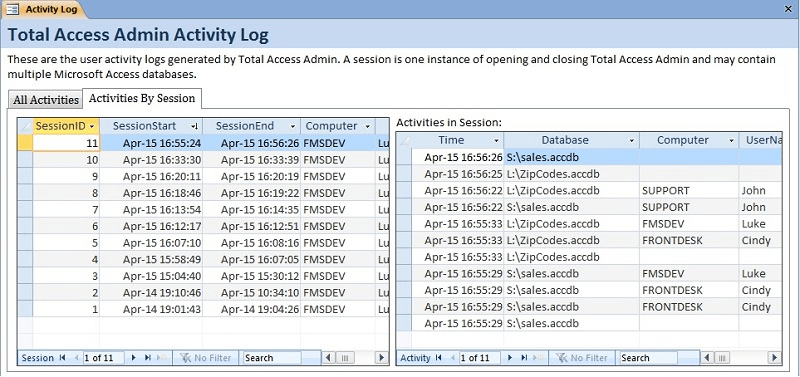
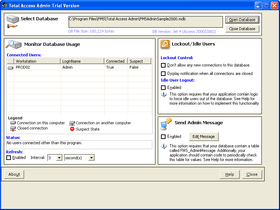
See who's in your database - Quickly see who is currently logged into your database either directly or through linked tables. Databases can be password protected or secured through a workgroup file. The machine name, their Access/Jet login name, and connection status are revealed. The latest version lets you log all the user connections and disconnects so you can record when people come in and out of the database. The information is stored in a table.
Prevent new connections to the database - This feature makes it easier than ever to prepare a database for backups, compact/repair, or other maintenance operations. Set at the Access/Jet database engine level, this option prevents new users from loading the database, giving you time to kick out the existing users. (This feature is supported in Jet 4.0 or later and is not available for Access 97 or earlier).
Automatically disconnect idle users - When a user leaves their computer on with your Access or Jet/VB database open, it can be impossible to get the database closed for maintenance until you track them down. Use Total Access Admin to automatically log users out of a database after a specified period of inactivity.
Compact database when all users exit - If you'd like, when all the users exit the database, Total Access Admin can get a full lock and compact the database.
Identify dropped or suspect connection - A dropped connection to an Access/Jet database can lead to database corruption. Total Access Admin identifies workstations or users who left the database in a suspect state. This can be invaluable for pinpointing a potential database corruption source. Not only can you use the log file to store when this occurs, you can also have Total Access Admin automatically compact the database once a suspect connection is detected and everyone else has exited.
Send messages to application users - Use Total Access Admin to communicate in real time with your application users. Simply type in a message and it appears in every instance of your application. Great for sending update or maintenance/log-out messages.