by FMS - Product Type: Add-In
Write and modify Access module code. Total Access CodeTools is the leading collection of tools for writing and modifying Access module code. Simplify your job of developing Access applications. This powerful collection of tools and utilities makes it easier to ship robust applications, quickly write solid code with Code Builders and standardize and clean up code (especially inherited projects you otherwise can't read).
Our regular prices are shown below. Please logon to see your discounted prices.
| Add to Cart | $ 293.02 | 1 Developer License | Download (1.3 MB) | |
| Add to Cart | $ 881.02 | 5 Developer License | Download (1.3 MB) | |
| Add to Cart | $ 195.02 | 1 Developer Upgrade License from previous version | Verify | Download (1.3 MB) |
| Add to Cart | $ 587.02 | 5 Developer Upgrade License from previous version | Verify | Download (1.3 MB) |
Our prices include ComponentSource technical support and, for most downloadable products, an online backup and a FREE upgrade to the new version if it is released within 30 days of your purchase. All sales are made on our standard Terms and Conditions and subject to our Return Policy. Please contact us if you require any licensing option not listed above including volume licensing and previous versions.
Our regular prices are shown above. Please logon to see your discounted prices.
Total Access CodeTools provides the features you need to create robust applications from beginning to end. After installing the program, you have a floating toolbar available while you develop your Access applications.
Code Cleanup
Code Cleanup takes existing code and standardizes it. It's great for cleaning up your old code and especially useful for taking over someone else's work. It applies your standards across all your modules by adding error handling, standardizing indentation, applying variable naming conventions, adding modules and procedure comments, and much more. Most importantly, you can add line numbers to every line of code so your error handler can pinpoint the exact line where a crash occurs. Use this tool on prototype code or inherited projects to quickly apply consistent standards. All parameters are fully user-configurable. Click Here for more information.
New Procedure Builder
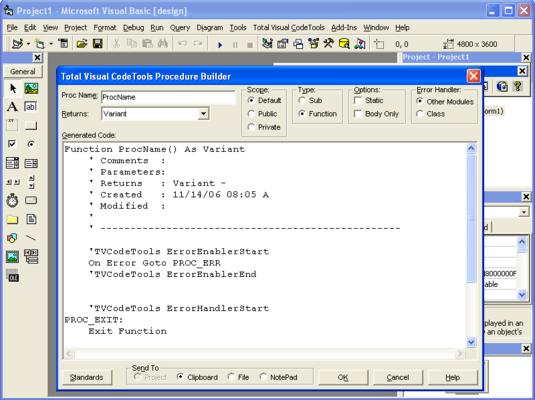
The Procedure Builder makes it easy to create new procedures that automatically contains all the important elements: A comment block, creation date information, error handling, and naming conventions. Just type in your new procedure name and Total Access CodeTools generates all the code for you. Then press a button and the new procedure is inserted into your module.
New Property Builder
The Property Procedure Builder does the same thing as the Procedure Builder, but is specifically designed to build Property Let/Set/Get procedures.
SQL Builder
The SQL Builder takes the SQL string out of any query in your database and converts it to VBA code with line continuation characters and word-wrapping on reserved SQL words such as SELECT, FROM, WHERE, etc.
Message Box Builder
The Message Box Builder makes creating MsgBox statement easy. Visually create your message box by selecting the icons, buttons, default button, title, message, and other options. Preview and test it. Total Access CodeTools takes care of the details including code to handle the response from the user.
Other Builders
The Select Case Builder and Long Text builder make inserting new code a snap.
Constants Generator
The Constants Generator generates the code to initialize constants naming each object in your database. A real must if you want to avoid hardcoding object names in your database code.
Bookmarker
BookMarker makes it easy to keep development notes and track tasks on specific objects in your database.
Access Information Tool
The Access Information Tool quickly displays all the settings and environment options for the current installation of Access and your database. Information on hardware and the operating system is also included to help solve your toughest debugging problems.
Database Tools
Database Tools give you a convenient launch pad for opening, designing, and copying database objects without having to hunt for the Access database window.