par FMS - Type de produit : Application
Veuillez noter que les informations sur les produits ne sont pas disponibles en français.
Easily deploy and maintain Access applications. Total Access Startup lets you ensure your users always use the correct version of Access, and automatically update the local copy of your database when you release a new version. Centrally manage your Access applications for everyone on your network.
Nos prix standard sont montrés ci-dessous. Veuillez vous connecter pour voir vos prix.
| Ajouter au Caddie | ₩ 760,300 | 1 Developer License Réf. Editeur : TASTR |
Téléchargement (10.1 Mo) |
Nos prix comprennent le support technique ComponentSource et, pour la majorité des produits téléchargeables, une sauvegarde en ligne ainsi qu'une mise à niveau GRATUITE si la nouvelle version est parue pendant les 30 jours consécutifs à votre achat. Toutes les ventes sont sujettes à nos Termes et Conditions standard à notre Politique de renvoi. Veuillez nous contacter si vous avez besoin d'une option de licence (licence de volume et versions précédentes) qui ne figure pas sur la liste ci-dessus.
Nos prix standard sont montrés ci-dessus. Veuillez vous connecter pour voir vos prix.
Start the right version every time
Upgrading Office but still need to run legacy Access applications? Total Access Startup guarantees that your users always launch the right version of Access with the right version of your Access database. Easily manage Access and your databases to ensure that users:
Start the Access version you specify
For example, your users will always run Access 97 with your Access 97 databases, regardless of the Access versions installed on their machine or what Windows considers the default for MDB files. Eliminate the need to convert your existing Access applications to later versions, while safely migrating to the newest version of Office.
Detect and run the latest version of your Access database
If desired, Total Access Startup automatically installs and updates your users local copy when you release a new version.
Extremely Simple Deployments
To deploy your Access application, simply send an email pointing to the shortcut that Total Access Startup generates, and youre done! Your users only need the right version of Access installed.
How Total Access Startup Simplifies Access
Total Access Startup always launches the correct version of Access with your database regardless of how many versions of Access are installed or what Windows considers the default for MDB files. Many environments require multiple versions of Access because the cost of converting old Access databases to the latest version of Access is unnecessary. With Total Access Startup, you can maintain your investment while easily supporting new Access versions. It knows how to find the correct version of Access even if its installed in a different directory on every machine.
If the user doesn't have the right version of Access installed on their machine, Total Access Startup displays a customized message showing the error along with your contact information. This gracefully handles the problem and prevents the user from inadvertently converting the database because the wrong version of Access is started.
If your users are running your application for the first time, Total Access Startup installs the database for them. If there are other files required, you can also launch a batch file or setup program.
When you update your database, your users local copy is automatically updated the next time they launch it. You can also launch a batch file or setup program if additional files need to be installed (different from what you run for the initial installation).
Everything is centrally stored so you can deploy your database consistently across all your users and easily manage it over time.
How Total Access Startup Works
Total Access Startup has two parts, Administrator and Startup.
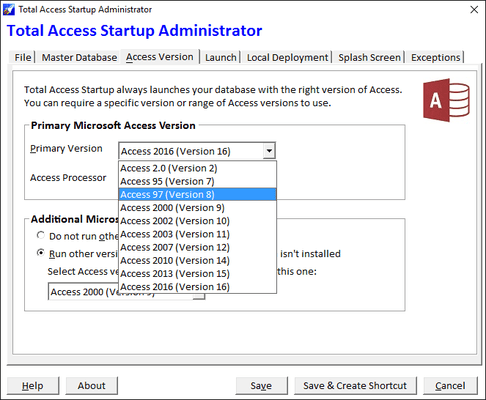
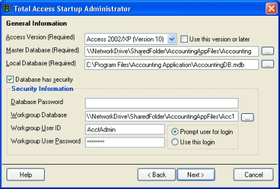
Administrator Program - lets you specify the Access version and database you want your users to use.
A Wizard lets you specify how your Access database is started and managed. You can specify:
When you complete the Wizard, Total Access Startup creates a small INI file and shortcut link in the network location you specify. The INI file includes your specifications, and the shortcut launches your database using these specifications.
Startup Program - A small executable (TAStart.exe) that that launches your database with the specifications selected in the Administrative program.
The shortcut, INI file, and Launcher reside on your network for your users to use. This Startup program has no dependencies and does not require your users to have anything installed on their machine other than a copy of Access.