Screenshot Preview

Total Access Startup

by FMS - 상품타입: 어프리케이션

주의 : 별도의 안내가 없는 경우에는 영어제품 입니다.

*

Easily deploy and maintain Access applications. Total Access Startup lets you ensure your users always use the correct version of Access, and automatically update the local copy of your database when you release a new version. Centrally manage your Access applications for everyone on your network.

$489.02

일반 적인 소비자 가격은 하기에 표시되어 있습니다. 고객님의 할인가격은 표시 하시려면 로그인 해주시기 바랍니다.

통화 선택 표시하고 있습니다. 전체 가격 | 리뉴얼 가격

Total Access Startup 2010   *

주문 $ 489.02 1 Developer License  *
메이커 제품 번호: TASTR
다운로드 (11.0 MB)
주문 $ 293.02 1 Developer Upgrade License  * 확인 다운로드 (11.0 MB)
주문 $ 1,469.02 5 Developer License  * 다운로드 (11.0 MB)
주문 $ 881.02 5 Developer Upgrade License  * 확인 다운로드 (11.0 MB)

Annual Premium Support Subscription   *

주문 $ 293.02 1 Support License  * 다운로드 (29 KB)
주문 $ 263.62 1 Support License Renewal  * 확인 다운로드 (29 KB)
주문 $ 979.02 5 Support License  * 다운로드 (29 KB)
주문 $ 881.02 5 Support License Renewal  * 확인 다운로드 (29 KB)

가격에는 ComponentSource의 기술지원 요금이 포함되어 있습니다. 또한 다운로드 판매를 하고 있는 상품의 대부분은 온라인 백업요금이 포함되어 있어서 구입날로부터 30일 이내에 새로운 버전이 발매된 경우 무료로 업그레이드해 드리고 있습니다.  모든 주문에 대해서 당사표준 계약조건 반품조건 의 내용이 적용됩니다. 다음의 경우,고객 서비스로로 연락 주시기 바랍니다. (대량의 라이센스나 구 버전 등의 라이센스 옵션이 필요한 경우)

일반 적인 소비자 가격은 상기에 표시되어 있습니다. 고객님의 할인가격은 표시 하시려면 로그인 해주시기 바랍니다.

 *

What's new Total Access Startup 2010?

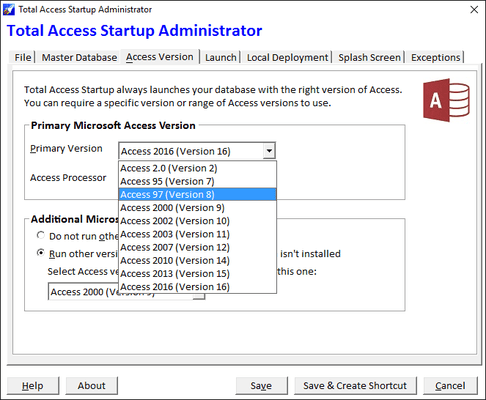
  • Microsoft Access 2010 Support - Total Access Startup originally shipped in 2003 for Microsoft Access 2003, and was followed by Total Access Startup 2007 for MS Access 2007. Total Access Startup 2010 builds on that with additional features to support Microsoft Access 2010:
  • Support for Microsoft Office Access 2010 32 and 64 bit Versions - Total Access Startup 2010 adds support for launching your MS Access databases using Microsoft Access 2010 while specifying whether to use the 32-bit version, 64-bit version, or either. Because of the significant differences between the 32 and 64 bit versions, your application may only run one or the other. With Total Access Startup 2010 you can make sure your users never launch it with the wrong version.
  • Supports All Multiple Access Database Formats - Support remains for all Access database formats including:
    • Microsoft Access 2007-2010 ACCDB formats
    • Microsoft Access MDB formats
    • Access Data Projects (ADPs)
  • Support Multiple Access Versions - Total Access Startup 2010 lets you specify a preferred Access version and older versions. For instance, you can specify Microsoft Access 2010 down to Access 2000. If the user has Access 2010 installed, it is launched. If not, it tries to find Access 2007, then Access 2003, etc. If it can't find that, your message for a missing Access version is displayed. This lets you support those with the latest version of Access immediately and those who haven't migrated. Of course, your database must support all the versions you specify. Conversely, you can specify an older Access version and any later versions and it will work in reverse.
  • Support New Operating Systems - Total Access Startup 2010 supports Windows 7 (32 and 64 bit versions), along with older Windows versions including XP, Vista, 2000, 98, 95, etc. Total Access Startup 2010 supports all operating systems that work with Microsoft Access.

 *

Start the right version every time
Upgrading Office but still need to run legacy Access applications? Total Access Startup guarantees that your users always launch the right version of Access with the right version of your Access database. Easily manage Access and your databases to ensure that users:

Start the Access version you specify
For example, your users will always run Access 97 with your Access 97 databases, regardless of the Access versions installed on their machine or what Windows considers the default for MDB files. Eliminate the need to convert your existing Access applications to later versions, while safely migrating to the newest version of Office.

Detect and run the latest version of your Access database
If desired, Total Access Startup automatically installs and updates your users local copy when you release a new version.

Extremely Simple Deployments
To deploy your Access application, simply send an email pointing to the shortcut that Total Access Startup generates, and youre done! Your users only need the right version of Access installed.

How Total Access Startup Simplifies Access
Total Access Startup always launches the correct version of Access with your database regardless of how many versions of Access are installed or what Windows considers the default for MDB files. Many environments require multiple versions of Access because the cost of converting old Access databases to the latest version of Access is unnecessary. With Total Access Startup, you can maintain your investment while easily supporting new Access versions. It knows how to find the correct version of Access even if its installed in a different directory on every machine.

If the user doesn't have the right version of Access installed on their machine, Total Access Startup displays a customized message showing the error along with your contact information. This gracefully handles the problem and prevents the user from inadvertently converting the database because the wrong version of Access is started.

If your users are running your application for the first time, Total Access Startup installs the database for them. If there are other files required, you can also launch a batch file or setup program.

When you update your database, your users local copy is automatically updated the next time they launch it. You can also launch a batch file or setup program if additional files need to be installed (different from what you run for the initial installation).

Everything is centrally stored so you can deploy your database consistently across all your users and easily manage it over time.

How Total Access Startup Works
Total Access Startup has two parts, Administrator and Startup.

Administrator Program - lets you specify the Access version and database you want your users to use.

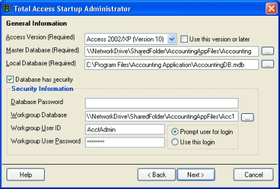
A Wizard lets you specify how your Access database is started and managed. You can specify:

  • The Access version to run (e.g. Access 95, 97, 2000, 2002/XP, or 2003) including runtime versions
  • The database to run and the startup macro (if any)
  • The location of the database on the network
  • The location of the database installed on the users machine (if desired)
  • The name of the field in the database that identifies its version (ensures that the local database is always in sync with the master)
  • The setup program or batch file to run when the database is created on the local machine (useful the first time the launches the application)
  • The program or batch file to run when the local copy is updated (in case you need to install other files, such as ActiveX controls)
  • Your contact information if your user cant start the program

When you complete the Wizard, Total Access Startup creates a small INI file and shortcut link in the network location you specify. The INI file includes your specifications, and the shortcut launches your database using these specifications.

Startup Program - A small executable (TAStart.exe) that that launches your database with the specifications selected in the Administrative program.

The shortcut, INI file, and Launcher reside on your network for your users to use. This Startup program has no dependencies and does not require your users to have anything installed on their machine other than a copy of Access.


주의

제품 리뷰의 한국어 번역이 완료되지 않는 제품은 Google통역 서비스와 연동되어 표시되어 있습니다.통역 기계에 의한 자동 번역인 관계로 한국어 표기가 조금 부자연 스러운 점 양해 바랍니다.
에서 제공
FireFox와 Opera에서는 Flash가 필요합니다.

상품검색

검색어를 입력해주세요:

ComponentSource에서 구입하는 이유?

ComponentSource는 세계 1,000,000명 이상의 개발자에게 각종 글로벌 서비스를 제공합니다.

상세 | About Us

Award