Total .NET Analyzer - Add-In

by FMS - 상품타입: Add-In

주의 : 이 제품정보에는 한글안내가 포함되어 있지 않습니다.
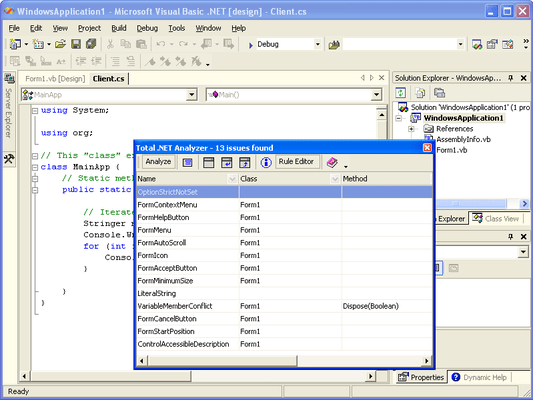
Total .NET Analyzer - Add-In 의 스크린샷Add code analysis on demand to your .NET applications. Total .NET Analyzer will increase the quality and performance of your C# and Visual Basic .NET applications. It allows you to develop faster. Scan your projects for hidden bugs, unused code, performance issues and more. Learn how to build reliable .NET applications the right way.

541,200₩
통화 선택

일반 적인 소비자 가격은 하기에 표시되어 있습니다. 고객님의 할인가격은 표시 하시려면 로그인 해주시기 바랍니다.

Total .NET Analyzer

주문 ₩ 541,200 1 User License 다운로드 (9.5 MB)
주문 ₩ 1,625,700 5 User License 다운로드 (9.5 MB)
주문 ₩ 5,421,400 25 User License 다운로드 (9.5 MB)

본 제품은 GSA Schedule 가격으로 제공해 드릴수 있습니다.가격에는 ComponentSource의 기술지원 요금이 포함되어 있습니다. 또한 다운로드 판매를 하고 있는 상품의 대부분은 온라인 백업요금이 포함되어 있어서 구입날로부터 30일 이내에 새로운 버전이 발매된 경우 무료로 업그레이드해 드리고 있습니다.  모든 주문에 대해서 당사표준 계약조건 반품조건 의 내용이 적용됩니다. 다음의 경우,고객 서비스로연락하시기 바랍니다. (상기의 리스트에 게재되지 않은 대량의 라이센스나 구 버전 등의 라이센스 옵션이 필요한 경우)

일반 적인 소비자 가격은 상기에 표시되어 있습니다. 고객님의 할인가격은 표시 하시려면 로그인 해주시기 바랍니다.

Avoid .NET Traps and Hidden Bugs

  • Detect references to inefficient legacy Visual Basic functions
  • Identify use of CType instead of DirectCast for conversions
  • Find incorrect event handler syntax
  • Locate redundant cast operations
  • lots more: over 150 types of issues detected

Improve Performance

  • Detect "Dead code" that has no effect on the application's functionality, but uses system resources and detrimentally affects performance
  • Find fields and variables whose scope can be tightened to optimize performance
  • Find non-optimal arrays
  • Discover where the StringBuilder class can be used to increase performance
  • Detect inefficient boxing and unboxing operations
  • lots more: over 150 types of issues detected

Learn .NET Best Practices

  • Find references to the Visual Basic Runtime library, which do not take advantage of the .NET framework and are not portable to other languages
  • Detect legacy Visual Basic error handling, which does not take advantage of Visual Studio .NET's structured exception handling and is not portable to other languages
  • lots more: over 150 types of issues detected

Simplify Code Management

  • Find standards violations to improve code readability and sharing code or libraries
  • Detect unnecessary code, which can be removed to make the code easier to understand and maintain
  • lots more: over 150 types of issues detected

Powerful Features

Total .NET Analyzer is designed to be easy to use and customize, and to suit your Visual Studio .NET development needs. The product includes the following powerful features:

  • Designed Exclusively for Visual Studio .NET Developers. Total .NET Analyzer is written in 100% managed C#, and was designed from the ground up to be completely integrated with Visual Studio .NET and SourceSafe. With lightning-fast project parsing, a powerful listview and issue report, code analysis is now easy and accurate
  • Supports Visual Basic .NET and C# code
  • Integrated in the VS.NET IDE with results in a tab window. You dont have to leave Visual Studio to perform Analysis. Total .NET Analyzer appears as a toolwindow right in the IDE
  • Real-time analysis means immediate analysis and results. Built on our integrated .NET parser, Total .NET Analyzer parses your entire project in the background, and quickly pinpoints where issues occur
  • Options to specify which rules to detectThe Rule Editor allows you to customize the analysis that is performed to suit your own needs. Turn rules on/off, modify rule severity and category, and add notes to individual rules
  • Output results to reports. You can send the entire contents of the Total .NET Analyzer list to a report at the click of a button

Use Analyzer During Every Step Of the Way

Total .NET Analyzer is designed to reduce and eliminate many of the tedious and difficult parts of development. Use Total .NET Analyzer during every step of the way:

Developing New Applications

Total .NET Analyzer can improve the development process from the start. The sooner you start analyzing your applications, the sooner you can start correcting issues and implementing practices.Its much easier to do it right the first time around than it is to change applications that have already been deployed. Plus, Total .NET Analyzer helps you learn along the way by offering suggestions for improvements.

Maintaining Existing Applications

Total .NET Analyzer can help you understand and improve existing applications. Total .NET Analyzer is quick, and its results can be viewed directly in your .NET solution. Just click, and youre taken to the location of the Total .NET Analyzer issue.


상품검색

검색어를 입력해주세요:

Quick 링크

Award