Total .NET SourceBook - for Visual Studio 2005

by FMS - 상품타입: Add-In

주의 : 이 제품정보에는 한글안내가 포함되어 있지 않습니다.
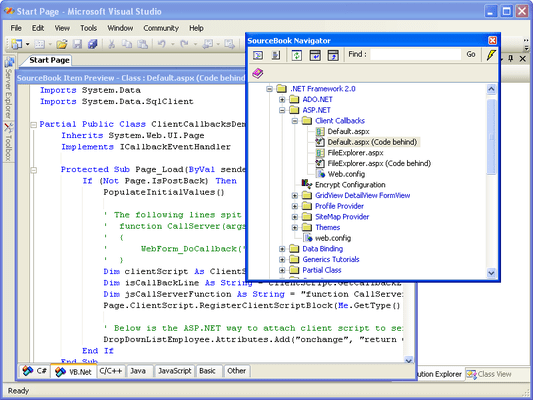
Total .NET SourceBook - for Visual Studio 2005 의 스크린샷Source code library and code repository for Visual Studio .NET. Total .NET SourceBook is a code library for .NET developers, teams, and enterprises. It provides a collection of ready-to-use code snippets, classes, how-to's and articles. It also allows you to manage your own code and share knowledge within a team by using the fully searchable code repository. Total .NET SourceBook provides both a full-featured standalone Code Explorer, and an integrated Visual Studio Add-In.

551,300₩
통화 선택

일반 적인 소비자 가격은 하기에 표시되어 있습니다. 고객님의 할인가격은 표시 하시려면 로그인 해주시기 바랍니다.

Total .NET SourceBook - for Visual Studio 2005

주문 ₩ 551,300 1 Developer License 다운로드 (16.2 MB)
주문 ₩ 689,400 1 Developer License - with Subscription to Code Webservice 다운로드 (16.2 MB)
주문 ₩ 1,794,800 5 Developer License 다운로드 (16.2 MB)
주문 ₩ 2,209,200 5 Developer License - with Subscription to Code Webservice 다운로드 (16.2 MB)
주문 ₩ 5,387,000 25 Developer License 다운로드 (16.2 MB)
주문 ₩ 413,100 1 Developer License - Upgrade from any previous Total .NET SourceBook 확인 다운로드 (16.2 MB)
주문 ₩ 1,242,100 5 Developer License - Upgrade from any previous Total .NET SourceBook 확인 다운로드 (16.2 MB)

Total .NET SourceBook - for Visual Studio 2005 - Annual Subscription to Code Webservice

주문 ₩ 274,900 1 Developer Annual Subscription License 다운로드 (29 KB)
주문 ₩ 827,600 5 Developer Annual Subscription License 다운로드 (29 KB)
주문 ₩ 2,485,600 25 Developer Annual Subscription License 다운로드 (29 KB)

본 제품은 GSA Schedule 가격으로 제공해 드릴수 있습니다.가격에는 ComponentSource의 기술지원 요금이 포함되어 있습니다. 또한 다운로드 판매를 하고 있는 상품의 대부분은 온라인 백업요금이 포함되어 있어서 구입날로부터 30일 이내에 새로운 버전이 발매된 경우 무료로 업그레이드해 드리고 있습니다.  모든 주문에 대해서 당사표준 계약조건 반품조건 의 내용이 적용됩니다. 다음의 경우,고객 서비스로연락하시기 바랍니다. (상기의 리스트에 게재되지 않은 대량의 라이센스나 구 버전 등의 라이센스 옵션이 필요한 경우)

일반 적인 소비자 가격은 상기에 표시되어 있습니다. 고객님의 할인가격은 표시 하시려면 로그인 해주시기 바랍니다.

Useful to all developers, regardless of skill level

Every level of developer will benefit from using Total .NET SourceBook. Beginners can use Total .NET SourceBook to get up to speed quickly by learning from the tips, articles, how-to’s, and examples. Experts can use the vast array of advanced concepts to learn new techniques, and will save time by using fully tested and ready-to-run code. And because the library code is open and available for modification, experts can customize the code to meet their specific needs.

Additional Code Available by Purchasing Code WebService

Every time you start Total .NET SourceBook, the program automatically connects to our unique Code WebService. Additional code, articles, and tips are automatically downloaded to your database. Our developers are constantly adding new content to help you with .NET. See The SourceBook Code Webservice for more information.

Huge Library of Code and Information

Total .NET SourceBook includes hundreds of classes, code snippets, how-to's and articles for just about every area of .NET development. C# and Visual Basic .NET versions of each item are provides along with helpful notes.

Share Your Entire Team's Knowledge

Because Total .NET SourceBook is completely multi-user, every member of your .NET development team can share in each other's knowledge and experience. As each individual adds code or content, it instantly becomes available to the entire team.

Manage Your Knowledge

You can even use Total .NET SourceBook to store your own code in one centralized, searchable location. No more rewriting code, or digging through old projects to find it. And because Total .NET SourceBook is completely multi-user capable, your entire development team can collaborate to share code, tips, and ideas.

Standalone Code Explorer, or Visual Studio .NET Add-In

Total .NET SourceBook provides both a full-featured standalone Code Explorer, and an integrated Visual Studio Add-in.

Code Explorer

The standalone Code Explorer makes it easy to find, organize, edit, and manage code. Implemented as a native .NET Windows Forms application, the Total .NET SourceBook Code Explorer is a complete code and knowledge management solution for developers.

Use the Code Explorer to:

  • View, edit, and delete existing code items
  • Add new code items and code databases
  • Perform advanced searches on code databases
  • Export code to a file or to the clipboard
  • Get new and updated code from the Code Webservice

Add-In

The integrated Visual Studio Add-In provides you with easy access to Total .NET SourceBook code while you’re working on your project. The Add-In displays as a toolwindow right inside of your development environment:

Use the Add-In to:

  • Insert individual items or entire folders from the Total .NET SourceBook database into your project
  • Insert code into your project without having a code editor open, or batch insert all items in a folder
  • Insert code from Total .NET SourceBook into existing files in your project
  • Drag code from of your project into the Total .NET SourceBook repository
  • View, edit, and delete existing code items and notes
  • Perform text searches within code items

상품검색

검색어를 입력해주세요:

Award