Grid FX - .NET - V1.0

by Software FX - 상품타입: Component / ASP.NET WebForms / .NET Class / 100% Managed Code / DLL

주의 : 이 제품정보에는 한글안내가 포함되어 있지 않습니다.
Grid FX - .NET - V1.0 의 스크린샷Enterprise-quality grid solution for next-generation Web applications. Grid FX is a highly integrated data visualization platform to display graphical and tabular data in enterprise applications. Grid FX features includes AJAX, WYSIWYG editing, Auto Format Wizard, advanced grouping, sorting and filtering, Drag and Drop Editing, Smart Tag Wizards and many more.Grid FX provides Chart FX functionality right in the box providing immediate charts, digital panels and gauges and can also be combined with other Chart FX products to provide additional data visualization needs.


2,026,900₩
통화 선택

일반 적인 소비자 가격은 하기에 표시되어 있습니다. 고객님의 할인가격은 표시 하시려면 로그인 해주시기 바랍니다.

Grid FX V1.0

주문 ₩ 2,026,900 1 Production Server License 확인 다운로드 (5.9 MB)
주문 ₩ 1,012,800 1 Test/Staging Server License 확인 다운로드 (5.9 MB)
주문 ₩ 759,300 1 Developer License 다운로드 (48.2 MB)

본 제품은 GSA Schedule 가격으로 제공해 드릴수 있습니다.가격에는 ComponentSource의 기술지원 요금이 포함되어 있습니다. 또한 다운로드 판매를 하고 있는 상품의 대부분은 온라인 백업요금이 포함되어 있어서 구입날로부터 30일 이내에 새로운 버전이 발매된 경우 무료로 업그레이드해 드리고 있습니다.  모든 주문에 대해서 당사표준 계약조건 반품조건 의 내용이 적용됩니다. 다음의 경우,고객 서비스로연락하시기 바랍니다. (상기의 리스트에 게재되지 않은 대량의 라이센스나 구 버전 등의 라이센스 옵션이 필요한 경우)

일반 적인 소비자 가격은 상기에 표시되어 있습니다. 고객님의 할인가격은 표시 하시려면 로그인 해주시기 바랍니다.

Grid FX offers in place WYSIWYG template editing and context-sensitive Smart Tag Wizards that expose common functionality.
Now the developer can click and drag right on the design surface or access Smart Tags where most functionality is readily available in graphical way rather than a simple list of properties.

Grid FX Main Features

Motifs
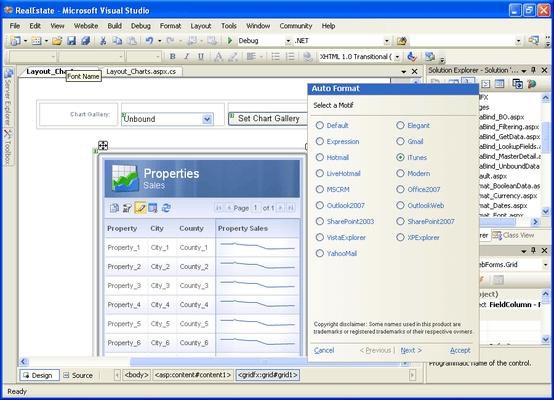
Found within Grid FX Auto Format Wizard, Motifs are an effective way to quickly apply visuals to your grid. Rather than customizing individual grid elements, Grid FX has pre-built professionally designed Motifs for virtually every major application, like Microsoft Office, Outlook, Sharepoint, Windows Vista, Dynamics CRM plus other popular formats such as Gmail, Yahoo and iTunes among others. These motifs not only change colors but also apply fonts, column and row effects and even change the characteristics of buttons and other navigation controls to match the grid's parent container or the application visuals. In addition, there are also palettes available to change virtually every grid color with a single mouse click.

Drag and Drop Editing
Grid FX allows the developer to intuitively grab, drag and rearrange grid elements right on the design surface. Gone are the days of working through abstract modal dialogs for design-time customization.

Smart Tag Wizards
Grid FX expands on the Visual Studio concept of Smart Tag Wizards by implementing full blown, context-sensitive wizards where most important functionality is readily available in an intuitive, graphical method.

In-Place Template Editing
Grid FX improves the template editing experience. Instead of the control being hidden and entering "template mode", Grid FX supports in-place WYSIWYG template editing, allowing a more natural method of grid manipulation.

FloatingBar
The Grid FX FloatingBar appears in an elegant and usable manner when the user hovers over an editable area. Properties are presented to allow the customization of aesthetic as well as functional aspects of the grid.

Data Editing
With Grid FX, end-users can easily insert, update and delete data using either in-place data editing or customizable modal dialog data editing. Either option allows for an intuitive method of end-user manipulation of data.

Grouping, Sorting and Filtering
End-users need to be able to efficiently manipulate and digest data in order to make key business decisions. Grid FX allows these users to group, sort and filter their data in any way their needs dictate.

Integrated Chart FX Technology
Grid FX ships Chart FX products in-the-box, offering immediate charts, digital panels, gauges and maps. In addition, these elements respond to contextual information such as clicks, drilldowns and master-detail.

Sidebars
Sidebars define space for child data that enhances the grid without additional design or development. Sidebars are completely flexible and can be used to display anything from html elements to Chart FX objects.

Card View
Card View gives developers an alternative method of displaying data in a non-columnar way. Developers can define custom templates and use these templates to display your data items in any particular layout.

Master Detail
Sometimes it's necessary to display detailed information about a particular data row. Master detail allows developers to define areas to display supporting data that may otherwise not fit into their defined tabular layout.


상품검색

검색어를 입력해주세요:

Quick 링크

화면 바로가기 갤러리

Award