by EC Software - Product Type: Application
Help and Manual Professional by EC Software
Create advanced multi format help and documentation. Help and Manual is an advanced multi format help authoring tool that provides all the formatting and editing features of a modern word processor. You can output your projects to all standard Windows help formats (HTML Help, Winhelp and MS Help 2.0 / Visual Studio Help), browser-based Help, PDF and Word RTF. All output formats supported by Help & Manual are generated from the same project, you only have to edit your help and documentation once. Help & Manual Professional (XML Edition) Edition includes advanced features like Unicode Support or export/import help projects in XML format. Help & Manual is fully compatible with Windows Vista and also with Internet Explorer 7 on Windows XP and Windows Vista.
Overview
Help & Manual is a stand-alone help authoring tool (HAT) that simplifies the production of Windows help files, printed manuals and documentation in general. Help & Manual also generates Browser-based Help, PDF and Word RTF and supports XML Export/Import (visit the 'evals and downloads' section for more information). The Browser-based Help output for web use includes a full menu structure that emulates the appearance and functionality of HTML Help and includes full-text search with highlighting for found words. EC Software successfully tested the browser-based help output with:
MS Internet Explorer (IE) 4, 5, 6 and 7 (Windows)
Opera 6, 7 and 8 (Windows)
Netscape 4 (Windows)
Firefox (Windows)
Mozilla (Linux)
Konqueror (Linux)
Safari (Mac)
PDF output and printed manuals are fully customizable with the bundled Print Manual Designer program: You can include a table of contents and a keyword index, automatic page referrers for links and cross-references, customized page layouts, headers, footers, page numbering, covers, introductions and more.
Help & Manual lets you create documentation in up to 106 languages. It is one of the few help authoring tools that fully support Unicode and can handle languages like Japanese, Chinese, Korean and many others. Help & Manual imports regular HTML and text files, compiled HTML Help, Word files (RTF format), Winhelp source files and even decompiles HLP files. Help & Manual Professional exports and imports help projects in XML (visit the 'evals and downloads' section for more information) format. To help new users migrate existing help projects, Help & Manual includes a dedicated import tool for RoboHelp X5 projects.
Help & Manual can convert and import the following formats, preserving virtually all of the original structure and formatting:
RoboHelp X5 for HTML projects
HTML and plain text files
Compiled HTML Help .CHM files
Compiled Winhelp .HLP files and Winhelp project source files
MS Word RTF files
You can also copy and paste text with complex formatting, graphics and tables to and from Microsoft Word, also with virtually all formatting intact.
Main features
WYSIWYG design interface: Help & Manual has integrated WYSIWYG editors for topics, table of contents and keyword index
Unicode support (Professional Version Only):Full Unicode support, meaning you can create help files in up to 106 languages, including Asian languages
XML and Localization support (Professional Version Only): Help & Manual 4 Professional has dedicated support for localization. XML export and re-import supports in-house translation as well as external translation tools.
RoboHelp® Import: Help & Manual can directly import RoboHelp® X5 project files
Template Support: Use and modify HTML templates for topics pages, layout templates for PDF and print, skins for e-books and browser-based help
Single source: Help & Manual creates all output formats (see below) from one single source without post-processing
Conditional Output: Include/exclude conditions are supported for chapter, topic and text level. You can customize the export with an unlimited number of user defined builds
Text Variables:In addition to include/exclude options on text level, use predefined text variables or create your own
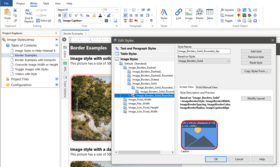
Dynamic cascading styles:Use text and paragraph styles to format the content. All styles support different media types for design, online help and printed outputs
Integrated hotspot editor:Help & Manual has a built-in hotspot editor for graphics with dedicated support for topic links, external links, file links and macros
Comments and bookmarks: Add design time comments anywhere in topics and bookmark topics for later review. Topics also support a topic status, to highlight, filter or sort topics
Modular help: Split your help project into modules for multi-user access. Modules can be merged at runtime or during compilation
Accessibility: Section 508 compatibility. Please, see visit the 'evals and downloads' section for the 'Help & Manual section 508 - Voluntary Product Accessibility Template'
OutPut Formats
HTML Help 1.x(CHM): Compiled HTML Help (.chm)
Winhelp(HLP): Compiled Standard Winhelp (.hlp)
Microsoft Help 2.0(HXS)(Professional Version Only): Visual Studio help (.hxs)
Adobe PDF: Built-in PDF engine with visual layout designer
Browser-based help: Platform independent and cross-browser web-based help, with table of contents, keyword index and context sensitive help support
Full-text search for browser-based help is included in the Professional Version only
Word manuals: Microsoft Word export in RTF format
e-Books: e-books in Windows 32 bit executable format with customizable skins
Printed manuals: Print manuals with customizable layout, including booklets, draft prints and duplex printing
Tools included
Screen capture: The built-in screen capture tool creates stunning screenshots at a mouse click
Image editor: Use the integrated image editor to resize and enhance screenshots, add annotations, callouts and text
Project report: Extensive reports document the status of your help project
Context sensitive help tool: Support for context sensitive help is fully integrated. Help & Manual additionally can export and import help context number maps
Syntax highlighter: Quickly format source code examples for Visual Basic, C++, Pascal or SQL statements
What's New in V5.0
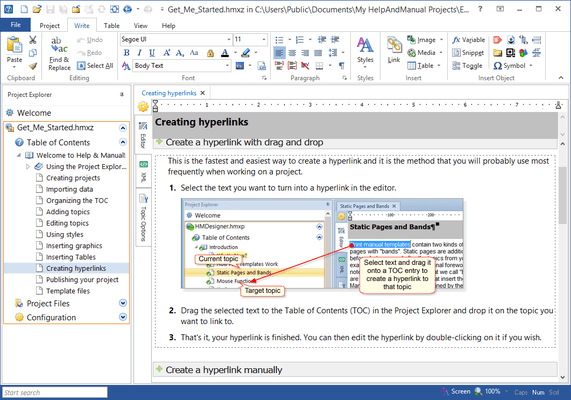
Revolutionary new user interface
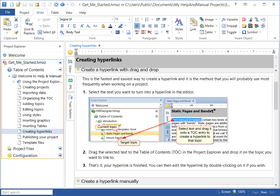
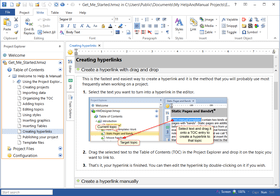
Built around the revolutionary new Microsoft Office ribbon interface, Help & Manual 5 is even more intuitive and will give your productivity a significant boost. The new interface features large icons, dropdown galleries for quick access and clear command buttons that are not hidden somewhere in a menu where you can't find them.
The ribbon is context-sensitive, so the commands that are relevant to what you are currently doing - for example working in the Editor or the new Project Explorer - are displayed automatically. Very frequently used commands can be added to the new Quick Access Bar above the ribbon and users who still prefer a more compact style of working can minimize the ribbon if they want.
Pure XML
The source format of Help & Manual 5 is XML. Your projects are saved directly as XML files, either directly in a folder with subfolders, or in a single compressed file that contains the subfolders, or directly in a database. No matter how you choose to store it, the XML format is consistent throughout the entire workflow.
WYSIWYG XML editing
Help & Manual 5 is a true WYSIWYG XML editor that doesn't require any knowledge of XML or XML coding skills. You work as you would in a familiar word processor like Word, but you also have full access to the XML source if necessary.
Concurrent multi-user authoring
Multiple users can work on the same help project at the same time. No database or server software is required, everything is built in.
In addition to this, Help & Manual 5 can also edit multiple projects simultaneously. Projects are inserted in the new Project Explorer and can be expanded to a full tree or collapsed down to a single line for easy management. You can also split off branches of a project into a separate Project Explorer window so that you can work on them more easily.
Improved handling of really large help projects
EC Software has added huge improvements regarding the handling of really large help projects with several thousands of topic pages. Improvements affect dynamic loading of help projects, find & replace, customizable topic status and reuse of styles and HTML skins.
Templates and Skins
Help & Manual 5 makes it even easier to customize your output: In addition to fully customizable HTML and PDF templates, version 5 also supports "skins" - professionally-designed layouts that you can apply to your entire project with a click of the mouse.
Snippets and external sources
Help & Manual is taking the term single-sourcing into a higher dimension: Help & Manual 5 can use data from multiple sources. Help projects can now include topics and chapters from other help projects directly and you can edit them in the same way as local topics. Snippets can be retrieved from a central snippets repository and are updated automatically when the repository source changes.
Highly Flexible
Help & Manual 5 continues to be one of the help authoring tools with the most flexible output options on the market. Create compiled HTML Help (.chm files), WebHelp (regular HTML), Visual Studio Help (.hxs files), PDF manuals, eBooks with an integrated reader and Word manuals - even the WinHelp format is still supported. All formats can be generated from the same project at any time, it's just a question of choosing a different output format.
Easier localization of help projects
With XML as the source format you can now use computer aided translation tools directly on the help project sources without any conversion or export/import cycle. If you want you can also edit your H&M topics and projects directly with XML editors.
Workflow integration for 3rd party tools
Pure XML as the primary save format opens the door to direct integration of 3rd party tools in your Help & Manual workflow. In other words, you can integrate the output of other tools (e.g. source code documentation tools) with Help & Manual and review and edit and polish your pre-generated documentation with your favorite help authoring tool.
PartNumbers: PC-516388-157513 516388-157513 PC-516388-157514 516388-157514 PC-516388-157515 516388-157515 PC-516388-157516 516388-157516 PC-516388-157526 516388-157526 PC-516388-157527 516388-157527 PC-516388-157528 516388-157528 PC-516388-157529 516388-157529 PC-516388-157531 516388-157531 PC-516388-157542 516388-157542 PC-516388-157543 516388-157543 PC-516388-157544 516388-157544 PC-516388-157545 516388-157545 PC-516388-157546 516388-157546 PC-516388-157547 516388-157547 PC-516388-157548 516388-157548 PC-516388-157549 516388-157549 PC-516388-157517 516388-157517 PC-516388-157518 516388-157518 PC-516388-157519 516388-157519 PC-516388-157520 516388-157520 PC-516388-157521 516388-157521 PC-516388-157522 516388-157522 PC-516388-157523 516388-157523 PC-516388-157524 516388-157524 PC-516388-157525 516388-157525
PurchaseOptions: Help & Manual V5.0 Professional (XML Edition) 1 User License , Help & Manual V5.0 Professional (XML Edition) 1 User Licence, per User from 2 to 4 Users , Help & Manual V5.0 Professional (XML Edition) 1 User Licence, per User from 5 to 9 Users , Help & Manual V5.0 Professional (XML Edition) 1 User License, per User from 10 Users , Help & Manual V5.0 Professional (XML Edition) - Concurrent User Licenses 1 Concurrent User License , Help & Manual V5.0 Professional (XML Edition) - Concurrent User Licenses 1 Concurrent User License, per User from 2 to 4 Users , Help & Manual V5.0 Professional (XML Edition) - Concurrent User Licenses 1 Concurrent User License, per User from 5 to 9 Users , Help & Manual V5.0 Professional (XML Edition) - Concurrent User Licenses 1 Concurrent User License, per User from 10 to 19 Users , Help & Manual V5.0 Professional (XML Edition) - Concurrent User Licenses 1 Concurrent User License, per User from 20 Users , Help & Manual V5.0 Professional (XML Edition) - Upgrade from Help & Manual Professional Version 4 1 User Upgrade License , Help & Manual V5.0 Professional (XML Edition) - Upgrade from Help & Manual Professional Version 4 1 User Upgrade Licence, per User from 2 to 4 Users , Help & Manual V5.0 Professional (XML Edition) - Upgrade from Help & Manual Professional Version 4 1 User Upgrade Licence, per User from 5 to 9 Users , Help & Manual V5.0 Professional (XML Edition) - Upgrade from Help & Manual Professional Version 4 1 User Upgrade License, per User from 10 Users , Help & Manual V5.0 Professional (XML Edition) - Concurrent User License Upgrade from Help & Manual Professional V4.0 Concurrent User 1 Concurrent User Upgrade License , Help & Manual V5.0 Professional (XML Edition) - Concurrent User License Upgrade from Help & Manual Professional V4.0 Concurrent User 1 Concurrent User Upgrade Licence, per User from 2 to 4 Users , Help & Manual V5.0 Professional (XML Edition) - Concurrent User License Upgrade from Help & Manual Professional V4.0 Concurrent User 1 Concurrent User Upgrade License, per User from 5 to 9 Users , Help & Manual V5.0 Professional (XML Edition) - Concurrent User License Upgrade from Help & Manual Professional V4.0 Concurrent User 1 Concurrent User Upgrade License, per User from 10 Users , Help & Manual V5.0 Professional (XML Edition) - Upgrade from Help & Manual Standard Version 4 or Help & Manual Version 3 1 User License , Help & Manual V5.0 Professional (XML Edition) - Upgrade from Help & Manual Standard Version 4 or Help & Manual Version 3 1 User Licence, per User from 2 to 4 Users , Help & Manual V5.0 Professional (XML Edition) - Upgrade from Help & Manual Standard Version 4 or Help & Manual Version 3 1 User Licence, per User from 5 to 9 Users , Help & Manual V5.0 Professional (XML Edition) - Upgrade from Help & Manual Standard Version 4 or Help & Manual Version 3 1 User Licence, per User from 10 Users , Help & Manual V5.0 Professional (XML Edition) - Upgrade from Help & Manual Standard Version 5 1 User License , Help & Manual V5.0 Professional (XML Edition) - Upgrade from Help & Manual Standard Version 5 1 User Licence, per User from 2 to 4 Users , Help & Manual V5.0 Professional (XML Edition) - Upgrade from Help & Manual Standard Version 5 1 User Licence, per User from 5 to 9 Users , Help & Manual V5.0 Professional (XML Edition) - Upgrade from Help & Manual Standard Version 5 1 User Licence, per User from 10 Users , Help & Manual V5.0 Professional (XML Edition) - Crossgrade from Robohelp (any version), Doc-to-Help and AuthorIT 1 User upgrade License from Robohelp (any version), Doc-to-Help and AuthorIT
Resources: Read the Help & Manual XML Reference, Read the Help & Manual help file, Browse the Differences between Standard and Professional Editions Web pages, Read the Help & Manual section 508 - Voluntary Product Accessibility Template, Download the Help & Manual V5.0 evaluation on to your computer - Expires after 14 Days
Operating System for Deployment: Windows Vista, Windows XP, Windows Server 2003, Windows ME, Windows 2000, Windows 98, Windows NT 4.0
Architecture of Product: 32Bit
Product Type: Application
Search Items: New Product Oct 05
Keywords: Help Authoring ForeFront Documentation documenting document author Author Help and Manual