經 EC Software - 產品類型: 應用程式
Create advanced multi format help and documentation. Help & Manual is an advanced multi format help authoring tool that provides all the formatting and editing features of a modern word processor. You can output your projects to all standard Windows help formats (HTML Help, Winhelp and MS Help 2.0 / Visual Studio Help), browser-based Help, PDF and Word RTF. All output formats supported by Help & Manual are generated from the same project, you only have to edit your help and documentation once. Help & Manual Professional (XML Edition) Edition includes advanced features like Unicode Support or export/import help projects in XML format. Help & Manual is fully compatible with Windows 7. New Help & Manual Premium Pack available. Help & Manual Premium Pack contains 14 professionally-designed "skins" with which you can transform the appearance of your HTML-based output with a single click.
我們的常規價格如下。 請登錄後查看打折後的價格。
| 加入購物車 | ₩ 479,700 | 1 User License * Mfr. 部件號: HM6S |
下載 (66.5 MB) | |
| 加入購物車 | ₩ 403,800 | 1 User Licence, per User from 2 to 4 Users * Mfr. 部件號: HM6S |
下載 (66.5 MB) | |
| 加入購物車 | ₩ 355,500 | 1 User Licence, per User from 5 to 9 Users * Mfr. 部件號: HM6S |
下載 (66.5 MB) | |
| 加入購物車 | ₩ 312,200 | 1 User License, per User from 10 Users * Mfr. 部件號: HM6S |
下載 (66.5 MB) |
| 加入購物車 | ₩ 240,900 | 1 User Licence * Mfr. 部件號: HM6S U |
驗證 | 下載 (66.5 MB) |
| 加入購物車 | ₩ 204,800 | 1 User Licence, per User from 2 to 4 Users * Mfr. 部件號: HM6S U |
驗證 | 下載 (66.5 MB) |
| 加入購物車 | ₩ 185,500 | 1 User Licence, per User from 5 to 9 Users * Mfr. 部件號: HM6S U |
驗證 | 下載 (66.5 MB) |
| 加入購物車 | ₩ 156,600 | 1 User Licence, per User from 10 Users * Mfr. 部件號: HM6S U |
驗證 | 下載 (66.5 MB) |
我們的價格包括ComponentSource的技術支持。對於大多數可下載的產品,還提供線上備份和免費升級為新版本,若新版本在購買後的30日內發佈的話。 所有銷售都是按照我們的標準條款 進行的,並且適用我們的退貨政策. 請 聯繫我們 若您需要任何未在列出的License選擇,包括批量License及以前的版本。
我們的常規價格見上。 請登錄後查看打折後的價格。
What’s new in Help and Manual V6?
Updated User Interface
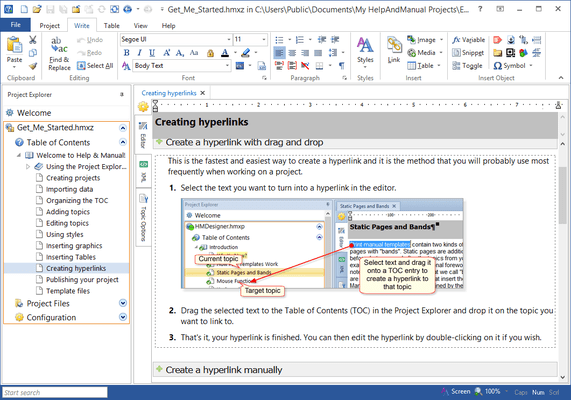
The user interface has been slightly redesigned. Most notably, the File menu is back. The so-called Backstage view as seen in Microsoft Office 2010 has been implemented, which replaces several dialogs. And the additional screen real estate has been used to improve import, publishing and configuration dialogs. Big dropdown menus make it easier to visually select a skin for publishing. Help+Manual 6 is a lot more "visual" throughout.
All new Webhelp 2.0
Help+Manual now creates HTML5 strict and while older templates and skins are still supported, the new standard is integrated Webhelp. The layout has become even more flexible and customizable. It is now really easy to integrate documentation into your website. The new Webhelp output fully supports jQuery and uses animations for non-static content such as table of contents, toggle text, etc. Toggle images and videos can optionally play in lightboxes. Sub-headings in topics are now exported as <h1> to <h6> headings, which increases the relevance of headings for search engines. Additionally, Help+Manual 6 creates an optional sitemap for your Webhelp output.
New publishing formats and publishing tasks
Help+Manual not only imports VisualStudio source code, it can publish the VisualStudio 2010 help format as well. Help+Manual lets you create batch jobs that combine several different outputs and/or different output formats. The publishing batch jobs are saved with the project. An additional function saves the publishing task to a command file for automated batch compilation.
Improved editor, new spell checker and a long list of new features
Help+Manual 6 has tabbed editing, so you can open multiple topics at once and easily switch between them. Help+Manual remembers which topics were open and re-opens them the next time you open the project. Images, toggle images and videos allow text flow around them (this works in PDF as well).
Repositories for snippets and styles
A repository is a special uncompressed Help+Manual project that you use to share styles and snippets between multiple projects. They are quite specialized and you should really only use them if you have multiple projects that must all have exactly the same styles. This is an excellent way to ensure that your styles are standardized for everyone when you are working on a project in a team.
Publisher directly to the Apple iPad
Help+Manual can publish directly to the Apple iPad. This is not a quirky "webhelp mobile" for smartphones, it's a genuine standards-compliant e-book for offline reading on your iPad.
Help & Manual Overview
Help & Manual is a stand-alone help authoring tool (HAT) that simplifies the production of Windows help files, printed manuals and documentation in general. Help & Manual also generates Browser-based Help, PDF and Word RTF and supports XML Export/Import (visit the 'evals and downloads' section for more information). The Browser-based Help output for web use includes a full menu structure that emulates the appearance and functionality of HTML Help and includes full-text search with highlighting for found words. EC Software successfully tested the browser-based help output with:
PDF output and printed manuals are fully customizable with the bundled Print Manual Designer program: You can include a table of contents and a keyword index, automatic page referrers for links and cross-references, customized page layouts, headers, footers, page numbering, covers, introductions and more.
Help & Manual lets you create documentation in up to 106 languages. It is one of the few help authoring tools that fully support Unicode and can handle languages like Japanese, Chinese, Korean and many others. Help & Manual imports regular HTML and text files, compiled HTML Help, Word files (RTF format), Winhelp source files and even decompiles HLP files. Help & Manual Professional exports and imports help projects in XML format. To help new users migrate existing help projects, Help & Manual includes a dedicated import tool for RoboHelp X5 projects.
Help & Manual can convert and import the following formats, preserving virtually all of the original structure and formatting:
You can also copy and paste text with complex formatting, graphics and tables to and from Microsoft Word, also with virtually all formatting intact.
Help & Manual Premium Pack
The new Help & Manual Premium Pack contains 14 professionally-designed "skins" with which you can transform the appearance of your HTML-based output with a single click. You just select one of the skins in the Publish dialog and click OK to publish, that's all there is to it. The templates in the skins are merged with your project to give you tabbed navigation, non-scrolling headers and a stylish design.
Configuration without code editing
You don't need to edit any confusing HTML code to configure your skins. All the text displayed in the skins, your support email address, the text in the email feedback form and so on are stored in simple text variables. You can set up everything just by editing the variable definitions.
Full documentation and all source materials included
If you want you can also create your own skins on the basis of the Premium Pack skins. All the source graphics, Photoshop files and other components are included.
Help & Manual Premium Pack Features
Main features
OutPut Formats
Tools included
」技術提供