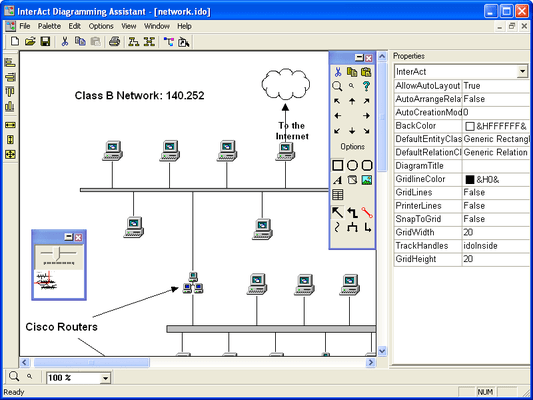
Screenshot Preview

Interact

by Infragistics - 상품타입: Component / ActiveX OCX

주의 : 별도의 안내가 없는 경우에는 영어제품 입니다.

*

Create diagramming interfaces for anything from telephone call centers to database management tools. InterAct is an ActiveX component that snaps into any IDE and integrates itself into your application interface. Use pre-built objects or customize InterAct to your specifications Includes a number of pre-built entities, relations and diagram formats for "out of the box" functionality. Additional customization is available with InterAct's rich programming model.


$495.00
통화 선택

일반 적인 소비자 가격은 하기에 표시되어 있습니다. 고객님의 할인가격은 표시 하시려면 로그인 해주시기 바랍니다.

Interact V4.0   *

주문 $ 495.00 1 Developer License  *
메이커 제품 번호: 23402
다운로드 (5.1 MB)

가격에는 ComponentSource의 기술지원 요금이 포함되어 있습니다. 또한 다운로드 판매를 하고 있는 상품의 대부분은 온라인 백업요금이 포함되어 있어서 구입날로부터 30일 이내에 새로운 버전이 발매된 경우 무료로 업그레이드해 드리고 있습니다.  모든 주문에 대해서 당사표준 계약조건 반품조건 의 내용이 적용됩니다. 다음의 경우,고객 서비스로연락하시기 바랍니다. (상기의 리스트에 게재되지 않은 대량의 라이센스나 구 버전 등의 라이센스 옵션이 필요한 경우)

일반 적인 소비자 가격은 상기에 표시되어 있습니다. 고객님의 할인가격은 표시 하시려면 로그인 해주시기 바랍니다.

 *

Features of Interact:

  • Custom Entities - Custom entities can easily be created at design time or run time, including text entities for labeling diagrams, and the creation of tables in entities for displaying legends and grids of data. Entity click events can launch HTML pages or custom events.
  • Images in Entities - Place images (bitmaps or metafiles) in entities, or place text either inside an entity or as a caption heading. Control the horizontal/vertical offset of images in entities for exact placement. The transparency option gives the appearance of image-based objects. Fill patterns can also be utilized.
  • Containers hold multiple entities and relations in a single object. ListEntities - The ListEntity contains list boxes that can be populated programmatically or at run-time. Relations can be attached to individual items in the list programmatically, and visually during run-time as well. The developer can build lists of information, and link items in the list to items in another ListEntity object.
  • Recursive linking Link a relation to its source. Custom relation styles - Allows for curved, L-Shaped, 90and straight relations, and include dash, dot, or solid lines, as well as complete control for thickness and color. Choose from over 30 end point images (arrow heads, circles, lines, database symbols and many more). Custom text can be assigned to relations.
  • Flexible behavior between relations and entities. While drawing relations on a diagram, a user can establish midpoints on the diagram canvas to properly route the flow of the relation line. Once linked with the destination, InterAct draws the relation and "snaps" to the proper shape (curved, L-shaped, 90Midpoints for each relation can be adjusted and anchor points can be set anywhere on a relation, including the edge of non-rectangular entities. Multiple points are allowed on 90lines and relations can snap to 45increments by using the SHIFT key. Change the relative position of relations during run-time by right clicking on the end points of the relation and selecting the desired option.
  • Custom Style Properties Complete control over font, size and colors for all entities, relations and diagram attributes. Custom Tools Palette - The custom tools palette can contain only the specific objects needed by the user. Custom objects can be added to the tools palette or created "on the fly" with built-in style dialogs.
  • Layout Manager - Coordinate diagram entities with a mouse-click. InterAct provides "hierarchical" and "compact" formats that use sophisticated layout management to properly route cluttered diagrams. The layout manager has a variety of options that let developers customize its behavior.
  • Overview Window - Help users navigate diagrams with an overview window that synchronizes itself with the viewable portion of the canvas. This thumbnail image displays a rectangle to indicate the area of the diagram currently in focus. Users can move the rectangle to navigate the diagram canvas and zoom in/out using the included scale bar.
  • PropertyBrowser - The PropertyBrowser can be used to get/set the properties of InterAct, the entities and the relations during run-time. This control adds a Visual-Studio style property browsing to InterAct.
  • Enhanced Clipboard for Copy/Paste - Copy objects to and from diagrams, or export to any third-party image-ready Windowsapplication (MicrosoftOffice, AdobePhotoShopCorelDrawand others). InterAct maintains standard copy/paste of objects inside diagrams, but when pasting to an outside destination, InterAct also creates a bitmap image of the objects copied.
  • User-friendliness is built-in InterAct includes advanced printing support with full "print preview" mode, and flexibility is guaranteed with Undo and Redo methods.
  • Enhanced zooming capabilities Zoom in or out on a specific point in a diagram. Use the left/right mouse buttons to zoom in/out, or zoom the entire diagram to automatically "fit in window."
  • Custom cursors Respond to events and display the cursor of your choice. Display an hourglass, printer, pen icon, or any number of cursor icons.
  • Execute Code through Diagrams InterAct allows developers to associate code stubs with objects in diagrams. Walk through steps of a process flow using built-in logic for run, pause, stop, goto and if...then...else commands. InterAct can execute diagrams using VBA, Visual Basic, VBScript, C++ or any programming language you choose.
  • Designing Your Diagrams Background images can be added to your canvas, and can be tiled and scaled on zoom in/out. A "snap to grid "property keeps entities in place, with the option to show or hide grid lines.
  • Deploying Your Diagrams At run time, load or save diagrams to disk, set access limits (read-only or full access) and enforce specific relationships (rules) between entities and lines. For large diagrams, or when displaying browser-based applications, use the virtual memory mode for the fastest reactions. Diagram files can be password-protected for greater security, and internationalization is supported with a multi-byte format, for global distribution of your application.

주의

제품 리뷰의 한국어 번역이 완료되지 않는 제품은 Google통역 서비스와 연동되어 표시되어 있습니다.통역 기계에 의한 자동 번역인 관계로 한국어 표기가 조금 부자연 스러운 점 양해 바랍니다.
에서 제공
FireFox와 Opera에서는 Flash가 필요합니다.

상품검색

검색어를 입력해주세요:

ComponentSource에서 구입하는 이유?

ComponentSource는 세계 1,000,000명 이상의 개발자에게 각종 글로벌 서비스를 제공합니다.

상세 | About Us

화면 바로가기 갤러리

클릭해서 이미지를 확대

 Interact - ActiveX - V4.0의 스크린샷
Award